
Is my roofing Google Business Profile set up to bring in calls?
- How can I tell if my roofing company's Google profile is set up to get calls and quote requests?
- What does "set up to bring in calls" actually mean for a roofer?
- Check 1: Is the profile verified and owned by your company?
- Check 2: Is your primary category set to roofing?
- Check 3: Does the phone number on your profile get answered?
- Check 4: Do your listed hours match when someone answers?
- Check 5: Is your service area drawn around the towns you actually work?
- Check 6: Does your services list show the jobs you want calls for?
- Check 7: Do your photos and reviews make a homeowner want to call?
- Check 8: Can homeowners still request a quote from my profile?
- How do I know if my roofing profile is actually bringing calls?
- What should I fix first if the calls aren't coming?
- What's different about a Google profile for a roofing company
- A worked example: scoring one roofer's profile
- Frequently asked questions
- Key takeaways
- More in this section
- Sources
The short version
- Must-haves: verified, the right primary category, an answered local number, honest hours.
- Then: a tight service area, a full services list, real photos and steady reviews.
- Homeowners can't request quotes through the profile anymore, so the call button and website link carry the load.
- Check the Calls metric in the performance report every month.
For roofing owners who want a pass-or-fail check on their Google Business Profile before blaming the market, the season or the ads.
Get a free visibility audit · Book a growth call
How can I tell if my roofing company's Google profile is set up to get calls and quote requests?
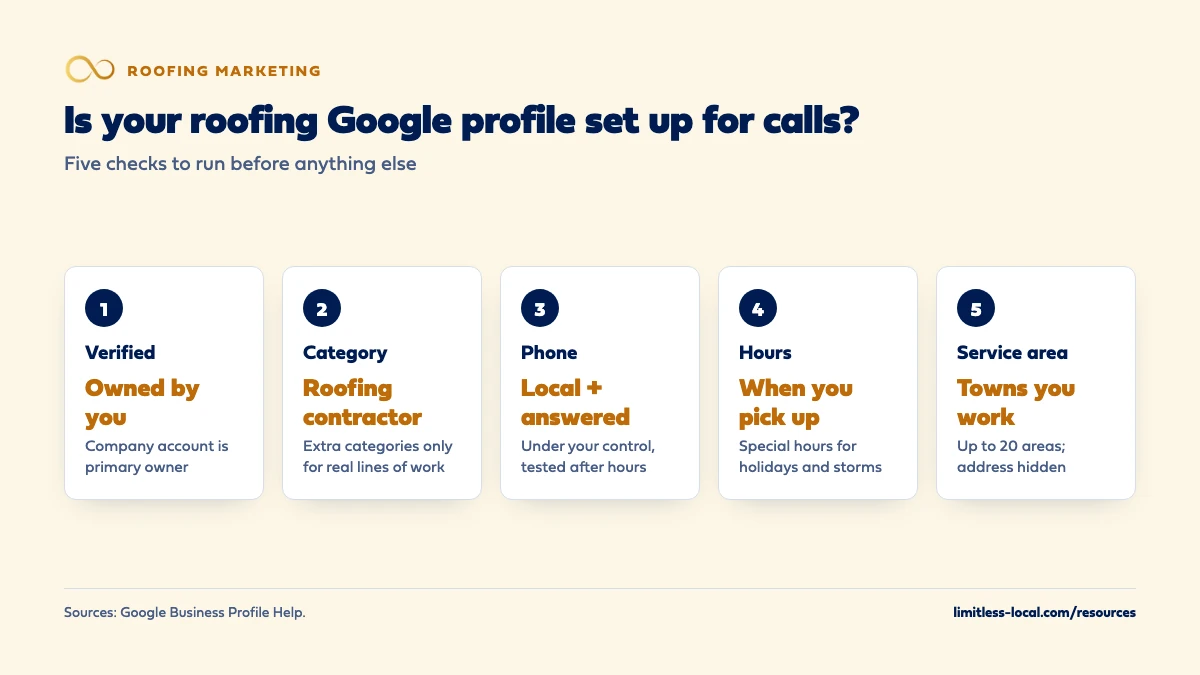
Your roofing Google Business Profile is set up to bring in calls when it’s verified, uses Roofing contractor as the primary category, shows a local phone number that’s answered during the hours you list, covers only the towns you actually serve, lists the roofing services you want calls for, and shows recent reviews and real photos of your work. If the verification, category, phone or hours is off, fix that before anything else. Then check the Calls number in the profile’s performance report each month to see whether it’s working.
Google Business Profile management is part of our local SEO work in every package. Essentials includes listing cleanup, a post every week, review responses and call tracking, so you can see which calls the profile actually produced. See how it fits a roofing company on our roofing marketing page. For the bigger picture on organic search, read is SEO worth it for roofers, and the roofing marketing questions library takes the follow-ups one at a time.
What does "set up to bring in calls" actually mean for a roofer?
A profile has two jobs. First, it has to show up when a homeowner nearby searches for a roofer or a roofing job. Second, once it shows up, calling you has to be the obvious next step.
Most profiles fail at one or the other. Some never show up because the category is wrong, the profile isn’t verified or the service area is a mess. Others show up fine but lose the call: the number rings to a cell nobody answers, the hours say open when the office is closed, or the photos are three stock images and a logo.
The checks below cover both jobs. Go through them in order, because the first few matter more than the rest.
Check 1: Is the profile verified and owned by your company?
Verification tells Google you’re authorized to represent the business, and Google’s local ranking tips say that makes the profile more likely to show up in search results. An unverified profile is the first thing to fix.
While you’re there, check who owns it. The primary owner should be a Google Account your company controls, not a former employee or a marketing vendor’s personal login. Anyone who helps you, in your office or outside it, can be added as a manager.
If you find two profiles for the same company, or one you can’t get into, sort that out before anything else. Duplicates split your reviews and confuse Google about which listing is real.
Check 2: Is your primary category set to roofing?
For a company whose main work is roofing, the primary category should be Roofing contractor. Additional categories are for other lines of work you sell on their own, like siding or gutters, not for every job type or for words you hope to rank for.
The category tells Google what kind of business you are, so a wrong one can keep you out of roofing searches no matter how good the rest of the profile is. Which Google Business Profile categories a roofer should choose goes through the options and the mistakes.
Check 3: Does the phone number on your profile get answered?
This is where most roofing profiles quietly lose calls. Check three things:
- It’s the right kind of number. Google’s guidelines for representing your business ask for a number that connects to your business location, a local number instead of a central call center helpline whenever possible, and a number under the direct control of the business. Premium numbers aren’t allowed.
- It’s set up properly. Your primary number goes in the profile’s contact section, and Google lets you add up to 2 more numbers. Never put a phone number in the business name.
- Someone picks up. Call it yourself from a number your office doesn’t know, during business hours and after. Count the rings, and listen to the voicemail.
If you want to know which calls came from the profile, a tracking number can help, as long as it forwards to your main line and your main number stays consistent everywhere else. What call tracking is and whether a roofer needs it explains the setup.
Check 4: Do your listed hours match when someone answers?
Your hours tell homeowners when it’s worth calling. List your regular customer-facing hours, and set special hours for holidays and closures. For a roofer, that means the hours a person actually answers the phone, not the hours crews are on roofs.
If the profile says open until 6 and the phone goes to voicemail by mid-afternoon, you’re paying for that gap in lost calls. Either answer during the hours you list, or list the hours you answer. If you have an answering service or after-hours coverage, your hours can reflect that.
Update special hours ahead of holidays and storm weeks, so a homeowner checking on a Sunday after a hailstorm knows whether you’ll pick up.
Curious what your marketing is actually booking?
Get a free visibility audit — no obligation, no sales pitch.
Check 5: Is your service area drawn around the towns you actually work?
Most roofers are service-area businesses: you go to the homeowner, they don’t come to you. If customers don’t visit your office, hide the address and set a service area instead.
Google lets you set up to 20 service areas by city, postal code or other area, and says the boundaries of your overall area shouldn’t be more than about 2 hours of driving time from where your business is based. Be specific: list the towns your crews will actually drive to, not every town you’d take a big job in.
A service area drawn too wide brings calls you’ll turn down. One drawn too narrow leaves out towns where you want work. Your website’s town list and your other listings should match it. Whether your roofing info needs to match on every listing covers that side.
Check 6: Does your services list show the jobs you want calls for?
Roofers can add a services list to the profile, and Google says that when local customers search for something you offer, that service may be highlighted on your profile. On the Google Maps app, customers can see the full list under “Services.”
Fill it in with the jobs you want: roof replacement, roof repair, storm and hail damage inspections, metal roofing, gutters if you sell them. Use the suggested options where they fit and add custom services for the rest, with a short description of each. Google rejects custom service names that include prices or phone numbers, so keep those out.
Leave off work you don’t want. A service on your profile invites calls for it.
Check 7: Do your photos and reviews make a homeowner want to call?
A homeowner comparing three roofers in Maps decides in seconds. What tips them toward calling you:
- Recent reviews, with your replies. More reviews and positive ratings can help your local ranking, and replies show you’re paying attention.
- Photos of your own work: crews on real roofs, finished replacements, your trucks. Not stock images. Which photos a roofer should post on Google has a shot list.
- A short, plain description of what you do and where.
Consistency matters as much as polish. A roofing client of ours got 3x map pack visibility in its target towns; better presence and consistent info across the web increased inbound calls.
Check 8: Can homeowners still request a quote from my profile?
No, not directly. Google retired the profile chat and call history features on July 31, 2024, and says customers can no longer request quotes through the Business Profile. You still receive calls from the profile, and for eligible accounts customers can contact you by text or WhatsApp if you add that option.
That puts more weight on two things:
- The call button, which means Check 3 matters even more.
- The website link. Point it at a page with a tap-to-call number and a short inspection request form, so a homeowner who’d rather not call has an easy way to ask for a quote.
If you used profile messaging in the past and your phone number was hidden, add it back so homeowners can reach you.
How do I know if my roofing profile is actually bringing calls?
Open the performance report in your profile. A few numbers matter most for a roofer:
- Calls: how many times someone tapped the call button on your profile. You need a phone number on the profile for this to count.
- Website clicks: how many people went to your site from the profile.
- Searches: the search terms people used to find you. It updates at the start of each month.
Set the date range to compare month against month, and the same month last year, since roofing has seasons. Remember that Calls counts taps on the button, not conversations, and you can no longer see call history inside the profile. To know which calls became inspections and signed roofs, you need tracking on your phone line and a source on every lead in your job software.
What should I fix first if the calls aren't coming?
- Failing any of Checks 1 to 4? Fix those first: verification, category, the phone and hours. Nothing else matters much until they’re right.
- Passing those, but few views? The profile isn’t showing up. Look at the service area, the services list, reviews and your website. Why a roofing company isn’t showing up on Google Maps walks through the causes.
- Plenty of views, few calls? The profile shows up but doesn’t persuade. Work on photos, reviews and replies, and test the phone again.
- Plenty of calls, few jobs? That’s the office and sales process, not the profile.
Then give it time. Local results are mainly based on relevance, distance and popularity, and popularity builds over months, not days. How quickly a Google Business Profile can bring in roofing calls sets realistic expectations.
Not sure which of these is costing you jobs?
A free visibility audit checks the Google profile, reviews, site and tracking, and shows what to fix first.
What's different about a Google profile for a roofing company
Storms test every setting at once. After hail or high winds, calls spike, often outside normal hours. Have special hours, a plan for who answers and fresh photos ready before storm season, not during it.
Trust decides who gets the call. Homeowners worry about storm chasers with no local history. A verified profile, a clear local service area, years of reviews and photos of your own crews say you’ll still be around to honor the warranty.
Most roofers have no storefront. If homeowners don’t come to your office or yard, hide the address and use a service area. Showing a home address can also put your family’s address in Maps.
One call is worth a lot. A replacement is a high-ticket job, so a profile that drops even a couple of calls a month to voicemail can cost more than a month of ads.
A worked example: scoring one roofer's profile
These numbers are made up to show the math, not a benchmark for your market. A roofer runs the eight checks. The profile is verified, the category is right and the services are listed. But the number on the profile is the owner’s cell, the hours say open until 6 while the owner is on roofs most afternoons, and the service area lists 26 towns pulled from a radius setting years ago.
The performance report shows 14 calls a month. The owner test-calls five times during listed hours and reaches a person twice. If that pattern holds, more than half of those 14 calls never turn into a conversation.
The fixes: route the profile number to the office line with after-hours coverage, list the hours someone actually answers, and cut the service area to the 12 towns the crews drive to. Over the next few months, profile calls rise to 19 a month and most get answered. Nothing about the ranking had to change for the profile to produce more conversations.
Frequently asked questions
Should I use my cell phone number on my roofing profile?
Only if you’ll always answer it. A main office line that rolls to after-hours coverage usually catches more calls, and it doesn’t leave with an employee.
Can I put my city or "roofing" in my business name on Google?
Only if it’s part of your real-world business name, as used on your trucks, website and paperwork. Adding unnecessary information to the name isn’t permitted and could get the profile suspended.
Do Google posts bring roofing calls?
Posts keep the profile current and give homeowners something recent to look at, but they’re a finishing touch. They won’t make up for a wrong category, an unanswered phone or a missing service area.
Should I add a text messaging option to my profile?
If your account is eligible and someone will reply quickly, yes. It gives homeowners who’d rather not call a way to reach you.
How often should I check my roofing profile?
Glance at it weekly for new reviews and any edits Google or the public suggested, and run the performance report monthly. Do the full eight-point check before each storm season.
Does a verified profile guarantee I'll show up in the map pack?
No. Verification and a complete profile make you eligible to show up; where you rank depends on relevance, distance and popularity, and nobody can promise a position.
Key takeaways
- A profile has two jobs: show up for roofing searches, and make calling you the obvious next step.
- The must-haves are verification, the Roofing contractor category, an answered local number and honest hours.
- Draw the service area around the towns your crews actually drive to, and fill in the services you want calls for.
- Homeowners can’t request quotes through the profile anymore, so the call button and website link carry the load.
- Check the Calls metric monthly, and use call tracking to see which calls became signed roofs.
Want a second set of eyes on your setup?
We'll look at how you show up locally and where calls are leaking, then send you a plain-English breakdown.
More in this section
- How quickly can a Google Business Profile bring in roofing calls?
- Do Local Services Ads help a roofer rank on Google Maps?
- Why isn't my roofing company showing up on Google Maps?
- What Google Business Profile categories should a roofer choose?
- What photos should a roofer post on Google Business Profile?
Sources
- Tips to improve your local ranking on Google — Google Business Profile Help
- Guidelines for representing your business on Google — Google Business Profile Help
- 1. Add your phone number — Google Business Profile Help
- Manage your service areas for service-area & hybrid businesses — Google Business Profile Help
- Manage your services on your Business Profile — Google Business Profile Help
- Understand your Business Profile performance & insights — Google Business Profile Help
- Changes to Google Business Profile chat and call history — Google Business Profile Help