
How should an HVAC company manage leads and customer follow-ups?

- What's a simple follow-up routine for HVAC leads that didn't book?
- Which leads actually need follow-up?
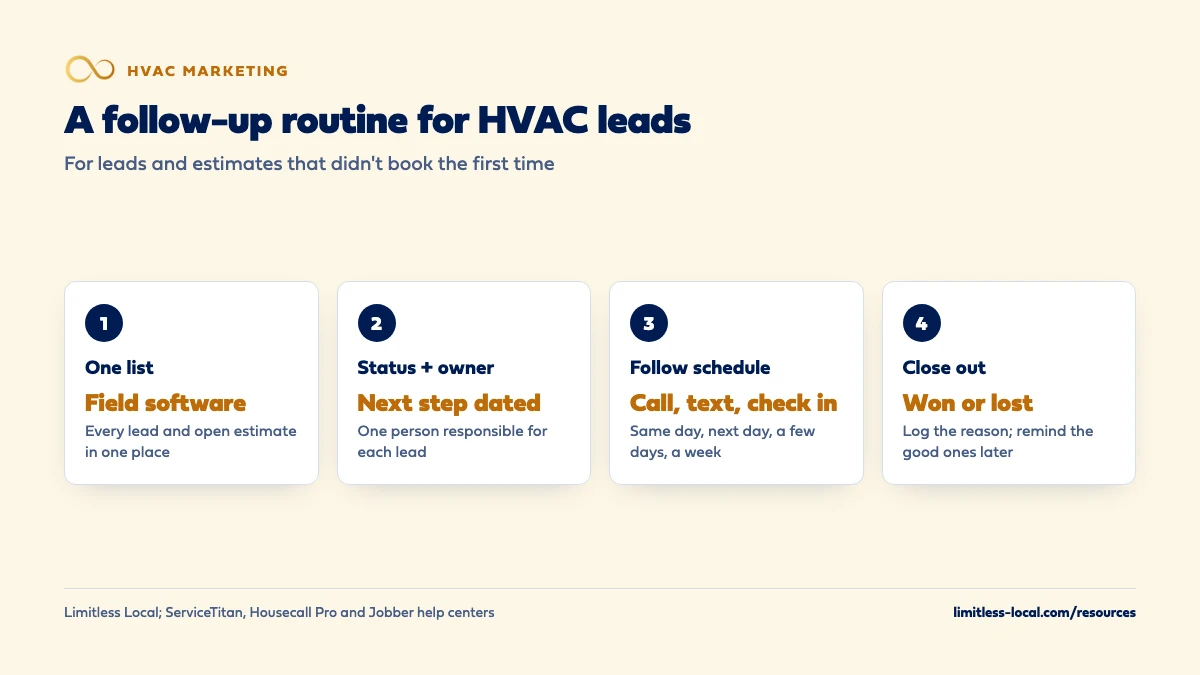
- Step 1: Where should every lead live?
- Step 2: Give every lead a status, a next step and an owner
- Step 3: Decide who owns follow-up in your shop
- Step 4: Set a follow-up schedule for leads that didn't book
- Step 5: Follow up on replacement estimates differently
- Step 6: Know what to say on a follow-up call
- Step 7: Close out dead leads on purpose
- Step 8: Turn finished jobs into the next booking
- What rules apply to follow-up emails?
- What should I check every week?
- What's different about follow-up for HVAC companies
- A worked example: what a weekly estimate review finds
- Frequently asked questions
- Key takeaways
- More in this section
- Sources
The short version
- One list, in your field software, for every lead and open estimate.
- Every lead has a status, a next step with a date, and one owner.
- Software sends the routine reminders; people make the calls that matter.
- Review open estimates weekly and close out dead leads with a reason.
For HVAC owners whose phones ring but whose open estimates and unbooked leads pile up with nobody clearly in charge of chasing them.
Get a free visibility audit · Book a growth call
What's a simple follow-up routine for HVAC leads that didn't book?
Put every lead in one list with a status, a next step and one person responsible, and work that list on a set schedule until each lead books, says no or goes quiet. The money is in what happens after the first call: callbacks on leads that didn’t book, follow-ups on open replacement estimates, and check-ins with past customers for tune-ups and maintenance plans. Let your field software send the routine reminders, have one person in the office work the list every day, and look at the open estimates with your salesperson every week.
An HVAC client got 47% more booked estimates from speed to lead, automated reminders and better follow-up, which is why we treat follow-up as part of the marketing, not an afterthought. Our automation add-ons (lead tracking dashboard, unified messaging, calendar and reminders) plug into any of our packages, alongside the call tracking and reporting every package includes. See how it fits HVAC marketing, read the HVAC marketing guide for every channel, or browse the HVAC marketing questions library.
Which leads actually need follow-up?
Most HVAC shops are good at the hot call: someone has no heat, the office books them, a tech goes. The leads that slip are everything else:
- Callers who asked for a price and said they’d call back.
- Web forms and messages that got one reply and no answer.
- Voicemails that got a callback that went to voicemail.
- Replacement estimates that were sent and never signed.
- Repair customers whose tech flagged an old system.
- Past customers due for a tune-up or a maintenance-plan renewal.
Answering new calls fast is its own topic, covered in how fast an HVAC company should respond to new leads. The rest is the list above: the people who didn’t book the first time, and the routine that turns more of them into jobs.
Step 1: Where should every lead live?
In one place, ideally the field software you already run the business on. Sticky notes, a whiteboard and three different inboxes are how leads fall through the cracks.
Most HVAC field software has a spot for this. ServiceTitan has a Follow Up screen for captured leads, where the office can schedule a follow-up date, add notes, dismiss the lead or convert it to a job. Housecall Pro’s Pipeline has a Leads board with columns like New Lead, First Contact and Second Contact, so you can see at a glance who’s been reached and who hasn’t. Jobber’s automations cover quotes and requests.
Leads that come in somewhere else need to be copied in. Google’s Local Services Ads keep their own lead inbox with call recordings (in the US) and message leads, so whoever handles LSAs should add each one to your main list the same day. One list, one place to look.
Step 2: Give every lead a status, a next step and an owner
A lead with no next step is a lead nobody will call. Every open lead should show three things:
- Status: new, contacted, estimate scheduled, estimate sent, won, lost.
- Next step with a date: “call back Thursday,” “text Monday about financing,” “check in after the holiday.”
- Owner: one name, not “the office.”
That’s what makes the list workable. Each morning, the person responsible filters for today’s next steps and works through them. Anything past its date without a new next step is a lead that’s being forgotten.
Step 3: Decide who owns follow-up in your shop
- Small shop, owner plus one or two techs: whoever answers the phone owns the list, often the owner’s spouse or office manager. A daily block of time is enough.
- Mid-size shop with a CSR team: one CSR owns lead follow-up as part of the job, not “whoever has time.” The comfort advisor or salesperson owns their own replacement estimates.
- Larger shop: a dedicated person for follow-up and outbound calls, plus a weekly estimate review with the sales team.
Techs have a part too: flagging old systems and unhappy customers in the field software, so the office knows who to call. The owner’s part is the weekly look at open estimates. For how the office should handle the calls themselves, see how your HVAC office should handle incoming calls.
Step 4: Set a follow-up schedule for leads that didn't book
A simple schedule beats a perfect one nobody follows. One that fits most HVAC shops:
- Same day: a call. If no answer, a short text with your name and a way to book.
- Next business day: a second call at a different time of day.
- A few days later: a text or email with something useful: an available appointment, a financing note or an answer to the question they asked.
- About a week later: a final check-in, then mark the lead lost with a reason, or move it to a later reminder.
Keep each message short and from a person, with your company name. “Hi, this is Sarah from Smith Heating and Air. Still need someone to look at that furnace? I’ve got an opening tomorrow morning.” beats a template that sounds like a robot.
Curious what your marketing is actually booking?
Get a free visibility audit — no obligation, no sales pitch.
Step 5: Follow up on replacement estimates differently
A replacement estimate is the most valuable lead on your list, and the one most likely to sit. Homeowners take time, get other quotes, talk to a spouse and look at financing. Your follow-up should help that decision along:
- Within a day or two: the salesperson calls to answer questions, not to push. What did they think of the options? Any questions about financing or rebates?
- After that: automatic reminders can help. Jobber, for example, can send up to two automatic quote follow-ups by email or text to clients who haven’t responded.
- Before it’s closed out: one last personal call. Ask if they went another way, and why. That answer is worth more than the call.
Track how many estimates turn into sold jobs, and how many follow-ups it took. What a good close rate looks like for HVAC replacement estimates helps you judge your numbers.
Step 6: Know what to say on a follow-up call
The goal of a follow-up call is to make booking easy, not to pressure anyone. A few lines that work:
- For a price shopper: “I can’t give an exact price without seeing it, but I can get a tech out tomorrow and the trip fee goes toward the repair.” Use whatever offer you actually have.
- For an unsigned estimate: “Did the options make sense? A lot of folks have questions about the financing. I can walk you through it.”
- For a cold lead: “Just checking in. If you got it handled, great. If not, we’ve got openings this week.”
Write down the answers. “Went with someone cheaper,” “fixed it themselves” and “never heard back from us” each point at a different problem.
Step 7: Close out dead leads on purpose
A list full of six-month-old leads is as useless as no list. Once a lead has had its full round of follow-ups, mark it lost and pick a reason: price, timing, went with a competitor, no response, not a job you do. Some software helps; Jobber can automatically archive requests and quotes after a set number of days.
Lost doesn’t have to mean gone forever. A homeowner who passed on a replacement in May may be ready when the old system dies in August. Put a reminder on the good ones for a few months out. And look at the lost reasons every month. If “no response from us” keeps showing up, that’s a follow-up problem, not a marketing one.
Step 8: Turn finished jobs into the next booking
Follow-up doesn’t stop when the job’s done. The cheapest next job comes from a customer you just served:
- A thank-you text after the job, with a link to leave a Google review.
- A maintenance-plan offer from the tech on site, or from the office the next day.
- Tune-up reminders before each season.
- A note on any system the tech flagged as nearing the end of its life, with a reminder to check in later.
Most field software can send these automatically once they’re set up. Getting more repeat customers and referrals covers the long game.
What rules apply to follow-up emails?
Marketing email has rules. The FTC’s CAN-SPAM compliance guide says the law covers commercial email, meaning messages whose primary purpose is advertising or promoting a product or service. Those need accurate sender information, honest subject lines, your physical postal address and a clear way to opt out, and opt-out requests must be honored within 10 business days. Messages that only confirm or complete a transaction the customer already agreed to are treated differently and are exempt from most of the rules.
If you hire another company to send your email marketing, you can’t contract away your responsibility; both companies can be held responsible. So a tune-up promotion to your past customers needs an unsubscribe link and your address. An appointment confirmation doesn’t need to read like a promotion.
What should I check every week?
- Open estimates: how many, how much they’re worth, and how old the oldest one is.
- Leads with no next step: should be zero.
- Lost reasons: anything new or growing?
- Booked jobs by source: which channels sent leads that actually booked.
That’s a ten-minute look, and it tells you whether follow-up is happening or just intended. The numbers an HVAC owner should track every week has the full list.
Not sure which of these is costing you jobs?
A free visibility audit checks the Google profile, reviews, site and tracking, and shows what to fix first.
What's different about follow-up for HVAC companies
Two speeds of lead. An emergency repair caller decides in minutes; a replacement buyer can take weeks. One follow-up schedule can’t serve both, which is why estimates get their own routine with the salesperson.
The season changes the list. In peak season, the office is buried and follow-up is the first thing dropped, right when the most leads come in. Decide in spring who owns the list in July, and protect their time.
A customer list that keeps paying. Every HVAC system you service will need tune-ups, repairs and eventually a replacement. A follow-up routine that keeps in touch with past customers turns one service call into years of work.
A worked example: what a weekly estimate review finds
These numbers are made up to show how the review works, not a benchmark. Say your salesperson has 12 open replacement estimates on Monday morning, worth $126,000 combined.
- 5 were sent this week and are on their first follow-up. Leave them on schedule.
- 4 are two to three weeks old and had one call each. They get a personal call this week about questions and financing.
- 3 are over a month old with no reply. One last call each, then mark them lost with a reason, with a reminder on the good ones for later.
If two of those four middle estimates close at an average of $10,500 each, that’s $21,000 in sold work from a few phone calls that would otherwise not have been made.
If you’d rather not build the routine yourself, our automation add-ons (lead tracking dashboard, calendar and reminders, unified messaging) plug into any package; pricing is shared on the discovery call.
Frequently asked questions
Should techs follow up on their own estimates?
For repairs, a quick text from the tech can work. For replacements, the salesperson or comfort advisor should own it, so nothing depends on a tech remembering between calls.
How many times should we follow up before giving up?
Three or four touches over about a week works for most unbooked leads. Replacement estimates deserve a longer window, with a final personal call before you close them out.
Is texting better than calling for follow-up?
Use both. A call first, since it’s more personal, then a short text if they don’t pick up. Many homeowners answer a text when they won’t answer an unknown number.
Do I need a separate CRM for follow-up?
Not usually. ServiceTitan, Housecall Pro and Jobber all have ways to track leads and estimates. Add a separate tool only if your field software can’t do what you need.
What do I do with leads from Local Services Ads?
Reply from the LSA lead inbox, then add the lead to your main list with its source. Once you respond, Google marks it active, and you’ll get emails about new messages on it.
Should follow-up texts mention prices?
Only prices you’d stand behind for that job. An offer or financing note is fine; a guessed price for a repair nobody has looked at causes trouble later.
Key takeaways
- Keep every lead and open estimate in one list, ideally your field software.
- Every lead needs a status, a dated next step and one owner.
- Use a short, consistent schedule for unbooked leads and a separate one for replacement estimates.
- Close out dead leads with a reason, and look at those reasons monthly.
- Marketing emails need an opt-out and your address; honor opt-outs within 10 business days.
Want a second set of eyes on your setup?
We'll look at how you show up locally and where calls are leaking, then send you a plain-English breakdown.
More in this section
- How can an HVAC company get more leads?
- How fast should an HVAC company respond to new leads?
- Which marketing channels give an HVAC company the best leads?
- How should my HVAC office handle incoming calls from new customers?
- What should I look for in a CRM for my HVAC company?
Sources
- Use the Follow Up screen to find and view captured leads — ServiceTitan Help
- Getting Started with Pipeline — Housecall Pro Help Center
- Automations — Jobber Help Center
- Manage leads and jobs — Google Local Services Help
- CAN-SPAM Act: A Compliance Guide for Business — Federal Trade Commission