
How do I manage my plumbing business digitally?

- What does a plumbing company need to run its office digitally, from first call to paid invoice?
- What does running a plumbing business digitally actually mean?
- Where should a plumbing company start?
- How should calls and messages come into my plumbing business?
- How do I handle scheduling and dispatch digitally?
- How do I send quotes and follow up on them?
- How do I get paid faster?
- Where do reviews fit in a digital plumbing office?
- How do I keep my plumbing books and records digital?
- Who should have access to what?
- What should my weekly numbers check look like?
- How do all the pieces connect?
- What shouldn't I try to digitize all at once?
- What's different about running a plumbing office digitally
- A worked example: one Monday numbers check
- Frequently asked questions
- Key takeaways
- More in this section
- Sources
The short version
- One field service platform is the hub: customers, jobs, quotes, invoices.
- Every call, booking and payment should end up there, tagged with where it came from.
- Automate the follow-ups people forget: quotes, invoices and review requests.
- Give everyone their own login, and check a handful of numbers every week.
For plumbing owners moving the office off whiteboards, paper tickets and personal cell phones, and wondering how the pieces fit together.
Get a free visibility audit · Book a growth call
What does a plumbing company need to run its office digitally, from first call to paid invoice?
Pick one field service platform as the home for every customer, job, quote and invoice, and make every call, booking and payment land there. Then add the pieces around it one at a time: a main business number with a call log, automatic quote and invoice follow-ups, a review request after every job, accounting that syncs, and separate logins for everyone. Finish with a short weekly numbers check, so the system tells you how the business is doing instead of just storing data.
The automation side of this, like lead tracking, unified messaging, calendar reminders, after-hours answering and AI website chat, is what our automation add-ons cover, and they plug into any plumbing marketing package. Every package also includes call tracking and a real-time dashboard that shows which marketing brought in each lead. The rest of the plumbing marketing questions library goes question by question.
What does running a plumbing business digitally actually mean?
It means every job leaves a trail you can follow without asking anyone: the call came in, someone booked it, a tech went out, a quote or invoice went to the customer, they paid, and they were asked for a review. All in one place, all searchable, from your phone in the truck.
Compare that with how a lot of plumbing offices still run: a whiteboard for dispatch, paper tickets in the truck, quotes in someone’s email, customer numbers saved on the owner’s personal cell, and the books caught up once a month. It works until you’re sick, the office manager quits or you add a third truck. Then jobs slip through the cracks and nobody can say why.
Going digital isn’t about buying lots of software. It’s about getting one clear path from first call to paid invoice.
Where should a plumbing company start?
Start on paper, not in a software demo. Write down how a job moves through your business today, step by step: who answers, where they write it down, how the tech finds out, how quotes go out, how you get paid. Circle the steps where things get lost.
Then pick the hub. For most plumbing shops that’s a field service platform like ServiceTitan, Housecall Pro or Jobber, which handles customers, scheduling, dispatch, quotes, invoices and payments in one place. Everything else connects to it.
Choosing one is its own decision, with its own questions about features, cost and getting your data out later. Choosing field service software for a plumbing business walks through it.
How should calls and messages come into my plumbing business?
Through one main business number that rings wherever someone can answer it, not the owner’s personal cell. Your phone system should keep a log of every call, answered or missed, so nothing disappears.
- Calls: route them so the office picks up first, then a backup person, with a clear plan for after hours.
- Texts and web forms: send them to a shared inbox the whole office can see.
- Google profile messages and leads from ads: make sure they notify a person, not an email nobody checks.
Every new caller should become a customer record in your software the same day, with the job and where they found you. How fast a plumbing office should answer a new call covers why speed matters so much here.
How do I handle scheduling and dispatch digitally?
Move the whiteboard into the software. A digital dispatch board shows every tech’s day, and every tech sees their jobs, the address, notes and the customer’s history on their phone.
A few habits make it work:
- Book in the software while you’re on the phone, not on a notepad to enter later.
- Let the software send appointment confirmations and on-my-way texts. Customers like knowing when you’ll show up, and it cuts down on calls asking.
- Use online booking for planned work, like drain cleanings or water heater flushes. Keep emergencies on the phone, where someone can triage them.
- Have techs add photos and notes before they leave the job. They’re gold for the next visit and for any dispute.
How do I send quotes and follow up on them?
Build quotes on a tablet or phone at the job, from templates for the work you do most: water heater replacements, repipes, sewer line repairs, fixture installs. Options at a few price points help the homeowner decide while you’re still there.
Then automate the follow-up, because that’s what gets forgotten. Jobber’s automations, for example, can send up to two automatic reminders by email or text on quotes awaiting a response, and can remind customers about invoices that are due. It can also draft a quote from a new request using its AI, which you review before you send.
Big plumbing tickets are often lost to silence, not to a competitor. A reminder two days later, and a call from a person after that, wins a lot of them back. Whether a plumbing company needs a CRM for follow-up goes deeper on estimate follow-up.
Curious what your marketing is actually booking?
Get a free visibility audit — no obligation, no sales pitch.
How do I get paid faster?
- Invoice from the truck the moment the job’s done, with a link to pay by card or bank transfer.
- Take payment on site for service calls, before the tech drives off.
- Take deposits on big jobs like repipes and water heater installs, through the same software.
- Turn on invoice reminders, so nobody in the office has to make the awkward call until a reminder or two has gone out.
- Check unpaid invoices every week, not every quarter.
When payments live in the same software as the job, you can see which customers pay slowly and which job types tie up the most cash.
Where do reviews fit in a digital plumbing office?
At the end of every job, automatically. Most field service software can send a Google review request by text or email when a job is marked finished or paid. Turn it on, point the link at your Google profile and check it’s going to every customer, not just the ones you pick.
Replies belong in the routine too: whoever runs the office should answer new reviews every few days. Whether AI can help a plumbing company get more 5-star reviews covers how to write the ask, time it and draft replies without breaking Google’s rules.
How do I keep my plumbing books and records digital?
Connect your field service software to your accounting software, so invoices and payments flow across without anyone typing them twice. Snap photos of receipts for parts and supplies as you buy them.
The IRS’s page on recordkeeping says you can choose any recordkeeping system suited to your business that clearly shows your income and expenses, and that records of employment taxes should be kept for at least four years. Digital is fine, as long as it’s complete and you can find things when you need them.
The upside for the owner is speed: when the books are current every week, you know whether last month was actually profitable before the next one is half over.

Who should have access to what?
Everyone gets their own login. No shared passwords, ever. It’s how you know who changed what, and how you lock someone out the day they leave.
- Your Google profile. Google’s help on managing owners and managers says each user needs their own Google Account so nobody has to share a password. Keep yourself as the primary owner, and add office staff or your marketing company as managers.
- Field service and accounting software. Techs see their jobs; the office sees scheduling and invoices; only you and your bookkeeper see the full financials.
- Former employees. The SBA’s guide to strengthening your cybersecurity recommends regular access audits so former employees are removed from your systems, plus multi-factor authentication and regular backups, weekly to the cloud if possible.
CISA’s advice on strong passwords is to make them at least 16 characters, random and unique to each account, and to give your team a password manager so they don’t have to remember them all.
What should my weekly numbers check look like?
Fifteen minutes every Monday, same numbers every time:
- Calls in, and how many were answered.
- Booked jobs, and where each one came from.
- Average ticket, so you notice when big jobs dry up.
- Open estimates, especially the big ones.
- Unpaid invoices.
- New reviews, and whether requests went out on every job.
The “where it came from” part only works if every job gets a source. Housecall Pro’s lead source field, for example, can be set on customers, jobs and estimates; the other platforms have their own versions. Make picking a source a required step at booking. Tracking which plumbing marketing books jobs shows how to connect calls from ads and your Google profile to booked jobs.
How do all the pieces connect?
Picture it as one line, from left to right:
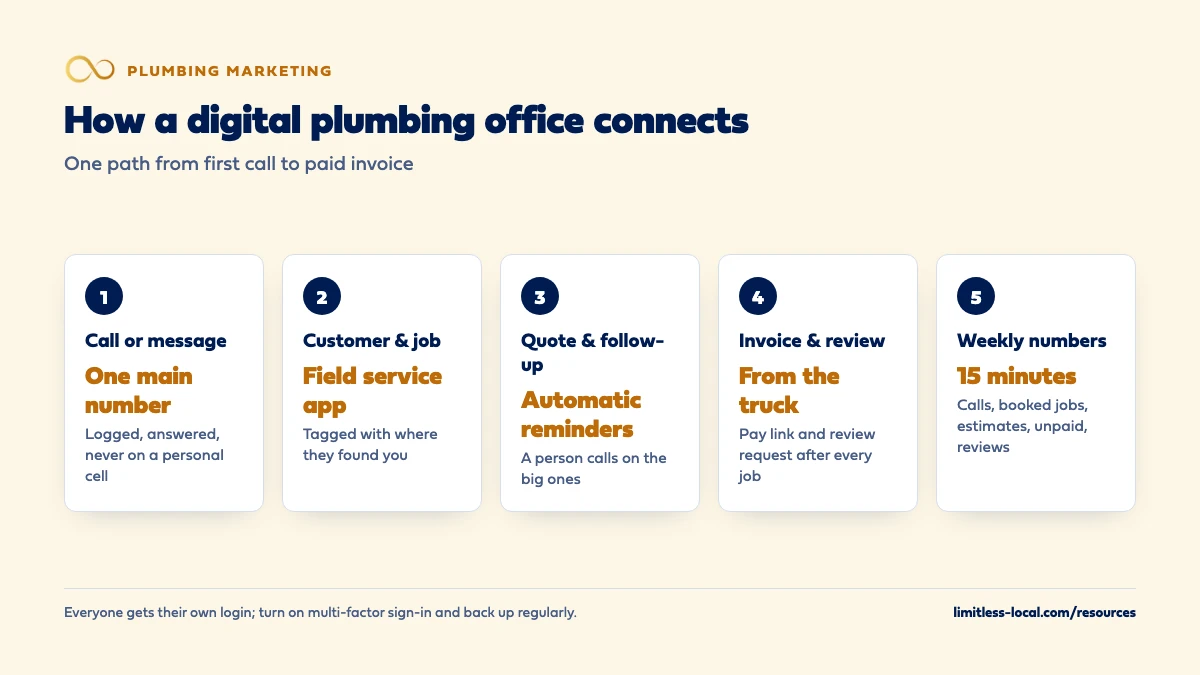
Marketing (Google profile, ads, website, referrals) → phone and messages (main number, call log, tracking numbers) → field service software (customer, job, quote, invoice, review request) → accounting (payments, expenses, payroll) → your weekly numbers.
Each arrow is a place data can get lost. Check each one: does a call from an ad end up as a customer with the right source? Does a paid invoice show up in the books without retyping? Does a finished job trigger the review ask? Fix the broken arrows before adding anything new.
The payoff comes when the last box feeds the first. Once you can see which marketing books jobs and what those jobs are worth, you know where to spend next month’s money.
What shouldn't I try to digitize all at once?
Most of it. Switching everything in one week is how offices end up running the old system and the new one side by side, badly.
- One change a month is a good pace: scheduling first, then quotes, then invoices and payments, then reviews and reporting.
- Train the team on each piece before the next one starts. Techs who don’t trust the app go back to paper.
- Don’t buy a tool for every problem. Check whether your field service software already does it before adding another login.
- Keep the old way as a backup for the first couple of weeks of each change.
Not sure which of these is costing you jobs?
A free visibility audit checks the Google profile, reviews, site and tracking, and shows what to fix first.
What's different about running a plumbing office digitally
Emergencies break the schedule every day. A burst pipe call at 3 p.m. reshuffles the afternoon. A digital dispatch board lets the office see who’s closest and move jobs around without five phone calls, and lets customers get an updated arrival time automatically.
Trucks carry stock. Water heaters, fittings and fixtures move between the supply house, the shop and the trucks. If your software tracks parts, use it for the expensive items at least, so jobs aren’t held up by a part nobody knew was gone.
Job photos protect big tickets. Before-and-after photos of a sewer line, a slab leak or a water heater install, attached to the job, help with warranty questions and with customers who later ask what was done.
A worked example: one Monday numbers check
These numbers are made up to show how the check works, not a benchmark. Say a three-truck plumbing shop opens its weekly report and sees:
- 60 calls in, 51 answered, so 85% answered.
- 30 booked jobs, each tagged with a source.
- 12 open estimates, three of them for repipes or sewer lines.
- $3,200 in unpaid invoices more than two weeks old.
Three actions come straight out of it. The 9 missed calls mostly came in around lunch, so the office sets up a backup person for that hour. The three big estimates each get a call from the owner today. And the invoice reminders, which were never switched on, get turned on.
Fifteen minutes, three fixes, and none of it needed anyone to remember anything. The software did the remembering.
Frequently asked questions
Do I need a CRM and field service software?
Most plumbing shops can start with field service software alone, since it stores customers and jobs. Add a separate CRM only if you need follow-up or marketing features yours doesn’t have.
Can a one-truck plumber manage everything from a phone?
Yes. Most field service apps run on a phone, including scheduling, quotes, invoices and payments. The key is getting off your personal number and putting every job in the app, even when it’s just you.
Should techs use their own phones?
Many shops do, but give each tech their own login, turn on multi-factor sign-in and have a plan to remove access the day someone leaves. Company phones make that easier.
Is it safe to keep customer information in the cloud?
It can be, if you use reputable software, give everyone their own login, use strong unique passwords with multi-factor sign-in and limit who sees what. Those habits matter more than where the data sits.
How do I get my old customer list into new software?
Most platforms can import a spreadsheet of customers. Clean it up first: remove duplicates, fix phone numbers and mark which customers are active.
Can AI run my plumbing office for me?
It can help, by drafting quotes, summarizing calls and sending follow-ups, but a person should still check quotes, handle emergencies and approve anything a customer sees.
Key takeaways
- Make one field service platform the home for every customer, job, quote and invoice.
- Use one main business number with a call log, not personal cell phones.
- Automate quote reminders, invoice reminders and review requests.
- Give everyone their own login, use a password manager and remove ex-employees fast.
- Check calls, booked jobs by source, open estimates, unpaid invoices and reviews every Monday.
- Change one piece a month, and train the team before the next.
Want a second set of eyes on your setup?
We'll look at how you show up locally and where calls are leaking, then send you a plain-English breakdown.
More in this section
- How do I choose field service software for a plumbing business?
- How do I see what my plumbing competitors are doing online?
- How do I scale a plumbing business with marketing?
- How do I fix inconsistent business info online as a plumber?
- How do I make my plumbing company look trustworthy online?
Sources
- Automations — Jobber Help Center
- Recordkeeping — Internal Revenue Service
- Manage your Business Profile owners & managers — Google Business Profile Help
- Strengthen your cybersecurity — U.S. Small Business Administration
- Require Strong Passwords — CISA
- How to Use Lead Sources — Housecall Pro Help Center