
Does my plumbing company need a CRM for leads and follow-up?

- What is a CRM for a plumbing business, and do I need one to manage leads and follow-up?
- What is a CRM for a plumbing company?
- How do I know my plumbing company needs one?
- Do I already have a CRM in my field-service software?
- What should a plumbing CRM do?
- How should a CRM handle follow-up on plumbing estimates?
- Can a CRM help me answer leads faster?
- Will a CRM show me which marketing books jobs?
- What rules apply to follow-up texts and emails from a CRM?
- How do I get my team to actually use a CRM?
- What's different about a CRM for plumbers
- A worked example: what estimate follow-up might recover
- Frequently asked questions
- Key takeaways
- More in this section
- Sources
The short version
- A CRM is one list of every lead and open estimate, each with a status and a next step.
- You likely need one when leads or quotes slip through, or when more than one person answers.
- Many plumbing field-service tools already include lead boards and automatic quote follow-ups.
- The win is follow-up on open estimates and a booking rate you can measure by source.
For plumbing owners whose leads live in a phone, a notebook and someone’s memory, deciding whether a CRM is worth setting up and what it should actually do.
Get a free visibility audit · Book a growth call
What is a CRM for a plumbing business, and do I need one to manage leads and follow-up?
Most plumbing companies need a CRM once leads and estimates come in faster than one person can remember them, which for many shops is earlier than they think. A CRM keeps every call, form and estimate in one list with a status and a next step, so open quotes get followed up and nobody has to rely on memory. If you already use field-service software such as ServiceTitan, Housecall Pro or Jobber, you may already have one; the work is setting it up and using it every day.
A CRM only pays when someone acts on what it shows. Our automation add-ons include CRM and lead tracking that puts every call, text, form and chat in one place, plus automated follow-up on estimates, no-shows and unclosed jobs, and they plug into any package alongside the call tracking every package includes. See how we approach plumbing marketing, or browse the rest of the plumbing marketing questions library.
What is a CRM for a plumbing company?
CRM stands for customer relationship management. For a plumbing company, in plain terms, it’s the place where every lead and customer lives: who called, what they needed, what you quoted, what happened next and what should happen next.
In practice it covers three lists:
- Leads that haven’t booked yet: calls, forms, texts and chats.
- Estimates sent but not yet accepted, such as a water heater replacement or a repipe.
- Customers and their history, for repeat work, memberships and reviews.
Housecall Pro’s Pipeline feature is a good picture of it: a Leads board, an Estimates board and a Jobs board, each showing open items as cards in one place. It says Pipeline doesn’t create those items for you; it organizes the ones you capture. That’s true of any CRM: it only knows what your team puts in.
How do I know my plumbing company needs one?
In our judgement, the signs are practical, not about company size:
- A homeowner calls back about a quote and nobody remembers the details.
- Estimates go out and nobody checks on them unless the customer calls.
- Leads live in text threads on three different phones.
- You can’t say which marketing brought in last month’s jobs.
- More than one person answers the phone or sends quotes.
- You pay for leads and can’t tell how many of them booked.
If two or more of those sound familiar, a CRM will probably pay for itself in recovered estimates alone. A one-plumber shop that answers every call itself and does mostly emergency service work may get by longer on a calendar and a notebook, but in our judgement even that shop loses quotes it never followed up.
Do I already have a CRM in my field-service software?
Quite possibly. Many plumbing companies run on field-service software for scheduling, dispatch and invoicing, and several of those tools include lead and estimate tracking:
- Housecall Pro has Pipeline boards for leads, estimates and jobs, and conversion rate reporting for Pipeline users that shows your leads’ win rate, which leads are still outstanding and conversions by date, source or employee.
- Jobber has automations for requests and quotes, including automatic quote follow-ups.
- ServiceTitan has a Follow Up screen where call takers find captured leads and work to convert them to jobs.
Some of these features depend on your plan or need setup; Jobber, for example, says quote follow-ups are on its Connect plan and up, and ServiceTitan says its lead capture needs account configuration. Check what you already pay for before buying a separate CRM. In our judgement, a second system that doesn’t talk to your scheduling tool usually ends up half-used.
What should a plumbing CRM do?
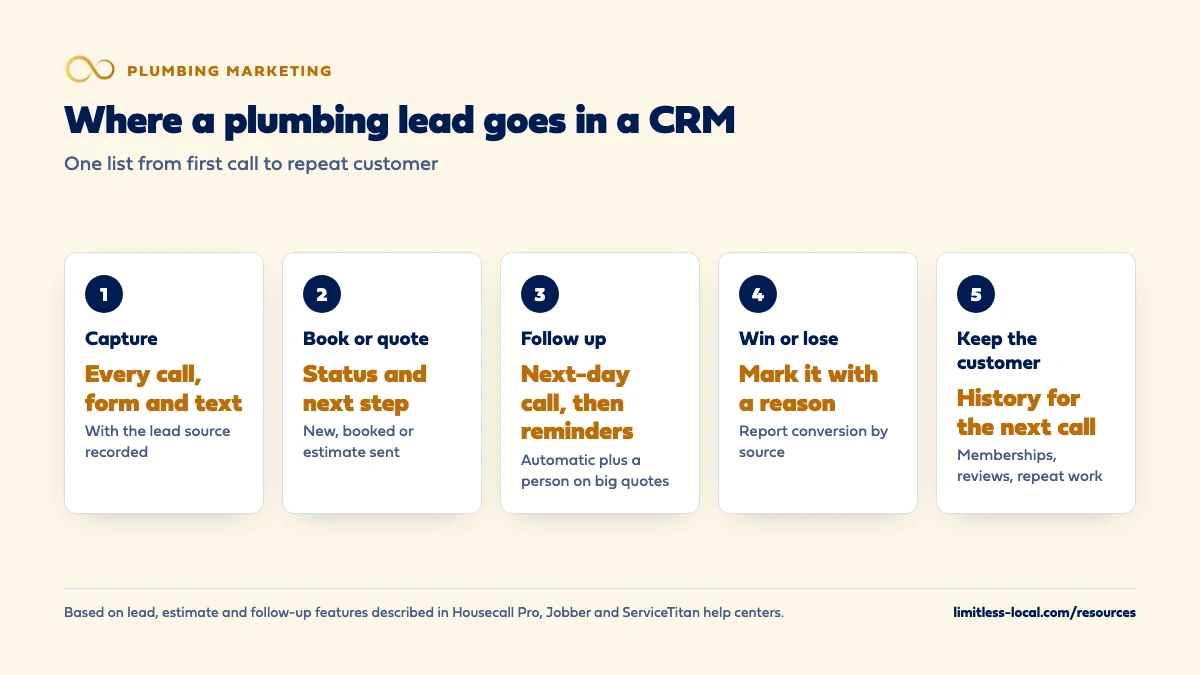
In our judgement, these matter most for a plumbing company, roughly in order:
- Capture every lead in one place, whatever channel it came from, with the source recorded.
- Give each lead a status: new, contacted, booked, estimate sent, won, lost.
- Show what needs action today, so an open estimate doesn’t sit for two weeks.
- Send follow-ups on open estimates automatically, by text or email, with a person stepping in on the big ones.
- Connect to your calendar and dispatch, so a won lead becomes a scheduled job without retyping it.
- Report conversion by source and by person, so you can see which marketing and which call taker book jobs.
Nice extras, not essentials: review requests after a job, membership renewals and marketing to past customers. Selling more maintenance memberships covers that side.
Curious what your marketing is actually booking?
Get a free visibility audit — no obligation, no sales pitch.
How should a CRM handle follow-up on plumbing estimates?
This is where most plumbing companies get their money back. A homeowner who got a quote for a water heater, a repipe or a sewer line and went quiet often hasn’t said no; they’re busy, comparing, or waiting on a spouse.
Jobber’s quote follow-up automation shows what a basic setup looks like: it sends automatic email or text reminders about quotes still awaiting a response, on a schedule you set by days since the quote went out, with up to two reminders, sent the same way as the original quote. Its archive automation can clear quotes that never turn into jobs after a set number of days, which keeps the list honest.
In our judgement, a sensible plumbing estimate follow-up looks like this:
- A personal call or text the next day from whoever quoted it.
- An automatic reminder a few days later.
- A second reminder or call about a week after that, with an easy way to say “not now”.
- Mark it lost with a reason when it’s lost, so you learn why.
Bigger quotes deserve a person, not only an automation. Jobber’s high-value quote alerts are built for that idea: a notification when a new auto-drafted quote comes in above your average quote value, so someone can follow up personally.
Can a CRM help me answer leads faster?
It can help, but it won’t pick up the phone. A CRM puts new forms, texts and missed calls in one list and can alert someone, which shortens the time before a callback. The speed itself still comes from staffing and habits.
Where it helps most, in our judgement:
- Web forms and texts land in the same list as calls, instead of an inbox nobody checks on a job site.
- Missed calls show up as leads to work, not just entries in a phone log.
- Hand-offs work: if the office captured a lead yesterday, whoever picks up today sees the notes. ServiceTitan’s Follow Up screen describes exactly that case.
How fast your office should answer covers the speed targets, and whether missed-call text back is worth it covers one automation that often sits next to a CRM.
Will a CRM show me which marketing books jobs?
Only if lead sources are recorded every time. A CRM that knows a lead came from Local Services Ads, your Google profile, a postcard or a referral can report conversion by source; one where the source field is blank can’t.
Housecall Pro’s conversion reporting, for example, can break lead conversion down by lead source. Combine that with call tracking numbers on each channel and you can see cost per booked job, not just cost per lead. In our judgement, this is the second big payoff of a CRM after estimate follow-up: you stop paying for channels that send calls but not jobs.
Tracking which marketing books jobs covers how to connect calls to jobs in ServiceTitan, Housecall Pro and Jobber.

What rules apply to follow-up texts and emails from a CRM?
Follow-up about a quote the customer asked for is different from marketing, and the rules treat them differently. This is general information, not legal advice.
- Email: the FTC’s CAN-SPAM compliance guide says messages that only facilitate an agreed transaction or update a customer about one are exempt from most of the law’s requirements (truthful routing information still applies), while commercial email must include your physical postal address and a clear way to opt out, and opt-outs must be honored within 10 business days.
- Text: texting has its own federal rules and carrier requirements, which this page doesn’t cover. If your CRM sends marketing texts, such as specials or membership offers, in our judgement send them only to customers who agreed to get them, and check the rules with your texting provider or an attorney first.
Jobber’s quote follow-ups only go to clients who have outstanding quote follow-ups turned on in their communication settings, which is a good habit whatever tool you use: keep each customer’s preferences in the CRM and respect them. If you’re unsure, ask your software provider or an attorney.
How do I get my team to actually use a CRM?
In our judgement, most CRMs fail on habits, not features. What helps:
- Start small. Leads and open estimates first. Add memberships and marketing later.
- Make it the only list. If quotes also live in a notebook, the CRM will never be complete.
- Keep required fields short: name, phone, address, job type, source and next step.
- Review it weekly. Ten minutes on open estimates and lost leads, with a reason for each loss.
- Let the plumbers use it from the truck, so an estimate given on site goes in the same day.
ServiceTitan notes that call reasons have to be set up before leads can be captured properly, and that bad setup makes reports unreliable. That’s true of every system: the first week of setup decides whether the numbers are worth reading.
What's different about a CRM for plumbers
Two kinds of work, two kinds of follow-up. Emergency service calls book or don’t on the first call, so the CRM’s job there is capture and source tracking. Quoted work, such as water heaters, repipes, sewer lines and water treatment, can sit for days or weeks, and that’s where follow-up earns its keep, in our judgement.
Plumbers quote in the field. Many plumbing estimates are given at the kitchen table, not by the office. A CRM the plumber can update from the truck catches those quotes; one that only the office uses misses them.
Plumbing customers come back. Water heaters age, drains clog again and homes get sold. A customer record with the equipment and work history turns the next call into a quicker, better-informed visit.
Want to see where your company stands?
A free visibility audit shows where you show up on Google, Maps and AI answers, and what it's costing you in calls.
A worked example: what estimate follow-up might recover
These numbers are made up to show the math, not a benchmark for your market. Say your plumbing company sends 30 estimates a month for water heaters, repipes and sewer work. Without a system, 12 are accepted, mostly by customers who call back on their own.
Now say you put every estimate in a CRM, call the next day and send two automatic reminders. If that brings in 4 more accepted estimates a month, at a made-up average job value of $1,800, that’s $7,200 a month in work that used to go quiet.
Even if the real figure in your shop is half that, it’s usually more than a field-service plan costs. The point isn’t the exact number; it’s that open estimates are the warmest leads you have and the easiest to lose.
Frequently asked questions
Is a spreadsheet good enough instead of a CRM?
For a very small shop, for a while. It won’t remind anyone, connect to your schedule or send follow-ups, so in our judgement it stops working once more than one person handles leads.
Should I buy a separate CRM if I use field-service software?
Usually not first. Check whether your current tool already tracks leads and estimates; a separate system that doesn’t sync with scheduling tends to be half-used.
Can a CRM send review requests after a job?
Many can. Ask every customer the same way after the job, and never offer anything in return for a review that says something positive (or negative), which the FTC’s 2024 rule on fake reviews prohibits. This is general information, not legal advice.
How long does it take to set up a CRM?
The software can be ready quickly; the habits take longer. Plan a few weeks of everyone entering every lead before the reports are worth reading.
Does a CRM help with Local Services Ads leads?
Yes, if LSA leads go into it with their source. You can then see how many booked, which helps when deciding whether the ads are worth what they cost.
What's the difference between a CRM and call tracking?
Call tracking tells you which marketing made the phone ring. A CRM tracks what happened to that lead afterwards. You need both to see cost per booked job.
Key takeaways
- A CRM is one list of every lead and open estimate, each with a status and a next step.
- Leads slipping through, quotes going unchased or several people answering are signs you need one.
- Check your field-service software first; Housecall Pro, Jobber and ServiceTitan include lead and estimate tools.
- The biggest payoff is follow-up on open estimates, followed by booking rate by source.
- Keep transactional follow-up and marketing messages separate, and respect opt-outs.
- A CRM works only if it’s the single list everyone uses, reviewed weekly.
Not sure what's working right now?
Start with a free visibility audit: rankings, Google profile, reviews and tracking, checked against your service area.
More in this section
- How do I get more plumbing leads?
- Is missed-call text back worth it for a plumbing company?
- What makes a good plumbing marketing company?
- How do I keep plumbing calls coming in during slow months?
- How should a plumbing company market to commercial customers?
Sources
- Getting Started with Pipeline — Housecall Pro Help Center
- Conversion Rate Reporting — Housecall Pro Help Center
- Automations — Jobber Help Center
- Use the Follow Up screen to find and view captured leads — ServiceTitan Help Center
- CAN-SPAM Act: A Compliance Guide for Business — Federal Trade Commission
- Federal Trade Commission Announces Final Rule Banning Fake Reviews and Testimonials — Federal Trade Commission