
How does a roofer optimize a Google Business Profile?
- How do I fully optimize my roofing Google Business Profile, service areas included?
- What does optimizing a roofing Google Business Profile actually mean?
- Step 1: Who should own and manage my roofing profile?
- Step 2: How should my name, phone number and hours look?
- Step 3: How should a roofer set up service areas?
- Step 4: Which category and services should I list?
- Step 5: What should my business description say?
- Step 6: What photos should go on my roofing profile?
- Step 7: How do I keep reviews coming in?
- Step 8: Should a roofer post updates on the profile?
- Step 9: How do I know the optimization is working?
- What should a roofer do first if time is short?
- What's different for roofers
- A worked example: one roofer's profile cleanup
- Frequently asked questions
- Key takeaways
- More in this section
- Sources
The short version
- Own the profile, and give your team and agency their own access instead of your password.
- Real business name, local phone, true hours, and service areas you actually drive to.
- Roofing contractor as the main category, and a full services list with descriptions.
- Keep it active with job photos, reviews, replies and posts, and track calls monthly.
For roofing company owners who have a Google Business Profile and want it working harder for calls in the towns they actually serve.
Get a free visibility audit · Book a growth call
How do I fully optimize my roofing Google Business Profile, service areas included?
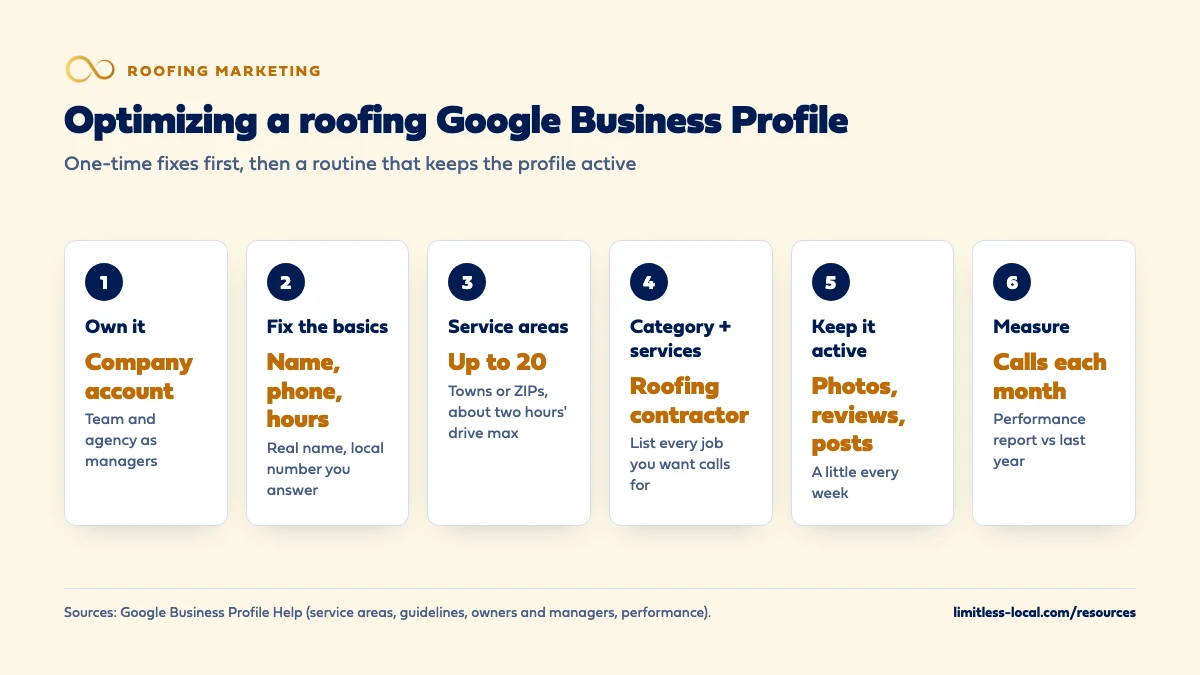
A roofer optimizes a Google Business Profile by getting the basics exactly right, then keeping it active. Lock down ownership, use your real business name, a local phone number you answer and accurate hours, set up to 20 service areas by town or ZIP code within about two hours’ drive, pick Roofing contractor as your main category, and list every roofing service you want calls for. Then keep adding real job photos, ask every happy customer for a review and reply to all of them, post updates, and check the calls in your performance report each month.
This is the core of our local SEO work for roofers: business listing cleanup and buildout, Google Business Profile management with regular posts, review response and review generation, and your name, address and phone synced across 50+ directories. One roofing client got 3x map pack visibility in its target towns; better presence and consistent info across the web increased inbound calls. See how it fits together on our roofing marketing page, read whether SEO is worth it for roofers, or browse the roofing marketing questions library.
What does optimizing a roofing Google Business Profile actually mean?
It means giving Google every reason to show your profile to homeowners searching for a roofer in your towns, and giving those homeowners every reason to call. Google’s guide to local ranking says local results are mainly based on relevance, distance and popularity, that businesses with complete and accurate info are more likely to show up, and that there’s no way to request or pay for a better local ranking.
For a roofer, that breaks down into three jobs:
- Relevance: tell Google exactly what you do and where, with the right category, services and service areas.
- Distance: you can’t change where your business is based, so don’t fight it. Make the most of the towns you’re close to.
- Popularity: earn reviews, links and activity over time.
The steps below go in order. The first few are one-time fixes. The last few are a routine that never really ends.
Step 1: Who should own and manage my roofing profile?
You should, or someone at your company should. Too many roofers find out their profile is owned by a former office manager, a past agency or an old personal Gmail.
Google’s page on owners and managers explains the roles. A profile can have several owners but only one primary owner, who has full control, including adding or removing users. Managers can do almost everything else: edit info, respond to reviews and manage posts. Each user needs their own Google Account, so nobody has to share a password.
So set it up like this:
- Make a company Google Account the primary owner, not a staff member’s personal one.
- Add your office manager, and any agency, as managers.
- Check the user list when someone leaves, and remove them.
New owners and managers also have to wait 7 days before they can do some things, like removing other users or transferring primary ownership, so sort out access before you need it.
Step 2: How should my name, phone number and hours look?
Google’s guidelines for representing your business are strict about these, and breaking them can cost you the profile.
- Name: your real business name, as it appears on your trucks, website and paperwork. Adding keywords like “Roof Repair Austin” to the name isn’t allowed and could get your profile suspended.
- Phone: a number that connects to your business and is under your direct control. Use a local number instead of a central call center line whenever possible.
- Hours: your regular customer-facing hours, meaning the hours someone actually answers the phone.
If you use call tracking, make sure the number on your profile still rings your office and that you control it. And whatever hours you list, answer during them. A homeowner who calls during your posted hours and gets voicemail usually calls the next roofer. Whether your roofing profile is set up to bring in calls runs through these checks one by one.
Step 3: How should a roofer set up service areas?
Most roofers are service-area businesses: you go to the homeowner, and they don’t come to you. Google’s help page on service areas says that if you don’t serve customers at your business address, you should remove the address from your profile. Then set your service areas:
- You can set up to 20 service areas, by city, ZIP code or another area.
- You can’t set a radius around your business anymore.
- Your overall area shouldn’t extend more than about two hours of driving time from where you’re based.
- Be as specific and accurate as possible. Service area edits may take up to 48 hours to show once approved.
Pick the towns you actually want work in, closest and most profitable first, not every town you’ve ever driven through. Your service areas help homeowners see where you work, but they won’t make you rank in a town far from your base. For towns farther out, a strong website page for that town and ads usually do more.
Step 4: Which category and services should I list?
Your primary category tells Google what kind of business you are. For most roofing companies it’s Roofing contractor. Use as few categories as possible to describe your core business, and don’t use categories as keywords. Which categories a roofer should choose covers the edge cases, like gutters and siding.
Services are where you get specific. Google’s page on managing services says you can pick from suggested services or add custom ones, group them, and add descriptions and prices. Keep prices and phone numbers out of custom service names; custom services that break Google’s policy are rejected automatically. For a roofer, list each kind of job you want calls for:
- Roof replacement and new roof installation
- Roof repair and leak repair
- Storm and hail damage repair
- Roof inspections
- Metal, tile or flat roofing, if you do them
- Gutters, if you sell them
Add a short, plain description to each one: what it includes, the materials you use, and the towns you do it in.
Curious what your marketing is actually booking?
Get a free visibility audit — no obligation, no sales pitch.
Step 5: What should my business description say?
The description is for useful information about your services, and the mission and history of your business. It can’t include links, and it shouldn’t focus on promotions, prices or sales.
A good roofing description answers what a homeowner wonders before calling:
- What you do: replacements, repairs, storm work, the materials you install.
- Where you work: your main towns or area.
- Why you: years in business, who runs it, your warranty, and how you handle the job from inspection to cleanup.
Write it like you’d explain it on a homeowner’s porch. Skip lines like “best roofer in town” and lists of keywords. They don’t help, and they make the profile read like an ad. Update it when something real changes, like a new service, a new town or a new warranty.
Step 6: What photos should go on my roofing profile?
Photos are where a roofing profile wins or loses the call. Homeowners want to see real roofs, real crews and real trucks, not stock images.
Start with a logo and a cover photo, then build up a steady stream of job photos:
- Finished roofs, from the street and up close.
- Before-and-after pairs from the same angle.
- Crews working safely, in harnesses.
- Your trucks and team.
Add a few each week as jobs finish, instead of fifty at once and then nothing for a year. Use clear, well-lit photos without heavy filters. What photos a roofer should post on Google Business Profile goes into detail, including what never to post.
Step 7: How do I keep reviews coming in?
Reviews feed the popularity side of local ranking, and they’re what homeowners read before they call. Google’s tips for getting more reviews are simple: remind customers to leave one with a Google link or QR code, reply to reviews, and value all of them, since a mix of positive and negative feedback often feels more trustworthy.
Build the ask into every job:
- The crew lead or salesperson asks at the final walk-through, while the homeowner is looking at a clean yard and a new roof.
- A text with your review link follows the same day.
- Someone replies to every review within a few days, good or bad.
Never offer a discount, gift or anything else in exchange for a review. Google treats incentives for reviews as fake and misleading content, and it’s strictly prohibited. How a roofer should reply to Google reviews has examples for the tricky ones.

Step 8: Should a roofer post updates on the profile?
Yes. Posts are a cheap way to keep the profile fresh and show homeowners you’re active. Google’s page on profile posts lists three types: updates, offers and events. Posts older than 6 months are archived unless they have a date range, so a steady trickle beats one big push.
Good roofing post ideas:
- A finished job in a named town, with a photo.
- What to check on a roof after a big storm.
- A seasonal offer, like a free inspection in spring.
- A new crew member, material or warranty.
Add a button that sends homeowners to the right page on your website. Don’t put a phone number in the post text: Google may reject posts with a phone number it can’t verify as yours. Your main number is already on the profile.
Step 9: How do I know the optimization is working?
Check your profile’s performance report every month. It shows views, the searches people used to find you, calls from the call button, website clicks and more, and you can set a date range to compare periods. The searches report updates at the start of each month and can take a few days to show up.
What to look for:
- Calls and website clicks trending up compared with the same months last year, so the season doesn’t fool you.
- Searches for roofing services, not just your company name.
- Signed jobs from the profile, from your own records or call tracking.
Also search from a phone in each of your main towns, the way a homeowner would, and note where you show up. If you’re missing from the map pack in towns close to your base, why a roofing company isn’t showing up on Google Maps walks through the common causes.
What should a roofer do first if time is short?
If you only have an hour this week, do these in order:
- Make sure your company owns the profile and you can log in.
- Fix the name, phone number and hours so they match reality.
- Set your service areas to the towns you want, and remove your address if homeowners don’t visit you there.
- Confirm the primary category and add your main roofing services.
Then set a weekly routine of about fifteen minutes: add a few job photos, reply to new reviews, and post one update. Check the performance report once a month.
How fast you’ll see results depends on your market and where you’re starting from. Calls from people searching your company name can pick up quickly, while showing up for “roofer near me” in competitive towns takes months. How quickly a Google Business Profile can bring in roofing calls sets realistic expectations.
Not sure which of these is costing you jobs?
A free visibility audit checks the Google profile, reviews, site and tracking, and shows what to fix first.
What's different for roofers
Storm chasers crowd the map. After big storms, out-of-town crews often set up listings in towns they don’t really serve. A local roofer with a real name, a true service area and recent reviews stands apart, and staying inside Google’s guidelines keeps your profile clear of any cleanup.
Your work is on the roof, out of sight. Homeowners rarely see a roof up close, so photos of finished work, details and before-and-after pairs do more for a roofer than for most trades.
Big jobs mean careful buyers. A homeowner hiring for a replacement reads reviews closely and compares profiles. A complete, active profile with recent reviews and replies often decides who gets the inspection.
A worked example: one roofer's profile cleanup
These numbers are made up to show the process, not a benchmark for your market. A roofing company’s profile had four problems: the address showed even though homeowners never visited, the service area listed 14 towns including several the crews rarely worked, there was only one service listed (Roofing), and the last photo was from two years ago.
In the first week, the owner removed the address, cut the service areas to the 8 towns closest to the yard, added six roofing services with short descriptions, and wrote a plain description of the company. Then the office manager took over a weekly routine: four job photos, replies to every new review, and one post.
Three months later, the performance report showed calls from the profile up from 18 to 27 a month compared with the same months a year earlier, mostly from the closest towns.
If you’d rather hand it off, our Essentials package is $3,500 a month and includes business listing cleanup, Google Business Profile management with a post every week, review response and basic review generation.
Frequently asked questions
Can I add my city name to my roofing business name on Google?
Only if it’s part of your real business name, as used on your trucks, website and paperwork. Adding keywords or locations to the name isn’t allowed and could get the profile suspended.
Should a roofer show their home address on Google?
No, if homeowners don’t visit you there. Service-area businesses that don’t serve customers at their address should remove it and list service areas instead.
Can I list more than 20 service areas?
No. Google allows up to 20 service areas, by city, ZIP code or another area. Pick the towns you want work in most.
Does posting on my Google profile help me rank?
Posts keep the profile fresh and help homeowners decide to call. Complete info, reviews, photos and replies carry more weight, so treat posts as part of an active profile, not a ranking trick.
Can my marketing agency manage my profile without owning it?
Yes. Add them as a manager. Managers can edit info, reply to reviews and manage posts, but can’t add or remove users or delete the profile.
How often should a roofer update the Google profile?
A little every week: a few job photos, review replies and a post. Revisit services, description and service areas when something real changes.
Key takeaways
- Keep the profile owned by your company, and give staff and agencies manager access.
- Use your real business name, a local number you answer, and hours you actually keep.
- Set up to 20 service areas by town or ZIP, within about two hours’ drive, and remove your address if homeowners don’t visit.
- Pick Roofing contractor as the main category and list every roofing service you want calls for.
- Keep it active weekly with photos, reviews, replies and posts, and check calls in the performance report monthly.
Want a second set of eyes on your setup?
We'll look at how you show up locally and where calls are leaking, then send you a plain-English breakdown.
More in this section
- What photos should a roofer post on Google Business Profile?
- Is my roofing Google Business Profile set up to bring in calls?
- What Google Business Profile categories should a roofer choose?
- How quickly can a Google Business Profile bring in roofing calls?
- Do Local Services Ads help a roofer rank on Google Maps?
Sources
- Tips to improve your local ranking on Google — Google Business Profile Help
- Manage your Business Profile owners & managers — Google Business Profile Help
- Guidelines for representing your business on Google — Google Business Profile Help
- Manage your service areas for service-area & hybrid businesses — Google Business Profile Help
- Manage your services on your Business Profile — Google Business Profile Help
- Tips to get more reviews — Google Business Profile Help
- Create & manage posts on your Business Profile — Google Business Profile Help
- Understand your Business Profile performance & insights — Google Business Profile Help