
What accounting software suits a small plumbing business?

- What should a small plumbing company look for in accounting software, and how should it connect to the job software?
- What does accounting software need to do for a small plumbing business?
- Should my books live in my field service software or a separate program?
- How should accounting connect to ServiceTitan, Housecall Pro or Jobber?
- What should I look for when choosing accounting software?
- Should a plumbing company use cash or accrual accounting?
- How do I see profit by job, not just revenue?
- How should I set up my books to see what marketing costs?
- How can my books show whether marketing is paying off?
- What records does a plumbing company need to keep, and for how long?
- Do I still need a bookkeeper if I have good software?
- What's different about accounting for plumbing companies
- A worked example: two marketing channels side by side
- Frequently asked questions
- Key takeaways
- More in this section
- Sources
The short version
- Pick the program that syncs with your field service software and your bookkeeper already uses.
- Jobs, invoices and lead sources live in the field software; the books live in accounting.
- Give each marketing channel its own expense line.
- Use both together to see cost per booked job and profit by channel.
For plumbing owners picking or cleaning up their bookkeeping software, who want books that also show which jobs and which marketing actually make money.
Get a free visibility audit · Book a growth call
What should a small plumbing company look for in accounting software, and how should it connect to the job software?
The right accounting software for a small plumbing business is one that syncs cleanly with your field service software, connects to your business bank and card accounts, handles payroll and sales tax the way your state needs, and is the program your bookkeeper or CPA already works in. Let the field service software own jobs, invoices and where each customer came from, and let the accounting software own the books. Set up separate expense lines for each marketing channel, so the two together show what each booked job cost and what it earned.
We don’t keep anyone’s books, but the marketing half of that picture is part of every Limitless Engine package: monthly reports with a cost-per-lead breakdown, call tracking with recording, source tagging on every lead and a real-time dashboard. Our automation add-ons add a lead tracking dashboard and follow-up tools that plug into any tier. See how it fits plumbing companies, or browse the rest of the plumbing marketing questions.
What does accounting software need to do for a small plumbing business?
Strip away the feature lists and a small plumbing company needs its books to do six things:
- Pull in every bank and card transaction automatically, so nothing gets typed twice.
- Record income from your job software: invoices, payments, refunds and processing fees.
- Sort expenses into categories you’ll actually read: parts, fuel, vehicles, tools, insurance, marketing.
- Run payroll or connect to the payroll service you use for your techs.
- Handle sales tax the way your state treats parts and labor.
- Produce the reports you and your accountant need: profit and loss, balance sheet, and cash flow.
The SBA’s guide to managing your finances calls the balance sheet the foundation of managing your finances, and it’s the report most owners never open. A program that makes it easy to read is worth more than one with fifty features you’ll never touch.
Should my books live in my field service software or a separate program?
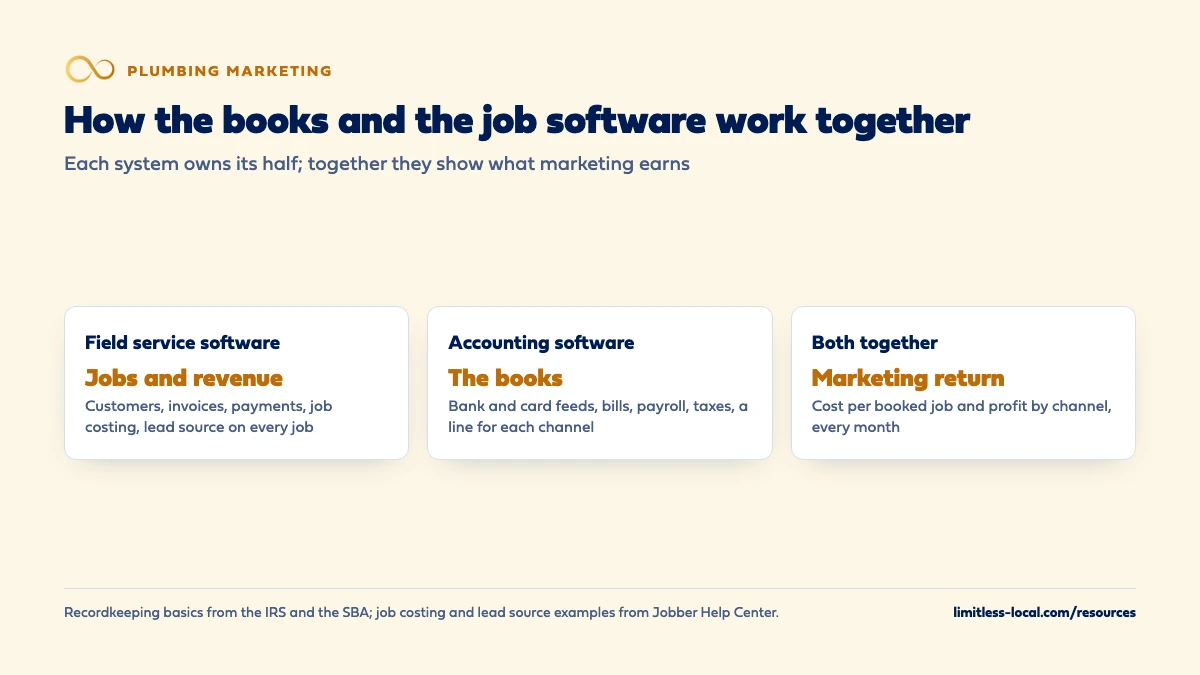
Usually separate, connected. Field service software like ServiceTitan, Housecall Pro or Jobber is built around jobs: booking, dispatch, estimates, invoices and payments. Accounting software is built around the books: every dollar in and out, payroll, taxes and the reports your accountant files from.
Each does its own job well. Problems start when both try to do the same job, like invoices created in both places, or payments recorded twice. Pick one home for each piece of information:
- Field service software: customers, jobs, estimates, invoices, payments taken in the field, and the lead source on every job.
- Accounting software: bank and card feeds, bills from suppliers, payroll, taxes, and the financial reports.
If you haven’t settled on job software yet, how to choose field service software for a plumbing business covers that choice, including what to ask about the accounting sync.
How should accounting connect to ServiceTitan, Housecall Pro or Jobber?
Before you choose accounting software, check which programs your job software syncs with, and how. Syncs differ in direction, timing and what happens when something changes after the first sync. A few rules keep the books clean whatever you use:
- Create invoices in one place only, usually the field software.
- Find out which way data flows, and what triggers a sync: a finished job, a sent invoice, a payment.
- Learn what doesn’t sync automatically, such as edits or cancellations after the first sync, and who fixes those by hand.
- Record card processing fees as an expense, not as a smaller payment, so revenue stays accurate.
- Have your bookkeeper test the sync with a few real jobs before you rely on it.
Getting this right once saves hours every month and keeps your revenue numbers trustworthy, which matters when you start judging marketing by them. Managing a plumbing business digitally shows where the sync fits with calls, scheduling and payments.
What should I look for when choosing accounting software?
A short checklist for a plumbing shop:
- Syncs with your field service software, ideally through an integration the software company supports itself.
- Your bookkeeper or CPA uses it. Paying them to work in a program they don’t know costs more than any subscription difference.
- Bank and card feeds for every business account, including fuel and supply-house cards.
- Payroll built in or connected, with job-level time if you want job costing.
- Classes, locations or tags, so you can split numbers by service line, like residential service, new construction or commercial.
- Receipt capture from a phone, because receipts get lost in trucks.
- User permissions, so your office manager can enter bills without seeing everything.
- A clean way to export your data if you ever switch.
Price matters less than fit. The cheapest plan that doesn’t sync with your job software will cost you in hours.
Curious what your marketing is actually booking?
Get a free visibility audit — no obligation, no sales pitch.
Should a plumbing company use cash or accrual accounting?
The difference is when a sale lands in the books. The accrual method records a sale when it’s completed; the cash method records it only once payment is received. Cash is easier to understand and shows cash flow clearly. Accrual gives an immediate snapshot of the business but is more complex to manage.
For a plumber, the difference shows up with commercial work and big jobs. If you finish a $12,000 repipe in March and get paid in April, cash books show a weak March and a strong April. Accrual books put the job in March, when the work and the marketing that won it happened.
Whichever method you file taxes under, many owners look at both for running the business: cash to know what’s in the bank, and job dates to know which months and which marketing really performed.
How do I see profit by job, not just revenue?
Revenue tells you how busy you were. Job profit tells you which work is worth chasing. That usually lives in your field software, not your accounting program.
Jobber’s job costing, for example, calculates profit and margin on each job from three things: line item costs for parts and materials, labor from timesheets at each employee’s hourly cost (wage, benefits and taxes), and expenses logged against the job. Other field service programs have their own versions.
For a plumber, that’s where the surprises show up. A drain call with almost no parts can carry a better margin than a water heater install loaded with equipment cost and two techs’ time. Set labor costs and part costs carefully, and keep them current when wages or supplier prices change, or every margin you see will be off.
How should I set up my books to see what marketing costs?
Most small plumbing companies dump everything into one “Advertising” line. That tells you the total and nothing else. Split it so each channel has its own expense line:
- Google Ads
- Local Services Ads
- Marketing agency or SEO fees
- Website hosting and changes
- Lead services and directories
- Direct mail and print
- Truck wraps, signs and uniforms
- Marketing software and call tracking
Have your bookkeeper set rules so recurring charges, like the monthly Google Ads bill, land in the right line automatically. Then each month you can see exactly what each channel cost, which is half of the only marketing question that matters: what did each booked job cost me?
How can my books show whether marketing is paying off?
Put the two systems side by side. The accounting software tells you what each channel cost. The field service software tells you what each channel earned, as long as every job carries its lead source.
Jobber’s lead source report is one example: it shows leads by source alongside the first revenue earned from each one. Most field software has something similar.
Each month, for each channel, work out:
- Cost per booked job: channel cost from the books divided by jobs booked from that source.
- Revenue per marketing dollar: revenue from those jobs divided by channel cost.
- Gross profit after marketing: the profit on those jobs minus what the channel cost.
Working out your plumbing customer acquisition cost goes deeper on the math, and turning plumbing marketing spend into more revenue covers what to do with the answer.
What records does a plumbing company need to keep, and for how long?
The IRS’s page on what records to keep says you may choose any recordkeeping system suited to your business that clearly shows your income and expenses, and that supporting documents like invoices, receipts, paid bills and deposit slips back up the entries in your books. Accounting software counts as that system, as long as the documents behind it are kept too.
How long depends on the record. Records supporting your tax return are generally kept until the period of limitations for that return runs out, which is 3 years in the most common case, with longer periods in some situations. Employment tax records are kept for at least 4 years after the tax becomes due or is paid, whichever is later. Your insurer or lender may want them longer.
Card payments add one more check. If customers pay you directly by credit, debit or gift card, you’ll get a Form 1099-K from your card processor no matter how many payments you got or how much they were for. Make sure the total matches what your books show.
Do I still need a bookkeeper if I have good software?
Most small plumbing companies do. Software pulls in transactions; it doesn’t decide that a supply-house charge was a water heater for a job and not tools, or notice that a payment synced twice. The usual options are a CPA, a bookkeeper or an online service: a bookkeeper handles the day-to-day work at a lower cost, while a CPA costs more but can offer more tailored service.
A simple monthly routine, whoever does it:
- Match every bank and card transaction.
- Check that every job payment in the field software landed in the books once.
- Review profit and loss by category, including each marketing line.
- Pull revenue by lead source and work out cost per booked job.
Thirty minutes with those numbers each month tells you more about your marketing than any agency report on its own.
Want to see where your company stands?
A free visibility audit shows where you show up on Google, Maps and AI answers, and what it's costing you in calls.
What's different about accounting for plumbing companies
Parts swing the margin. Water heaters, fixtures and pipe can be a large share of a job’s cost. Record parts against jobs, not just as a monthly supply-house total, or you won’t see which jobs actually make money.
After-hours work costs more to deliver. Overtime or on-call pay for emergency calls belongs in job costing, so you can see whether your after-hours rates cover it.
Commercial customers pay later. If you do commercial work on payment terms, track what’s owed to you closely. Busy months with slow payers can still leave the bank account thin.
Memberships are recurring revenue. Maintenance plan payments should be tracked separately from one-off jobs, so you can see what the plan program brings in on its own.
A worked example: two marketing channels side by side
These numbers are made up to show the math, not a benchmark for your market. Say the books show $2,000 on Google Ads and $800 on a postcard mailing last month. The field service software shows Google Ads brought 20 new booked jobs worth $9,000, and the postcards brought 4 jobs worth $3,000.
Google Ads cost $100 per booked job. Postcards cost $200 per booked job, but brought bigger tickets.
Now add margin. Say your job costing shows about half of revenue is gross profit on these jobs. Google Ads jobs produced $4,500 in gross profit, or $2,500 after the ad spend. Postcard jobs produced $1,500, or $700 after the mailing. Both paid for themselves; Google Ads paid more. Without separate expense lines and lead sources, all you’d know is that you spent $2,800 on marketing and had a decent month.
Frequently asked questions
Is QuickBooks Online the best choice for plumbers?
It’s a common one, and many field service programs sync with it. The best choice is whichever program your job software syncs with cleanly and your bookkeeper already knows.
Can I just use a spreadsheet?
For a one-truck start, maybe. Once you have employees, card payments and several suppliers, the time spent typing and the mistakes usually cost more than software.
Should I keep business and personal spending separate?
Yes. A dedicated business bank account and card make the books far easier to keep and every expense easier to support.
How do I handle card processing fees?
Record the full payment as revenue and the fee as an expense. Netting them together understates what each job brought in.
Can my accounting software track where customers came from?
Not well on its own. Lead sources belong on the job in your field service software; the books then supply the cost side.
When should I switch accounting software?
At the start of a year or quarter, with your bookkeeper, after testing the sync with real jobs. Switching mid-month makes reconciling much harder.
Key takeaways
- Choose accounting software that syncs cleanly with your field service software and that your bookkeeper already uses.
- Let the field software own jobs, invoices and lead sources, and the accounting software own the books.
- Split marketing into one expense line per channel.
- Use job costing to see profit by job, not just revenue.
- Each month, combine channel cost from the books with revenue by lead source to get cost per booked job.
Not sure what's working right now?
Start with a free visibility audit: rankings, Google profile, reviews and tracking, checked against your service area.
More in this section
- What is the best POS for a plumbing business?
- How do I choose field service software for a plumbing business?
- How do I manage my plumbing business digitally?
- Which marketing channel gives a small plumbing company the best ROI?
- How do I scale a plumbing business with marketing?
Sources
- What kind of records should I keep — Internal Revenue Service
- How long should I keep records? — Internal Revenue Service
- Understanding your Form 1099-K — Internal Revenue Service
- Manage your finances — U.S. Small Business Administration
- Job Costing — Jobber Help Center
- Lead Source Report — Jobber Help Center