
What happens if competitors click on my HVAC Google Ads?

- Do I pay when a competitor clicks my HVAC ads, and how do I stop it?
- Does Google count a competitor clicking my ad as invalid?
- Do I pay for clicks from competitors?
- How do I see how many invalid clicks Google filtered out?
- How can I tell if a competitor is really clicking my HVAC ads?
- Can I report suspected click fraud to Google?
- Can I block a competitor from seeing my ads?
- Are my own office and techs costing me ad clicks?
- Which settings cut down on junk clicks for an HVAC company?
- Do fake calls and form fills count as invalid clicks?
- Should I pay for a click fraud protection tool?
- What's different for HVAC companies
- A worked example: what a few bad clicks really cost
- Frequently asked questions
- Key takeaways
- More in this section
- Sources
The short version
- Google names competitors clicking to raise your costs as one kind of invalid traffic.
- Invalid clicks caught before billing aren't charged; ones caught later are credited where possible.
- Check the Invalid clicks column and the Invalid activity credits before assuming the worst.
- Many click spikes are real demand, like a heat wave, not fraud.
For HVAC owners who suspect a rival is clicking their Google Ads to drain the budget, and want to know what Google does about it and what they can check themselves.
Get a free visibility audit · Book a growth call
Do I pay when a competitor clicks my HVAC ads, and how do I stop it?
Google treats a competitor clicking your ads to run up your costs as invalid traffic: clicks its filters catch before your bill closes are removed from your reports and your bill, and invalid clicks it finds after you’ve been billed come back as an “Invalid activity” credit where appropriate and possible. You can see how many clicks Google filtered by adding the Invalid clicks column to your campaigns, and you can ask Google to investigate suspicious activity from the last 60 days. Because some invalid traffic isn’t caught right away, the practical defenses are tight location settings, excluding IP addresses you know about, and judging your ads on booked jobs instead of raw clicks.
That’s how we read suspicious clicks in client accounts too: against tracked calls and booked jobs, with the call recordings to hear what a lead actually was. Google Ads management and reporting are part of our local ads work in every one of our HVAC marketing packages. For what wasted ad spend does to the overall budget, see what HVAC marketing costs, and the rest of the HVAC marketing questions library goes question by question.
Does Google count a competitor clicking my ad as invalid?
Yes. Google’s list of invalid traffic includes what it calls other invalid user activity: intentional clicks from real people with no genuine interest in your ad, and it names competitors who click manually to increase your spend as an example (About invalid traffic). Google’s short definition of invalid clicks covers the same ground, including manual clicks that increase your ad costs (Invalid clicks: Definition).
Competitors aren’t the only source. Google’s list also includes bots and automated software, accidental clicks caused by poor ad placement, and fraudulent placements on publisher sites. In our judgement, that matters for an HVAC owner, because a run of useless clicks isn’t automatically a rival with a grudge. It may be automated traffic Google already filters, or settings that put your ads in front of the wrong people.
Do I pay for clicks from competitors?
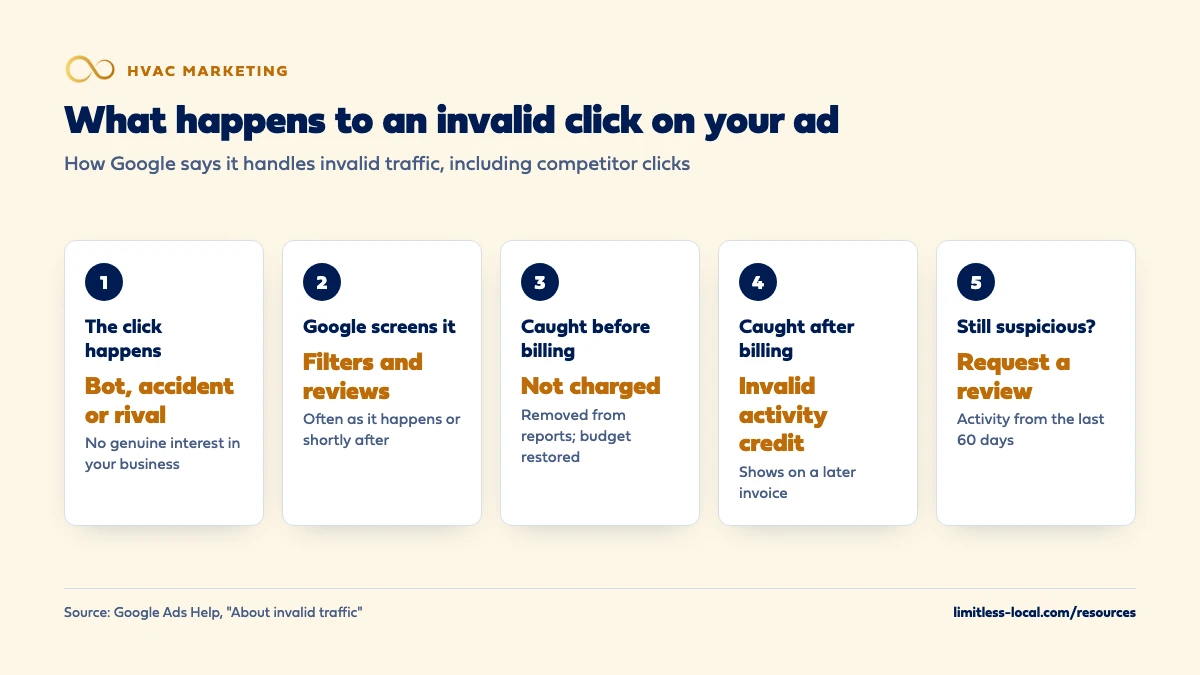
Not for the ones Google identifies as invalid. Google uses automated filters, machine learning and manual reviews, and says it often detects invalid traffic as it happens or shortly after. What happens next depends on timing (About invalid traffic):
- Caught before your billing cycle ends: the clicks are removed from your campaign reports and your bill, so there’s nothing to refund. Google also puts that money back into your campaign budget and tries to spend it on valid clicks, within your normal monthly limits.
- Caught after you’ve been billed: you get a credit, a billing adjustment for the value of the invalid activity, where appropriate and possible.
The honest limit: clicks Google doesn’t flag as invalid are billed like any other click. That’s why the rest of this page is about what you can check and change yourself.
How do I see how many invalid clicks Google filtered out?
Add the Invalid clicks column to your campaigns table: open Campaigns, select the Columns icon, search for Invalid clicks and apply it. Google says an increase in that number means its defenses are catching and removing more invalid activity from your clicks, cost and bill, not that you’re being charged for more of it (About invalid traffic).
Credits for activity caught after billing show up somewhere else: under Billing, then Summary, as “Invalid activity” in the Adjustments list for the month. Two details trip people up:
- Google freezes campaign metrics at month’s end, so a later credit appears on your invoice but doesn’t change last month’s campaign numbers. The Invalid Activity Credit Report in Report Editor shows your figures with credits applied.
- A large Invalid clicks count with a small credit is normal, because the column shows clicks filtered before billing and credits cover clicks found after.
How can I tell if a competitor is really clicking my HVAC ads?
Look for clicks that don’t behave like homeowners: a jump in clicks with no rise in calls or forms, clicks from outside the towns you target, or the same few IP addresses in your website’s server logs clicking again and again without ever calling.
Then rule out the innocent explanations, because Google lists several that look the same at first (About invalid traffic):
- Real demand. Seasonal trends and news events cause genuine spikes. For HVAC, the first heat wave is exactly that.
- A competitor going quiet. If a rival stops advertising, your ads can show more and get more clicks.
- Your own changes. A bigger budget, new keywords or wider location settings bring more clicks. Check Change history.
- Analytics quirks. A zero-second visit can just mean the person didn’t click a second page. And one IP address can be shared by hundreds or thousands of devices on the same network, such as a mobile carrier’s.
If the clicks are real but the calls aren’t coming, the problem may be the page or the phones, not fraud; telling whether ads, website or follow-up is the problem walks through that check.
Curious what your marketing is actually booking?
Get a free visibility audit — no obligation, no sales pitch.
Can I report suspected click fraud to Google?
Yes. If you think invalid traffic got past the automatic filters, you can request an investigation through Google’s Click Quality Form, for activity within the last 60 days. Google asks you to gather (About invalid traffic):
- Your Google Ads customer ID and the exact dates you noticed the activity.
- The campaigns, ad groups and keywords involved.
- Web server logs, especially IP addresses with repeated clicks or clicks without conversions, browser and device details, and the Google click IDs (GCLIDs) for the suspicious clicks.
- For bad leads, a spreadsheet with the GCLID for each lead and what happened when you called or emailed them.
- A short explanation of why the traffic looks wrong.
Google says a review typically takes several business days, you’ll get an email with the findings, and if the review finds invalid traffic the automated filters missed, Google notifies you of any credits. It won’t tell you whether specific clicks were judged valid or invalid, because that would show bad actors how to get around its checks.
Can I block a competitor from seeing my ads?
Only if you know where they’re clicking from. Google lets you exclude IP addresses so your ads don’t show to computers and networks at those addresses: up to 500 per campaign, with an asterisk in place of the last three digits to exclude a block. You can also set exclusions at the account level, which covers all campaigns, including Performance Max (Exclude IP addresses).
In our judgement, IP blocking is a narrow tool for an HVAC company. A competitor on a phone is on a mobile network, where Google notes many devices can share one public IP address (About invalid traffic), and blocking that address could hide your ads from real homeowners too. It’s most useful for a fixed address you’re sure of, like a rival’s office network, or your own.
A competitor who just wants to see your ads doesn’t need to click them at all. Google’s Ads Transparency Center lets anyone look up the ads a verified advertiser has run, where they showed and when they last ran (Announcing the Ads Transparency Center). For sizing up who you’re bidding against, see how competitive HVAC marketing is in your area.
Are my own office and techs costing me ad clicks?
In our judgement, this is more common than competitor clicking: someone in the office searches the company to grab the phone number and taps the first result, which is the ad. Google’s own example for IP exclusions is exactly this, excluding your company’s network so staff checking search results don’t create costly impressions and clicks (Exclude IP addresses).
To check whether your ads are showing, use the Ad preview and diagnosis tool in Google Ads instead of searching on Google. Google says it shows you the ad without piling up impressions that affect your performance numbers (About the Ad preview and diagnosis tool). Tell the office and the techs the same thing: if you need our number, use the website or the saved contact, not the ad.

Which settings cut down on junk clicks for an HVAC company?
- Location: Presence instead of Presence or Interest. By default, Google shows ads to people in your area and to people who’ve shown interest in it, even if they’re elsewhere. Switching to Presence limits ads to people likely to be in, or regularly in, your targeted locations (About advanced location options). Google says most campaigns see fewer impressions after switching, which for a local service is usually the point. Google’s invalid traffic page suggests the same change for unexplained spikes.
- Location exclusions for towns you won’t drive to. Picking those areas is covered in deciding which cities and ZIP codes to target.
- Negative keywords for searches you don’t want, like jobs, training or parts.
- Display Expansion. A Search campaign can be set to also show your ads on the Google Display Network, and Google now lets you give Display a low priority or cap its share of the daily budget (About Display Expansion on Search campaigns). Google doesn’t say Display Expansion brings in invalid clicks. In our judgement, though, a repair campaign is usually cleaner kept to Search, where the person on the other end typed in the problem you fix.
Do fake calls and form fills count as invalid clicks?
Not automatically. Google’s filters run after an ad is served, so they can’t stop traffic from reaching your website, and real people sometimes submit fake details. Google calls lead quality a shared effort: it filters the clicks, and you protect your forms with tools like reCAPTCHA and server-side checks, and point your campaigns at goals like qualified leads or booked appointments (About invalid traffic). If you suspect a run of fake leads, the GCLID spreadsheet described above is what Google asks for.
Local Services Ads work differently, because you pay per lead. Google screens leads at first contact and doesn’t charge for ones it finds invalid or low quality, such as spam or duplicate contacts, and charged leads are reassessed over time and can be credited automatically (How leads work). Whether Local Services Ads are worth it covers what still gets charged.
Should I pay for a click fraud protection tool?
Check Google’s own numbers first. Google says third-party tools often flag traffic that its defenses already filtered and kept off your bill, that it can’t evaluate those tools’ reports because it doesn’t know their criteria, and that it won’t give a click-by-click comparison (About invalid traffic). So a tool’s alarming number may describe clicks you never paid for.
In our judgement, most single-location HVAC companies get more from three free checks: the Invalid clicks column, the Invalid activity credits on the invoice, and cost per booked job by campaign. If those look normal, the clicks you’re paying for are turning into work. If cost per booked job is climbing with no change in calls, that’s the time to dig into server logs and, if needed, file an investigation. Why booked jobs beat clicks as the measure is covered in the difference between a click, a lead and a booked job.
Want to see where your company stands?
A free visibility audit shows where you show up on Google, Maps and AI answers, and what it's costing you in calls.
What's different for HVAC companies
Heat waves look like attacks. The first hot week can send clicks up sharply overnight. In our judgement, check the weather and your call log before you check for fraud.
Rivals watch each other’s offers. Owners check what the shop down the road is advertising, and the Ads Transparency Center lets them do it without clicking. Repeated clicks with no calls are worth a look; one curious click isn’t.
Calls are the better signal than clicks. Most HVAC ad leads come by phone. A tracked call with a recording tells you far more about whether a click was a real homeowner than any click report can.
A worked example: what a few bad clicks really cost
These numbers are made up to show the math, not a benchmark for your market. Say you spend $3,000 a month on HVAC repair ads at about $20 a click, which buys about 150 clicks, and the month produces 15 booked jobs. That’s $200 in ad spend per booked job.
Now say a competitor got 8 clicks past Google’s filters. That’s $160 of the month’s spend. Without those clicks you’d have spent $2,840 for the same 15 jobs, or about $189 each. The clicks cost you roughly $11 per booked job.
Compare that with 3 of those jobs lost because the calls went to voicemail during a busy afternoon: 12 booked jobs from the same $3,000 is $250 each, $50 more per job than the original month. In our judgement, that’s the usual order of priorities for an HVAC company: answer every call first, then chase the clicks. Our reporting includes call tracking with recording, so you can hear what each paid call was, and cost per lead by channel. Running your own numbers through the same math is what a free visibility audit is for.
Frequently asked questions
What's a normal invalid click rate for Google Ads?
Google says there’s no industry standard for a normal invalid traffic rate, because it varies from accidental clicks to sophisticated fraud (Google Ads Help). Compare your own account month to month instead.
Does invalid traffic use up my daily budget?
Not for long. Google says when it identifies invalid interactions before the end of the month, it restores those costs to your campaign budget and tries to spend them on valid traffic, within your normal monthly limits.
Can I get a refund for clicks I think were a competitor?
Clicks Google finds invalid before billing are never charged, so there’s nothing to refund. For ones it finds later, you get a credit. If you think it missed some, submit an investigation request with your server logs and GCLIDs.
Why do I see clicks from outside my service area?
Google determines location from signals like IP address, settings and device, and says it can’t guarantee accuracy in every case. Ads can also show when someone outside your area searches with your town’s name (Google Ads Help). Presence targeting and location exclusions narrow it.
Will Google tell me which clicks it marked invalid?
No. Google keeps detection details confidential so bad actors can’t learn how to get around them. You see totals in the Invalid clicks column and credits on your invoice, not a click-by-click list.
Can a competitor run up my Local Services Ads bill by calling?
Google screens Local Services Ads leads at first contact and doesn’t charge for ones it finds invalid, such as spam or duplicates, and it can credit low-quality charged leads later (Google Local Services Help). Review your lead list regularly and use the feedback option on any lead that wasn’t real.
Key takeaways
- Google names competitors clicking to raise your costs as invalid traffic.
- Invalid clicks caught before billing are removed and not charged; ones caught later come back as credits where Google can issue them.
- The Invalid clicks column and the Invalid activity credits show what Google caught.
- Most click spikes have innocent causes, like a heat wave or your own setting changes, so check those first.
- Presence-only targeting, location exclusions and IP exclusions for known addresses cut down junk clicks.
- Judge the ads on cost per booked job; missed calls usually cost more than bad clicks.
Not sure what's working right now?
Start with a free visibility audit: rankings, Google profile, reviews and tracking, checked against your service area.
More in this section
- What decides how much my HVAC company pays per click on Google Ads?
- How soon will Google Ads start bringing in HVAC calls?
- Do Google Ads work for a brand-new HVAC company?
- Are Google Local Services Ads worth it for an HVAC company?
- Does my HVAC company need landing pages for Google Ads?
Sources
- About invalid traffic — Google Ads Help
- Invalid clicks: Definition — Google Ads Help
- Exclude IP addresses — Google Ads Help
- About the Ad preview and diagnosis tool — Google Ads Help
- About advanced location options — Google Ads Help
- About Display Expansion on Search campaigns — Google Ads Help
- How leads work — Google Local Services Help
- Announcing the launch of the new Ads Transparency Center — Google (The Keyword blog)