
What is a service-area business on Google for a roofing company?
- What does service-area business mean when I set up my roofing company's Google Business Profile?
- What does service-area business mean on Google?
- Is my roofing company a service-area business, a hybrid or a storefront?
- Should a roofer hide the business address on Google?
- Does hiding my address change where my roofing company shows up?
- How do I set my roofing company's service area on Google?
- Which towns should a roofer put in the service area?
- Can a roofing company have more than one service-area profile?
- How does a service-area roofer verify a Google profile?
- What service-area mistakes cause problems for roofing profiles?
- Do Local Services Ads use the same service area?
- What's different about service areas for roofing companies
- A worked example: building a roofer's service-area list
- Frequently asked questions
- Key takeaways
- More in this section
- Sources
The short version
- A service-area business serves customers at their location, not its own, like most roofers.
- If homeowners don't come to your address, hide it and list your service areas instead.
- Google allows up to 20 areas, set by city or ZIP code, within about two hours' drive.
- Listing a town doesn't guarantee you'll show up there; distance still counts in Maps.
For roofing owners setting up or cleaning up a Google Business Profile who aren’t sure whether to show their address, hide it, or list towns instead.
Get a free visibility audit · Book a growth call
What does service-area business mean when I set up my roofing company's Google Business Profile?
On Google, a service-area business is one that goes to its customers instead of having customers come to it, which describes most roofing companies. If homeowners don’t visit your office, Google’s guidelines say to hide your address and list the cities or ZIP codes you serve instead, up to 20 areas, with the whole area no more than about two hours’ drive from where you’re based. It changes what homeowners see on your profile, but it doesn’t let you rank everywhere you list, so the towns you name should be the ones you actually want work in.
Getting the service-area setting right is part of the Google Business Profile cleanup we do for roofers, along with syncing your name, address and phone across 50+ directories so Google sees the same business everywhere. One roofing client got 3x map pack visibility in its target towns; better presence and consistent info across the web increased inbound calls. It’s all part of our local SEO work in every roofing marketing package. For the wider ranking picture, see our guide to roofing SEO companies, or browse the roofing marketing questions library.
What does service-area business mean on Google?
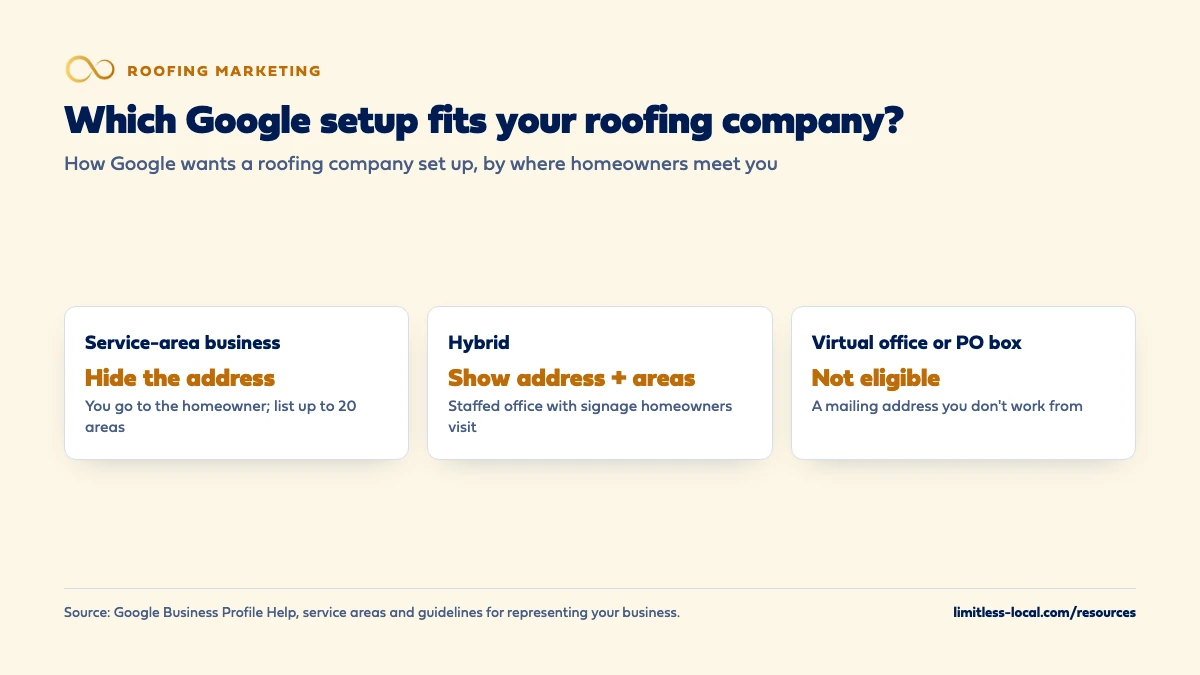
Google sorts local businesses by where the customer gets served. Its page on service-area and hybrid businesses sets out the types:
- Service-area business: visits or delivers to customers directly but doesn’t serve them at its business address. Google’s own examples include plumbers and cleaning services.
- Hybrid business: serves customers at its address and also goes out to them.
- Storefront: customers come to a staffed location with permanent signage during business hours.
A roofing company inspects, repairs and replaces roofs at the homeowner’s house. Unless homeowners walk into your office to pick shingles or sign contracts, you’re a service-area business in Google’s eyes, and your profile should be set up as one.
Google also says a service-area business can only have one profile for the whole area it serves, which matters if you’ve been tempted to add a profile for each town.
Is my roofing company a service-area business, a hybrid or a storefront?
Ask where homeowners meet you:
- You run it from home or a yard with no public office: service-area business. Hide the address.
- You have an office or warehouse, but homeowners never come there: still a service-area business. A building doesn’t make you a storefront; serving customers there does.
- You have a showroom or office with permanent signage, staffed during your listed hours, where homeowners come to look at samples or sign: hybrid. Show the address and add a service area.
Google is specific about the signage: if a location doesn’t have permanent on-site signage, it isn’t eligible as a storefront and should be listed as a service-area business. And a rented mailing address you don’t work out of, also known as a virtual office, isn’t eligible for a profile at all.
If you’re between categories, go with how homeowners actually deal with you today, not how you’d like it to look.
Should a roofer hide the business address on Google?
If homeowners don’t come to it, yes. Google’s guidelines for representing your business say that if you’re a service-area business, you should hide your business address from customers. Their example is a plumber who runs the business from a home address and clears it from the profile. The same logic applies to a roofer working out of the house or the shop.
Google’s page on managing your business address adds two details worth knowing:
- You should only choose not to show your address if you’re a service-area business.
- Once the address is hidden, your profile only shows your service area, and if you don’t enter one, Google picks a local area for you, which you can edit later.
Hiding the address changes what homeowners see. It doesn’t change where your business is based: you still verify the profile at a real address, and Google still knows it.
Does hiding my address change where my roofing company shows up?
Not in the way most owners hope. Google says local results are mainly based on relevance, distance and popularity, and that distance is how far each business is from the person searching. Listing a town as a service area tells homeowners you work there. It doesn’t move your business closer to them, and Google doesn’t say service areas are used to rank you in each town.
In practice, most service-area roofers show up strongest near where they’re based, with visibility thinning out the farther a searcher is. That’s why the service-area setting works best alongside:
- Website pages for the towns and services you most want, so Google has something relevant to match. Which services and cities a roofer should build website pages for covers which to build first.
- Reviews that mention the towns you work in, which happens naturally when you ask after every job.
- Ads for the farther towns, where you can set the area yourself.
If you’ve set everything up and still can’t find yourself, why a roofing company isn’t showing up on Google Maps walks through the usual causes.
Curious what your marketing is actually booking?
Get a free visibility audit — no obligation, no sales pitch.
How do I set my roofing company's service area on Google?
In your Business Profile, go to Edit profile, then Location, then Service area. The rules Google sets:
- Up to 20 service areas, by city, ZIP code or another named area.
- No radius. You can’t draw a circle around your shop anymore; older radius settings can’t be edited and have to be replaced with named areas.
- About two hours’ drive. The boundaries of your overall area shouldn’t be more than about 2 hours of driving time from where you’re based.
- Be specific and accurate. Google asks for as specific and accurate a list as possible.
If approved, service-area edits may take up to 48 hours to show. Pick cities over a handful of huge counties when you can; a list of real towns tells a homeowner far more than one county name does.
Which towns should a roofer put in the service area?
The towns where you want work and will reliably send someone for an inspection, not every place you’ve ever taken a job. A few ways to decide:
- Start from your best jobs. Pull last year’s signed replacements from your job software and see which towns they came from.
- Check the drive. If a crew can’t get there and back in a working day without losing money, leave it off.
- Favor towns with the homes you want. Neighborhoods with the roof age and home values that fit your replacement work beat a bigger town that sends you small repairs.
- Leave room to grow. You don’t have to use all 20. You can add towns as crews and demand grow.
A tight, honest list is easier for a homeowner to trust than a list of every city in the region, and it keeps calls coming from places you’ll actually go.
Can a roofing company have more than one service-area profile?
Only with real locations. Google’s guidelines say a service business with different locations, each with its own service area and its own staff, is allowed one profile per location. One crew working out of one yard gets one profile, however many towns it covers.
Extra profiles for towns where you don’t have a staffed location, or several profiles for the same business, break Google’s rules and can cause problems with how your information displays. If you’re opening a real second branch, how to set up Google Maps for a second roofing location covers the setup, including keeping the two service areas from overlapping.
How does a service-area roofer verify a Google profile?
Google decides which verification methods you’re offered, and video is one of them. Its page on verifying with a video recording lists what a service-area business must show in one continuous, unedited recording of at least 30 seconds, made from a phone through your Business Profile:
- Where you operate: street signs, landmarks or other identifiers at your business address. If you work from home, signs and landmarks in your immediate neighborhood count.
- That the business exists: the tools and equipment you use, business cards, or branded apparel.
- That you manage it: you performing a service, or unlocking a van with your business branding, or business documents like a permit, invoice or utility bill that match the name on your profile.
For a roofer, that usually means a walk from a street sign to a branded truck, the ladders and tools on it, and a document with the company name. Plan the shot list before you hit record; pre-recorded videos aren’t allowed.
What service-area mistakes cause problems for roofing profiles?
- Showing a home address homeowners can’t visit. It invites people to your house and breaks the guidelines for a service-area business.
- Using a virtual office or PO box to look local in a bigger city. Google says those aren’t eligible.
- One profile per town. A service-area business gets one profile for its whole area unless it has real, staffed locations.
- Stuffing the service area with every city in the region, including places the crews never go.
- Keywords in the address lines, like “best roofer” or a URL. Google says not to include anything that isn’t part of your physical location.
Most of these show up when an owner tries to rank in a town that’s too far away. The fix is ads and website pages for those towns, not a workaround on the profile.
Do Local Services Ads use the same service area?
No, they’re set separately. In Local Services Ads you edit service areas under Profile & Budget, by county, city or ZIP code, and you can exclude areas too. Unlike the free profile, you’re paying for leads there, so keep it to where you’ll actually drive; a lead from a town you won’t go to still costs money.
The move of Local Services Ads into Google Ads also touches service-area businesses. Google’s transition timeline has the first phase starting in August 2026 for select home service advertisers, including roofing, and expanding in late 2026 to broader groups, including service-area businesses without physical storefronts. After the move, campaigns pull information from your Google Business Profile, so a clean profile helps both.
Before you turn on any ads, it’s worth checking the profile itself; whether your roofing Google Business Profile is set up to bring in calls is a quick check, and which categories a roofer should choose covers the other setting that decides which searches you show up for.
Want to see where your company stands?
A free visibility audit shows where you show up on Google, Maps and AI answers, and what it's costing you in calls.
What's different about service areas for roofing companies
Storms pull you farther than your normal area. After a big hail event, crews may work towns hours away for a few weeks. Don’t rewrite your service area for every storm. Keep the profile to your regular area and use ads or storm pages for temporary work, then nothing needs undoing when the crews come home.
Replacements justify a longer drive than repairs. You might drive an hour for a full re-roof but not for a few missing shingles. Your service area should reflect where you’ll go for the work you want most, and your website and ads can say which jobs you’ll travel for.
Many roofers run from home or a yard. That’s exactly the case Google has in mind for a hidden address, so there’s nothing to fake and nothing to apologize for.
A showroom changes the answer. If you have a staffed office with signage where homeowners pick materials, you’re a hybrid, and showing the address can help those customers find you.
A worked example: building a roofer's service-area list
This example is made up to show the process, not a recommendation for your market. A roofer runs the business from a home office in a suburb, with crews leaving from a rented yard nearby. Homeowners never come to either.
- Business type: service-area business. Address hidden.
- Last year’s signed replacements came from 14 towns. Twelve are within about 45 minutes; two were one-off storm jobs three hours away.
- Service area: the 12 nearby towns, listed by city name. The two storm towns stay off, since they’re outside the roughly two-hour limit anyway and the crews won’t go back without a storm.
- Room left: 8 more slots for towns the owner wants to grow into as a second crew comes on.
The profile now says exactly where this roofer works. To win more calls in the farther towns on the list, the owner adds a website page for each of the biggest ones and runs ads there, instead of stretching the profile.
Frequently asked questions
Will hiding my address hurt my roofing company's ranking?
Google doesn’t say hiding the address changes ranking. It says local results are mainly based on relevance, distance and popularity, and it tells service-area businesses to hide addresses customers don’t visit.
Can I list a whole county as one service area?
You can enter cities, ZIP codes or other areas. Cities you actually work usually tell homeowners more than one big county name.
How long do service-area changes take to show?
Google says approved service-area edits may take up to 48 hours to appear on your Business Profile.
Can I draw a radius around my shop instead of listing towns?
No. Google no longer allows a radius service area; you set it by city, ZIP code or another named area.
Do I need a separate profile for each town I serve?
No. A service-area business gets one profile for its whole area. Separate profiles are only for real locations with their own staff and service area.
What if I use a co-working space as my office?
Google only allows it if the office has clear signage, receives customers during business hours and is staffed by your team. Otherwise it isn’t eligible.
Key takeaways
- Most roofers are service-area businesses in Google’s eyes, because they serve homeowners at the home.
- Hide the address if homeowners don’t come to it, and list up to 20 cities or ZIP codes instead.
- Keep the whole area within about two hours’ drive, and list only towns you’ll really work.
- Listing a town doesn’t make you rank there; distance still counts, so back far towns with pages and ads.
- One profile per business, unless you have real, staffed locations with separate service areas.
- Local Services Ads have their own service-area settings, so check both.
Not sure what's working right now?
Start with a free visibility audit: rankings, Google profile, reviews and tracking, checked against your service area.
More in this section
- Are Google Local Services Ads worth it for a roofing company?
- Do Local Services Ads help a roofer rank on Google Maps?
- What Google Business Profile categories should a roofer choose?
- What makes a roofing company rank higher in Google Maps?
- How quickly can a Google Business Profile bring in roofing calls?
Sources
- Manage your service areas for service-area & hybrid businesses — Google Business Profile Help
- Manage your business address — Google Business Profile Help
- Guidelines for representing your business on Google — Google Business Profile Help
- Tips to improve your local ranking on Google — Google Business Profile Help
- Verify your business with a video recording — Google Business Profile Help
- Edit your industries, service areas, and job types — Google Local Services Help
- Local Services Ads transition to Performance Max campaigns with pay-per-lead goals — Google Ads Help