
How much should a plumbing company spend on Google Ads?

- What's a sensible monthly Google Ads budget for a plumbing company?
- How do I work out a Google Ads budget for my plumbing company?
- Where do I find what plumbing clicks cost in my area?
- Should emergency calls and planned plumbing jobs get separate budgets?
- How do I turn a monthly number into the daily budget Google asks for?
- Does turning my ads off at night or on Sundays save money?
- What happens to my budget when a freeze or a busy week hits?
- How long should I run a budget before I judge it?
- How do I know if my Google Ads budget is too small?
- Do Local Services Ads now come out of my Google Ads budget?
- Does an agency's fee come out of my Google Ads budget?
- What's the most a plumbing company should spend on Google Ads?
- What's different about Google Ads budgets for plumbing companies
- A worked example: two plumbing campaigns, two budgets
- Frequently asked questions
- Key takeaways
- More in this section
- Sources
The short version
- Work it backward: booked jobs wanted, call booking rate, click-to-call rate, local click price.
- Budget emergency service calls and planned big jobs as separate campaigns.
- Monthly budget divided by 30.4 is the daily budget; a busy day can spend up to twice that.
- Raise the budget only while booked jobs stay under the cost per job you can afford.
For plumbing owners setting or second-guessing a Google Ads budget. The total marketing budget across every channel is covered in how much a plumbing company should spend on marketing; this page is Google Ads only.
Get a free visibility audit · Book a growth call
What's a sensible monthly Google Ads budget for a plumbing company?
A plumbing company should spend enough on Google Ads to buy the booked jobs it wants at a cost per job its margins can carry, so work the budget backward for each kind of job: jobs wanted, divided by the share of calls that book, divided by the share of clicks that call, times what a click costs in your area. Emergency service calls and big planned jobs like water heater replacements have different click prices and booking rates, so budget them as separate campaigns. Divide each monthly figure by 30.4 to get the average daily budget Google asks for.
Google Ads management is part of every one of our local ads packages, and the ad spend itself is always paid to Google separately, so you can see exactly what goes to clicks. How that fits a plumbing shop is on our plumbing marketing page, and the rest of the plumbing marketing questions library goes question by question.
How do I work out a Google Ads budget for my plumbing company?
Start from the jobs, not from a round number. For each kind of work you want more of:
- Decide how many more booked jobs a month you want, and can staff.
- Divide by the share of calls from new customers your office books. That’s the calls you need.
- Divide by the share of ad clicks that turn into calls. That’s the clicks you need.
- Multiply by what a click costs in your area. That’s the monthly ad spend.
Then check the result against what you can afford to pay for one booked job: monthly spend divided by booked jobs. If that number is higher than your margin on the job can carry, the budget isn’t the problem to solve first; the booking rate, the click-to-call rate or the keywords are. How much you can afford to pay for a plumbing lead walks through finding that ceiling. Use past numbers from your call tracking and job software if you have them, and cautious guesses if you don’t.
Where do I find what plumbing clicks cost in my area?
Google’s Keyword Planner. For each keyword it shows a top of page bid low and high range, which Google describes as roughly the 20th and 80th percentile of what advertisers have historically paid for a top-of-page spot, based on your location settings and recent bids.
Three things to do with it for plumbing:
- Set the location to where your trucks actually go, not your whole state.
- Look up job types separately: emergency and burst-pipe searches, drain cleaning, water heater replacement, sewer line repair. Their prices can be far apart.
- Use the high end of the range for the budget, and treat the low end as a good month.
Google also notes that forecasts are less accurate for a small geographic area because there’s less data to base them on. In a small town, treat the numbers as a rough starting point and let your own first month of clicks replace them.
Should emergency calls and planned plumbing jobs get separate budgets?
In our judgement, yes. Google Ads sets budgets per campaign, so if emergency searches and water heater replacement searches share one campaign, whichever gets more clicks uses up the day’s money. For a plumber that usually means the cheaper, more frequent service-call clicks crowd out the bigger planned jobs, or a busy emergency day leaves nothing for anything else.
Separate campaigns let you set a budget for each and judge each by its own cost per booked job. A drain cleaning call and a repipe aren’t worth the same to you, so they shouldn’t be held to the same number.
How do I turn a monthly number into the daily budget Google asks for?
Divide by 30.4, the average number of days in a month. Google’s own example: $304 a month divided by 30.4 is a $10 average daily budget.
Spend won’t be the same every day. Google spends more on days it expects more clicks and conversions, so on a given day a campaign can spend up to twice the average daily budget, and on others less. Over the month, you won’t be charged more than 30.4 times the daily budget.
Does turning my ads off at night or on Sundays save money?
It depends on how you turn them off, and a June 2026 change matters here. Google says that from June 1, 2026, a campaign whose ad schedule turns it off on certain days of the week will still pace toward spending 30.4 times its daily budget across the days it does run. So if your ads are off on Sundays and you leave the daily budget where it was, the other days will spend more to make up for it. Google’s own examples work the daily budget out from the monthly amount you want to spend, not from the number of days the ads run. Schedules that only turn ads off for certain hours of the day aren’t affected by this change.
Whether to run ads overnight at all is a plumbing question more than a budget one. In our view, a night click is only worth paying for if someone answers the phone. If nobody does, a schedule that turns ads off overnight saves money that would otherwise go to calls you can’t take; if you do answer, nights can be your best emergency work. Stopping lost after-hours plumbing calls covers the answering side.
Curious what your marketing is actually booking?
Get a free visibility audit — no obligation, no sales pitch.
What happens to my budget when a freeze or a busy week hits?
You can raise the budget the same day. Google says budget changes show in your account immediately and ads start serving based on the new budget. On the day you change it, the daily spending limit is based on the highest budget you set that day, and for the rest of the month spending is capped at the new daily budget times the days left.
Two cautions for plumbers. Raise the budget only for the work your crews can actually take; more emergency calls in a freeze don’t help if they go to voicemail or wait three days. And bring the budget back down when the rush ends, because Google won’t do it for you. Preparing plumbing marketing for a winter freeze covers the rest of the plan.
How long should I run a budget before I judge it?
Longer than a few days. If you use automated bidding, Google says a campaign can show a “Learning” status for up to 7 days after a major change, and recommends judging performance over two conversion cycles or a two-week window, whichever is longer, because conversions often take several days to come in. Google also notes that very low daily budgets can slow that ramp-up.
In our judgement, plumbing owners should add one more step: give it a full month and count booked jobs from the ads in your job software, not just calls in Google Ads. A campaign that rings the phone with price shoppers and wrong-service calls can look busy and still lose money.
How do I know if my Google Ads budget is too small?
Google tells you one way. A campaign can be marked “Limited by budget” when it’s underperforming because of its budget, and Google Ads may offer a recommended daily budget based on recent performance, your keywords and your targeting. Google won’t show a recommendation if you rarely spend your daily budget or the campaign has little data.
Before you raise it, check whether the clicks you already buy are turning into booked jobs. If your cost per booked job is comfortably under your ceiling and the campaign is limited by budget, more budget is likely to buy more of the same, which is our judgement, not a promise. If clicks aren’t turning into calls, more budget buys more of the problem. Why plumbing ads get clicks but no calls covers what to fix first.
Do Local Services Ads now come out of my Google Ads budget?
They’re moving into the same account. Google says Local Services Ads are transitioning into Google Ads as Performance Max campaigns with pay-per-lead goals, with plumbing named in the first migration phase, which starts with select advertisers in August 2026. You still pay per valid lead, not per click, but the budget is managed in Google Ads: your old weekly budget is divided by 7 to set a daily average, and monthly spend is capped at 30.4 times that daily figure.
Because it’s a separate campaign, it’s a separate budget line from your search ads. Work it out the same way, booked jobs wanted backward to leads, with the lead price in place of the click price. Whether Local Services Ads deserve a share of the budget at all is covered in whether Local Services Ads are worth it for plumbers.
Does an agency's fee come out of my Google Ads budget?
It shouldn’t, and you should be able to see both numbers separately. With us, ad spend isn’t included in any package; it’s paid directly to Google, and we recommend a budget after a quick audit. Our Essentials package ($3,500 a month) includes Google Ads management for up to $2,500 a month in ad spend; Growth ($4,500 a month) covers up to $5,000 a month in ad spend and adds Local Services Ads management; Scale is custom. Whoever runs your ads, you should be able to see the Google Ads billing yourself; without it you can’t work out your real cost per booked job.
What's the most a plumbing company should spend on Google Ads?
Two limits, and the lower one wins. The first is money: the most you can afford to pay for one booked job, times the jobs you want. The second is capacity: the number of extra jobs your crews can actually run without pushing out existing customers or leaving calls waiting.
In our judgement, the second limit is the one plumbing owners hit first in a busy season. Past it, more spend mostly buys calls you can’t serve quickly, and slow response is how a paid lead turns into a lost one. The total across every channel, not just Google Ads, belongs in your overall budget, which what a plumbing company should spend on marketing works out.
Talk it through with someone who runs this every day
A 15-minute growth call: your market, your numbers, and what a realistic budget looks like. No pressure.
What's different about Google Ads budgets for plumbing companies
Demand comes in spikes you don’t control. A hard freeze, a heavy storm or a holiday weekend can bring a week’s worth of emergency searches in a day. Google’s flexible daily spending helps, but the budget plan should say in advance how far you’ll raise it and for how long.
One phone, two very different jobs. A clogged drain and a whole-house repipe can start from the same kind of search. Plumbing budgets work better split by job value than set as one number for “plumbing.”
Night calls cost the same click as day calls. Whether they’re worth it depends on whether you answer and dispatch after hours, which makes the ad schedule part of the budget decision.
DIY searches eat budget. Many plumbing searches are people trying to fix it themselves. Keeping those out with negative keywords is how a budget goes to callers, not readers, and it changes how much budget you need.
A worked example: two plumbing campaigns, two budgets
These numbers are made up to show the math, not a benchmark for your market.
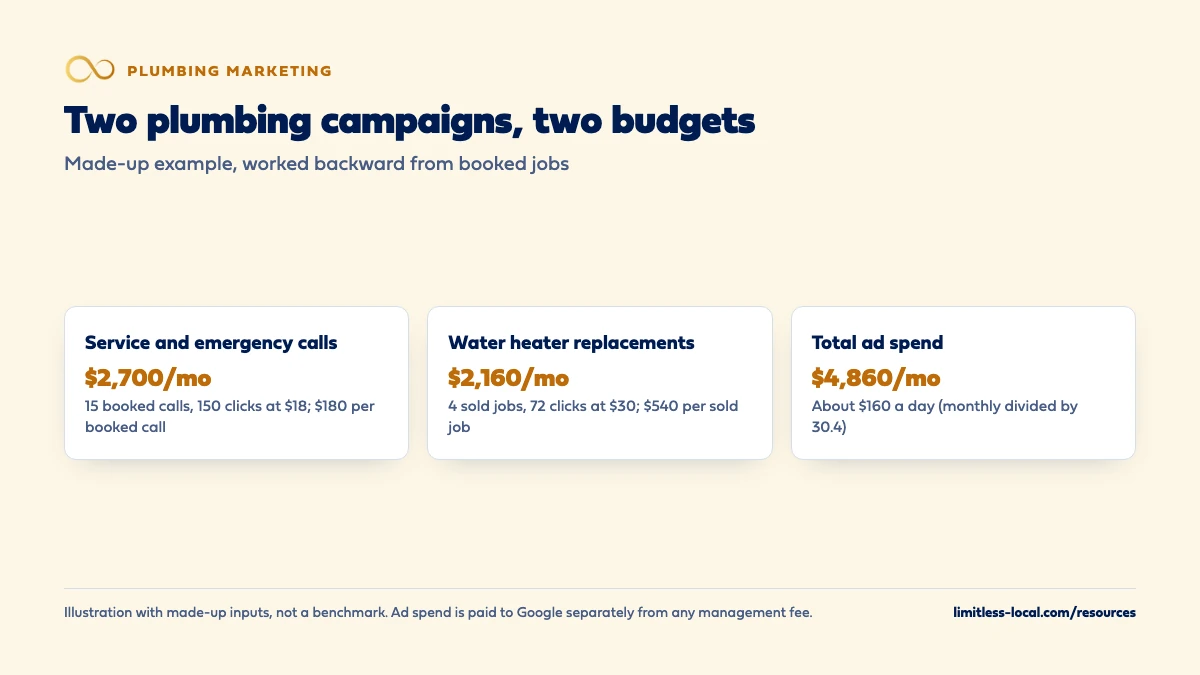
Service and emergency calls. You want 15 more booked service calls a month. Your office books about 1 in 2 calls from new customers, so you need 30 calls. About 1 in 5 people who click call you, so you need 150 clicks. Say Keyword Planner’s high range puts these clicks around $18 in your area. The month costs 150 times $18, or $2,700, and each booked call costs $180 in ad spend.
Water heater replacements. You want 4 more sold replacements a month. About 1 in 3 calls for a replacement turns into a sale, so you need 12 calls. About 1 in 6 clicks calls, so you need 72 clicks. At a made-up $30 a click, that’s $2,160, or $540 in ad spend per sold replacement.
Together that’s $4,860 a month. Divided by 30.4, the daily budgets are about $89 for service calls and about $71 for water heaters, roughly $160 a day in total. Whether $180 per service call and $540 per replacement are good numbers depends on what those jobs leave you after parts and labor.
Now stress-test it. If service clicks cost $24 instead of $18, the same 150 clicks cost $3,600 and each booked call $240. Run the low and high ends of the range before you commit. For comparison, $4,860 a month is more ad spend than the $2,500 our Essentials package manages and within the $5,000 Growth covers; either way the ad spend is paid to Google separately. A free visibility audit is the simplest way to run your own inputs through the same math.
Frequently asked questions
Is $1,000 a month enough for plumbing Google Ads?
It depends on your click prices and booking rates. Divide it by the high end of Keyword Planner’s range for your main keywords to see how many clicks it buys, then work forward to booked jobs. If that’s only a handful of jobs a month, focus it on one job type and one area.
Will Google ever charge me more than my monthly budget?
For most campaigns, Google says you won’t be charged more than 30.4 times your average daily budget in a month, even though a single day can spend up to twice the daily budget.
Should I let Google's recommended budget set my spend?
Treat it as information, not an instruction. Google bases it on recent performance, keywords and targeting; only you know whether the extra clicks would book jobs your crews can run at a cost you can carry.
Can I set a fixed total for a short push, like a freeze week?
Google Ads offers campaign total budgets for new campaigns: you set a total and start and end dates, and Google adjusts daily spend to use it. Existing campaigns can’t switch to a total budget.
Does raising or lowering my budget reset Google's learning?
No. Google says changes to budgets take effect in the next auction and never trigger a “Learning” status. Applying a new portfolio bid strategy can.
Should my Google Ads budget change by season?
Usually. Many plumbing shops see more emergency demand in cold snaps and storms; set a planned range in advance, raise it only for work you can take, and bring it back down afterward.
Key takeaways
- Work the budget backward from booked jobs, booking rate, click-to-call rate and local click price.
- Use Keyword Planner’s high range for your own service area, job type by job type.
- Split emergency service calls and big planned jobs into separate campaigns and budgets.
- Monthly budget divided by 30.4 is the daily budget; check how day-off ad schedules pace since June 2026.
- Local Services Ads are moving into Google Ads as their own campaign, still paid per lead, with its own budget.
- The real ceiling is the lower of what a booked job is worth and what your crews can handle.
Ready to compare options?
Book a short growth call and we'll walk through the math for your service area, including when we're not the right fit.
More in this section
- How much should a plumbing company spend on marketing each month?
- What keywords should my plumbing Google Ads target?
- Are Google Local Services Ads worth it for plumbers?
- How should I structure my plumbing Google Ads campaigns?
- Should my plumbing company start with LSAs, Google Ads or SEO?
Sources
- About average daily budgets — Google Ads Help
- Changes to Google Ads budget pacing for Ad Scheduling — Google Ads Help
- How budget changes take effect — Google Ads Help
- Fix “Limited by budget” status — Google Ads Help
- About Keyword Planner forecasts — Google Ads Help
- About Smart Bidding learning — Google Ads Help
- Local Services Ads transition to Performance Max campaigns with pay-per-lead goals — Google Ads Help
- About campaign total budgets — Google Ads Help