
My HVAC phone suddenly stopped ringing. What should I check first?
- What should I check first when HVAC calls drop off overnight?
- Is it a sudden drop or a slow slide?
- Step 1: Do calls to my own numbers actually ring through?
- Step 2: Are calls arriving but never reaching a person?
- Step 3: Is my Google Business Profile still live with the right number?
- Step 4: Are my Google Ads still running?
- Step 5: Are my Local Services Ads running?
- Step 6: Is my website up, and do the forms still reach someone?
- Step 7: Did anyone change anything last week?
- What if everything checks out and calls are still down?
- How do I catch a broken phone line faster next time?
- What's different for HVAC companies
- A worked example: reading calls by source
- Frequently asked questions
- Key takeaways
- More in this section
- Sources
The short version
- Call every number you advertise from an unknown phone.
- Check your Google profile: live, open, right number.
- Check Google Ads and LSAs for billing, policy or budget stops.
- Check the website and forms, then look at slower causes.
For HVAC owners whose calls fell off a cliff this week, not slowly over a season, and who need to find what broke before spending another dollar.
Get a free visibility audit · Book a growth call
What should I check first when HVAC calls drop off overnight?
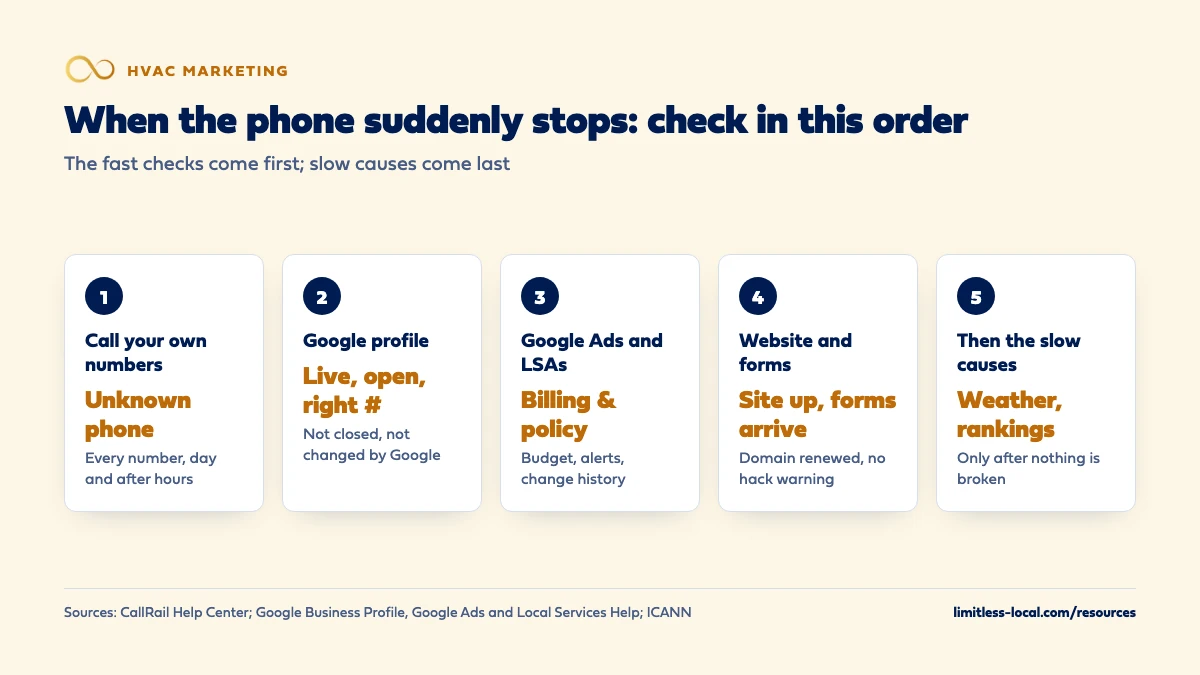
When calls drop suddenly, assume something broke before you assume demand changed. First call every number you advertise from a phone your office doesn’t know, and check your call log for calls that arrive but never reach a person. Then check, in order, that your Google Business Profile is live with the right phone number and isn’t marked closed, that your Google Ads and Local Services Ads are running with no billing or policy problems, and that your website and contact forms work. Only when all of that checks out should you look at slower causes like weather, rankings or competitors.
Most of these checks are faster when every call is already tracked by source, because a channel that drops to zero points straight at what broke. Every one of our packages includes call tracking with recording and a real-time dashboard, and it’s part of how we run HVAC marketing. The HVAC marketing guide covers how the channels fit together, and the rest of the HVAC marketing questions library goes question by question.
Is it a sudden drop or a slow slide?
The answer changes what you check. A slow slide over a season usually means something is weakening: rankings, reviews, ad costs, or how the office handles calls. That’s a diagnosis job, and telling whether it’s your ads, website or follow-up walks through it stage by stage.
A sudden drop, normal on Monday and quiet by Wednesday, is more often something that broke or got switched off. Before you assume that, rule out the weather. In our experience the first mild week after a hot or cold stretch can cut repair calls sharply for every shop in town, so compare this week with the same week last year, not with last week. If the weather is ordinary and the phone still went quiet, work through the steps below in order. The early ones take minutes and catch the most common breaks.
Step 1: Do calls to my own numbers actually ring through?
Grab a phone your office won’t recognize and call every number a homeowner might use:
- Your main business line.
- The number on your Google Business Profile, tapped from the profile itself on Maps.
- The number in your Google Ads and Local Services Ads.
- Every number on your website, on a phone and on a computer, since tracking numbers can change by visitor.
- Truck wraps, yard signs and mailers, if they use their own numbers.
Listen for what a homeowner hears: rings, a voicemail box that’s full, “this number is no longer in service,” or a phone tree that dead-ends. Then check the destination, the phone those numbers forward to. If you use call tracking, CallRail recommends dialing the destination number directly first, because if that number is down, calls to every tracking number pointed at it fail too (Troubleshoot call routing).
Step 2: Are calls arriving but never reaching a person?
Open your call log before you open anything else. If calls are still coming in but most show as missed, abandoned or very short, the marketing is working and the phones aren’t.
CallRail’s own troubleshooting guide lists causes that catch owners out (Troubleshoot call routing):
- Calls marked abandoned. CallRail counts a call as abandoned when the caller hangs up less than fifteen seconds after placing it. Some of those are just callers who changed their mind, but if most of your calls show as abandoned, CallRail asks you to contact its support team.
- T-Mobile Scam Block. It blocks “unverified” numbers and can block calls routed through call-tracking services or 800 numbers, which shows up as a high number of abandoned calls.
- iPhone’s Silence Unknown Callers. It silences numbers you’ve never been in contact with, which can include calls forwarded from your tracking numbers. Turn it off, or save the number as a contact.
- A dead destination number. If the forwarding target is turned off or disconnected, every tracking number pointed at it fails.
If calls ring but go unanswered, that’s an office problem; how the office should handle incoming calls covers it.
Step 3: Is my Google Business Profile still live with the right number?
For many HVAC shops the Google profile is the biggest single source of calls, so look at it the way a homeowner does: search your company name and your main service on Maps, from a phone that isn’t signed in to your account.
- Closed by mistake. A profile marked “Temporarily closed” or “Permanently closed” displays that way on Maps and Search, and Google says temporarily closed businesses can rank after open ones for broad searches (Mark your business as closed). Check your hours and special hours, too.
- Changed by Google. Google can update your profile based on reports from users and other sources. Info Google changed shows in blue in your profile editor. For suggested edits it notifies you about, you have 4 days to accept or reject them, after which Google may publish the change if other public information supports it (Understand Google updates on your Business Profile). A wrong phone number published this way can quietly send your calls somewhere else.
- Suspended or missing. If the profile doesn’t show at all, or shows as suspended in your account, that’s a separate fix with its own process. Getting back into the Google Map Pack walks through suspensions, appeals and duplicates.
If your phone number is wrong in other places online too, fixing your name, address and phone online covers the cleanup.
Curious what your marketing is actually booking?
Get a free visibility audit — no obligation, no sales pitch.
Step 4: Are my Google Ads still running?
Ads that stop don’t send a loud warning to your phone; the calls just stop. Sign in to Google Ads and check the notifications bell and the status of each campaign, then look at these in order:
- Billing. Google says that if a payment is declined, your ads might stop running until the payment goes through, though some accounts keep running for a short time after a decline. The decline comes from your bank or card company, not Google, and your Billing Summary shows the date, amount and reason when one is given. Google suggests adding a backup payment method so a declined card doesn’t take your ads down (Resolve a declined payment). A card that expired or got replaced after fraud is a common culprit.
- Status and budget. A campaign or ad that’s paused, still in review or disapproved won’t bring in calls. Google lists low daily budgets, ads in review and policy violations as common reasons Search and Performance Max campaigns aren’t getting impressions or clicks (Local Services Help).
- Spend pattern. In our experience, a daily budget that’s too small for your market often runs out early in the day, and the calls stop with it until the next morning.
To see whether your ad is showing for a search, use the Ad preview and diagnosis tool in Google Ads instead of searching Google yourself. Google says the tool gives you similar results without racking up ad impressions that skew your numbers (About the Ad preview and diagnosis tool).
Step 5: Are my Local Services Ads running?
Local Services Ads have their own list of reasons for going quiet. Google’s troubleshooting page names the common ones (Why aren’t my Local Services Ads running?):
- The account or ad isn’t active. Check that the ad is toggled on, that your ad schedule covers the days and times you want, and that your business hours show you as open and taking customers. Google says that outside your listed hours, or if you’re listed as not taking customers, your ad won’t show in searches with a badge. Disapproved ads won’t be displayed at all.
- Account or billing issues. Your ads won’t run until these are fixed. Check the notifications bell in Google Ads for alerts.
- No budget left. Google says to confirm your monthly budget hasn’t been reached, and if it has, to increase the budget or use the Maximize Leads bid strategy.
Google also points to the change history in Google Ads, which logs every change to your campaigns and who made it. If the budget dropped or the campaign paused and nobody at your shop did it, that log tells you who did.
Step 6: Is my website up, and do the forms still reach someone?
Load your site on your phone, on cellular data, not your office Wi-Fi. Then submit your own contact form and time how long it takes for the notification to reach whoever is supposed to answer it.
Two less obvious causes of a site going dark:
- An expired domain. ICANN says that to keep using your domain name and the services tied to it, like your website and email, you need to renew it before it expires, and that registrars must send renewal reminders about one month and one week before expiration (Domain Name Renewals and Expiration). If those reminders go to a former employee’s or an old agency’s email address, nobody sees them.
- A hacked site. If Google decides your site was hacked or could harm visitors, Search Console’s Security issues report shows it, and affected pages can carry a warning label in search results or a warning page in the browser (Security issues report). Few homeowners click past a warning.
Step 7: Did anyone change anything last week?
Sudden drops often line up with a change nobody connected to the phones: a new website launch, a new phone system, an agency switch, a staff member leaving who had the logins, a new office manager who rerouted calls, or a card replaced on the account that pays for ads. Ask the people who touch these systems what changed in the last two weeks, and check the change history in Google Ads.
This is also where ownership matters. If you can’t sign in to your own Google profile, ad account, domain registrar or call tracking, you can’t check any of the above without waiting on someone else. Make sure the business owns each one, with your own login as an owner or admin.
What if everything checks out and calls are still down?
Then it probably isn’t one broken thing, and it’s time for the slower questions: did your map ranking slip, did a competitor start outspending you, did your reviews stall, did ad costs rise, or did the season turn. Give the numbers a week or two rather than reacting day by day.
Start with the stage-by-stage check in whether it’s your ads, website or follow-up, which tells you where in the path the drop is happening. If the drop is on Maps specifically, the Map Pack guide linked in step 3 covers what decides local rankings. What not to do: raise the ad budget into a problem you haven’t found yet, or fire whoever runs your marketing before you know whether anything they control actually changed.
How do I catch a broken phone line faster next time?
- Watch calls by source, weekly. A source that drops to zero is a break; a slow decline across sources is a trend. You can only tell them apart if calls are tracked by where they came from.
- Send account alerts to an inbox someone reads.
- Add a backup payment method to Google Ads, and keep the card on file current.
- Turn on auto-renew for your domain, and make sure renewal reminders go to an address you’ll still have in five years.
- Test-call your numbers monthly, including after hours, from a phone your office doesn’t know.
Tracking whether your marketing pays off covers setting up the source tracking that makes this possible.
Not sure which of these is costing you jobs?
A free visibility audit checks the Google profile, reviews, site and tracking, and shows what to fix first.
What's different for HVAC companies
Weather can fake a break, and a break can hide in weather. A mild week after a heat wave cuts calls across the whole market, so check the forecast and last year’s call log before tearing anything apart. The reverse is worse: a broken line during the first heat wave costs more than any other week of the year, which is why test calls before peak season are worth the ten minutes.
After-hours calls are where breaks hide. HVAC gets no-heat and no-cool calls at night, and an answering service or forwarding rule that fails after closing time won’t show up in daytime test calls. Call after hours, too.
Busy seasons bring account changes. New hires, new phones and new trucks get added in a rush before peak. Each one is a chance for a forwarding rule or a login to get changed without anyone writing it down.
A worked example: reading calls by source
These numbers are made up to show the method, not a benchmark. Say a normal week brings you about 44 calls: 20 from your Google profile, 16 from Google Ads and 8 from your website and everything else. This week you got 25.
Looked at as one number, that’s a scary drop with no obvious cause. Split by source, it isn’t a mystery: the Google profile brought 18 calls, the website and other sources brought 7, and Google Ads brought zero. Two of the three sources are close to normal. One went to nothing.
That points straight at the ad account, and the first place to look is billing and campaign status, not your rankings, your website or your office. If instead every source had dropped by about the same share, a broken account would be unlikely, and you’d be looking at the phones themselves (step 2) or at weather and the market. Either way, the split tells you which step to start on.
Frequently asked questions
How do I test my number without my office recognizing me?
Use a cell phone that isn’t saved in anyone’s contacts, such as a family member’s, and call from it during business hours and after closing. Note how many rings it takes and exactly what you hear.
Can Google change my business phone number without asking?
Google can update profile info based on reports from users and other sources, and changes it made show in blue in your profile editor. For suggested edits it notifies you about, you have 4 days to respond; after that, Google may publish them if other public information, such as your website, supports the change.
Will my Google Ads stop right away if my card is declined?
Not always. Google says ads might stop until the payment goes through, but some accounts keep running for a short period after a decline. Either way, fix the payment method and add a backup.
Should I search Google for my own ad to see if it's showing?
Use the Ad preview and diagnosis tool in Google Ads instead. Google says it gives similar results without adding impressions to your account, and it can tell you why an ad isn’t showing.
Could a cell phone setting really block my calls?
Yes. CallRail names T-Mobile Scam Block and the iPhone’s Silence Unknown Callers as settings that can block calls forwarded through tracking numbers, which shows up as a lot of abandoned calls.
How long should I wait before deciding it's not something broken?
Work through the checks the same day; most take minutes. If everything works, give the numbers a week or two and compare with the same weeks last year before changing your marketing.
Key takeaways
- A sudden drop usually means something broke; a slow slide means something weakened.
- Start with test calls and your call log, because they rule out the phones in minutes.
- Check your Google profile for a closed status or a Google-made change to your number.
- Check Google Ads and LSAs for billing, policy, schedule and budget stops, then use change history.
- Track calls by source so the channel that went to zero points straight at the problem.
Want a second set of eyes on your setup?
We'll look at how you show up locally and where calls are leaking, then send you a plain-English breakdown.
More in this section
- How do I tell if my HVAC ads, website or follow-up is the problem?
- How do I keep HVAC calls coming in during slow months?
- How do I know if AI search is sending my HVAC company calls?
- What happens to my HVAC calls if I stop marketing?
- How should my HVAC office handle incoming calls from new customers?
Sources
- Troubleshoot call routing — CallRail Help Center
- Understand Google updates on your Business Profile — Google Business Profile Help
- Mark your business as closed — Google Business Profile Help
- Resolve a declined payment in Google Ads — Google Ads Help
- About the Ad preview and diagnosis tool — Google Ads Help
- Why aren't my Local Services Ads running? — Local Services Help
- Security issues report — Search Console Help
- FAQs for Registrants: Domain Name Renewals and Expiration — ICANN