
Is a pool builder’s website turning visitors into leads?

- How do I measure how well my pool website turns visits into consultation requests?
- How can I tell if my website is turning visitors into leads?
- What counts as a lead from a pool builder website?
- How do I count consultation form submissions?
- How do I count calls that come from the website?
- How do I work out my website's lead rate?
- Which pages should be producing pool leads?
- Are homeowners starting my consultation form and giving up?
- Does my pool website work for homeowners on their phones?
- Why might my website look worse than it really is?
- What should I fix first if the website isn't producing leads?
- What's different about measuring a pool builder's website
- A worked example: finding the leak
- Frequently asked questions
- Key takeaways
- More in this section
- Sources
The short version
- Count consultation forms, calls and chats from the site as key events.
- Divide by visits from homeowners who could hire you, not every visit.
- Check which pages produce leads and how many people abandon the form.
- Fix the specific leak before paying for a redesign or more traffic.
For pool builders who suspect the website isn’t pulling its weight and want a way to measure it before spending on a redesign or more traffic.
Get a free visibility audit · Book a growth call
How do I measure how well my pool website turns visits into consultation requests?
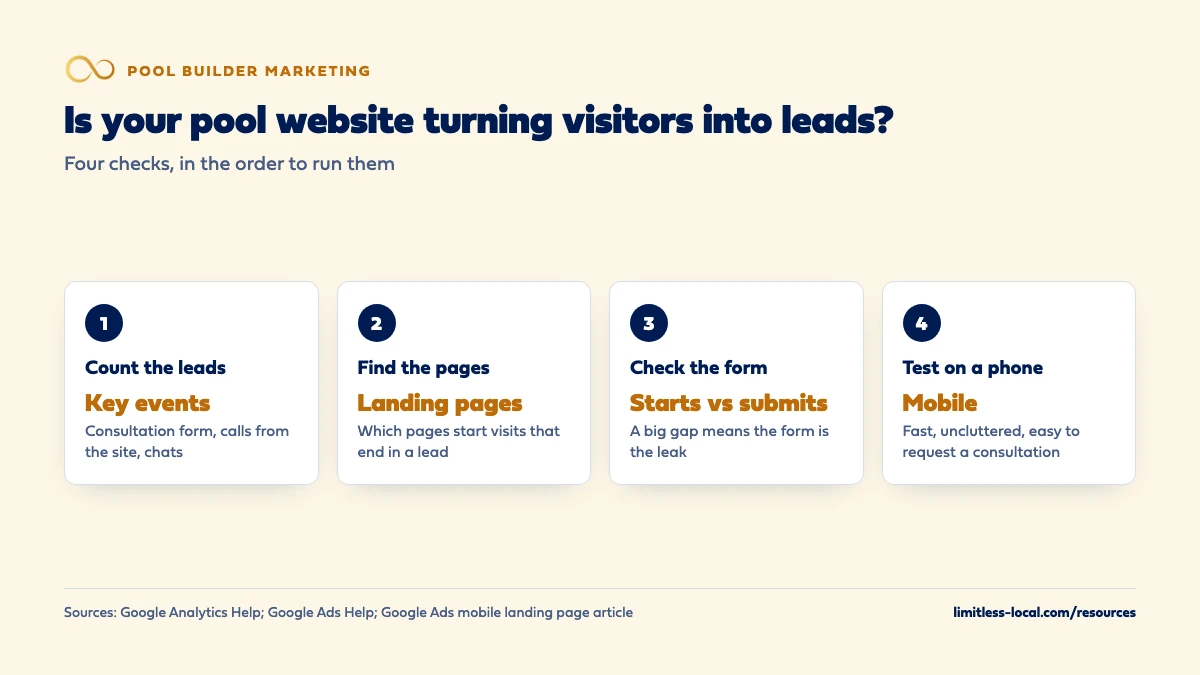
You can only tell if you count the leads the website itself produces: consultation form submissions, calls from the site and chats, each recorded as a key event in Google Analytics or through call tracking, then divided by the visits that came from homeowners who could actually hire you. Once that’s in place, look at which pages produce leads, how many people start the consultation form without finishing it, and whether the site works on a phone. A low rate usually points to a specific leak on the page, such as a long form, a slow mobile page or no clear way to ask for a consultation, rather than a reason to rebuild everything.
Measuring this is part of every package we sell, which includes call, web and form tracking, and our website design work is built around the consultation request: a themed website is $3,750 ($3,000 with any Limitless Engine package), and custom websites start at $5,000. How the website fits with Maps and ads for a builder is on our pool builder marketing page, and the pool builder marketing questions library covers the rest.
How can I tell if my website is turning visitors into leads?
By measuring it, because the feeling that “the website doesn’t do anything” is usually based on calls nobody traced. You need three things:
- A definition of a lead from the site: a consultation request, a call from someone who was on the site, or a chat asking about a pool.
- A way to count each one in Google Analytics or a call tracking tool.
- The right denominator: visits from people who could plausibly hire you, not every visit from anywhere.
With those, the question becomes a number you can watch month to month and page by page. Without them, the website gets blamed or credited by guesswork. If you’re still separating visits from real quote calls, the difference between website traffic and pool quote calls covers the definitions.
What counts as a lead from a pool builder website?
In our judgement, count actions that mean a homeowner wants to talk about a pool: a submitted consultation or estimate form, a call to the number shown on the site, a chat or text asking about a build, and a booking on your calendar if you offer one. Leave out newsletter sign-ups, brochure downloads, job applications and service-customer messages. They can be worth tracking, but counting them as leads makes the website look better than it is.
Google Analytics lets you mark the actions that matter most as key events: an event that measures an action particularly important to your business. Any event Analytics collects can become one. Source: About key events.
How do I count consultation form submissions?
Google Analytics can record form activity on its own through enhanced measurement, which includes a form_start event the first time someone interacts with a form in a session and a form_submit event when they submit one. Source: Enhanced measurement events. Because that counts every form, Google’s own lead-form walkthrough shows how to create a separate event for submissions of one specific form, then mark that new event as a key event. Once it’s a key event, you can see the paths people take before filling out the form and get metrics such as the key event rate. Source: How to measure key events with Google Analytics.
For a pool builder, that specific form is the consultation request. In our judgement, it’s also worth checking that a test submission actually reaches your inbox or CRM: a form that reports a submission in Analytics but never reaches the office is the most expensive kind of leak.
How do I count calls that come from the website?
A plain phone number on a page can’t tell you a visitor dialed it. For visitors who arrived from your ads, Google Ads can replace your business number on the site with dynamically generated Google forwarding numbers at no cost, and count a call as a conversion when it lasts longer than a minimum length you set, which filters out short calls that probably aren’t sales. Source: Set up Tracking calls to a phone number on a website.
For visitors from every source, builders typically use a call tracking service that swaps the number by source; whether a pool builder should use call tracking covers the setup and the Google profile cautions. A tap on a phone link can also be recorded as an event, but in our judgement it’s a weaker signal: it shows intent to call, not a conversation that happened.
Curious what your marketing is actually booking?
Get a free visibility audit — no obligation, no sales pitch.
How do I work out my website's lead rate?
Divide the leads the site produced by the visits from people who could hire you, for the same period. Google Analytics shows a key event rate once your consultation form is a key event. Source: How to measure key events with Google Analytics. Add tracked calls from the site, which may sit in a separate tool, to get the full figure.
The hard part is the denominator. In our judgement, a fair one for a pool builder is visits from your state or service area, excluding pages that attract readers who will never hire you, such as a careers page or a popular blog post read mostly by people far away. There’s no published benchmark for pool builders that we’d trust, so the useful comparison is your own rate over time and between pages.
Which pages should be producing pool leads?
Many Google Analytics reports, including Landing pages, include a Key events column that shows how many key events happened, split by the pages or sources on the left. Source: About key events. That’s where a builder can see whether the pool type pages, the gallery, the process page or the homepage is starting the visits that end in a consultation request.
In our judgement, the pages that should carry the most leads are the ones about the work homeowners came to buy: pool type pages, town pages for areas where you really build, and the design and process page. A gallery with many visits and few leads isn’t broken, but it should make asking for a consultation easy from every project. What those pages should include is covered in what a pool builder website should include to get more consultations.
Are homeowners starting my consultation form and giving up?
You can find out. Google’s enhanced measurement documentation says the form_start and form_submit events let you see how many users started to fill out a form and compare that with how many submitted it. Source: Enhanced measurement events. A big gap between the two is one of the clearest signs of a leak you can fix.
In our judgement, the usual causes on pool sites are too many required fields, questions homeowners can’t answer yet (exact budget, lot dimensions), a form that breaks on phones, and a submit button that gives no sign anything happened. Asking a few qualifying questions is still worth it; the trick is making them easy to answer. How pool builders qualify leads before a design consultation covers which questions earn their place.

Does my pool website work for homeowners on their phones?
Check it on a phone yourself, start to finish, including the form. Google’s article on mobile landing pages says mobile sites should be free of clutter, easy to read and quick to load, that prospects will wait only seconds for mobile pages to load before going elsewhere, and that full-size pop-ups and chat boxes covering the screen can disrupt the experience. It also says forms are inconvenient on mobile and can cause visitors to leave. Source: 5 things to consider when optimizing your mobile landing page.
Pool sites lean on large photo galleries, which in our judgement makes slow mobile pages a common problem in this trade. Smaller image files usually help more than removing photos, since the photos are what buyers came to see.
Why might my website look worse than it really is?
Because some leads the website helped create are counted somewhere else. A homeowner can find you in Maps and call from your Google profile, which Google counts as calls from the profile’s call button, not website leads. Source: Understand your Business Profile performance & insights. In our judgement, many referred homeowners also look at the website and then call the number on your truck or the one a neighbor gave them, and nothing ties that call to the visit.
That’s why asking every new caller how they found you, and recording it, is worth doing even with full tracking in place. It won’t catch everything, but it keeps the website from being judged only on the leads it can prove.
What should I fix first if the website isn't producing leads?
In our judgement, in this order, because each step is cheaper than the next:
- Tracking. Make sure forms reach the office and calls from the site are counted. Many “dead” websites are simply unmeasured.
- The form. Fewer required fields, questions homeowners can answer, a clear confirmation.
- The ask. A consultation button visible on every page on a phone, not only on the contact page.
- Speed on mobile, especially gallery pages.
- The pages that matter. Pool type and town pages that answer homeowners’ questions and show your own builds.
Google Analytics’ engagement guidance makes a similar point about pages with low engagement: check whether the content matches the marketing sending people there and whether the page offers an easy path to the next step. Source: [GA4] Engagement rate and bounce rate. Only if those don’t move the numbers is a rebuild worth weighing; whether a pool website needs a redesign before marketing covers that decision.
Want to see where your company stands?
A free visibility audit shows where you show up on Google, Maps and AI answers, and what it's costing you in calls.
What's different about measuring a pool builder's website
Small numbers swing hard. In our judgement, a pool builder’s website produces far fewer leads a month than a plumber’s, so a couple of extra form submissions can make the rate jump. Read it over a quarter, and compare the same season year over year.
Homeowners visit many times before asking. A pool is planned over months. In our judgement, a homeowner may come back to your gallery and process page several times before requesting a consultation, so the page where they finally ask may not be the page that persuaded them.
A consultation is a bigger ask. Requesting a design consultation means inviting a builder to the backyard to plan a large purchase. In our judgement, that’s why the page has to answer the questions about timeline, process and budget before the form, not after.
A worked example: finding the leak
These numbers are made up to show the math, not a benchmark. In one quarter, a builder’s site had 1,200 visits from its state. Analytics shows 40 people started the consultation form and 14 submitted it. Call tracking shows 9 calls from site visitors that lasted long enough to be real conversations. That’s 23 leads from the site (14 plus 9), or about 1.9% of those visits.
The form numbers point at the leak: 14 finished out of 40 who started, which is 35%, so most people who began the form gave up. The builder trims the form from eleven required fields to five, keeps one budget question with ranges instead of a blank box, and tests it on a phone. If the next quarter brings the same 1,200 visits and the same 40 starts but 24 submissions, leads from the site rise to 33 with the same calls, about 2.8% of visits, without a redesign or a dollar more in ads.
Frequently asked questions
What's a good conversion rate for a pool builder website?
We haven’t found a published benchmark for pool builders we’d trust. In our judgement, compare your site with itself over the same season each year, and compare pages with each other.
Should a chat widget count as a lead?
Only conversations from homeowners asking about a build. Google’s mobile landing page article cautions that chat boxes covering the screen can disrupt the experience on phones, so keep it from blocking the page.
Does Google Analytics track phone calls?
Not on its own from a plain number. Google Ads website call tracking can count calls from visitors who came through your ads, and Google says phone reporting is also available in Google Analytics once website call conversions are enabled.
Can I use these key events for my Google Ads?
Google says you can create Google Ads conversions from Google Analytics key events and bid against them, which reduces the risk of the two counts disagreeing.
How long should I measure before changing the website?
In our judgement, at least a full quarter for a pool builder, since lead counts are small and seasonal. A broken form is the exception: fix it the day you find it.
Key takeaways
- Count consultation forms, calls from the site and chats as key events, and leave out sign-ups and job applications.
- Divide by visits from homeowners who could hire you, and compare your rate with itself over time.
- The Landing pages report and form starts versus submits show where the leak is.
- Test the whole path on a phone, including the form.
- Fix tracking, the form and the ask before paying for a redesign or more traffic.
Not sure what's working right now?
Start with a free visibility audit: rankings, Google profile, reviews and tracking, checked against your service area.
More in this section
- What should a pool builder website include to get more consultations?
- How long does pool builder SEO take to bring in leads?
- How do pool builders qualify leads before the design consultation?
- Is word-of-mouth and a basic website enough for a pool builder?
- Does a pool builder need a CRM to manage leads?
Sources
- About key events — Google Analytics Help
- How to measure key events with Google Analytics — Google Analytics Help
- Enhanced measurement events — Google Analytics Help
- [GA4] Engagement rate and bounce rate — Google Analytics Help
- Set up Tracking calls to a phone number on a website — Google Ads Help
- Understand your Business Profile performance & insights — Google Business Profile Help
- 5 things to consider when optimizing your mobile landing page — Google Ads