
What does a qualified lead cost a pool builder in each channel?

- How do I work out cost per qualified lead for Google, LSAs, Facebook, SEO and referrals?
- Why is there no price list for a qualified pool lead?
- How do I work out cost per qualified lead for one channel?
- What does a qualified lead cost from Google search ads?
- What does a qualified lead cost from Local Services Ads?
- What does a qualified lead cost from Facebook and Instagram ads?
- What does a qualified lead cost from SEO and Google Maps?
- What does a qualified lead cost from Angi, HomeAdvisor and other lead services?
- What does a qualified lead cost from home shows, mail and yard signs?
- What about referrals? Aren't they free?
- How do I compare channels fairly?
- How long should I measure before I trust a channel's number?
- What's different about lead costs for pool builders
- A worked example: one quarter, five channels
- Frequently asked questions
- Key takeaways
- More in this section
- Sources
The short version
- Cost per qualified lead = all-in channel cost / leads that passed your rule, same period.
- No published price list fits your market; your own numbers do.
- Cheap leads often turn into expensive qualified leads once you screen them.
- Settle ties between channels on cost per signed contract.
For pool builders comparing Google Ads, Local Services Ads, Facebook and Instagram, SEO, lead services, home shows and referrals, and trying to see which one really brings buyers for the money.
Get a free visibility audit · Book a growth call
How do I work out cost per qualified lead for Google, LSAs, Facebook, SEO and referrals?
There’s no fair price list for a qualified pool lead, because the cost depends on your market, your season, the pools you sell and what you count as qualified. Work it out per channel: everything the channel cost you over a period, divided by the leads in that period that passed your written qualified-lead rule. Each channel gets there differently: search ads cost per click, Local Services Ads per valid lead, social lead forms are cheap but need more screening, and SEO and referrals cost time up front. Compare channels on cost per qualified lead first, then on cost per signed contract.
We report this the same way: every package includes call tracking with recording and transcription, form tracking, source tagging and a monthly cost-per-lead breakdown, so each channel’s leads can be marked and counted. Our local ads page covers how we run Google Ads and Local Services Ads, the pool builder marketing page covers the trade, and the pool builder marketing questions library goes deeper on budgets and tracking.
Why is there no price list for a qualified pool lead?
Because the same channel costs very different amounts in different places. A search for a pool builder in a crowded Sunbelt metro has more builders bidding on it than the same search in a small town. Spring costs more than late fall. A custom gunite builder and a fiberglass installer attract different buyers. And one builder’s “qualified” is another builder’s tire-kicker.
A national average blends all of that into one number that may not look anything like yours. It also usually measures cost per lead, not cost per qualified lead, which is the number that tells you what a real buyer cost. So the useful move is to build your own number for each channel, from your own records, and compare them side by side.
How do I work out cost per qualified lead for one channel?
Three pieces, kept the same every month:
- A written rule for a qualified lead. For example: a homeowner in your service area, asking about a pool you build, with a rough budget and timing that fit. Spam, vendors, job seekers, service and supply questions and out-of-area calls don’t count.
- A count. Mark each lead from the channel as qualified or not, in your call tracking or your CRM, within a few days of first contact.
- The all-in cost. Ad spend or fees for the channel, plus its share of anything it needs: management fees, landing pages, tracking software, booth space, printing.
Divide the cost by the qualified count for the same period. Keep a second, ad-only version if you like, but the all-in figure is the one that tells you what a buyer really cost. If the marking is the hard part, the tracking that shows cost per qualified lead walks through the setup step by step.
What does a qualified lead cost from Google search ads?
With Google search ads you usually pay per click. Google’s cost-per-click definition says that with CPC bidding you pay for each click on your ads, and that the final amount you’re charged is often less than your maximum bid. So your cost per qualified lead stacks up in three steps: what a click costs, how many clicks turn into a call or form, and how many of those calls and forms pass your rule.
Each step is a lever. Tighter keywords and negative keywords cut the clicks from people shopping for cleaning, supplies or above-ground pools. A landing page that matches the pool type someone searched for turns more clicks into leads. A form that asks about timing and budget makes the qualifying easier. Search ads tend to bring people who are actively looking for a builder, so the share that qualifies is often healthy, as long as the keywords are tight.
One trap: Google’s “Cost / conv.” column isn’t your cost per qualified lead. Google’s page Understand your conversion tracking data says it’s your total cost divided by the number in your Conversions column, and that column counts whatever you set as a primary conversion, qualified or not.
What does a qualified lead cost from Local Services Ads?
Local Services Ads charge per lead, not per click, and pool contractor and pool cleaner are both listed categories in Google’s Getting started with Local Services Ads page. Google’s How leads work page says lead prices may vary depending on your location, the job type, the type of lead and your bidding mode. It counts as a valid lead when you answer a call, or when you miss a call during business hours and the caller stays on the line for more than 20 seconds, along with messages, voicemails and booking requests.
That’s why the price of a charged lead and the price of a qualified one can be far apart. A homeowner asking about a green pool or a pump repair is a valid lead to Google and an unqualified one to a builder who only wants new construction. Google says it doesn’t charge for leads it finds invalid or low quality, but a real homeowner who wants work you don’t do isn’t low quality to Google. Set job types and service areas to the work you want, answer every call, and mark the rest honestly. Whether Local Services Ads are worth it for pool builders covers who they fit best.
What does a qualified lead cost from Facebook and Instagram ads?
Social ads often show the cheapest cost per lead and one of the higher costs per qualified lead, for a simple reason: the forms are easy to fill in. Meta’s page About lead ads with instant form explains that instant forms collect details without people leaving Facebook or Instagram, and that name, email and phone number may be prefilled. A homeowner scrolling past a backyard photo can become a lead in a couple of taps, months or years before they’re ready to build.
The same page lists ways to raise the bar: a higher-intent form type, custom questions, and conditional logic that changes the next question based on an answer. Ask about timing, budget range and the type of pool, and your lead count will drop while your share of qualified leads rises. Many builders also send social traffic to a page on their own site instead of an instant form. Whether Facebook and Instagram ads work for pool builders covers where social fits in the mix.
Curious what your marketing is actually booking?
Get a free visibility audit — no obligation, no sales pitch.
What does a qualified lead cost from SEO and Google Maps?
SEO and your Google Business Profile don’t charge per click or per lead, so the cost is what you pay to build and keep them: an agency or freelancer, content and photos, your own time. The catch is the timing. SEO typically takes 3-6 months to show meaningful organic growth, so the early months carry cost with few leads, and the cost per qualified lead looks terrible if you measure it in month two.
Measure it over a year instead. Add up twelve months of cost and divide by twelve months of qualified leads from organic search and Maps. Because these homeowners found you by searching for a pool builder near them, the share that qualifies is often high, and the cost per qualified lead tends to fall as the work builds up, while ad costs rise and fall with every month’s spend. Tag these leads carefully: a homeowner who saw your ad, then searched your name and clicked your Maps listing, can end up counted as organic.
What does a qualified lead cost from Angi, HomeAdvisor and other lead services?
Lead services set the price of each lead, so cost per lead is easy to read. Cost per qualified lead takes more work, because the homeowner may be sent to other builders at the same time, some leads are for work you don’t do, and some never answer. Count only the leads you actually reached that passed your rule, and add any membership or subscription fee to the cost side.
The speed of your reply matters more here than in any other channel, since you may be racing other builders to the first call. Whether Angi and HomeAdvisor leads work for pool builders covers the trade-offs in detail.
What does a qualified lead cost from home shows, mail and yard signs?
Offline channels are easy to under-count and over-count at the same time. The booth fee is obvious; the staff days, the display, the giveaways and the travel aren’t, so add them all. On the other side, a homeowner who picked up your brochure in March may call in June and never mention the show.
Give each offline channel its own tracking phone number and its own web address or QR code, and ask every caller how they heard of you. Count leads for a few months after the event or mailing, not just the week after. Whether home and garden shows are worth it for pool builders walks through how to judge a show once the leads come in.
What about referrals? Aren't they free?
Referrals feel free, but they cost something: your time staying in touch with past customers, a customer event, a thank-you note, the hours spent with landscapers and realtors who send you work. Put a rough number on that time and include it. Referral leads usually have the highest share of qualified leads of any channel, because someone who already trusts you has done the screening.
The limit isn’t cost; it’s volume. You can’t turn referrals up when the schedule has a gap, which is why most builders who grow past referrals add one paid channel and one long-term channel alongside them. Keep referral leads out of your paid-channel math, though, or they’ll make your ads look cheaper than they are.
How do I compare channels fairly?
Line them up the same way, or the comparison is meaningless:
- Same period. A full season or a full quarter for every channel, not a good month for one and a slow month for another.
- Same rule. One written definition of a qualified lead, applied to every channel by the same person.
- All-in costs. Fees, software and staff time, not just the media spend.
- One step further. Then follow each channel’s qualified leads to consultations and signed contracts.
The last step matters because two channels with the same cost per qualified lead can sign very differently. Referral and search leads often close faster than social leads that were early in their planning. What a good cost per signed pool contract is covers the number that settles it.
How long should I measure before I trust a channel's number?
Longer than most owners do. Pool leads come in small numbers, so a few leads more or fewer swing the average a lot. A quarter is the shortest stretch worth judging for paid channels, and a full year for SEO.
Also expect the number to move with the calendar. Cost per qualified lead in peak season and in the dead of winter can look like two different businesses. Compare each month with the same month last year when you can, and don’t cut a channel for one slow stretch that every builder in town is having too.
Talk it through with someone who runs this every day
A 15-minute growth call: your market, your numbers, and what a realistic budget looks like. No pressure.
What's different about lead costs for pool builders
“Pool” brings in the wrong people. Cleaning, repairs, supplies, above-ground pools and job seekers all search with the same word, so the gap between cost per lead and cost per qualified lead is wider than in most trades.
Leads are early. Many pool leads are months from signing, so a lead that isn’t ready yet isn’t unqualified. Decide whether “right buyer, wrong year” counts, and keep it consistent.
Few leads, big tickets. Monthly counts are small and each contract is worth a lot, so a cost per qualified lead that would scare a service trade can be fine for a builder, as long as enough of those leads sign.
Seasons shift every channel. Spring lifts search volume and ad prices together, and home shows cluster in certain months, so compare like with like.
A worked example: one quarter, five channels
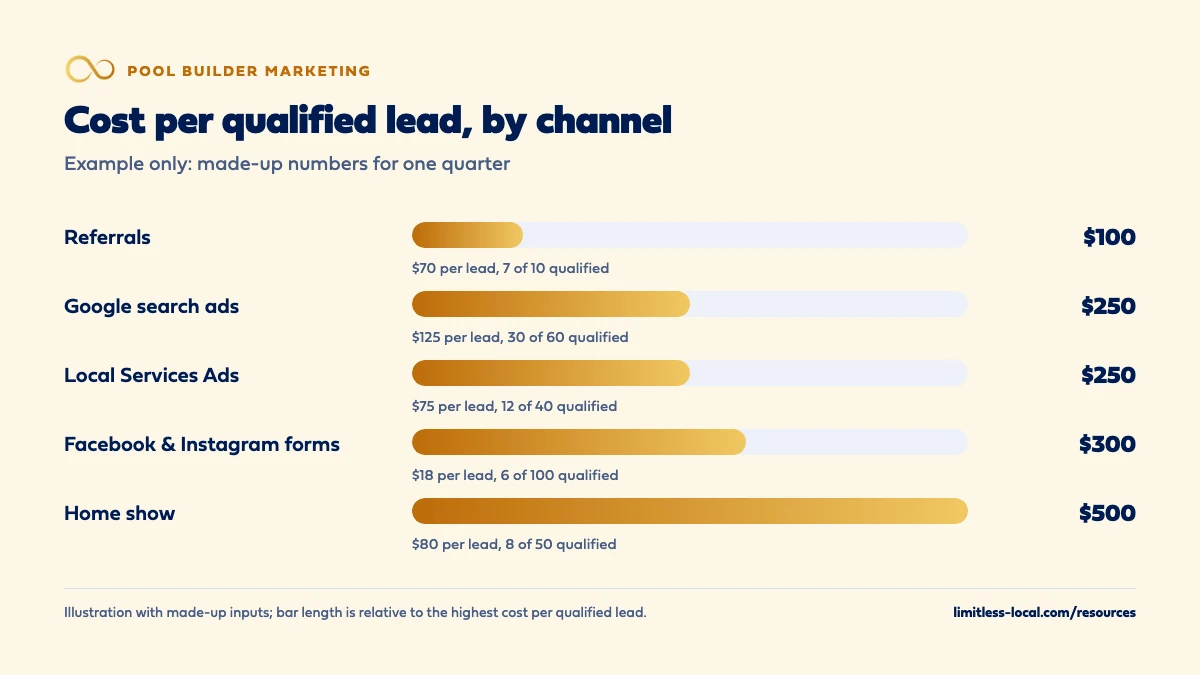
These numbers are made up to show the math, not a benchmark for your market. Say a builder tracks one quarter of spring leads, with every cost counted and one qualified-lead rule for every channel:
- Google search ads: $7,500 all-in, 60 leads, 30 qualified. That’s $125 per lead and $250 per qualified lead.
- Local Services Ads: $3,000, 40 leads, 12 qualified (many were service and repair calls). $75 per lead, $250 per qualified lead.
- Facebook and Instagram instant forms: $1,800, 100 leads, 6 qualified. $18 per lead, $300 per qualified lead.
- A home show: $4,000 with booth, display and staff days, 50 leads, 8 qualified. $80 per lead, $500 per qualified lead.
- Referrals: about $700 of time and a past-customer event, 10 leads, 7 qualified. $70 per lead, $100 per qualified lead.
The cheapest lead, from social, became one of the more expensive qualified leads. Search ads and Local Services Ads tie at $250, so the next question is which one’s qualified leads signed more contracts. And referrals win on cost but can’t be turned up, which is the case for keeping a paid channel running beside them.
Frequently asked questions
Should a lead that isn't ready until next year count as qualified?
Decide once and stick to it. Many builders count a right-fit homeowner with a later timeline as qualified but track their timing, so follow-up, not the channel, gets judged on whether they sign.
Who should decide whether a lead is qualified?
The same person, using the same written rule, for every channel. If the salesperson marks some sources and the office marks others, the comparison drifts.
Do I include my own time in cost per qualified lead?
For channels that run on time, like referrals, shows and posting on social, yes. Put a simple hourly figure on it, or those channels will always look free.
Should I split an agency fee across channels?
Yes, roughly in line with the work each channel takes. If one fee covers SEO, Google Ads and your Google profile, a sensible split is better than loading it all onto one channel.
What if a homeowner came through two channels?
Pick one rule, such as the first source they mention or the first tracked touch, and use it every time. Note the second source so you can see which channels work together.
Is a high cost per qualified lead always bad?
No. If those leads sign at a high rate and the jobs are large, a pricier qualified lead can still be your cheapest signed contract.
Key takeaways
- No published price list fits your market, so build cost per qualified lead from your own records.
- Use one written qualified-lead rule, all-in costs and the same period for every channel.
- Local Services Ads charge per valid lead, which can include work you don’t do; mark those leads honestly.
- Instant-form leads are cheap and need more screening; custom questions raise the bar.
- Judge SEO over a year and paid channels over at least a quarter, then settle ties on cost per signed contract.
Ready to compare options?
Book a short growth call and we'll walk through the math for your service area, including when we're not the right fit.
More in this section
- How does a pool builder work out what a lead is worth?
- What tracking shows a pool builder cost per qualified lead?
- What does cost per lead mean for a pool builder's ad budget?
- Agency vs own lead quality: what should a pool builder expect?
- How do pool builders qualify leads before the design consultation?
Sources
- Cost-per-click (CPC): Definition — Google Ads Help
- Understand your conversion tracking data — Google Ads Help
- Getting started with Local Services Ads — Google Local Services Help
- How leads work — Google Local Services Help
- About lead ads with instant form — Meta Business Help Center