
Does a roofer’s name, address and phone need to match everywhere?
- Do my roofing company's name, address and phone number need to be the same on every listing?
- What does "matching everywhere" actually mean for a roofer?
- Why does Google care if my listings don't match?
- Which mismatches actually matter, and which can I ignore?
- Should my roofing company show an address at all?
- What name should my roofing company use on every listing?
- Which phone number goes on my listings if I use call tracking?
- How do I audit my listings, step by step?
- How do I fix wrong or duplicate listings?
- What should I update first when I move, rebrand or change numbers?
- Will matching listings move me up the map pack on their own?
- What's different about listing cleanup for a roofing company
- A worked example: a roofer's listing audit
- Frequently asked questions
- Key takeaways
- More in this section
- Sources
The short version
- Same business name, same main phone number, same address or service area, everywhere.
- Google compiles your profile from your website, licensed data and user edits, so stray versions can come back.
- Fix the Google profile and your website first, then Apple, Bing and the big directories.
- Small formatting differences don't matter; old numbers, old addresses and old names do.
For roofing owners who’ve changed numbers, moved the yard, rebranded or just never checked what the directories say about them.
Get a free visibility audit · Book a growth call
Do my roofing company's name, address and phone number need to be the same on every listing?
Yes. Your roofing company’s name, address (or service area) and main phone number should read the same on your Google Business Profile, your website and every directory that lists you, because Google builds and updates your profile from information it finds across the web. When an old number or address keeps showing up elsewhere, Google can show it, and a homeowner can call it. Pick one master version, audit where you’re listed, and fix the profile, the website and the big directories first.
Listing cleanup is the first thing our local SEO work does for a roofer: your name, address and phone get synced across 50+ directories, and the Google profile is cleaned up and built out before anything else. See how that fits a full plan on the roofing marketing page, get the bigger picture in the roofing marketing guide, or keep going through the roofing marketing questions library.
What does "matching everywhere" actually mean for a roofer?
It means a homeowner, or Google, finds the same three things wherever your company is listed: the same business name, the same address (or no address and the same service area), and the same main phone number. Marketers call this NAP, short for name, address and phone. You don’t need the term. You just need every listing to agree.
“Everywhere” is wider than most roofers think. Beyond your Google profile and website, it’s Apple Maps, Bing, Facebook, Yelp, the Better Business Bureau, Angi, Houzz, your chamber of commerce, manufacturer contractor finders, and old listings from the year you started. Each is a place a homeowner might find your number, and a place Google might read it.
Why does Google care if my listings don't match?
Because your Google profile isn’t built only from what you type into it. Google’s page on how it sources business information says profiles are compiled from a mix of sources: publicly available information such as your website, licensed data from third parties, users who suggest facts like addresses and phone numbers, and business owners who claim their profiles.
That matters in two ways:
- Old details can come back. Google’s page on updates to your Business Profile says that if sources report your info is incorrect or outdated, Google may update your profile, and changed fields show in blue in the profile editor. When a user suggests an edit that needs your review, you get 4 days to accept or reject it. If you don’t respond, Google may publish it automatically if it’s supported by other publicly available information, such as your business website. So if your own website still shows the old number, it can work against you.
- Accuracy is part of showing up. Google’s local ranking tips say businesses with complete and accurate info are more likely to show up in local results.
Which mismatches actually matter, and which can I ignore?
Not every difference is worth an afternoon. Sort what you find into two piles.
Fix these right away:
- An old or wrong phone number, especially one that no longer rings your office.
- An old address from a yard or office you’ve left.
- A different business name, like the name you used before a rebrand or a former partner’s company name.
- Duplicate listings for the same company, each with slightly different details.
- A listing that says you’re closed when you’re not.
Don’t lose sleep over these:
- “St” versus “Street”, or “Ste 4” versus “Suite 4”.
- Phone formatting, like dashes versus dots.
- A directory that shortens your name to fit its layout.
The test is simple: would this difference make a homeowner call the wrong number, drive to the wrong place, or wonder whether it’s the same company? If yes, fix it. If not, move on.
Should my roofing company show an address at all?
Most roofers go to the homeowner, not the other way around, which makes you a service-area business. Google’s guidelines for representing your business say a service-area business should have one profile for its central office with a designated service area, and should hide its address from customers. If you run the company from home, clear the home address from the profile. A rented mailbox or virtual office you don’t work from isn’t eligible at all.
Once you’ve made that call on Google, make it everywhere:
- Address hidden on Google? Don’t publish your home address on your website or on directories that let you hide it. Show the city you’re based in and the towns you serve instead.
- Directory insists on an address? Use the same real address you verified with Google, and choose the option to hide it from the public if the site offers one.
- Real office or showroom where homeowners visit? Then show that address, the same way, on every listing.
Curious what your marketing is actually booking?
Get a free visibility audit — no obligation, no sales pitch.
What name should my roofing company use on every listing?
Use your real-world name, the one on your trucks, yard signs, estimates and invoices. Google wants your name to reflect your business’s real-world name as used consistently on your storefront, website and stationery. Adding unnecessary information to it isn’t permitted and could get your profile suspended.
For a roofer, that rules out a few common habits:
- No keywords: “Smith Roofing”, not “Smith Roofing Best Roof Replacement Dallas”.
- No taglines or phone numbers in the name.
- No “LLC” or “Inc” unless it’s part of how you actually present the company. Google asks for real-world proof, like signage or invoices, before legal terms can be part of the profile name.
Then pick one exact form, write it down, and use it on every directory, so whoever updates a listing uses the same one.
Which phone number goes on my listings if I use call tracking?
Your main business number, the same one everywhere. The number should connect to your business, be under your direct control, and be a local number instead of a central call center line whenever possible.
Call tracking still works if you keep the roles separate:
- Listings and directories: your one main number. This is the number that should read the same across the web.
- Ads, mailers, yard signs and specific campaigns: tracking numbers are fine here, because they measure that one source and aren’t how Google identifies your company.
- Your website: if you swap in tracking numbers for visitors from different sources, make sure your main number still appears in the page itself, such as in the footer or on the contact page, so it matches your listings.
And whatever number you list has to ring a person who answers during your listed hours. How to set up tracking without breaking this is covered in how a roofer tracks calls and forms from Google.
How do I audit my listings, step by step?
Set aside an hour or two and work through it in order.
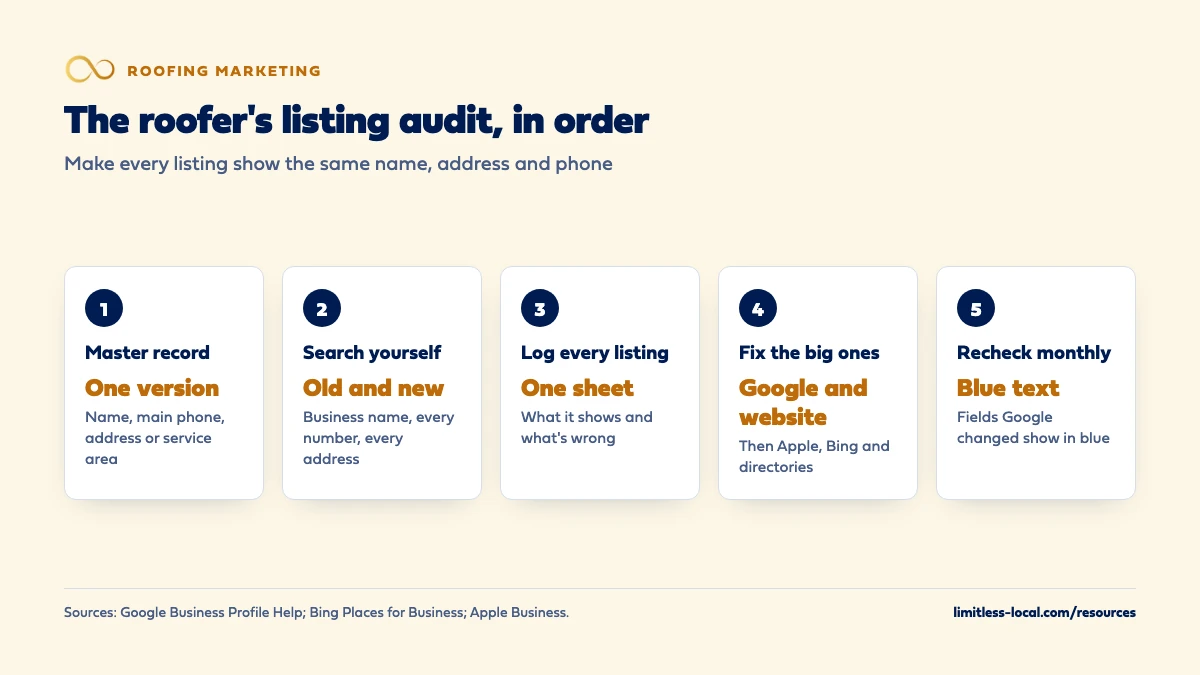
- Write down your master record. Exact business name, main phone number, address or service area, website address and hours. This is the version everything gets compared against.
- Search yourself the way a homeowner would. Search your business name, your main number, every old number you’ve ever used, and every old address. Each one turns up listings you didn’t know about.
- Check the big ones by hand. Google Business Profile, your own website (every page footer and the contact page), Apple Maps, Bing, Facebook, Yelp, the BBB, Angi, Houzz, and any manufacturer or supplier contractor directory you’re on.
- Log every listing. One row each: site, link, name shown, phone shown, address shown, whether you can log in, and what’s wrong.
- Mark the priority. Wrong number or old address first, wrong name second, duplicates third, formatting last.
- Check your Google profile for blue text. Blue fields in the editor are details Google changed. Accept the ones that are right and fix the ones that aren’t.
How do I fix wrong or duplicate listings?
Claim first, then edit. Most directories won’t let you change a listing until you’ve proved you own the business, and every site has its own process.
- Google: edit the profile directly. Google allows only one profile per business, and extra profiles can cause problems with how your information displays on Maps and Search, so deal with duplicates instead of leaving them.
- Bing: claim or create your listing in Bing Places. Its help page on managing listings says listings get information from multiple outside sources, and that if your business has moved or changed its name, you should create a new listing and mark the old one closed instead of editing the old one, to avoid conflicting information.
- Apple Maps: manage your place card in Apple Business. Apple’s page on keeping location information accurate says it reviews customer reports and may edit your location’s name, status or hours, and emails you when it does, so you can accept or contest the change.
- Everything else: claim the listing, correct it, and if a site won’t let you claim it, use its “report incorrect information” or support form.
What should I update first when I move, rebrand or change numbers?
Change the sources Google trusts most first, then work outward:
- Your Google Business Profile. Update it the day the change happens.
- Your website. Every footer, the contact page and any page that mentions the old details, so it backs up the profile instead of contradicting it.
- Apple Maps and Bing. Following each one’s process for moves and name changes.
- Facebook, Yelp, the BBB and the trade directories.
- Everything printed: truck wraps, yard signs, estimate forms and email signatures, as they come up for reprinting.
If you’re retiring a phone number, keep it forwarding to your new one for as long as you can afford to. Old yard signs and stale listings will send homeowners to it for years.
Will matching listings move me up the map pack on their own?
Not on their own. Local results are mainly based on relevance, distance and popularity, and clean listings mostly protect the first of those: Google can’t match you to the right searches if it isn’t sure what your details are. Popularity comes from things like reviews and links, and distance is out of your hands.
Think of consistency as the foundation. It stops you from losing calls to a wrong number and stops your profile from being edited out from under you. The other factors are what move you up, so recheck your profile each month and do a full sweep of your listings after storm season, when stray numbers creep in. For the full list, read what makes a roofing company rank higher in Google Maps, and if you’re not showing up at all, start with why a roofing company isn’t showing up on Google Maps.
Not sure which of these is costing you jobs?
A free visibility audit checks the Google profile, reviews, site and tracking, and shows what to fix first.
What's different about listing cleanup for a roofing company
Storm season creates stray numbers. When hail or wind hits, it’s tempting to spin up a second line for the storm crew or a temporary office in the next county. Use tracking numbers on storm ads if you like, but keep the listings on your one main number, and don’t set up a profile at a hotel, rented office or address you won’t be staffing.
Manufacturer and supplier directories are easy to forget. Shingle manufacturer contractor finders and supplier referral lists send real homeowners to roofers, and they often still show the details you gave when you first signed up. Add them to your audit.
Rebrands and partner splits are common. When partners split or “Smith Roofing” becomes “Smith Exteriors”, each change leaves a trail of old listings. Treat a rebrand as a full audit, not a profile edit.
Your number is on the trucks and signs. Wraps and yard signs keep your number in front of a neighborhood for years. Changing the number means changing those too, which is one more reason to pick one main number and keep it. Whether yard signs and truck wraps are worth it covers what they bring in.
A worked example: a roofer's listing audit
These numbers are made up to show how an audit plays out, not a benchmark. A roofer who changed numbers three years ago and moved the yard last spring searches the business name, both numbers and both addresses, and logs 24 listings.
- 15 are correct.
- 6 still show the old phone number.
- 2 show the old yard address.
- 1 is a duplicate on a directory, under the company’s old name.
So 9 of the 24 listings, a little over a third, need work. The owner fixes them in order: the old phone number first, because those listings send homeowners to a line nobody answers; then the old address; then the duplicate. The website footer still shows the old number too, so it jumps to the top of the list.
If you’d rather hand this off, business listing cleanup and buildout is part of our Essentials package at $3,500 a month, along with Google Business Profile management and review response. One roofing client got 3x map pack visibility in its target towns; better presence and consistent info across the web increased inbound calls.
Frequently asked questions
Does it matter if one directory says "LLC" and another doesn't?
Not much for most directories. On your Google profile, leave legal terms out of the name unless your signage, invoices and other branding consistently use them, because Google asks for real-world proof before they can be part of the name.
Can I use my cell phone as the business number?
You can, as long as it’s the number you’ll keep, it’s under your control and someone answers it during your listed hours. Many roofers move to a dedicated business line later, which then means changing every listing, so it’s easier to pick the long-term number from the start.
Do I need to be listed on hundreds of directories?
No. Correct details on the listings homeowners actually use, plus Google, Apple, Bing and your website, matter far more than a long tail of directories nobody visits.
What if a listing I can't log into shows my old number?
Try the site’s claim or verification process first. If you can’t claim it, use its report or support form to request the correction, and note it in your audit sheet so you can check back.
Does a different number on my yard signs hurt my listings?
No. A tracking number on yard signs or mailers isn’t a listing, so it won’t conflict with your profile, and it tells you how many calls those signs bring in. Just keep the main number on the listings themselves.
Key takeaways
- Your name, address or service area, and main phone number should read the same on Google, your website and every directory.
- Google builds your profile from many sources and may publish a suggested edit backed by your own website, so fix the website too.
- Old phone numbers, old addresses, old names and duplicates matter; small formatting differences don’t.
- Service-area roofers hide the address on Google and should show the same service area everywhere else.
- Keep listings on one main number and use tracking numbers on ads, signs and mailers.
- Clean listings are the foundation, not the whole ranking; reviews, relevance and distance still decide where you show.
Want a second set of eyes on your setup?
We'll look at how you show up locally and where calls are leaking, then send you a plain-English breakdown.
More in this section
- Does my roofing company info need to match on every listing?
- How can a roofer look local and trustworthy enough to rank?
- What photos should a roofer post on Google Business Profile?
- Should a roofer market gutters and siding, or just roofs?
- What should a roofing website say about services and locations?
Sources
- Understand how Google sources & uses info in Business Profiles & local search results — Google Business Profile Help
- Understand Google updates on your Business Profile — Google Business Profile Help
- Guidelines for representing your business on Google — Google Business Profile Help
- Tips to improve your local ranking on Google — Google Business Profile Help
- Bing Places for Business: Manage your listing — Bing Places for Business
- Maintain location information accuracy with Apple Business — Apple Support