
Should my HVAC website have an FAQ page?

- Is an FAQ page worth adding to an HVAC company website in 2026?
- Does an HVAC website need a separate FAQ page?
- Will FAQ schema get my HVAC site those question dropdowns on Google?
- Should I keep the FAQ schema my site already has?
- Which questions belong on my HVAC FAQ page?
- Which questions should go on my service pages instead?
- Can the same question appear on my FAQ page and a service page?
- Where do I find the questions homeowners actually ask?
- How should I write the answers on an HVAC FAQ page?
- Does an FAQ page help my HVAC company show up in AI answers?
- What makes an HVAC FAQ page a waste of space?
- What's different about FAQ pages for HVAC companies
- A worked example: turning two weeks of calls into an FAQ page
- Frequently asked questions
- Key takeaways
- More in this section
- Sources
The short version
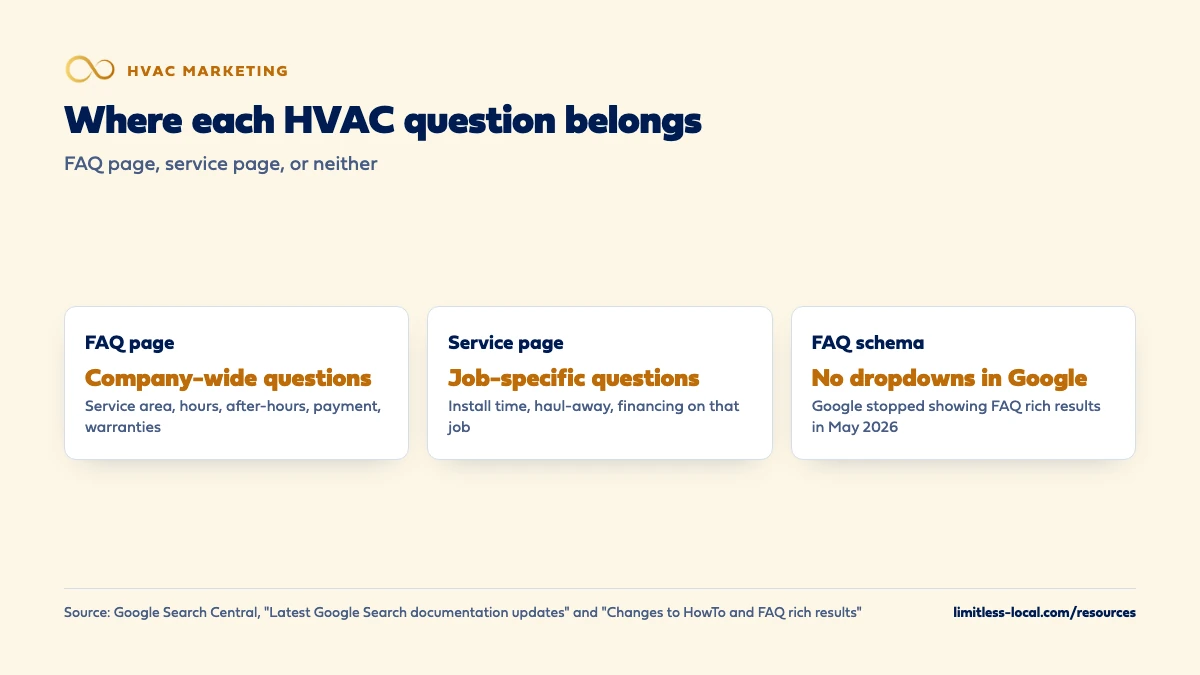
- Keep one FAQ page for company-wide questions: area, hours, after-hours, payment, financing, warranties.
- Answer job-specific questions on the matching service page, not the FAQ page.
- FAQ markup no longer gets you dropdowns in Google; it stopped showing them in May 2026.
- Pull the questions from your phones, your techs and your Search Console data, not a template.
For HVAC owners deciding whether to build an FAQ page, put the answers on their service pages, or both, now that Google no longer shows FAQ rich results.
Get a free visibility audit · Book a growth call
Is an FAQ page worth adding to an HVAC company website in 2026?
Yes, a short FAQ page is worth having if it answers the company-wide questions homeowners ask before they call, such as which towns you cover, your hours, after-hours service, payment, financing and warranties. Questions about a specific job, like AC repair or a furnace replacement, belong on that service page instead, where the homeowner is already reading. Don’t build one to get the question dropdowns in Google’s results: Google stopped showing FAQ rich results in May 2026.
We build HVAC sites the same way: the service pages carry the job-specific questions, and a short FAQ page handles the rest. Website builds and service-page writing are part of our website work for HVAC companies. For how the website fits with Maps, ads and follow-up, the HVAC marketing guide covers every channel, and the rest of the HVAC marketing questions library goes question by question.
Does an HVAC website need a separate FAQ page?
Not to work, but most HVAC sites are better with a short one. The questions homeowners ask before they call fall into two groups, and they belong in two different places:
- Company-wide questions that apply to every job: which towns you serve, your hours, whether you come out at night, how payment and financing work, what your warranty covers, whether you’re licensed and insured. These fit an FAQ page, because no single service page owns them.
- Job-specific questions about one kind of work: how long an AC replacement takes, whether a furnace repair needs a part ordered, what a maintenance visit includes. These belong on the service page for that job.
If you only have room for one, put the effort into the service pages first. They’re the pages that match what homeowners search for and book from. The FAQ page is a useful extra, not the foundation. If your site already has a long FAQ page and thin service pages, moving the job-specific answers onto the service pages is often the quickest improvement. Which pages make up that foundation is covered in what pages an HVAC website needs.
Will FAQ schema get my HVAC site those question dropdowns on Google?
No. For years, marking up a page with FAQ structured data could get expandable questions shown under your result. Google cut that back in August 2023, when it said FAQ rich results would only be shown for well-known, authoritative government and health websites. Then it ended the feature: Google’s documentation changelog says FAQ rich results no longer appear in Google Search starting May 7, 2026, and in June 2026 it removed the FAQ documentation because the feature is no longer shown.
So if a web designer or SEO pitches FAQ schema as a way to take up more space in the results for an HVAC company, that pitch is out of date. Write the FAQ page for the homeowner reading it, because that’s the only audience left for it. Sources: Changes to HowTo and FAQ rich results and Latest Google Search documentation updates.
Should I keep the FAQ schema my site already has?
You can leave it. When Google first limited FAQ rich results, it said you could drop the structured data but there was no need to proactively remove it, and that structured data that isn’t being used doesn’t cause problems for Search but also has no visible effect. In our judgement, that still applies now the feature is gone: removing it isn’t urgent, and adding it to new pages isn’t worth anyone’s billable time.
The one place it’s worth a look is your web designer’s or agency’s task list. If FAQ markup is listed as ongoing monthly work, ask what it’s for. Source: Changes to HowTo and FAQ rich results.
Which questions belong on my HVAC FAQ page?
The ones that come up regardless of the job, and that a homeowner wants answered before picking up the phone:
- Service area. The towns and ZIP codes you cover, and what happens if they’re just outside it.
- Hours and after-hours. When the office answers, whether you take no-heat and no-cool calls at night and on weekends, and whether that costs more.
- Booking and arrival. How to schedule, how you confirm, and whether you give an arrival window.
- Payment and financing. What you take, when payment is due, and whether financing is available on replacements.
- Warranties. What your workmanship warranty covers and for how long, in plain words.
- Licensing and insurance. Only what you actually hold.
- Brands. Which equipment you install and which brands you’ll repair.
Each answer should be true for your company specifically. If an answer would be identical on any HVAC site in the country, it isn’t telling the homeowner anything about you.
Curious what your marketing is actually booking?
Get a free visibility audit — no obligation, no sales pitch.
Which questions should go on my service pages instead?
Anything tied to one job. A homeowner reading your AC replacement page wants to know how long the install takes, whether the old unit gets hauled away, what affects the price and whether financing applies. Answering those on that page keeps them where the reader already is, and gives the page more of what someone searching for that job is looking for.
Google’s Starter Guide says creating content people find compelling and useful will likely influence your presence in search results more than any of its other suggestions, and it lists up-to-date, unique, well-organized content as common traits. A short question-and-answer block at the bottom of each service page is an easy way to add that kind of detail. How to build those pages so they show up for repair and installation searches is covered in making HVAC service pages rank. Source: SEO Starter Guide.
Can the same question appear on my FAQ page and a service page?
Try not to repeat whole answers. Google’s Starter Guide says having two pages with the same information can be a confusing experience, with people wondering which one is right and whether there’s a difference, and it suggests each piece of content be reachable at one URL. The guide adds that duplicate content isn’t a spam violation, but it can be a bad experience for the reader.
The workable pattern: give the short, company-wide answer on the FAQ page and link to the service page for the detail. “Yes, we offer financing on system replacements” on the FAQ page, linked to your replacement page, where the financing terms are spelled out once. The same guide says link text tells people and Google something about the page you’re linking to, so the link reads “AC replacement financing”, not “click here”. Source: SEO Starter Guide.
Where do I find the questions homeowners actually ask?
Not from a list of generic HVAC questions. Better sources, all of which you already have:
- Your office. Have whoever answers the phone keep a tally for two weeks of every question callers ask before they book.
- Your techs. The questions they get in driveways and at the thermostat are the ones homeowners care about.
- Your reviews. What customers praise or complain about shows what they worried about beforehand.
- Search Console. The Performance report shows which search queries bring people to your site, which often reads like a list of questions. Google notes that results depend on the time, place, device and recent history of the person searching, so you may not see your site when you run the same search yourself.
- Your Business Profile. Its performance report shows the search terms people used to find your business.
Google’s Starter Guide makes the same point about wording: people new to a topic use different words than experts. A homeowner asks “why is my AC running but not cooling”, not “low refrigerant charge”. More on that wording in what homeowners type into Google. Sources: Performance report (Search results) and Understand your Business Profile performance.

How should I write the answers on an HVAC FAQ page?
Short, direct and specific to your company:
- Answer in the first sentence. “Yes, we take emergency calls 24 hours a day” before any explanation.
- Use real details. Your actual towns, hours, payment methods and warranty terms. If you won’t commit to a detail, leave the question out.
- Keep prices honest. If you list a trip charge or a diagnostic fee, keep it current. An old price on the FAQ page turns into an argument at the door.
- Link to the detail. Point each answer to the service or contact page where the homeowner can book.
- Put a name on it. Answers checked by the owner or a lead tech are more believable than anonymous text.
There’s no target length. Google’s Starter Guide says content length alone doesn’t matter for ranking and there’s no magical word count. A page with eight answers that are true for your business beats one with forty that could belong to anyone. Source: SEO Starter Guide.
Does an FAQ page help my HVAC company show up in AI answers?
Not because it’s an FAQ page. Google’s guide to its generative AI features says they’re rooted in its core Search ranking and quality systems, so the usual SEO basics still apply. It also lists things you don’t need to do for Google: there’s no special schema.org markup required for generative AI search, no need to break content into tiny chunks, and no need to rewrite content in a special way for AI systems.
What the guide does emphasize is content that’s unique and non-commodity: first-hand, expert takes rather than common knowledge anyone could write. An FAQ answer that explains how your after-hours dispatch actually works fits that; “Regular maintenance can extend the life of your system” doesn’t. The guide also warns that creating separate content for every variation of how people might search, mainly to manipulate rankings or AI responses, violates Google’s scaled content abuse policy. How AI Overviews affect HVAC companies more broadly is covered in what AI Overviews mean for HVAC. Source: Optimizing for generative AI features on Google Search.
What makes an HVAC FAQ page a waste of space?
Four patterns, from Google’s own guidance:
- Questions nobody asks. “Why choose us?” written as a question isn’t an FAQ. If no homeowner has ever asked it, cut it.
- A block of town names. Google’s spam policies list blocks of text that name the cities and regions a page is trying to rank for as an example of keyword stuffing. Answer “Which areas do you serve?” with a clear list once, not with every town repeated through the page.
- Dozens of question pages. Generating many pages mainly to manipulate rankings, with little value to readers, is what Google calls scaled content abuse. One FAQ page plus answers on your service pages is plenty.
- Copied answers. Google’s Starter Guide says not to copy others’ content in part or in its entirety. Answers lifted from a manufacturer or another contractor’s site say nothing about your company.
In our judgement, an FAQ page also stops paying off once it’s out of date. The Starter Guide suggests checking published content and updating it as needed, or deleting it if it’s no longer relevant. Sources: Spam policies for Google web search and SEO Starter Guide.
Not sure which of these is costing you jobs?
A free visibility audit checks the Google profile, reviews, site and tracking, and shows what to fix first.
What's different about FAQ pages for HVAC companies
Two seasons, two sets of questions. Cooling questions come with the first hot week and heating questions with the first cold one. Review the FAQ page before each season so the after-hours, scheduling and pricing answers match what you’re actually doing that season.
After-hours is the question that costs calls. A homeowner with no heat at night wants to know whether calling you now does anything. A clear answer, on the FAQ page and the contact page, saying whether you dispatch at night, what it costs and when you’ll call back, settles that before they move on to the next company.
Replacements raise money questions. Financing, warranties and whether old equipment is hauled away come up on almost every replacement estimate in our experience. Answer them once on the replacement page and point to them from the FAQ page.
Maintenance plans need their own answers. If you sell tune-up agreements, what’s included, how often you visit and how to cancel are FAQ questions in their own right.
A worked example: turning two weeks of calls into an FAQ page
These numbers are made up to show the method, not a benchmark. Say your office logs every call for two weeks and gets 120 calls. Of those, 30 include a question asked before booking, and they fall like this: 11 ask whether you serve their town, 8 ask about after-hours or weekend service, 6 ask about financing on a new system, and 5 ask what a maintenance visit includes.
That’s 11 + 8 + 6 + 5 = 30. The first two are company-wide, so they go on the FAQ page, with the town list and the after-hours policy spelled out. Financing goes on the replacement page, with a one-line answer and a link from the FAQ page. The maintenance question goes on the maintenance plan page. Four questions, four places, and each answer written once.
Repeat the tally once a season and you’ll see which answers stopped questions and which didn’t. Writing and fixing service pages is part of our website work, and our themed websites are $3,750 for up to 25 pages; whether that’s the right spend for you is what a free visibility audit is for.
Frequently asked questions
How many questions should an HVAC FAQ page have?
As many as homeowners really ask and no more. Google says there’s no magical word count for ranking, and in our judgement eight to twelve real questions usually cover the company-wide ones.
Can I use AI to write my FAQ answers?
It can help with a draft, but the details have to be yours. Google’s generative AI guide says AI-assisted content still has to meet its Search Essentials and spam policies, and it says unique, first-hand, non-commodity content is likely to do more for your presence than common knowledge anyone could write.
Will an FAQ page help my HVAC company show up in the map pack?
Not directly. Google says local results are mainly based on relevance, distance and popularity, and the help page on it talks about your Business Profile, reviews and the websites that link to you; FAQ pages aren’t on that list. An FAQ page helps the homeowner who’s already on your site.
Should I list prices in my FAQ answers?
Only prices you’ll stand behind and keep current, such as a diagnostic fee or trip charge. In our judgement, ranges for replacements belong on the replacement page with the factors that move the price.
Should I delete an old FAQ page nobody visits?
Check Search Console first. If the page gets no impressions and its answers are out of date, Google’s Starter Guide suggests updating content as needed or deleting it if it’s no longer relevant.
Do FAQ answers need to be hidden behind dropdowns?
No. Dropdowns are a design choice for long pages on a phone. Whether the answers are open or collapsed, what matters is that they’re specific to your company and easy to find.
Key takeaways
- A short FAQ page is worth having for company-wide questions: area, hours, after-hours, payment, financing and warranties.
- Job-specific questions belong on the matching service page, where the homeowner is already reading.
- Google stopped showing FAQ rich results in May 2026, so FAQ schema won’t get you dropdowns in the results.
- Pull questions from your phones, techs, reviews and Search Console, and write each answer once.
- Google’s AI features need no special FAQ markup; specific, first-hand answers are what count.
Want a second set of eyes on your setup?
We'll look at how you show up locally and where calls are leaking, then send you a plain-English breakdown.
More in this section
- What pages should an HVAC company website have?
- Does my HVAC company website need a blog?
- Should I fix my HVAC website and reviews before paying for ads?
- Does my HVAC company need landing pages for Google Ads?
- What is the best website platform for an HVAC company?
Sources
- Latest Google Search documentation updates — Google Search Central
- Changes to HowTo and FAQ rich results — Google Search Central Blog
- Google's guide to optimizing for generative AI features on Google Search — Google Search Central
- Search Engine Optimization (SEO) Starter Guide — Google Search Central
- Tips to improve your local ranking on Google — Google Business Profile Help
- Spam policies for Google web search — Google Search Central
- Performance report (Search results): Overview and basic setup — Search Console Help
- Understand your Business Profile performance & insights — Google Business Profile Help