
Can I switch my restoration marketing agency or go in-house?
- How do I switch restoration marketing agencies or bring it in-house without losing calls?
- What actually has to move when I switch?
- How do I check what I own before I give notice?
- What should I ask the agency for before I leave?
- How do I keep the phone ringing during the switch?
- Will I lose my Google rankings if I switch agencies?
- What if my website is built on the agency's own platform?
- Should I switch to a new agency or bring marketing in-house?
- What does running marketing in-house take week to week?
- When is the wrong time to switch?
- How do I tell whether the new setup is working?
- What's different about switching for a restoration company
- A worked example: what a two-week gap costs
- Frequently asked questions
- Key takeaways
- More in this section
- Sources
The short version
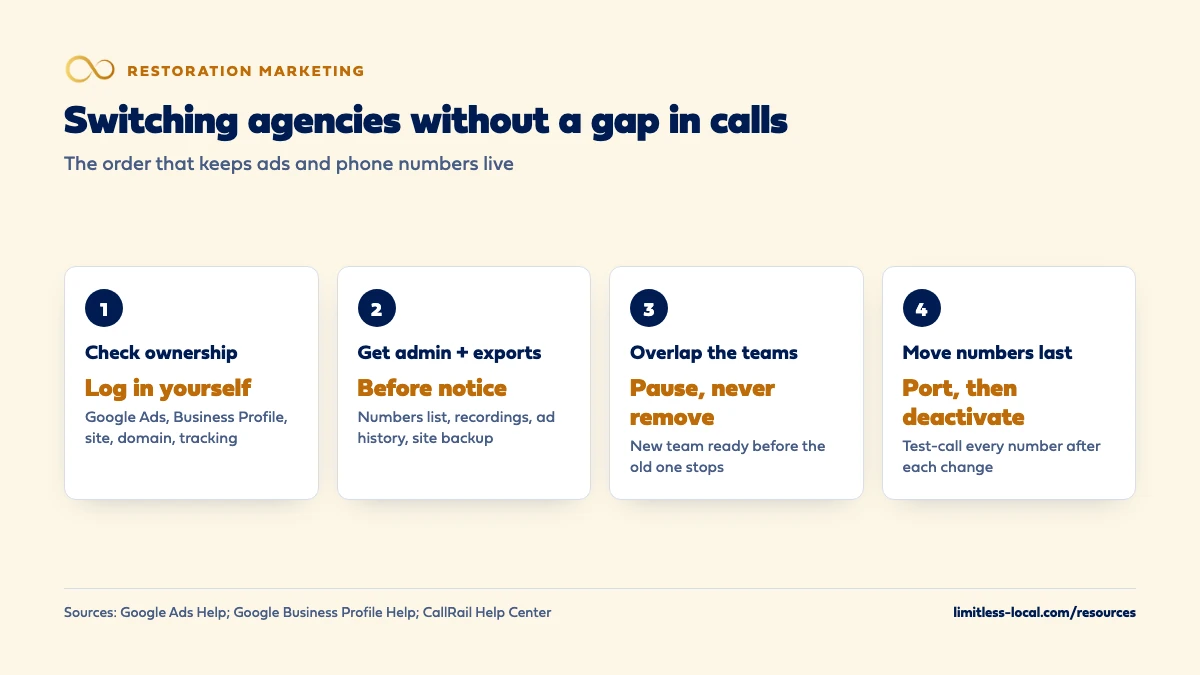
- Check who owns each account before you say a word to the agency.
- Get admin access and exports first, then give notice.
- Never let tracking numbers or campaigns go dark during the handover.
- In-house works when one person can cover ads, Maps, the website and tracking, or when you add outside help for the gaps.
For restoration owners who are done with their current agency and want a clean exit, whether the next step is a new agency or someone on payroll.
Get a free visibility audit · Book a growth call
How do I switch restoration marketing agencies or bring it in-house without losing calls?
Yes. You can switch agencies or bring restoration marketing in-house at any time your contract allows, and the work is mostly getting your accounts back in order before you give notice. Make sure your business owns or has admin access to the Google Ads account, Google Business Profile, website, domain, Search Console and call tracking numbers, then line up whoever takes over so ads and phone numbers never go dark. The real risk isn’t losing your rankings overnight; it’s a gap in emergency calls while campaigns are paused, tracking numbers are switched off or the website is moved carelessly.
Switching goes smoothly when the next setup is built so you could leave it just as easily. That’s how we work: no long-term contracts, month-to-month, and onboarding that takes your team about 2-3 hours before campaigns go live in weeks 1-2. Our packages lay out exactly what’s included at each tier, and our restoration marketing page shows how it fits water, fire and mold work. For the full channel picture, read the restoration marketing guide, or browse more restoration marketing questions.
What actually has to move when I switch?
Less than most owners fear, but more than most remember. Your marketing isn’t one thing the agency hands back; it’s a set of separate accounts and assets, each with its own login and its own owner. Before you plan anything, write the list:
- Google Ads, including your search campaigns, Local Services Ads, conversion tracking and years of search term history.
- Google Business Profile, with your reviews, photos, hours and service areas.
- Website: the domain name, the hosting, the site files and any landing pages built for ads.
- Search Console and analytics, which hold your organic search history.
- Call tracking: every tracking number, where it’s printed, and the call recordings behind it.
- Everything else: review request tools, directory listings, social accounts, photos and written content.
For each line, note three things: whose email is the owner, whether you can log in today, and who pays the bill.
How do I check what I own before I give notice?
Log in to each account yourself, with your own email, before anything else. If you can’t, that’s the first problem to fix while the relationship is still friendly.
Google Ads is usually the most tangled. Agencies manage ads through a manager account. Google’s guide to client account ownership says a client account can have only one owner manager, and that a manager who creates a new account becomes its owner automatically. The client account still owns its data, though, and users of the client account can always unlink a manager that has ownership. In practice, you need at least one admin user on the client account itself. If every admin login belongs to the agency, ask for admin access now.
Your Google Business Profile should have you as primary owner. Google’s owners and managers page says owners can add and remove users and even delete the profile, while managers can do almost everything else. It also says a new owner has to wait 7 days before removing other owners or transferring primary ownership, so get yourself added a week or more before you plan to give notice.
Do the same check on the domain registrar, the hosting account and the call tracking account. Who owns your website and ad accounts if you fire your agency goes account by account if you find something registered in the agency’s name.
What should I ask the agency for before I leave?
Ask in writing, and ask for everything at once:
- Admin access to Google Ads, your Business Profile, Search Console, analytics and the call tracking account, under your own email.
- A list of every tracking number, what it forwards to, and where it’s published: ads, your Google profile, directories, van wraps, yard signs, referral cards.
- Website files and logins for the domain registrar and hosting, plus a full backup of the site.
- Ad history: negative keyword lists, the towns and hours each campaign targets, and what each campaign cost per lead and per booked job.
- Call recordings and lead lists for at least the last year, exported to a file you keep.
- Photos and written content they created for you, along with confirmation of who owns them.
- A handover date agreed in writing, so nobody switches anything off early.
A good agency will hand this over without a fight. If one stalls, check your contract for what it says about accounts and content, and keep the request polite and specific. What contract length is normal for a restoration marketing agency covers the clauses that decide how hard leaving is.
How do I keep the phone ringing during the switch?
Overlap, don’t hand off cold. The new agency or your in-house person should have access and a working plan before the old agency stops. Three things cause most of the gaps:
Campaigns that get removed instead of paused. Google’s help page on pausing campaigns says pausing is temporary and keeps your settings and history, while removing a campaign is permanent and can’t be undone. Ask the outgoing agency, in writing, not to remove anything.
Tracking numbers that get switched off. If the call tracking account is in the agency’s name, the numbers on your Google profile and vans can stop ringing the day the account closes. Moving a number takes time: CallRail’s porting guide says the process typically takes 4-6 weeks, that you shouldn’t deactivate the number or close the account until the port is confirmed, and that you own the numbers you create in your own CallRail account. Start the port early, and keep paying for the old account until it’s done.
Forms and emails that point at the old agency. Check where your website form, chat and lead notification emails actually go. Send yourself a test lead after every change.
If you’re thinking of cutting ads entirely during the changeover, what happens to your job flow when you stop ads shows why that gap shows up on the schedule within days.
Curious what your marketing is actually booking?
Get a free visibility audit — no obligation, no sales pitch.
Will I lose my Google rankings if I switch agencies?
Not because of the switch itself. Your rankings belong to your website and your Business Profile, not to whoever logs in to them.
Rankings move when the site moves. If the new agency wants a new domain, a new platform or new page addresses, treat it as a site move. Google’s site move guide recommends mapping every old address to its new one with redirects, changing one thing at a time, and timing the move for a lower-traffic period if you can. It also says to expect temporary ranking fluctuation, and that a medium-sized site can take a few weeks or more before Google shows the new addresses instead of the old ones.
Search Console matters here too. The Search Console help page on owners says a property must have at least one verified owner, and that if the only verified owner leaves, you should verify ownership yourself to keep access. Once you’re verified, you can remove the previous owners. Get that done before the old agency’s access disappears.
What if my website is built on the agency's own platform?
Some agencies build on a platform they license or host themselves. You might own the domain and the words, but not the theme, the page builder or the hosting it runs on. That isn’t automatically a problem, but it means you can’t just carry the site out the door.
Ask the agency directly: can you export the site, or only the content? If only the content, plan a rebuild with the new team before you leave, and keep the old site live until the new one is ready. Keep the same page addresses where you can, and redirect the ones you can’t, so the service pages that already rank for water damage, mold or fire in your towns carry that over.
Should I switch to a new agency or bring marketing in-house?
It depends on what went wrong and what you can staff. If the old agency was sloppy, a better agency fixes that fastest. If the problem is that nobody outside your company understands your market, your crews and your towns, an in-house person can fix that, as long as they have the skills.
The catch with in-house is breadth. A restoration company’s marketing usually spans Google Ads and Local Services Ads, the Google profile and reviews, the website and its service pages, call tracking and reporting. One hire rarely does all of that well, and you’ll pay for software on top of the salary. A common mix is someone in-house for reviews, photos, referral partners and follow-up, with outside help for ads and SEO.
Whether to hire an in-house marketer or an agency works through the cost comparison in detail. Whichever way you go, set it up so that every account stays in your company’s name.

What does running marketing in-house take week to week?
More than most owners plan for. Daily, someone checks that every call, form and Local Services Ads message got a reply. Weekly, they read the search terms your ads paid for and block the junk, match budgets to how busy the crews are, post real job photos to the Google profile and ask every finished customer for a review. Monthly, they match leads to booked jobs and work out cost per booked job by channel.
If that list belongs to someone who’s also dispatching crews or chasing insurance paperwork, the marketing gets the leftover hours. Budget the time honestly before you pull it in-house.
When is the wrong time to switch?
The middle of a storm surge or a hard freeze is the worst time. Calls are at their peak, the ad budgets are working hardest and nobody has a spare hour to check that tracking numbers still ring. Plan the change for a quieter stretch, when a short dip costs less.
And don’t switch over one bad month, or before you’ve confirmed the agency is really the problem. Leads that don’t book can come from slow answering, weak follow-up or crews at capacity, and a new agency inherits those same problems. Before you leave, check whether your agency is producing real jobs, and look at your own call log for missed and unreturned calls.
How do I tell whether the new setup is working?
Take a baseline before you switch: booked jobs by source for the last three months, what each source cost, and cost per booked job overall. Without that, every comparison afterward is a guess.
Then judge each channel on its own timeline. Ads can generate leads within days of launch, so a new team running your Google Ads and Local Services Ads should show you calls and cost per lead within the first few weeks. SEO typically takes 3-6 months to show meaningful organic growth, so don’t expect a new SEO team to beat the old one in month one, especially if the site moved.
Whoever runs it next, ask for reports that show booked jobs and cost per booked job, not clicks and impressions. If you can’t see which calls became jobs, you’ll be back in the same spot in a year. And set the new arrangement up so leaving is just as easy: every account under your company’s email, you as primary owner of the Business Profile and a verified owner in Search Console, and tracking numbers in an account you control.
Want to see where your company stands?
A free visibility audit shows where you show up on Google, Maps and AI answers, and what it's costing you in calls.
What's different about switching for a restoration company
Emergency calls can’t wait out a gap. A homeowner with water on the floor calls whoever answers first. A week with dead tracking numbers or paused ads in a restoration company doesn’t just delay work; it sends those jobs to whoever was still showing up.
Your numbers are printed everywhere. Restoration companies hand out phone numbers on vans, magnets, door hangers and referral cards for plumbers and property managers. Those printed numbers are the hardest to change, so the call tracking account deserves more attention than any other part of the switch.
Weather sets the calendar. Pick a switch date away from your region’s storm and freeze season, and have the new team running at least a few weeks before the next surge.
A worked example: what a two-week gap costs
These numbers are made up to show the math, not a benchmark for your market. Say your search ads and Local Services Ads book 10 water damage jobs a month, and your average invoice on those jobs is $4,000.
- A careless handover leaves ads paused and tracking numbers dead for two weeks. That’s roughly half a month of paid jobs: about 5 jobs, or $20,000 in invoices that go to someone else.
- A planned handover keeps the old setup running while the new team gets access. Say that overlap costs one extra month of the old agency’s fee, a made-up $2,000.
Even if the overlap only saves half of those jobs, that’s about $10,000 in work for a $2,000 overlap. The exact numbers will differ for you; the shape of the math usually won’t. A gap in emergency calls costs more than an extra few weeks of fees.
Frequently asked questions
Do I lose my Google reviews if I leave my agency?
No. Reviews live on your Google Business Profile, not in the agency’s account. When an owner removes a user, Google says that person’s past replies and posts stay on the profile.
Can my agency keep my Google Ads account?
The client account owns its data, and users of the client account can unlink a manager that has ownership. You need an admin login on the account itself to do that, so ask for one before you give notice.
Should I tell the agency before I take back admin access?
Usually yes. Ask for access as part of a planned handover; most agencies cooperate, and a surprise lockout can leave campaigns half-changed in the middle of a busy week.
Can I keep the landing pages the old agency built?
Only if they live on your website or you can export them. Pages hosted on the agency’s own platform usually stop working when the account ends, so rebuild them on your site before the handover date.
Do I need to tell Google I changed agencies?
No. You just change who has access to each account: add the new team as users or managers, then remove the old agency once everything works.
How long does a clean switch take?
Plan for at least a month. Getting a new Business Profile owner fully set up takes a week or more, and porting a tracking number can take several weeks.
Key takeaways
- You can switch agencies or go in-house any time your contract allows; the work is in the accounts.
- Log in to every account yourself and get admin access before you give notice.
- Pause campaigns, never remove them, and keep tracking numbers live until a port is confirmed.
- Rankings only move if the website moves; treat a new domain or platform as a site move.
- In-house works when someone has the time and skills for ads, Maps, the website and tracking, or when outside help fills the gaps.
- Set up the next arrangement so every account stays in your company’s name.
Not sure what's working right now?
Start with a free visibility audit: rankings, Google profile, reviews and tracking, checked against your service area.
More in this section
- Should a restoration company hire an in-house marketer vs agency?
- What should a restoration company look for in a marketing agency?
- How do I vet a restoration marketing agency before signing?
- Is my restoration marketing agency producing real jobs?
- How much of my time does managing a restoration marketer take?
Sources
- Manager Accounts (MCC): About ownership of client accounts — Google Ads Help
- Manage your Business Profile owners & managers — Google Business Profile Help
- Managing owners, users, and permissions — Search Console Help
- Enable, pause, or remove a campaign — Google Ads Help
- Port a phone number away from CallRail — CallRail Help Center
- Site Moves and Migrations — Google Search Central