
What is plumbing software for a small business?

- What does plumbing software actually do for a small plumbing shop?
- What counts as plumbing software?
- What does field service software do in a plumbing shop?
- Is a CRM the same thing as plumbing software?
- Where do payments and the POS fit in?
- What does accounting software do that job software doesn't?
- Do I need separate software for phones and call tracking?
- Which software helps with reviews and marketing?
- What should plumbing software tell me about my marketing?
- What software does a one- or two-truck plumbing shop actually need?
- What changes as the shop grows to three to five trucks?
- Can I get my customer list out if I switch software?
- What mistakes do small plumbing shops make with software?
- What's different about software for plumbing companies
- A worked example: what one month of lead sources shows
- Frequently asked questions
- Key takeaways
- More in this section
- Sources
The short version
- Field service software is the core: calls, schedule, dispatch, estimates, invoices.
- Accounting software keeps the books; payments, phones and review tools plug in around them.
- A small shop needs one job program and one set of books, not five apps.
- Every job should carry a lead source, so the software shows what marketing booked work.
For owners of one- to five-truck plumbing companies who keep hearing about job software and want to know what each kind does before they buy any of it.
Get a free visibility audit · Book a growth call
What does plumbing software actually do for a small plumbing shop?
Plumbing software is the set of programs a plumbing company runs on: field service software that books, dispatches, estimates and invoices jobs, plus accounting, payments, phones and review or marketing tools around it. For a small shop, one field service program usually carries most of the load, from the first call to the paid invoice, and passes the money side to accounting software that keeps the books. Judge it on how fast it gets an emergency call to a truck, how it handles estimates on big jobs, and whether every job records where the customer came from.
Software only pays off when the calls coming into it are answered, followed up and traced back to the marketing that sent them. That’s the part we build on the automation and follow-up side: a lead tracking dashboard, unified messaging, calendar and reminders, after-hours answering and AI website chat, which plug into any package and are priced on the discovery call. Every package also includes call tracking with recording, source tagging and a monthly cost-per-lead report. See how it fits marketing for plumbing companies, or browse the rest of the plumbing marketing questions library.
What counts as plumbing software?
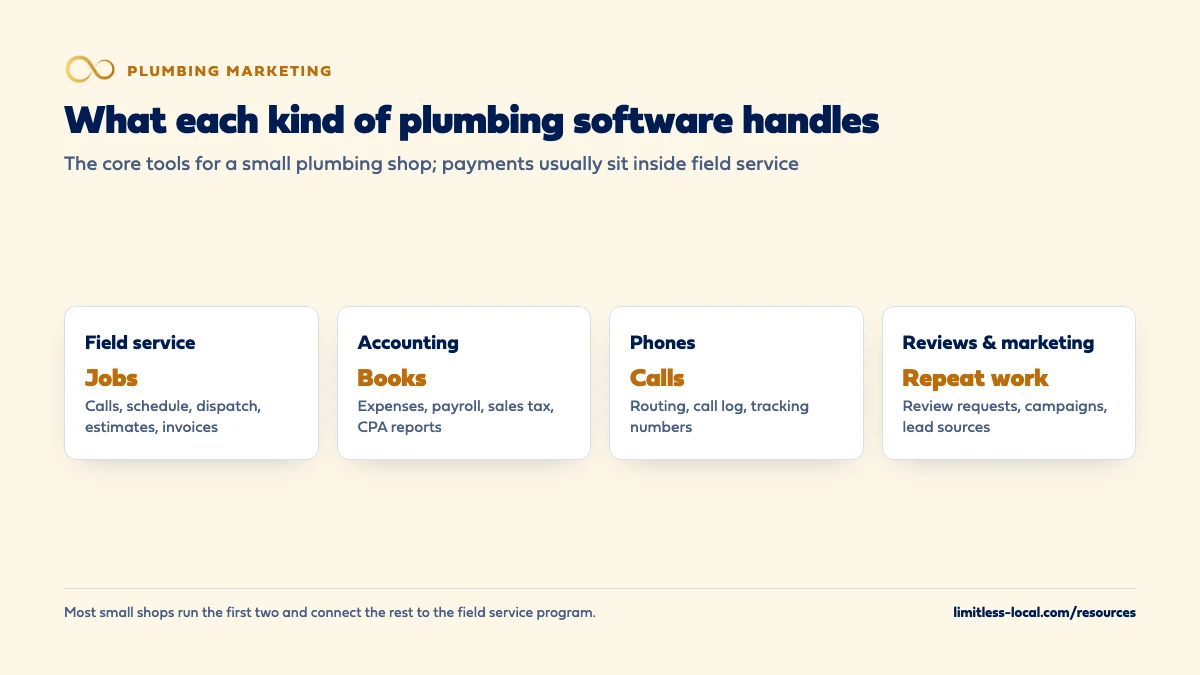
“Plumbing software” isn’t one product. It’s a handful of tools that each run one part of the business, and owners usually mean one of these:
- Field service software: the job side. Customers, calls, the schedule, dispatch, estimates, invoices. ServiceTitan, Housecall Pro and Jobber are the names most plumbers hear first.
- Accounting software: the books. Income, expenses, payroll, sales tax and what you hand your CPA.
- Payments: how techs take a card at the job and how customers pay an invoice link.
- Phones and call tracking: the business line, who answers, and which ad or listing each call came from.
- Review and marketing tools: review requests, emails to past customers and lead-source reports.
For a small shop, most of these either live inside the field service program or connect to it. That’s why the field service choice matters most.
What does field service software do in a plumbing shop?
It follows a job from the moment someone calls to the moment they pay. In a plumbing shop that usually means:
- Booking: the office, or the owner on the truck, creates the customer and the job while the caller is still on the line.
- Scheduling and dispatch: a calendar by plumber, so you can see who’s free and drop an emergency into the gap.
- Estimates: written quotes sent by text or email, with options the customer can choose from.
- The job on the tech’s phone: address, notes, photos, the pricebook and a checklist.
- Invoices and payment: sent from the truck when the work is done.
A good schedule view does more than list appointments. Jobber’s schedule, for example, puts a map next to the day’s calendar so you can see where each team member’s jobs are and drag a visit from one person to another. That’s the difference between guessing who’s closest to a burst pipe and seeing it. When you get to picking one, how to choose field service software for a plumbing business walks through the features and the demo questions.
Is a CRM the same thing as plumbing software?
Mostly, for a plumber. A CRM is the customer list with a status and a next step on every lead and estimate. Generic CRMs are built for sales teams; field service programs build the same thing into the job side, so the customer record, the open estimate and the finished job sit in one place.
Where small shops get caught is assuming they need a second program for leads. Usually the one you have already tracks open estimates and can remind someone to follow up; the gap is that nobody set it up or uses it every day. If estimates are slipping through the cracks, whether a plumbing company needs a CRM for leads and follow-up covers what to check before you buy anything new.
Where do payments and the POS fit in?
For a plumber, the “point of sale” is the customer’s kitchen, not a counter. Payment tools let a tech take a card from a phone or a small reader, send an invoice with a pay link, and take a deposit before a big job starts.
Most field service programs offer their own payments, and that’s usually simplest for a small shop, because each payment lands on the right job and the right customer without anyone typing it twice. A separate payment app can be cheaper per transaction, but then someone has to match payments to invoices by hand. What the best POS is for a plumbing business compares the options and what each really costs.
What does accounting software do that job software doesn't?
Job software knows what you sold. Accounting software knows what you spent and what you kept: payroll, truck payments, parts bills, insurance, sales tax and the reports your CPA needs. The two are meant to connect, not replace each other.
Check how the connection works before you rely on it. Housecall Pro’s QuickBooks Online sync, for example, typically runs one way, from Housecall Pro into QuickBooks: invoices, payments and new customers go across, but changes made to an invoice after its first sync have to be pushed again by hand, and an invoice deleted in Housecall Pro has to be deleted in QuickBooks too. Small details like that are where books drift.
The IRS says on its recordkeeping page that you can use any recordkeeping system suited to your business that clearly shows your income and expenses, and that employment tax records should be kept for at least four years. What accounting software suits a small plumbing business goes further on picking one.
Curious what your marketing is actually booking?
Get a free visibility audit — no obligation, no sales pitch.
Do I need separate software for phones and call tracking?
Often, yes, and it’s the piece small shops skip. Your phone is where plumbing jobs are won or lost, and most field service programs don’t run the phone line itself. Phone and call tracking tools handle three jobs:
- Routing: the business number rings whoever’s on call, not one person’s cell that’s in a crawlspace.
- A call log: every call, answered or missed, with a time and a number to call back.
- Tracking numbers: a different number on your ads, your Google profile and your website, so you know which one made the phone ring.
If your field service program includes phones or connects to call tracking, that saves typing the source by hand. Whichever you use, check that the call and the job end up linked, because that link is what tells you which marketing booked work and which only made noise.
Which software helps with reviews and marketing?
Most field service programs now carry a few marketing tools, and for a small shop they’re often enough:
- Review requests sent by text or email when a job is marked finished or paid.
- Email or text campaigns to past customers, such as a water heater check before winter.
- Estimate follow-ups that remind customers about a quote they haven’t approved.
- Lead-source reports that show which channels bring jobs and money.
Before paying for a separate review or email tool, see what your job software already does. A dedicated tool makes sense when you need something it can’t do, not because a sales rep called.
What should plumbing software tell me about my marketing?
One thing above all: which source each booked job came from, and what it paid. That only works if a lead source is on every job. Housecall Pro’s guide to lead sources says sources can be tracked on customers, jobs and estimates, and some are added automatically when the software knows where a customer came from. Jobber’s lead source report counts leads by source, how many reached a request, a quote, a job and an invoice, and the value of the first invoice.
That first-invoice view is worth knowing about. A customer who first called for a clogged drain and came back a year later for a water heater shows up with the drain invoice, so set your expectations for repeat work separately. Make the lead source a required field when the office books a call, and check the untagged jobs every week. Tracking which plumbing marketing books jobs covers the full setup.

What software does a one- or two-truck plumbing shop actually need?
Less than the sales demos suggest. A lean setup that covers almost everything:
- One field service program for customers, schedule, estimates, invoices and payments.
- One accounting program that your bookkeeper or CPA already knows, synced to the first.
- A business phone number that rings more than one person and keeps a call log.
- Your free Google Business Profile, kept current, with a review link going out after every job.
That’s it. Add call tracking once you’re paying for ads, and add anything else only when you can name the job it does that nothing you own already does. Two programs that talk to each other beat six that don’t.
What changes as the shop grows to three to five trucks?
The software stays the same kind of thing; you start using more of it. Usually that means:
- User permissions, so techs see their jobs but not the company’s numbers, and the office can book without changing prices.
- Service areas on the schedule. ServiceTitan’s glossary describes zones as groups of zip codes, color-coded on the dispatch board and schedule, which helps once trucks cover different towns.
- A real pricebook, so every tech quotes the same water heater the same way.
- Service plans or memberships, if you sell maintenance.
- Reports by tech and by job type, not just by month.
This is also the point where marketing starts to need the software’s numbers to make decisions, which is what growing a plumbing business past one or two trucks is about.
Can I get my customer list out if I switch software?
Check before you sign, not when you’re leaving. Your customer list, with addresses and job history, is worth more than the program it lives in, because it’s who you’ll market to for years.
Jobber’s client export, for example, lets an admin export the client list as a CSV or vCard file, including tags, property addresses, contact information and custom fields, and notes that client exporting is available on select plans. Ask every vendor the same three questions: can I export customers, jobs and invoices; which plan does that need; and who on my account can do it. Then make sure the account is in your name and your email, not a former office manager’s.
What mistakes do small plumbing shops make with software?
- Buying for the shop you hope to be. A program built for twenty trucks can bury a two-truck office in setup.
- Skipping setup. No pricebook, no lead sources, no review automation, so the software becomes an expensive calendar.
- Running two job lists. If the owner keeps half the jobs in a notebook or texts, the reports are wrong.
- Leaving lead source blank. Then nobody can say which marketing paid.
- Ignoring the techs. If the app is slow on a phone in a basement, they’ll stop using it.
A mid-priced program set up properly does more than the most expensive one used halfway.
Want to see where your company stands?
A free visibility audit shows where you show up on Google, Maps and AI answers, and what it's costing you in calls.
What's different about software for plumbing companies
Emergencies break the schedule. A burst pipe or a sewer backup can’t wait for tomorrow’s opening. Plumbing software has to make it easy to see who’s closest and slot an urgent call in, including after hours, which is where a map view and a phone that rings the on-call plumber earn their keep.
Big jobs need estimates with choices. Water heaters, repipes and sewer line work are where the money is, and customers often decide between options. Jobber’s optional line items let customers pick extra products or services and approve the quote with them, which is the same idea as offering a standard tank, a larger tank and a tankless option side by side.
Some jobs run over several visits. A repipe or a sewer replacement can take more than a day, so the software needs to handle multi-visit jobs without splitting them into separate invoices.
The caller isn’t always the owner. Tenants call, landlords and property managers pay. Software that keeps a separate billing address and service address saves the office from fixing invoices by hand.
A worked example: what one month of lead sources shows
These numbers are made up to show the math, not a benchmark for your market. Say a three-truck plumbing shop books 120 jobs in a month. Last month, the office left lead source blank on most calls, so the owner had no idea what paid. This month, lead source is a required field. The report shows, among other sources:
- Google search ads: $2,000 spent, 22 booked jobs, about $91 per booked job.
- Postcards: $1,200 spent, 6 booked jobs, $200 per booked job.
Without the software, both looked like “marketing.” With it, the owner can see the postcards cost more than twice as much per booked job, and can check whether those six jobs were bigger tickets before cutting them. The software didn’t make that decision. It made the numbers visible, which is all most small shops need from it to start spending smarter.
Frequently asked questions
Is plumbing software worth it for a one-truck plumber?
Usually, once you’re sending more than a few estimates a week or losing track of who owes you money. A basic field service plan replaces the notebook, the invoice book and the reminder you keep forgetting.
Does plumbing software include a website?
Check what your field service program offers. A booking form that drops requests straight into your schedule is useful; whether a site from your software vendor can rank in your towns is a separate question.
Can plumbing software answer my phone?
If your software offers AI or virtual answering, test it on real emergency calls before trusting it with them, and make sure a person can take over fast.
Should my techs use the app or just call the office?
Use the app for job notes, photos, checklists and payment, and the phone for anything urgent. Photos and notes in the app are what let the office quote the follow-up work without another visit.
What's a pricebook in plumbing software?
It’s your list of services and parts with set prices, so every tech quotes the same job the same way. It takes a few days to build and saves arguments for years.
How long does it take to switch plumbing software?
Plan on a few weeks: export customers, set up the pricebook and lead sources, train the office and techs, and run both side by side for a short overlap so no booked job falls through.
Key takeaways
- Plumbing software is a small set of tools; field service software is the core.
- Let job software own jobs and invoices, and accounting software own the books.
- Phones and call tracking are the piece small shops most often skip.
- Require a lead source on every job so the software shows what marketing booked work.
- Buy for the shop you have, set it up fully, and make sure you can export your customers.
Not sure what's working right now?
Start with a free visibility audit: rankings, Google profile, reviews and tracking, checked against your service area.
More in this section
- What accounting software suits a small plumbing business?
- How do I choose field service software for a plumbing business?
- How do I manage my plumbing business digitally?
- What is the best POS for a plumbing business?
- How should a plumbing company market to commercial customers?
Sources
- New Schedule — Jobber Help Center
- QuickBooks Online: Syncing Information from Housecall Pro — Housecall Pro Help Center
- Recordkeeping — Internal Revenue Service
- How to Use Lead Sources — Housecall Pro Help Center
- Lead Source Report — Jobber Help Center
- ServiceTitan Glossary (commonly used ServiceTitan terms) — ServiceTitan Help
- Export Client Information — Jobber Help Center
- Optional Line Items on Quotes — Jobber Help Center