
How many city pages should an electrician’s website have?

- How many town or service-area pages does an electrical contractor really need?
- Is there a right number of city pages for an electrician?
- Which towns should get a city page first?
- How do I tell if a town has enough for its own page?
- How far out should my city pages go?
- What happens if I build too many city pages?
- Should I make a page for every service in every town?
- What should an electrician's city page actually say?
- Do neighborhoods and ZIP codes need their own pages too?
- Will more city pages get me into the map pack in more towns?
- How do I know when to add another city page?
- What do I do with the thin city pages I already have?
- What's different about city pages for electricians
- A worked example: 120 pages or six
- Frequently asked questions
- Key takeaways
- More in this section
- Sources
The short version
- One page per town you can fill with real local jobs, reviews and photos.
- Start with the towns that already book most of your work, plus one or two you want more of.
- List every other town on a single service-areas page until it earns its own.
- Skip every-service-in-every-town pages: near-copies are what Google's doorway examples describe.
For electrical contractors deciding how many town pages to build, which towns earn one first, and when to stop.
Get a free visibility audit · Book a growth call
How many town or service-area pages does an electrical contractor really need?
An electrician’s website should have one city page for each town where you can write something true and specific: jobs you’ve done there, reviews from customers there, photos from local work and how quickly you get there. For most single-shop electricians that means a handful of towns to start, not dozens, with every other town listed on one service-areas page until it has enough real material for its own. Google’s spam policies name pages targeted at specific cities that funnel visitors to one page as doorway abuse, so the count should follow your job history, not a template.
That’s how we build town pages for electricians: we start with the towns that already book your best work, write each page from your own jobs and reviews, and add towns as the material builds up. Our local SEO page shows how town pages fit with your Google profile and listings, and our electrical contractor marketing page shows how it all works together. More questions like this one are in the electrical marketing questions library.
Is there a right number of city pages for an electrician?
No. Google doesn’t publish one, and there isn’t a count that works for every shop. What Google does publish is a set of warning signs. Its guidance on helpful, people-first content asks whether you’re producing lots of content in the hope that some of it performs in search, and whether you’re using extensive automation to produce it. Both describe generating a page for every town within an hour’s drive.
So the useful question isn’t “how many?” but “which towns can I write a genuinely useful page for?” That answer is your number. In our view, for a single-shop electrician it starts small: the towns where most of your jobs already happen, plus one or two you’re trying to grow.
Which towns should get a city page first?
Start from your own job records, not a map. Pull the last year of jobs from ServiceTitan, Housecall Pro, Jobber or whatever you run, and sort them by town. Then look at three things:
- Where the work already is. The towns that book the most jobs, and especially the most of the jobs you want: panel upgrades, EV chargers, generators, rewires, commercial service.
- Where you want more. A town with newer subdivisions full of EV owners, or an older part of the county with a lot of original wiring, can be worth a page if you already have some jobs there to write about.
- Where you can actually get to. A town forty minutes out that you’d rather not drive to for a service call shouldn’t have a page asking for service calls.
The towns that score on all three go first. If you’re not sure where your best jobs come from, tracking which marketing brings in real jobs sets up the lead source and job records this decision depends on.
How do I tell if a town has enough for its own page?
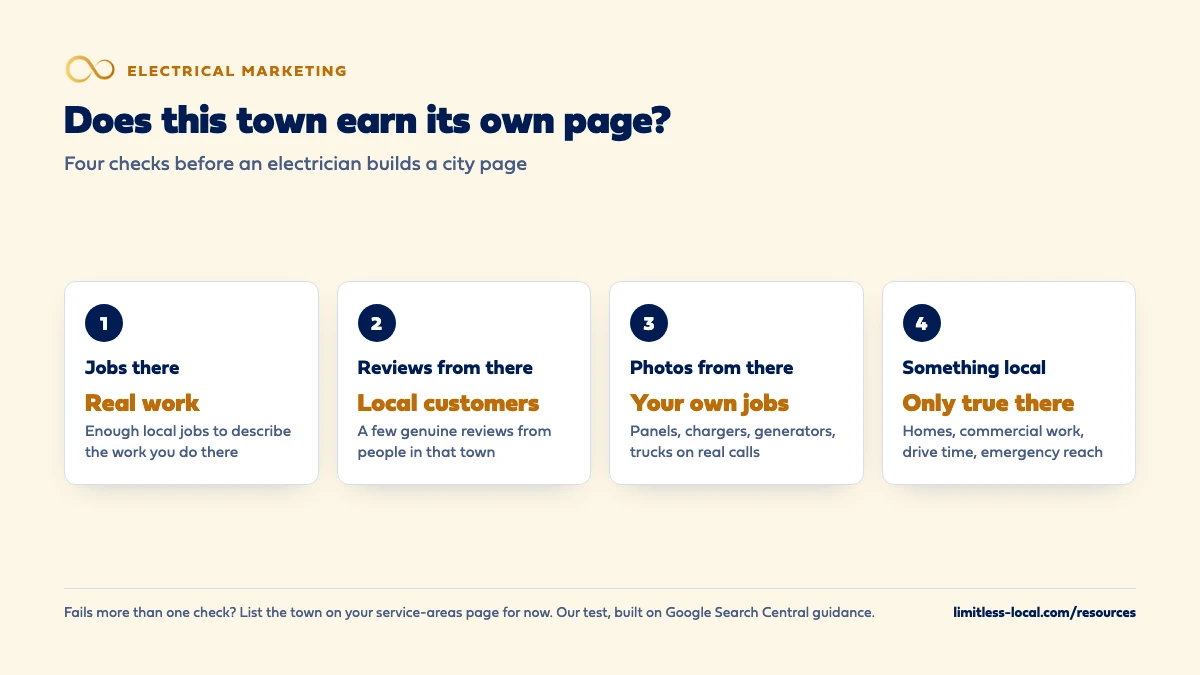
Run each town through four checks. If it fails more than one, it isn’t ready for its own page yet:
- Jobs there. Enough real jobs in that town that you can describe the kinds of work you do there, with a couple of short examples (no customer names without permission).
- Reviews from there. A few genuine reviews from customers who live in that town.
- Photos from there. Your own photos from jobs in that town: panels, chargers, generators, your trucks on real calls.
- Something local to say. The kind of homes you work in there, the commercial work you do there, how fast you can get there, and what you see on jobs in that town that you don’t see in the next one.
These checks are our test, not Google’s. But they line up with the questions in Google’s helpful content guidance, which asks whether a page provides original information and clearly shows first-hand expertise. A page built from your own jobs in a town passes that kind of question; a page with the town name swapped in doesn’t.
How far out should my city pages go?
No farther than your Google Business Profile service area, and usually not that far. Google’s help page on managing service areas says you can set up to 20 service areas by city, postal code or other area, and that the boundaries of your overall area shouldn’t be more than about two hours of driving time from where your business is based. It also asks you to be as specific and accurate as possible.
That gives you an outer limit, not a target. In our view, a city page is a promise that you want work in that town and can get there in a reasonable time. If the honest answer for a far-off town is “only for a big job,” say that on the service-areas page instead of building a page that invites service calls you’ll turn down.
What happens if I build too many city pages?
Two things, and neither helps. The first is a spam risk. Google’s spam policies define doorway abuse as pages created to rank for specific, similar searches that lead people to intermediate pages that aren’t as useful as the final destination. Their examples include pages targeted at specific regions or cities that funnel users to one page, and substantially similar pages that are closer to search results than a clearly defined, browseable hierarchy. Sites that break the policies can rank lower or drop out of results.
The second is that near-copies don’t multiply your chances. Google’s guide to its ranking systems says that when pages are very similar, its deduplication systems show only the most relevant ones, and its site diversity system generally won’t show more than two listings from the same site in the top results. Twelve almost identical town pages mostly end up competing with each other.
Curious what your marketing is actually booking?
Get a free visibility audit — no obligation, no sales pitch.
Should I make a page for every service in every town?
Almost never. That’s how electrical sites end up with “EV Charger Installation in Town A,” “EV Charger Installation in Town B” and a hundred more pages that say the same thing. In our view, it’s the clearest version of the substantially similar pages Google’s doorway examples describe.
A better order: one strong page for each kind of work, one page for each town that earns it, and links between them. A service-plus-town page only makes sense when a big town has enough of its own material for that one service to fill a page, such as a steady run of panel upgrades in one older neighborhood with its own photos and reviews. Which service pages an electrical contractor needs covers the service side of that structure.
What should an electrician's city page actually say?
Things that are only true of that town. For an electrical contractor, that usually means:
- The work you do there. If one town is mostly older homes with original panels and you do a lot of upgrades and rewires there, say so. If another has new subdivisions where you install EV chargers, say that.
- Commercial work in that town, if you do it: the kinds of buildings and businesses you serve there.
- Local reviews and photos from customers and jobs in that town.
- How you serve it. Drive time from your shop, whether you take emergency calls there, and any area you don’t cover.
- Questions people there ask your office, answered in plain words.
The page should also do the basics every page on your site does: a tap-to-call number, a short quote request and your license and insurance details. What an electrician’s website needs to get more calls covers those.
Do neighborhoods and ZIP codes need their own pages too?
Usually not. Mention the neighborhoods you work in on the town page itself, in sentences that say something (“we’ve replaced a lot of original panels in the older homes near downtown”), rather than splitting each one onto a page of its own.
Avoid the long list at the bottom of the page, too. Google’s spam policies list blocks of text naming the cities and regions a page is trying to rank for as an example of keyword stuffing. A short, readable list of the towns you serve on your service-areas page is fine; a paragraph of forty town and ZIP names stuffed into every footer isn’t.

Will more city pages get me into the map pack in more towns?
Not by themselves. The map pack comes from your Google Business Profile, and Google’s local ranking help says local results are mainly based on relevance, distance and popularity, which it also calls prominence. Distance is how far your business is from the person searching, and a web page doesn’t change that.
Google’s help page does say prominence draws on information such as how many websites link to your business and how many reviews you have, and that complete, detailed business information helps relevance. A good town page can support that and help you show up in the regular results for searches that name the town. For the Maps side, getting into the map pack and optimizing your Google Business Profile go further.
How do I know when to add another city page?
Watch two things. First, your own job records: when a town on your service-areas page starts producing steady jobs, reviews and photos, it’s ready for its own page. Second, Google Search Console. Its Performance report shows which search queries showed your site and brought clicks, and you can group the data by query or by page. If searches that name a town keep showing your site but you have no page for that town, that’s a reason to look at it.
Search Console also tells you when a town page isn’t pulling its weight. A page that shows up for almost nothing after several months, and has no calls or quote requests tied to it, is a candidate for a rewrite with better local material, or for merging into the service-areas page. Remember the honest ramp: SEO typically takes three to six months to show meaningful organic growth, so judge new town pages on months, not weeks.
What do I do with the thin city pages I already have?
Cut back before you add. Sort the existing pages into towns where you have real material and towns where you don’t. Rewrite the keepers with local jobs, reviews and photos, and give each a title that says what’s specific about it; Google’s title link guidance warns against long boilerplate titles that vary by only a single piece of information.
For the rest, Google’s SEO Starter Guide suggests redirecting duplicate pages to the URL that best represents the information, so most thin town pages can be redirected to your service-areas page. And for pages that are clearly mass-produced, the spam policies are direct: if you’re hosting that kind of content, exclude it from Search.
Not sure which of these is costing you jobs?
A free visibility audit checks the Google profile, reviews, site and tracking, and shows what to fix first.
What's different about city pages for electricians
Towns differ in the work they produce. A town full of older homes tends to bring panel upgrades, rewires and troubleshooting on aging wiring. Newer subdivisions bring EV chargers, smart-home work and generator hookups. A commercial corridor brings tenant work and service contracts. That’s real local material, and it’s the reason an electrician’s town pages can be genuinely different from each other.
Permits and inspections are local. In our experience, the permit office and inspection process an electrician deals with can change from one city or county to the next. If you pull permits in a town regularly and know how it works there, saying that you handle the permit and inspection is useful, specific content. Don’t state a licensing or permit rule on the page unless you’ve checked it with that jurisdiction.
Emergency reach matters more than in many trades. No power to half the house is a call people want answered fast. Be honest on each town page about whether you take emergency calls there and how quickly you can usually get there.
A worked example: 120 pages or six
This shop is made up to show the math. It offers eight kinds of electrical work (repairs, panel upgrades, EV chargers, generators, lighting, rewiring, smart-home work and commercial service) and lists 15 towns in its Google service area. Building a page for every service in every town is 8 times 15, or 120 pages, nearly all of them near-copies.
The alternative is one service-areas page that lists all 15 towns, plus town pages for the five towns where the shop has years of jobs, reviews and photos. That’s six pages of town content, each with something real on it, linked to eight service pages. The other ten towns get their own pages later, one at a time, as jobs and reviews from them build up.
Our Essentials package ($3,500 a month) includes a content sprint of up to 10 pages. For a shop like this, we’d rather spend those on the service pages for the work it most wants and its strongest town pages than on ten near-copies. A free visibility audit is where we’d look at which of your towns already have the material for a page.
Frequently asked questions
Do city pages need to be long?
No. Google’s helpful content guidance says it doesn’t have a preferred word count. A town page needs enough to be useful to someone in that town, which usually means real local detail rather than more words.
Can I use AI to write my city pages?
It can help draft or tidy a page, but Google’s spam policies give using generative AI tools to generate many pages without adding value for users as an example of scaled content abuse. The local jobs, reviews and photos have to come from you.
Should city pages be in my main menu?
Link them from a service-areas page in your main menu. Google’s SEO Starter Guide recommends organizing a site so people and search engines can understand how pages relate, and a town page nobody can reach from the menu looks built for search, not for visitors.
Should I make city pages for towns outside my service area?
No. If you wouldn’t take a normal job there, a page asking for jobs there sets up calls you’ll turn down. Keep pages inside the area you’d actually drive to.
What about towns I serve but rarely get calls from?
List them on your service-areas page so people there know you cover them. If one starts producing steady jobs and reviews, it can get its own page.
Key takeaways
- There’s no magic number of city pages; the count is the number of towns you can write a genuinely useful page for.
- Start with the towns that already book most of your best jobs, plus one or two you’re actively trying to grow.
- List every other town on one service-areas page, inside a Google service area of up to 20 areas.
- Skip every-service-in-every-town pages and long lists of town names; both match what Google’s spam policies describe.
- Add a town page when its jobs, reviews and photos build up, and judge it over months in Search Console and your job records.
Want a second set of eyes on your setup?
We'll look at how you show up locally and where calls are leaking, then send you a plain-English breakdown.
More in this section
- Which service pages should an electrical contractor's website have?
- What should an electrician's website have to get more calls?
- Should electricians show prices on their website?
- What should I fix on my electrical website before investing in SEO?
- How do I optimize my electrician Google Business Profile?
Sources
- Spam policies for Google web search — Google Search Central
- A guide to Google Search ranking systems — Google Search Central
- Creating helpful, reliable, people-first content — Google Search Central
- Manage your service areas for service-area & hybrid businesses — Google Business Profile Help
- Tips to improve your local ranking on Google — Google Business Profile Help
- Performance report (Search results): Overview and basic setup — Search Console Help
- Search Engine Optimization (SEO) Starter Guide — Google Search Central
- Influencing your title links in search results — Google Search Central