
How do I build HVAC city pages without them looking like spam?
- How do I make HVAC service area pages that Google won't treat as doorway pages?
- What does Google consider a doorway page?
- What makes an HVAC city page look like spam?
- What should an HVAC city page say instead?
- Which towns deserve their own page?
- How many city pages is too many?
- Can I use a template or AI to build city pages?
- Should I make pages for every service in every town?
- How should city pages fit into my website?
- Will a city page get my HVAC company into the map pack in that town?
- What if my site already has dozens of thin city pages?
- What's different about city pages for HVAC companies
- A worked example: 72 pages or 5
- Frequently asked questions
- Key takeaways
- More in this section
- Sources
The short version
- Google's spam policies list city pages that funnel visitors to one page as doorway abuse.
- A useful city page has local jobs, local reviews, local photos and real drive times; a doorway has a swapped town name.
- Fewer, stronger pages beat a page for every town, let alone a page for every service in every town.
- City pages help in the regular results and with homeowners; they don't create a Maps listing in that town.
For HVAC owners who serve several towns and want pages for them, without getting caught by Google’s rules on doorway pages.
Get a free visibility audit · Book a growth call
How do I make HVAC service area pages that Google won't treat as doorway pages?
Build a city page only for a town where you can say something true and specific: the jobs you’ve done there, reviews from customers there, the homes and equipment your crews see there, and how quickly you get there. Google’s spam policies name pages targeted at specific cities that funnel visitors to one page as doorway abuse, so a stack of copies with the town name swapped is the risk, not the strategy. Start with the few towns that bring most of your work, give each page its own content, title and place in your site’s menu, and add more only when you have real material.
That’s how we approach location pages: towns with real material first, and nothing published that we’d be embarrassed for a homeowner from that town to read. Service and location pages are part of the content work in our local SEO, and the HVAC marketing page shows how it fits with ads and follow-up. The HVAC marketing guide covers the map pack and local search more broadly, and the rest of the HVAC marketing questions library goes question by question.
What does Google consider a doorway page?
Google’s spam policies define doorway abuse as sites or pages created to rank for specific, similar searches that lead people to intermediate pages that aren’t as useful as the final destination. The examples it lists read like a description of the classic contractor city-page setup:
- Multiple domain names or pages targeted at specific regions or cities that funnel users to one page.
- Pages generated to funnel visitors into the actual usable or relevant portion of a site.
- Substantially similar pages that are closer to search results than a clearly defined, browseable hierarchy.
- Multiple websites with slight variations to the URL and home page to maximize their reach for any specific search.
The stakes are spelled out on the same page: sites that violate the policies may rank lower or not appear in results at all, and Google detects violations through automated systems and, when needed, human review that can lead to a manual action.
What makes an HVAC city page look like spam?
Most problem city pages share a few traits:
- The same text with the town name swapped. “Looking for reliable AC repair in Town A?” on one page and “Town B” on the next.
- A wall of town names. Google’s spam policies list blocks of text naming the cities and regions a page is trying to rank for as keyword stuffing.
- Titles that differ by one word. Google’s title link guidance calls out long boilerplate titles that vary by only a single piece of information.
- Pages nobody can reach from the menu, that exist only to send a visitor to the contact form.
- Mass-produced pages. The spam policies call it scaled content abuse when many pages are generated mainly to manipulate rankings rather than help users, typically large amounts of unoriginal content with little to no value, no matter how it’s created.
If a homeowner in Town B would read your Town B page and learn nothing they couldn’t learn on the home page, that’s the test failing.
What should an HVAC city page say instead?
Things that are only true of that town:
- Jobs you’ve done there. The kinds of calls you run in that town, with a couple of short examples (no customer names without permission).
- Reviews from customers there. Two or three reviews where the customer lives in that town.
- Photos from jobs there. Your trucks and techs on real calls, with descriptive alt text.
- The homes and systems you see. Older neighborhoods with original ductwork, newer subdivisions with heat pumps, whatever is true.
- How you serve it. Drive time from your shop, whether you offer same-day service there, and which services you offer there.
- Local questions. Answers to the questions homeowners in that town actually ask your office.
Google’s guidance on helpful, people-first content asks whether content provides original information and first-hand expertise, and whether readers would leave feeling they learned enough to reach their goal. A town page built from your own job history passes those questions in a way a template can’t.
Which towns deserve their own page?
Start with the towns that already bring most of your work, plus any town you specifically want more of and can serve well. For each one, ask: do we have enough jobs, reviews and photos from there to fill a page that’s clearly different from the others? If not, that town goes on the general service-area page for now.
Deciding where you want to win is a separate question from how to write the page. If you haven’t settled it, start with deciding which cities and ZIP codes to target, then build pages for the towns at the top of that list.
Curious what your marketing is actually booking?
Get a free visibility audit — no obligation, no sales pitch.
How many city pages is too many?
There’s no number in Google’s guidance, but there are warning signs. Its helpful content guidance lists producing lots of content in the hope that some of it performs well in search, and using extensive automation to produce content, as signs of search engine-first content.
Google’s guide to its ranking systems also explains why near-copies don’t multiply your chances. When pages are very similar, its deduplication systems show only the most relevant ones. And its site diversity system generally won’t show more than two listings from the same site in the top results. Ten nearly identical town pages competing for one search mostly compete with each other.
In our view, the right count is the number of towns where you can write a page you’d be comfortable showing a homeowner from that town. For most single-location HVAC shops that’s a handful, not dozens.
Can I use a template or AI to build city pages?
A consistent layout is fine. Every town page can have the same sections (local jobs, local reviews, services, how to book) as long as what fills them is different. The problem is identical or nearly identical content, not identical design.
Generating the content is where the line sits. Google’s spam policies give using generative AI tools or similar tools to generate many pages without adding value for users as an example of scaled content abuse, and they also list automated rewording, such as swapping synonyms, as a way scraped content gets disguised. A tool can help draft or tidy a page, but the local details, photos and reviews have to come from your own jobs, and someone who knows the town should read it before it goes up.
Should I make pages for every service in every town?
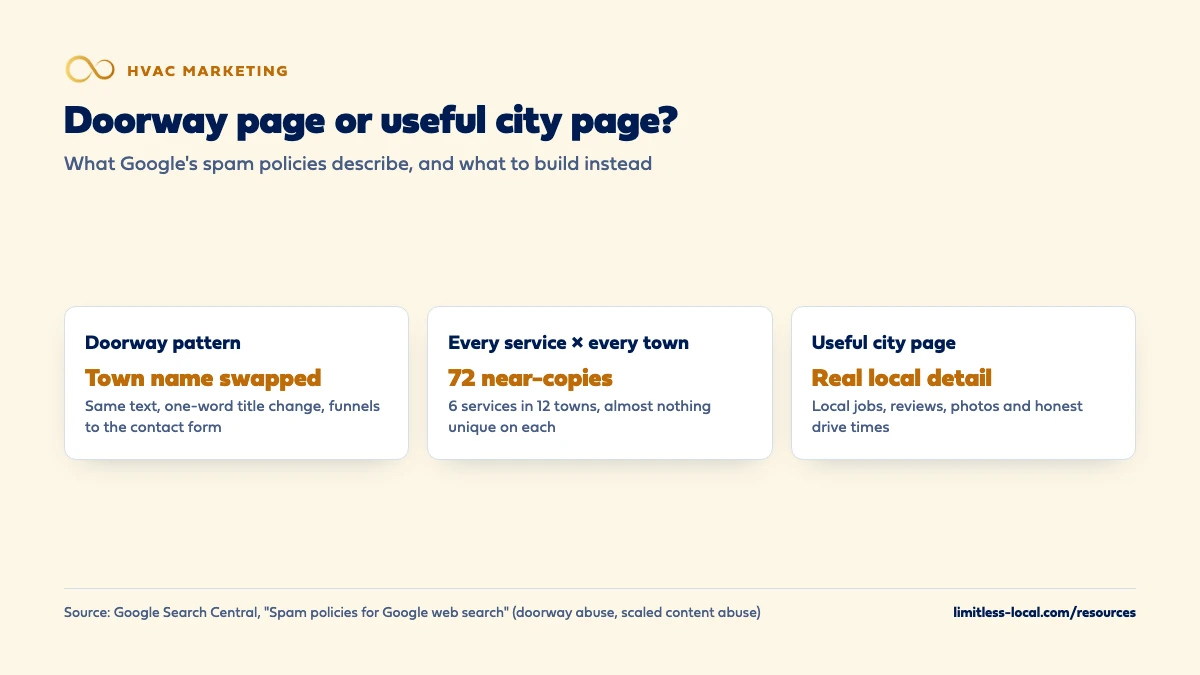
That’s how sites end up with hundreds of pages nobody reads. Six services in twelve towns is 72 pages, and almost none of them can carry genuinely different content. In our view, that’s very close to the substantially similar pages Google’s doorway examples describe.
A safer order: one strong page per service (covered in making HVAC service pages rank), one page per town that covers what you do there, and a service-plus-town page only when a big town has enough of its own material for that service to fill one. If you’re expanding into a town where nobody knows you yet, marketing in a new city covers more than the page.

How should city pages fit into my website?
Make them part of the site, not a side door. One of Google’s doorway examples is pages that are closer to search results than a clearly defined, browseable hierarchy, so the fix is structure:
- A “Service Areas” page in the main menu that links to each town page.
- Clear addresses grouped together, like
/service-areas/town-name/. Google’s SEO Starter Guide recommends descriptive URLs and organizing a site so people and search engines can see how pages relate. - Each town page linking to the relevant service pages, and service pages linking back to the towns they serve.
- Link text that names the town or service. Google’s link best practices say every page you care about should have a link from at least one other page.
If you can’t find a natural place to link a town page from, that’s a sign it was built for Google, not for visitors.
Will a city page get my HVAC company into the map pack in that town?
Not by itself. The map pack comes from your Google Business Profile, and Google’s local ranking help says local results are mainly based on relevance, distance and popularity. A web page doesn’t move your shop closer to a searcher.
Google’s Business Profile guidelines also say a service-area business should have one profile for its central office with a designated service area, that a rented address you don’t operate from (a virtual office) isn’t eligible, and that you shouldn’t create more than one profile per location. So a city page plus a mailbox in that town isn’t a shortcut; it’s a suspension risk. If you’ve opened a real, staffed second shop, that’s a different situation, covered in marketing a second HVAC location. For the Maps side in general, see getting back into the map pack.
What a good town page can do is help you show up in the regular results for searches that name the town, and give a homeowner there a reason to pick you once they find you.
What if my site already has dozens of thin city pages?
Clean them up instead of adding more:
- Sort them. Keep the towns where you have real material; mark the rest.
- Rewrite the keepers with local jobs, reviews and photos, and give each a distinct title.
- Merge or remove the rest. The Starter Guide suggests redirecting duplicate pages to the URL that best represents the information, and deleting content that’s no longer relevant.
- Fix the structure so every page that’s left is linked from your service-areas page.
For pages that clearly fit the scaled content description, Google’s spam policies are direct: if you’re hosting such content on your site, exclude it from Search. Removing pages that rank for nothing and book no jobs costs you very little.
Not sure which of these is costing you jobs?
A free visibility audit checks the Google profile, reviews, site and tracking, and shows what to fix first.
What's different about city pages for HVAC companies
Towns really do differ for HVAC. Housing age, the mix of gas furnaces, heat pumps and boilers, and how many homes still have original ductwork can change from one town to the next. That’s legitimate local material most trades don’t have, and it’s the opposite of a swapped town name.
Drive time is part of the offer. A no-heat call in a town forty minutes away is a different promise than one ten minutes from the shop. Saying honestly how fast you can get to each town helps homeowners and keeps you from booking calls you can’t reach in time.
Utilities and local rules vary. Rebate programs, utility companies and local permit steps for system replacements can differ by town. Where you know them firsthand, they’re useful, specific content for a replacement shopper.
Seasonal load isn’t even. If one town’s calls spike harder in a heat wave, say what your capacity looks like there, instead of promising the same response everywhere.
A worked example: 72 pages or 5
This shop is made up to show the math. It sells six services and its trucks cover twelve towns. The “every service in every town” approach is 6 times 12, or 72 pages, almost all of them near-copies, which is close to the pattern Google’s doorway examples describe.
The alternative: one service-areas page listing all twelve towns for people to check, plus town pages for the four towns where the shop has years of jobs and reviews. That’s 5 pages, each with something real on it. The other eight towns get pages later, as the jobs, reviews and photos from them build up.
Our Essentials package ($3,500 a month) includes a content sprint of up to 10 pages. For a shop like this, we’d rather spend those on six service pages and the four strongest town pages than on ten near-copies. A free visibility audit is where we’d look at which towns you already have the material for.
Frequently asked questions
Can I list all the towns I serve on one page?
Yes, as information for people: a short list or map so homeowners can check you come to them. What Google’s spam policies call keyword stuffing is a block of town names written to rank, not to inform.
Should I rent an office in a town so I can rank there?
Not a virtual one. Google’s Business Profile guidelines say a rented address you don’t operate from isn’t eligible, and service-area businesses should have one profile for their central office with a service area.
Can thin city pages hurt the rest of my website?
They can. Google’s spam policies say violating sites may rank lower or not appear at all, and its ranking systems guide says site-wide signals are used alongside page-level ones. Cleaning up a pile of thin pages is a reasonable precaution.
Can I use the same FAQ on every city page?
A question or two that genuinely applies everywhere is fine. If the whole FAQ is identical across pages, it adds to the near-copy problem; give each town the questions its homeowners actually ask.
How long until a new city page shows up in Google?
Google’s SEO Starter Guide says some changes take effect in a few hours and others take several months, and suggests waiting a few weeks before judging. Make sure the page is linked from your service-areas page so Google can find it.
Do I need a separate website for each town?
No. Google’s doorway examples include multiple websites with slight variations and multiple domains aimed at specific cities. One site with good town pages is simpler and safer.
Key takeaways
- Google’s spam policies list pages aimed at specific cities that funnel visitors to one page as doorway abuse.
- Build a town page only where you have local jobs, reviews, photos and honest drive times to put on it.
- Near-copies don’t multiply your chances: Google deduplicates similar pages and generally shows no more than two listings per site.
- Make town pages part of the site’s structure, linked from a service-areas page in the menu.
- City pages don’t create a Maps presence; a virtual office for that town isn’t eligible for a Business Profile.
Want a second set of eyes on your setup?
We'll look at how you show up locally and where calls are leaking, then send you a plain-English breakdown.
More in this section
- What pages should an HVAC company website have?
- How do I get HVAC service pages to rank for repair and install?
- How do I make my HVAC company look trustworthy online?
- How does an HVAC company earn backlinks?
- Does my HVAC company need landing pages for Google Ads?
Sources
- Spam policies for Google web search — Google Search Central
- Creating helpful, reliable, people-first content — Google Search Central
- A guide to Google Search ranking systems — Google Search Central
- Search Engine Optimization (SEO) Starter Guide — Google Search Central
- Influencing your title links in search results — Google Search Central
- Link best practices for Google — Google Search Central
- Guidelines for representing your business on Google — Google Business Profile Help
- Tips to improve your local ranking on Google — Google Business Profile Help