
How do I know if AI search is sending my roofing company leads?

- How can a roofer tell whether ChatGPT, Gemini or Google's AI Overviews are bringing in estimate requests?
- How does AI search send a roofing company a lead?
- Step 1: Where do ChatGPT and Gemini visits show up in Google Analytics?
- Why don't Google AI Overviews show up as AI traffic?
- Step 2: How do I catch calls from homeowners who found me through AI?
- Step 3: How do I catch AI-driven calls that never touch my website?
- Step 4: Are AI search leads turning into signed roofing jobs?
- How often should a roofer check for AI search leads?
- How much of my roofing business should come from AI search?
- What should I do once I can see AI search leads?
- What's different about measuring AI search leads for roofing companies
- A worked example: one month of AI search leads
- Frequently asked questions
- Key takeaways
- More in this section
- Sources
The short version
- Google Analytics: Reports, then Acquisition, then Traffic acquisition; look at the AI Assistant channel.
- Google's AI Overviews and AI Mode clicks count as Organic Search, not AI Assistant.
- Use call tracking on your site so calls from AI visitors keep their source.
- Ask every caller how they found you, with an AI option, and follow each lead to a signed job.
For roofing owners who keep hearing about AI search and want to know, with their own numbers, whether it’s sending calls and estimate requests that turn into signed jobs.
Get a free visibility audit · Book a growth call
How can a roofer tell whether ChatGPT, Gemini or Google's AI Overviews are bringing in estimate requests?
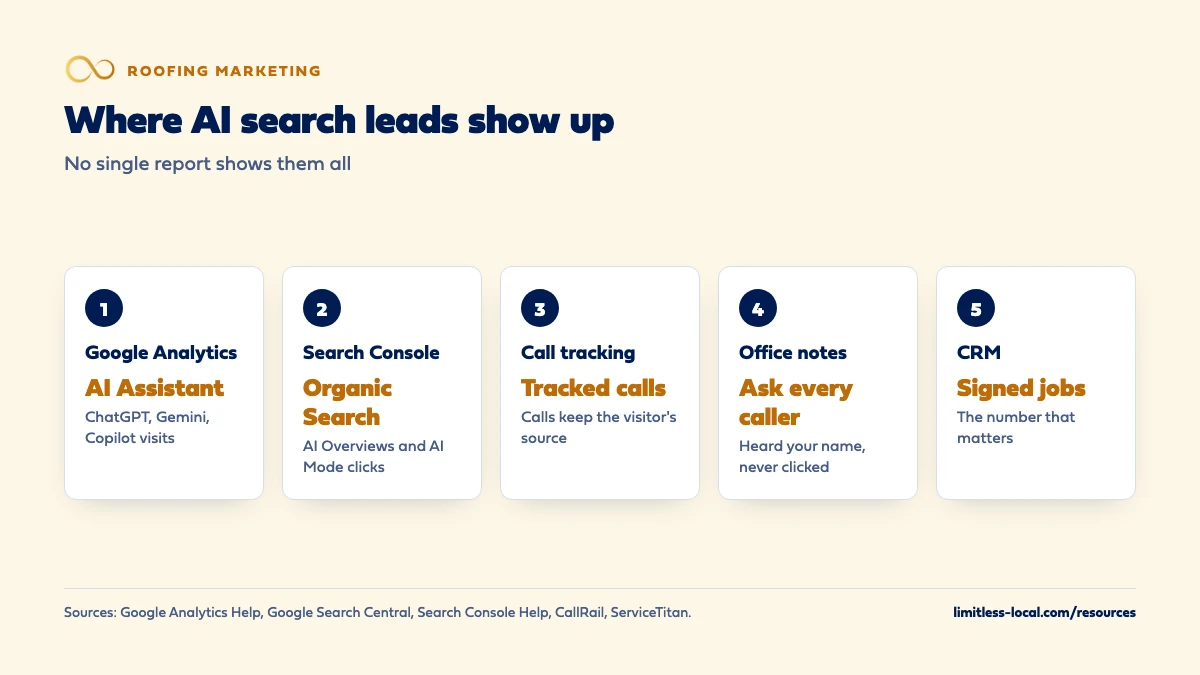
Check three places, because no single report shows it all. Google Analytics has an AI Assistant channel for visits from tools like ChatGPT, Gemini and Copilot, but clicks from Google’s own AI Overviews and AI Mode are counted as Organic Search and in Search Console’s overall Web numbers, so they can’t be pulled out on their own. Website call tracking keeps the source on calls from those visitors, and a lead-source question your office asks on every call catches homeowners who heard your name in an AI answer and phoned without visiting your site; then follow each of those leads through to a signed contract.
Measuring this is the same job as measuring any other channel: tie every call and estimate request to where it came from, then to the jobs that sign. That tracking is part of our local SEO work for roofing companies. If you’re still deciding whether SEO is worth it with AI search in the picture, is SEO worth it for roofers covers that, and the roofing marketing questions library goes one question at a time.
How does AI search send a roofing company a lead?
Three ways, and each one shows up in a different report:
- A click from an AI assistant. ChatGPT can search the web and answer with links to relevant sources; responses that use search may include citations a person can open (OpenAI Help Center). A homeowner who clicks through to your site arrives as a website visit.
- A click from Google’s AI features. AI Overviews and AI Mode show links to supporting web pages (Google Search Central). Those clicks arrive as Google search traffic.
- No click at all. In our judgement, this one is common for roofers: the answer names your company, and the homeowner searches your name or calls the number from your Google profile. Nothing in your analytics links that call back to the AI answer.
Roofing questions also split two ways. Some homeowners are researching (repair or replace, what hail damage looks like, how claims work) and may not need a roofer for months. Others are hiring now. The first kind reaches you through useful pages; the second through listings and local pages. How roofers get recommended by ChatGPT covers what those tools read.
Step 1: Where do ChatGPT and Gemini visits show up in Google Analytics?
In the AI Assistant channel. Google Analytics defines it as the channel by which users arrive at your site from sources like ChatGPT, Gemini, Deepseek, Copilot or Grok (Google Analytics Help). To see it:
- Open Google Analytics and select Reports.
- Select Acquisition, then Traffic acquisition (Google Analytics Help).
- Find the AI Assistant row and set the date range to at least a few months, so a single storm week doesn’t skew it.
The same report shows key events by channel. If you’ve marked your estimate-request form and click-to-call button as key events, you can see how many of those AI Assistant visits actually asked for an estimate, not just how many showed up.
Why don't Google AI Overviews show up as AI traffic?
Because Google files them under search. The AI Assistant channel definition says it excludes Google’s AI Overviews and AI Mode, and the Organic Search channel definition says it includes them (Google Analytics Help). Google’s guidance for site owners says sites appearing in AI Overviews and AI Mode are included in the overall search traffic in Search Console’s Performance report, within the Web search type (Google Search Central).
Search Console’s help adds how they’re counted: clicking a link in an AI Overview counts as a click, and an AI Overview occupies a single position, with every link in it assigned that same position (Search Console Help). In our reading, that means you can’t separate AI Overview clicks from your other Google clicks in either tool. What you can watch is your overall organic numbers for the research-style questions roofers get, and whether calls from organic visitors are holding up.
One more gap: Google Analytics defines Direct as a visit from a saved link or a typed-in address, and Unassigned as what it uses when no channel rule matches. If an AI app doesn’t pass along where the visit came from, or a homeowner copies your web address from an answer, the visit may land in one of those instead. That’s our reading; Google doesn’t document how each AI app hands off visits.
Step 2: How do I catch calls from homeowners who found me through AI?
In our judgement, many roofing leads still come in by phone, so a website visit isn’t the end of the trail. Call tracking with dynamic number insertion fills the gap: CallRail describes a website pool as numbers that swap based on how a lead reaches your website, capturing visitor-level data such as the pages visited (CallRail Help). When a homeowner arrives from ChatGPT and calls the number on your storm damage page, the call keeps that source.
Two practical notes, in our judgement. Put the tracked number on every page an AI tool might send people to, including older blog posts that answer homeowner questions. And keep your main number on your Google profile and listings consistent; swapping numbers belongs on the website, not in your business listings.
Curious what your marketing is actually booking?
Get a free visibility audit — no obligation, no sales pitch.
Step 3: How do I catch AI-driven calls that never touch my website?
Ask. A homeowner who hears your name from ChatGPT and then taps call on your Google profile shows up in Business Profile performance as a call: Google counts the number of times a customer clicked the call button on your profile (Google Business Profile Help). Nothing there tells you an AI answer started it.
So the office has to record it. Field service software already has a place for this; in ServiceTitan’s roofing edition, a CSR closing out a call that didn’t book selects a marketing campaign and logs a follow-up (ServiceTitan Help). In our judgement:
- Add “ChatGPT or another AI tool” and “Google AI answer” as options in your lead-source list.
- Have whoever answers ask “How did you hear about us?” on every new call, and write down the first answer.
- Allow more than one answer. Roofing leads often have several touches: a yard sign, a door hanger, a neighbor, then a search. Door knocking versus online marketing covers how canvassing fits in.
Step 4: Are AI search leads turning into signed roofing jobs?
This is the number that matters, and it takes longer to see in roofing than in most trades. Between the first call and a signed contract there’s an inspection, an estimate, often an adjuster’s visit, and sometimes a spouse or a second bid. In our judgement, a lead from an AI answer in April may not sign until summer, so judge it over a season, not a week.
The method is the same as for any channel: carry the lead source from the first call into your CRM or field service software, through the estimate, to the signed job and its contract value. Tracking which roofing leads sign walks through setting that up. Once it’s in place, AI search is just one more row in the report.
How often should a roofer check for AI search leads?
In our judgement, monthly is enough for the numbers, plus a look after any big storm. Roofing demand spikes after hail and wind, and so do research questions; a month with a storm and a month without aren’t comparable. Compare each month to the same month last year once you have the history.
Alongside the numbers, a monthly spot check is worth five minutes: ask ChatGPT, Gemini and Google a few real homeowner questions with your town in them, and note whether your company or your pages appear. OpenAI says ChatGPT may use an approximate location from the IP address for local results, so include the town in the question.
How much of my roofing business should come from AI search?
There’s no published benchmark we’d trust for roofers, and we wouldn’t quote one. Your own numbers, collected the way this page describes, are the only figure that means anything for your company.
Google has said one thing worth knowing: it has seen that clicks from results pages with AI Overviews are higher quality, meaning people are more likely to spend more time on the site (Google Search Central). That’s Google’s statement about search overall, not about roofing leads, and time on site isn’t a signed job. Treat it as a reason to measure, not a forecast.
What should I do once I can see AI search leads?
In our judgement, use the numbers the way you’d use any channel’s:
- If AI visits come in but don’t call, look at the pages they land on. Are the phone number and estimate button easy to find? Does the page answer the question that sent them?
- If AI-driven calls come in but don’t sign, listen to the recorded calls. Are they research questions from homeowners months away from a roof, or real jobs being lost at the estimate?
- If you see almost nothing, start with the basics AI tools read: your site, your Google profile, consistent listings and pages with real facts. Whether ChatGPT can write your pages covers one shortcut to avoid.
And if someone else is doing this work for you, ask them to show AI Assistant visits, tracked calls and signed jobs side by side. Knowing if your roofing agency is getting results covers what else to ask for.
What's different about measuring AI search leads for roofing companies
Long, uneven sales cycles. Inspections, estimates, adjusters and second bids stretch the time from first call to signed job. In our judgement, a roofer needs a season of data before deciding AI search does or doesn’t pay.
Storms distort every month. One hailstorm can swamp a quarter’s normal traffic and calls. Compare like with like, and note storm dates next to your numbers.
Many touches per job. Yard signs, truck wraps, canvassers, neighbors and searches all overlap in a neighborhood after a storm. Record the first answer the homeowner gives, allow more than one, and don’t expect any single report to settle it.
Not sure which of these is costing you jobs?
A free visibility audit checks the Google profile, reviews, site and tracking, and shows what to fix first.
A worked example: one month of AI search leads
These numbers are made up to show the method; they’re not a benchmark or a real client. A roofer pulls one month:
- Google Analytics, AI Assistant channel: 30 sessions, with 2 estimate-request forms marked as key events.
- Call tracking: 3 calls from visitors whose source was an AI assistant.
- Office lead-source notes: 4 callers said they found the company through ChatGPT or a Google AI answer, with no tracked website visit.
That’s 9 leads with an AI touch (2 + 3 + 4). Following them through the CRM, 5 got an inspection, 3 got an estimate, and 2 have signed so far, with others still waiting on adjusters. The roofer can’t count AI Overview clicks separately, so organic search numbers are watched as a whole.
The decision isn’t “AI is huge” or “AI is nothing”; it’s whether the pages and listings behind those leads deserve more work, measured over a full season. For context, every one of our packages includes call, web and form tracking with source tagging, a real-time dashboard and a monthly report with a cost-per-lead breakdown; Essentials is $3,500 a month and Growth, which adds advanced attribution, is $4,500 a month.
Frequently asked questions
Does ChatGPT tell me when it recommends my roofing company?
No report from OpenAI tells you that. You can spot-check by asking it real homeowner questions with your town in them and opening the sources it cites.
Can Search Console show me which searches triggered an AI Overview with my site?
Google says AI Overview and AI Mode appearances are included in the overall Web search data in the Performance report, so they’re counted with your other search results rather than shown on their own.
Should I put a separate phone number on my site just for AI visitors?
A call tracking website pool already swaps numbers by visitor source, which covers AI visitors without a special number. Keep your main number on your Google profile and listings.
Why does my AI Assistant channel show zero?
It may be that few homeowners in your area click through from AI tools, or that some arrive as Direct or Unassigned. Check that Google Analytics is installed on every page before drawing conclusions.
Is AI search worth paying for separately?
In our judgement, not as a separate line item until your own tracking shows it producing signed jobs. The groundwork that helps with AI answers is ordinary SEO and listings work.
Do Google Business Profile calls count AI-driven calls?
They count taps on your profile’s call button, whatever led the homeowner there. Only asking the caller tells you an AI answer started it.
Key takeaways
- In Google Analytics, check the AI Assistant channel under Acquisition, then Traffic acquisition.
- Clicks from Google’s AI Overviews and AI Mode are counted as Organic Search and can’t be split out.
- Call tracking keeps the source on calls from AI visitors; a lead-source question catches the rest.
- Follow AI-touched leads to signed jobs, and judge them over a season, not a storm week.
- No published benchmark for roofers exists that we’d trust; your own numbers are the answer.
Want a second set of eyes on your setup?
We'll look at how you show up locally and where calls are leaking, then send you a plain-English breakdown.
More in this section
- How do I track which roofing leads turn into signed jobs?
- Does a roofing company need a CRM to follow up on leads?
- How do I get commercial roofing leads with Google Ads?
- How do I know if my roofing marketing agency is getting results?
- Do Facebook ads work for getting roofing leads?
Sources
- [GA4] Default channel group — Google Analytics Help
- [GA4] Traffic acquisition report — Google Analytics Help
- AI features and your website — Google Search Central
- What are impressions, position, and clicks? — Search Console Help
- Searching the web with ChatGPT — OpenAI Help Center
- Dynamic number insertion overview — CallRail Help
- Capture a lead from an incoming call — ServiceTitan Help (Roofing)
- Understand your Business Profile performance & insights — Google Business Profile Help