
Does a pool builder need a CRM to manage leads?

- When does a pool construction company outgrow a spreadsheet for its leads?
- What is a CRM, in pool builder terms?
- When is a spreadsheet enough for a pool builder?
- What are the signs a pool builder has outgrown the spreadsheet?
- What CRM features matter for a pool construction company?
- What does lead routing mean for a pool builder's sales process?
- Can a CRM follow up with pool leads automatically?
- How does a CRM connect to my marketing?
- How do I pick a CRM my team will actually use?
- What should a pool builder do with old and lost leads in the CRM?
- What's different about CRMs for pool builders
- A worked example: what slipping leads can cost
- Frequently asked questions
- Key takeaways
- More in this section
- Sources
The short version
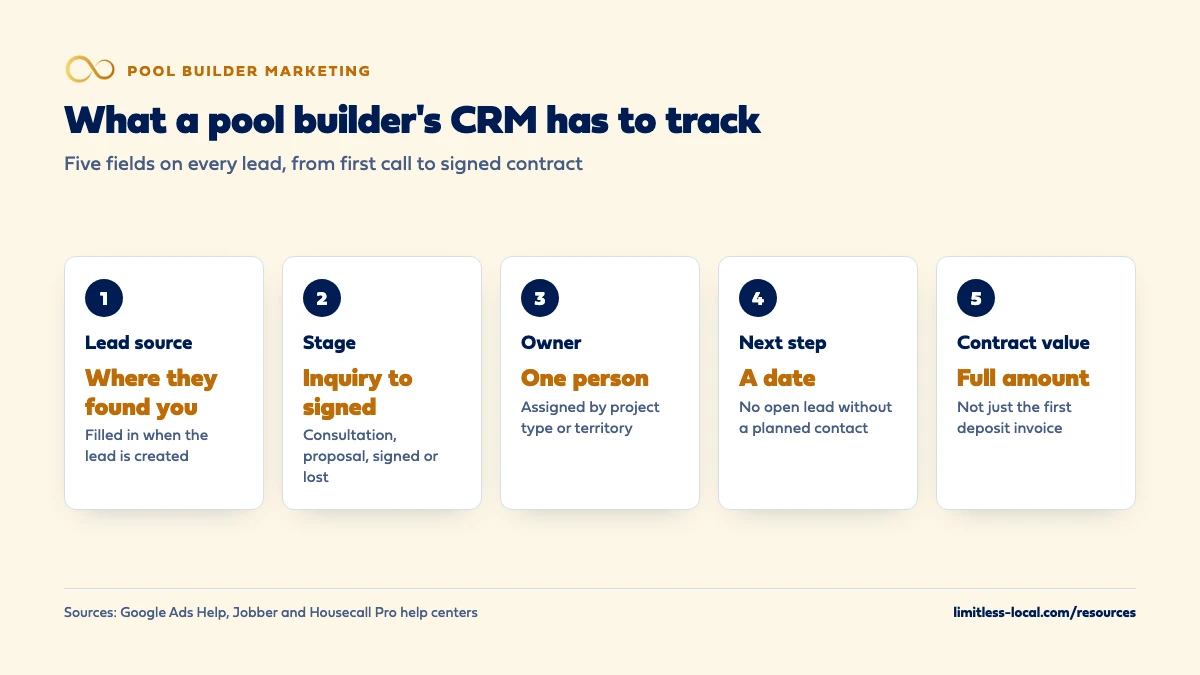
- A CRM keeps one record per homeowner, with where the lead came from, what stage it's at, who owns it and when the next contact is due.
- A small builder with one salesperson can run a shared spreadsheet; once several people touch leads, a CRM saves deals.
- The features that matter for pools are stages through to signed contract, lead source, next-step reminders, assignment and contract value.
- Pick the tool your team will actually update every day; an expensive CRM nobody fills in is worse than a good spreadsheet.
For pool builders deciding whether their inquiries, consultations and proposals need a real system, and what that system has to do.
Get a free visibility audit · Book a growth call
When does a pool construction company outgrow a spreadsheet for its leads?
A pool builder needs a CRM once more than one person handles leads or once leads start slipping between the first call and the signed contract, which in a months-long pool sale happens quickly. A CRM is simply one place where every lead lives with its source, its stage, who owns it and the date of the next step. A small builder can start with a well-kept shared spreadsheet, but the system has to hold every lead until it signs or says no.
We’ve seen this from inside a pool company. The agency was an equity partner in a pool construction company, where it streamlined back-office operations, built the lead-generation engine and ran sales and marketing. That business did $2M+ revenue in year one. Lead tracking, calendar reminders and follow-up are part of our lead follow-up and automation options, and the pool builder marketing page shows how it fits with the rest of our work for pool companies. More questions are answered in the pool builder marketing questions library.
What is a CRM, in pool builder terms?
CRM stands for customer relationship management. Stripped of the sales talk, it’s the place where every lead lives: one record per homeowner, with their contact details, where they found you, what they want built, every conversation so far, what stage they’re at and what happens next.
For a pool builder that record has to last. A homeowner who calls in February might hold a design consultation in March, get a proposal in April, go quiet while they sort out financing and sign in June, or decide to wait until next year. A CRM is what keeps that homeowner from becoming a sticky note.
Plenty of field software includes CRM features. Jobber’s lead management labels prospective clients as leads so you can tell them apart from active clients at a glance, and Housecall Pro’s Pipeline lays leads, estimates and jobs out on boards. You don’t need a dedicated sales platform to have a CRM; you need one system everyone uses.
When is a spreadsheet enough for a pool builder?
When one person handles every lead, the volume is manageable and that person actually keeps it up. A shared spreadsheet with one row per homeowner and columns for source, project type, stage dates, next step and contract value will do the job for a small builder.
It’s not a lesser option for tracking either. Google’s offline conversion imports FAQs answer the question “Do I need to have a CRM system?” with “Not necessarily”, saying any system that captures lead information can be adapted, and that a Google spreadsheet will also work.
The spreadsheet breaks down in predictable ways, in our judgement: two people edit the same row, nobody notices a follow-up date passed, a salesperson keeps their own list in their phone, or leads from a web form never get copied in. When you see those, it’s time to move.
What are the signs a pool builder has outgrown the spreadsheet?
- More than one person handles leads. An office manager answers, a designer runs consultations, the owner closes. Handoffs are where leads go missing.
- You can’t answer “what’s open?” If it takes an afternoon to list every proposal that’s out, with its amount and next step, the system isn’t working.
- Follow-ups depend on memory. Nobody gets a reminder when a proposal has gone a week without contact.
- Leads arrive from too many places. Calls, web forms, Facebook lead forms, home show sign-ups and referrals, each landing somewhere different.
- You can’t say which channel signs contracts. If the source isn’t on the record, you can’t judge your marketing. Our page on tracking which marketing produces signed pool contracts depends on it.
Two or more of these and a CRM will usually pay for itself in deals that don’t slip.
What CRM features matter for a pool construction company?
Fewer than the sales demos suggest. For pool builders, in our judgement these are the ones that matter:
- Stages that match your sale: inquiry, qualified, design consultation, proposal sent, signed, lost. You should be able to rename stages to fit how you sell.
- Lead source on every record, filled in when the lead is created. Jobber’s Lead Source Report shows which channels bring in the most valuable leads by tracking leads and the revenue tied to them. It counts the first invoice linked to each lead, so for a pool contract billed in stages it can make a channel look smaller than it is; keep the full contract value on the record too.
- Next-step dates and reminders, so no open lead sits without a planned contact.
- Assignment, so each lead has one owner.
- Contract value, entered as the full contract amount.
- Project type: new build, renovation, service.
- Connections to where leads come from, such as your web forms and ad lead forms, so nobody retypes them.
- Export. Jobber, for example, documents how to export client information. Your customer list should never be trapped in one vendor.
Curious what your marketing is actually booking?
Get a free visibility audit — no obligation, no sales pitch.
What does lead routing mean for a pool builder's sales process?
Lead routing is the rule for who gets each new lead, decided ahead of time instead of whoever picks up the phone. For a pool builder it’s usually simple:
- By project type: new builds to the designer or salesperson, renovations to the renovation estimator, service requests to the service manager.
- By territory, if different people cover different towns.
- By availability, so a lead that comes in while the designer is on a job site still gets a fast first call from someone.
The CRM’s job is to make the rule automatic: a new web form lands, it’s assigned, the owner is notified and a first-contact task is due. The point is speed and ownership. A new pool inquiry that sits unassigned over a weekend is a lead you paid for and may have lost. Our page on how fast a pool builder should respond to a new lead covers the response side.
Can a CRM follow up with pool leads automatically?
Partly, and the parts it can do are worth having. Jobber’s automations, for example, can follow up on quotes and invoices, create draft quotes from client requests and alert you about high-value opportunities. Many CRMs can send a confirmation when a consultation is booked, a reminder before it, and a check-in after a proposal has been out for a set number of days.
What automation shouldn’t do, in our judgement, is replace the conversations that sell a pool. A homeowner deciding on a large backyard project wants to talk to a person about design, financing, permits and timing. Use automation to make sure the person never forgets to call, not to stand in for the call.
What to say at each stage is its own question; our page on following up through a long pool sales cycle covers it.
Automated texts and emails to leads are subject to consent and marketing rules. This isn’t legal advice; check the rules that apply to you before turning on automated messages.
How does a CRM connect to my marketing?
Through the lead source, and through connections that bring leads in without retyping. Meta’s help page on CRM system integrations for lead ads explains that once your CRM is connected, new leads from your Facebook and Instagram lead ads arrive in one place, so you don’t download a file each time. Web forms, call tracking and many scheduling tools connect in similar ways.
The other direction matters too. When the CRM records a held consultation or a signed contract, that result can be sent back to Google Ads with offline conversion imports, so your ads learn from contracts instead of clicks. Google’s FAQs note that any system that captures lead information can be adapted for this, so the CRM doesn’t have to be fancy, it just has to keep the click details and the stage dates.
How do I pick a CRM my team will actually use?
- Start with what you already pay for. If your job management or design software has lead stages and sources, try it before buying something else.
- Test it with real leads. Put a week of actual inquiries through it, from first call to proposal, before you sign an annual contract.
- Check the phone app. Designers and owners update leads from driveways and job sites.
- Keep it simple at launch. Stages, source, owner, next step, value. Add fields later if you need them.
- Own the account. The CRM holds your customer list; keep it in your company’s name and make sure you can export it.
Then set one rule everyone follows: no lead without a source, an owner and a next-step date. That rule matters more than which product you pick.
What should a pool builder do with old and lost leads in the CRM?
Keep them, labeled. A lead marked lost with a reason, such as price, timing, went with another builder or financing fell through, tells you what to fix. Lost reasons sorted by lead source tell you which channels bring in homeowners who aren’t ready.
Timing losses are also next season’s pipeline. A homeowner who said “not this year” in August is worth a planned contact before your next build season, which is exactly what our page on nurturing leads who plan to build next year covers. A CRM with a next-step date on every “not now” lead is what makes that happen instead of hoping someone remembers.
What's different about CRMs for pool builders
The sale is long and has several meetings. Inquiry, design consultation, proposal, sometimes a revised design, financing and signature. Most CRMs are set up for quick quote-and-book trades, so rename the stages to match how you actually sell.
Several people touch one lead. Office, designer, owner and sometimes a finance contact. Clear ownership and notes on the record matter more than for a one-visit service call.
Contract values are large and staged. Record the full contract value on the lead, not just the first deposit invoice, or your best channels will look smaller than they are.
“Not this year” is common. A pool CRM has to hold leads for many months with a planned next contact, not close them out after a few unanswered calls.
Want to see where your company stands?
A free visibility audit shows where you show up on Google, Maps and AI answers, and what it's costing you in calls.
A worked example: what slipping leads can cost
These numbers are made up to show the math, not a benchmark. Say a pool builder logs 90 new inquiries over a spring. When the owner finally reviews the spreadsheet in June, 30 of them have no next-step date and no contact in weeks. Nobody decided to drop them; they just fell between the office and the designer.
Suppose that with steady follow-up, just 2 of those 30 would have signed, at a made-up average contract of $70,000. That’s $140,000 in contracts that went quiet without anyone choosing to let them go.
You don’t need those exact numbers to see the point. With a long sale and large contracts, the cost of a few forgotten leads is usually much bigger than the cost of a system that reminds someone to call.
Frequently asked questions
Is a CRM the same as job management software?
Not exactly, but they overlap. Job management software runs scheduling, crews and invoicing; a CRM runs leads and sales. Many field service tools include lead stages, so check yours before buying a separate CRM.
How long should a pool builder keep a lead open?
Until the homeowner signs or clearly says no. A homeowner who says “next year” should stay in the system with a next-step date, not be deleted.
Should my designer and my office share one CRM?
Yes. One record per homeowner, seen by everyone who touches the lead, is the whole point. Separate lists in separate phones are how leads get lost.
Can a CRM tell me which marketing is working?
Only if the lead source is filled in on every record and the signed contracts are recorded with their value. Then a report like Jobber’s Lead Source Report can show which channels bring in the most valuable leads.
What's the first thing to set up in a new CRM?
Your stages, your lead sources and the rule that every lead gets an owner and a next-step date. Everything else can wait until the team is using it every day.
Key takeaways
- A CRM is one record per homeowner with source, stage, owner, next step and contract value.
- A small builder with one salesperson can run a shared spreadsheet; Google says even a spreadsheet can feed offline conversion imports.
- Move to a CRM when several people handle leads or follow-ups depend on memory.
- Route each lead to one owner by project type or territory, and never leave an open lead without a next-step date.
- Keep the account and the export in your company’s name; the customer list is yours.
Not sure what's working right now?
Start with a free visibility audit: rankings, Google profile, reviews and tracking, checked against your service area.
More in this section
- How should pool builders follow up on leads during a long sales cycle?
- How do pool builders qualify leads before the design consultation?
- Should a pool builder use call tracking?
- How many leads are needed for a pool builder to hit its revenue goal?
- How do pool builders keep leads coming in the off-season?
Sources
- Lead Management — Jobber Help Center
- Lead Source Report — Jobber Help Center
- Automations — Jobber Help Center
- Export Client Information — Jobber Help Center
- Getting Started with Pipeline — Housecall Pro Help Center
- Offline conversion imports FAQs — Google Ads Help
- About CRM system integrations for lead ads — Meta Business Help Center