
What photos and posts should a plumber add to Google Business Profile?
- Which job photos, videos and updates belong on a plumbing company's Google profile?
- What photos should a plumbing company put on its Google profile?
- Which plumbing jobs make the best photos?
- What are Google's rules for profile photos and videos?
- Should a plumber add videos to Google?
- What should a plumber post on Google Business Profile?
- Can I put a phone number or coupon in a Google post?
- How often should a plumbing company post and add photos?
- Do photos and posts help a plumber rank higher on Google Maps?
- How can I use AI for Google profile photos, videos and posts?
- How do I know if photos and posts are doing anything?
- What's different about Google photos and posts for plumbers
- A worked example: a month of photos from the jobs you already do
- Frequently asked questions
- Key takeaways
- More in this section
- Sources
The short version
- Job photos: your techs on the work you want more of, with customers' faces and house numbers out of frame.
- Team and truck photos so homeowners know who's coming to the door.
- Short videos of up to 30 seconds showing the work, not a sales pitch.
- Posts only when something is true and timely, with the Call button instead of a phone number in the text.
For plumbing owners whose Google profile is set up and verified, and who want a simple weekly routine for photos, short videos and posts that customers actually look at.
Get a free visibility audit · Book a growth call
Which job photos, videos and updates belong on a plumbing company's Google profile?
A plumber should add real photos from real jobs: techs at work on water heaters, drains, repipes and sewer lines, the team, and the trucks, shot in focus and good light with no heavy filters or AI alterations. Add short clips of the work, up to 30 seconds each, and use posts for things that are true right now, such as a freeze reminder, a seasonal offer or a new town you serve. Google lists photos among its tips for local ranking, but it doesn’t say how much they count, so treat them mainly as proof for the homeowner deciding whether to call.
Photos and posts are a small part of a Google profile that gets calls; the rest is categories, services, hours, reviews and answering the phone. Our local SEO service includes Google Business Profile management with a weekly post on Essentials and three a week on Growth. See how we approach marketing for plumbing companies, or browse the full plumbing marketing library.
What photos should a plumbing company put on its Google profile?
Google’s page of tips for business-specific photos sorts photos into types and suggests a minimum for each. Two of them fit a plumbing company almost exactly:
- Photos at work. Google asks for at least three photos that represent the services you offer, including your team doing different types of work and any specialty services.
- Team photos. At least three showing you and your staff, and Google suggests something “a little less formal” so customers get a feel for who you are.
The other types are written for shops and restaurants. Exterior photos help customers recognize a business as they approach it, which matters if homeowners come to your counter or warehouse. If you work out of your home and hide your address, skip them. In our judgement, a plumbing profile is strongest when it reads like a portfolio of the work you want more of: if you want water heater replacements, the photos should show water heater replacements.
The minimums are a floor, not a target. Three good photos of each type gets a profile started; a steady trickle of new ones keeps it looking like a company that’s busy this month, not one that set the profile up years ago.
Which plumbing jobs make the best photos?
The ones a homeowner can understand at a glance and that match the calls you want. In our judgement, these work well for plumbers:
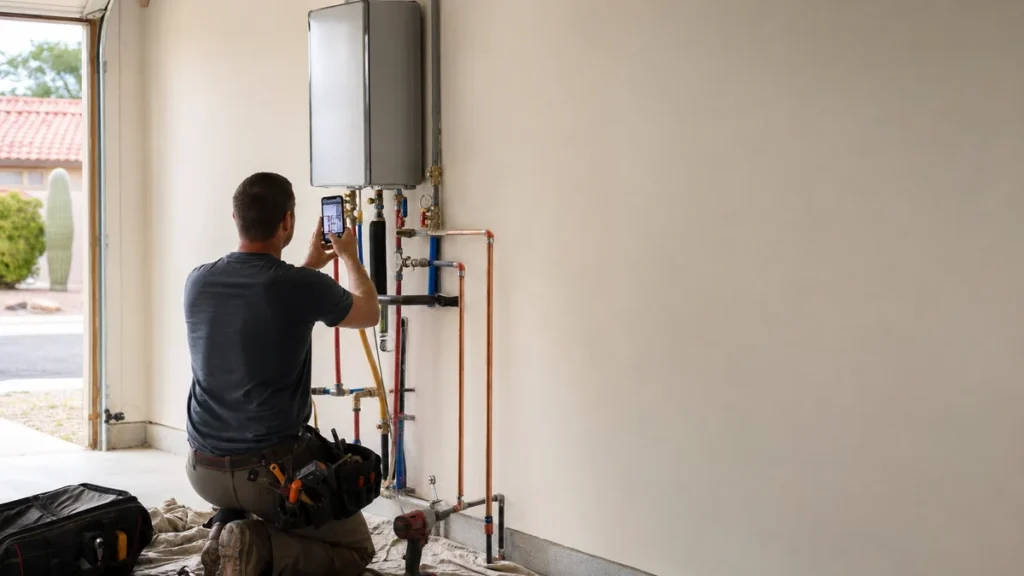
- Water heaters: a finished tank or tankless install with neat piping, venting and a clean floor.
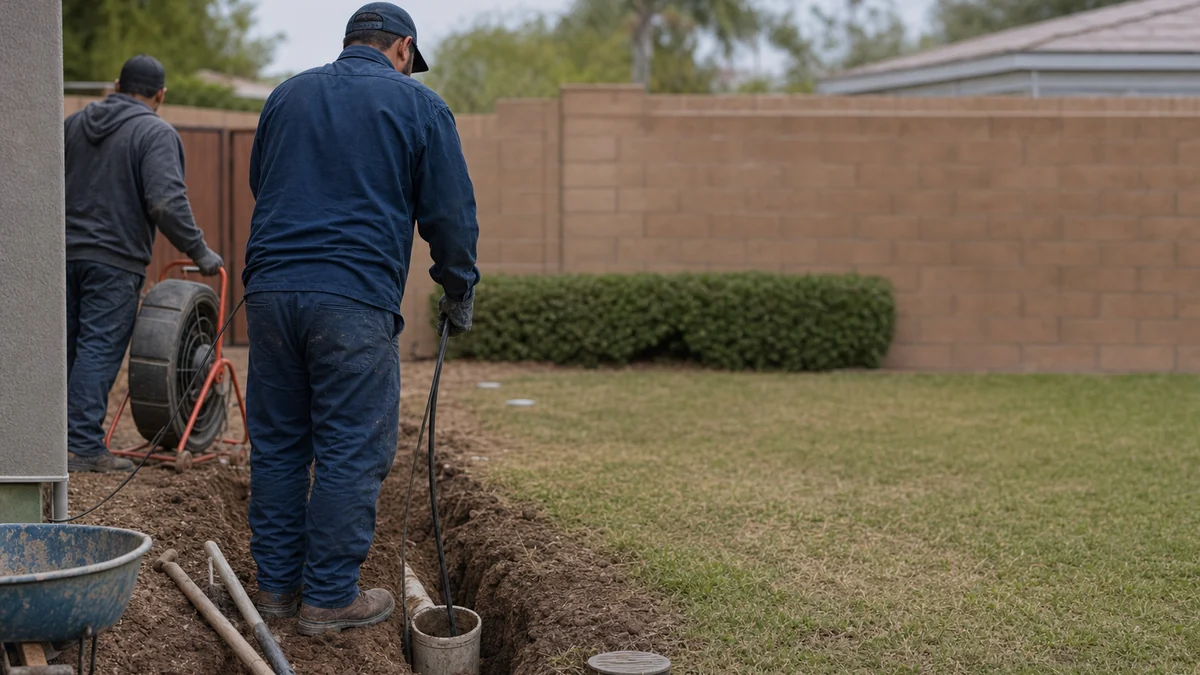
- Drains and sewer: a tech feeding a camera or jetter into a cleanout, or a crew at an open sewer trench.
- Repipes: runs of new PEX or copper in an open wall before it’s closed up.
- Fixtures: a new faucet, toilet or shower valve going in, hands and tools in frame.
- Emergency work: a tech shutting off a main or repairing a burst line, shot so the damage isn’t the subject.
- Trucks and gear: a stocked van with the doors open, shelving, fittings and machines.
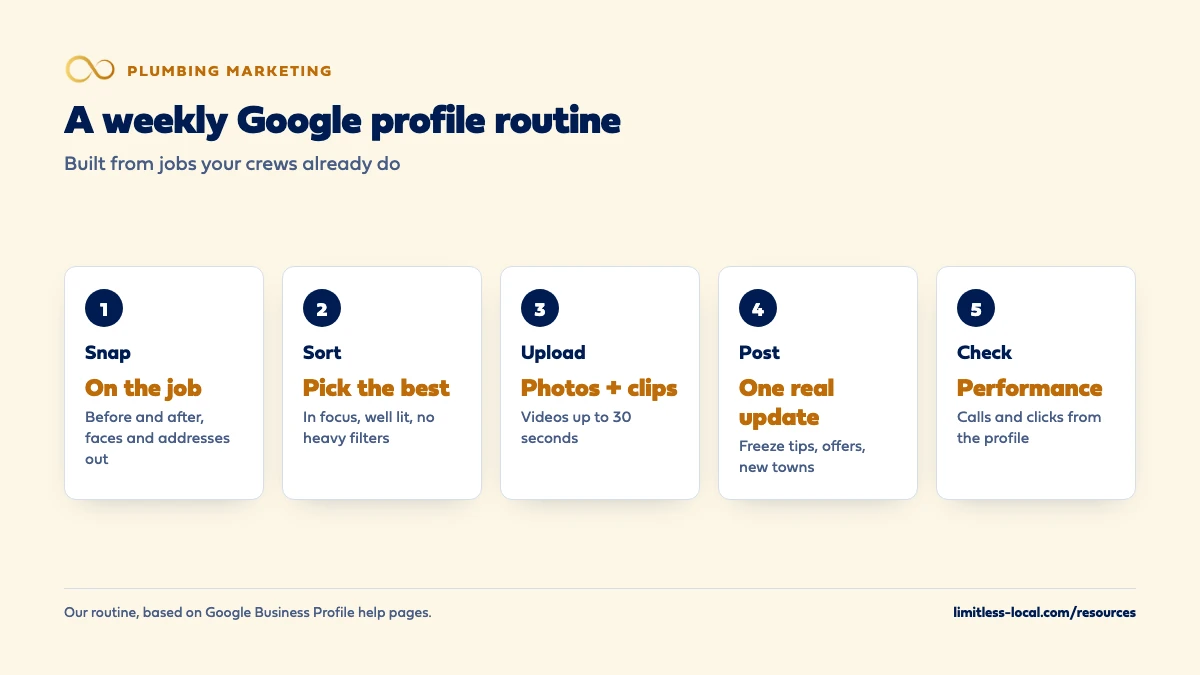
Before-and-after pairs are worth the extra ten seconds on site. A corroded old tank next to the new install tells the story without a caption.
Leave out anything that belongs to the customer: faces, house numbers, license plates, family photos on the wall and anything personal in a bathroom. Ask before you shoot inside someone’s home, and if a customer says no, respect it.
What are Google's rules for profile photos and videos?
Google’s page on managing Business Profile photos and videos sets the specs:
- Photos: JPG or PNG, between 10 KB and 5 MB, a recommended size of 720 by 720 pixels and a minimum of 250 by 250.
- Quality: in focus, well lit, with no significant alterations or excessive filters. Google’s words are that the image “should represent reality.”
- Videos: up to 30 seconds long, up to 75 MB, at 720p or higher.
A few more details from the same page matter in practice. Photos and videos only show once the profile is verified. Every upload is reviewed against Google’s policies and shows as Pending while it’s uploading or processing, or while the profile is unverified, and Google says it can take up to two days to appear. Newest media shows first on the profile.
Google’s separate tips for posting media to Maps add the rules most plumbers break by accident: use media you captured yourself at the location, and avoid screenshots, stock photos, collages, heavy filters, borders and added text. Low-quality media may be removed, and Google says those removals can’t be appealed.
Should a plumber add videos to Google?
Yes, if they’re short and real. A 30-second limit suits plumbing well: a camera feed showing a root intrusion, water running freely after a drain is cleared, a walk past a finished tankless install, or a tech explaining what a pressure-reducing valve does. In our judgement, a clip that shows the work does more than a clip that talks about the company.
Shoot horizontally or vertically, but keep it steady; Google’s Maps tips say stable video is the most helpful and to avoid shaky or out-of-focus footage. Most phones record at well over 720p, so the bigger risk is file size. Trim long clips on the phone before uploading so they stay under 75 MB.
Don’t post camera footage that shows anything identifying inside a customer’s home, and don’t narrate a customer’s address or name.
Curious what your marketing is actually booking?
Get a free visibility audit — no obligation, no sales pitch.
What should a plumber post on Google Business Profile?
Google’s help page on creating and managing posts describes three types:
- Updates for news about your business, with an optional photo, video and a button linking to your website.
- Offers for deals, which need a title and dates and get a “View Offer” button automatically.
- Events, which most plumbers won’t use.
Google says posts show in the Updates or Overview tabs on mobile and in the “From the owner” section on a computer, on both Search and Maps. It presents them as a way to share news and offers that help customers decide. Plumbing posts that fit that purpose, in our judgement:
- A reminder to protect outdoor spigots and exposed pipes before a hard freeze.
- A water heater flush or inspection offer, with real dates and terms.
- A new town or service you’ve added, such as tankless installs or hydro jetting.
- A recent job, with a photo and two sentences on what was wrong and what you did.
- Holiday hours or after-hours coverage, so emergency callers know you’re answering.
If a freeze is coming, preparing for a winter freeze covers the rest of the plan; the post is just the visible part of it.
Can I put a phone number or coupon in a Google post?
Put the coupon in an Offer post, where Google gives you fields for a coupon code, a link and terms. Leave the phone number out of the text. Google’s posts page warns that posts with a phone number in the description might get rejected if the number can’t be verified as connected to the business, and its posts content policy says posts with unverified contact information, including phone numbers, may be removed. Its suggested fix is the Call now button, which uses the verified phone number on your profile.
That matters more for plumbers than most trades, because many shops run a separate emergency or tracking line. If you want that number to get calls, it belongs in the profile itself, not typed into a post.
Keep offers honest and specific. A coupon with real dates and terms reads better to a homeowner than a vague “special pricing,” and an offer that’s quietly expired makes the profile look neglected. Whether coupons attract good customers is a separate question worth reading before you build posts around discounts.
How often should a plumbing company post and add photos?
Google doesn’t publish a recommended frequency for either. Its posts page does say posts older than 6 months are archived unless a date range is set, and that you can schedule posts or set them to repeat weekly or monthly. So a profile that hasn’t posted since spring will show nothing in the updates section by winter.
In our judgement, a workable rhythm for a small plumbing shop is new job photos every week and one real post a week. That’s also the rhythm our Essentials package uses for profile posts. A busier shop chasing more towns can post more often, and Growth includes three a week, but a post with nothing to say isn’t worth making. Google’s own posting tips ask for no text that adds no value and no auto-generated or distracting content.
If you have more than one Google profile, Google lets you share one post across several profiles when you publish it. Keep each location’s photos local to that location.
Do photos and posts help a plumber rank higher on Google Maps?
Google’s page of tips to improve your local ranking lists adding photos and videos alongside verifying, keeping your information accurate and replying to reviews. The same page says local results are mainly based on relevance, distance and popularity, and that there’s no way to request or pay for a better local ranking. It doesn’t say how much photos count, and Google’s posts help page doesn’t describe posts as a ranking factor at all.
So in our judgement, photos and posts are worth doing for the customer, with any ranking help a bonus. A homeowner comparing three plumbers in the map pack will tap the one whose photos show real trucks and real work. The things that move a profile in the map pack are covered in getting into the map pack, and the setup that comes before photos is in optimizing your Google profile.
How can I use AI for Google profile photos, videos and posts?
Use it for words, not pictures. Google’s photo tips ask for images without excessive use of filters or AI, images that represent reality, and its Maps tips say to use media you captured yourself. An AI-generated photo of a perfect water heater install fails both, and it misleads the homeowner about what you’ll deliver.
Where AI can help, in our judgement:
- Drafting post text from a tech’s two-line job note, which you then check for accuracy and trim.
- Simple fixes such as straightening, cropping or brightening a dark crawlspace photo. Google’s Maps tips say minimal adjustments like correcting rotation or improving lighting can be helpful.
- Blurring a house number or license plate you missed, which protects the customer.
- Sorting and trimming a week of phone photos and clips so the best ones get uploaded.
Never use AI to invent a job, a before-and-after or a review. If a post describes work, it should be work your crew did.
How do I know if photos and posts are doing anything?
Check your profile’s Performance page. Google’s guide to Business Profile performance says owners and managers can see views, calls from the profile, website clicks, direction requests and the searches people used to find you, and that offer views and clicks are counted when you run Offer posts. The searches metric updates at the start of each month and can take up to 5 days to show.
Those numbers show interest, not booked jobs. In our judgement, the honest test is the same as for any marketing: did calls from the Google profile turn into booked jobs, and at what cost? Tracking which marketing books jobs shows how to tag each job’s source so you can tell.
Want to see where your company stands?
A free visibility audit shows where you show up on Google, Maps and AI answers, and what it's costing you in calls.
What's different about Google photos and posts for plumbers
Your best work is often hidden. Pipes go behind drywall and sewer lines go under the yard, so the moment to shoot is before the wall is closed or the trench is filled. Make “photo before you close it up” part of the job, not an afterthought.
You’re in people’s bathrooms. Plumbing photos are taken in the most private rooms of a house. Frame tight on the work, keep personal items and faces out, and ask first.
Emergencies drive the searches. A homeowner with water on the floor scrolls fast. Photos that show a stocked truck and a tech at work, plus posts that say you answer after hours, speak to that moment better than a polished logo shot.
A worked example: a month of photos from the jobs you already do
These numbers are made up to show the math, not a benchmark. Say a shop runs 3 trucks, and each tech takes before-and-after photos on 2 jobs a week.
- Jobs photographed a month: 3 trucks x 2 jobs x 4 weeks = 24 jobs.
- Photos uploaded: the office picks the best 2 from each week’s jobs, so 8 photos a month go on the profile.
- Posts: one a week, built from the best job of that week, so 4 posts a month.
No one went out to “make content.” The techs spent a minute on each photographed job, and the office spent part of an afternoon a week choosing and posting. That’s the point: the routine runs on work you’re already doing.
Frequently asked questions
Can I use stock photos on my plumbing Google profile?
Google’s Maps media tips say to avoid stock photos and to use media you captured yourself. Use your own job photos, even if they’re taken on a phone.
Can customers add photos to my plumbing profile?
Yes, customers can add photos, and Google may show a user-submitted photo instead of a low-quality cover photo. You can request removal of a customer photo that breaks Google’s policies.
Why isn't my new photo showing on Google?
Google reviews each upload, and it stays Pending until it’s approved or while the profile is unverified. Google says it can take up to two days for photos and videos to appear.
Should my logo and cover photo be job photos?
Use your real logo as the logo. For the cover, pick the photo that best represents the business, such as a stocked truck or a clean install. Google notes the cover photo isn’t guaranteed to show first.
Do I need a separate Google post for every town I serve?
No. Posts appear on your profile, not in individual towns. Mention a new town in a post when it’s news, and keep your service area set in the profile itself.
Can my office manager or agency post for me?
Yes. Add them as a manager on the profile so they can post and upload without your password, and stay the owner yourself.
Key takeaways
- Show real work you want more of: water heaters, drains, sewer lines and repipes, plus your team and trucks.
- Follow Google’s specs: JPG or PNG, in focus, no heavy filters or AI, and videos up to 30 seconds.
- Post only what’s true and timely, use Offer posts for coupons, and use the Call button instead of typing a number.
- Posts older than 6 months are archived unless a date range is set, so a weekly rhythm keeps the profile current.
- Photos and posts help homeowners choose you; Google doesn’t say how much they count for ranking.
Not sure what's working right now?
Start with a free visibility audit: rankings, Google profile, reviews and tracking, checked against your service area.
More in this section
- What Google Business Profile categories should a plumber choose?
- How do I optimize my plumbing Google Business Profile?
- How do I get more Google reviews for my plumbing company?
- What should a plumbing company website include?
- How do I make my plumbing company look trustworthy online?
Sources
- Tips for business-specific photos on your Business Profile — Google Business Profile Help
- Manage your Business Profile photos & videos — Google Business Profile Help
- Create & manage posts on your Business Profile — Google Business Profile Help
- Business Profile photos, videos & posts content policy — Google Business Profile Help
- Tips for posting media to Maps — Google Maps User Contributed Content Policy Help
- Tips to improve your local ranking on Google — Google Business Profile Help
- Understand your Business Profile performance & insights — Google Business Profile Help