
How can a roofer track calls and forms from Google?

- How do I set up call and form tracking for my roofing company's Google traffic, step by step?
- What can Google already tell me about calls and forms?
- Step 1: How do I tag my Google Business Profile link?
- Step 2: How do I track calls from Google Ads?
- Step 3: How do tracking numbers on my website work?
- Step 4: How do I track estimate request forms?
- Step 5: How do I put a source on every lead?
- Step 6: How do I connect signed roofs back to Google Ads?
- What should a roofer count as a lead?
- How do I check my tracking is working?
- What tracking mistakes cost roofers the most?
- What's different about call tracking for roofing companies
- A worked example: from tracked calls to cost per signed roof
- Frequently asked questions
- Key takeaways
- More in this section
- Sources
The short version
- Tag the website link on your Google Business Profile so those visits show as their own source.
- Track calls from Google Ads, and from your website after an ad click, as conversions.
- Use call tracking numbers that swap by source, and count form submissions as key events.
- Put the source on every lead in your CRM and follow it through to a signed contract.
For roofing owners who know Google is sending calls and estimate requests but can’t say which ones, from where, or whether any of them signed.
Get a free visibility audit · Book a growth call
How do I set up call and form tracking for my roofing company's Google traffic, step by step?
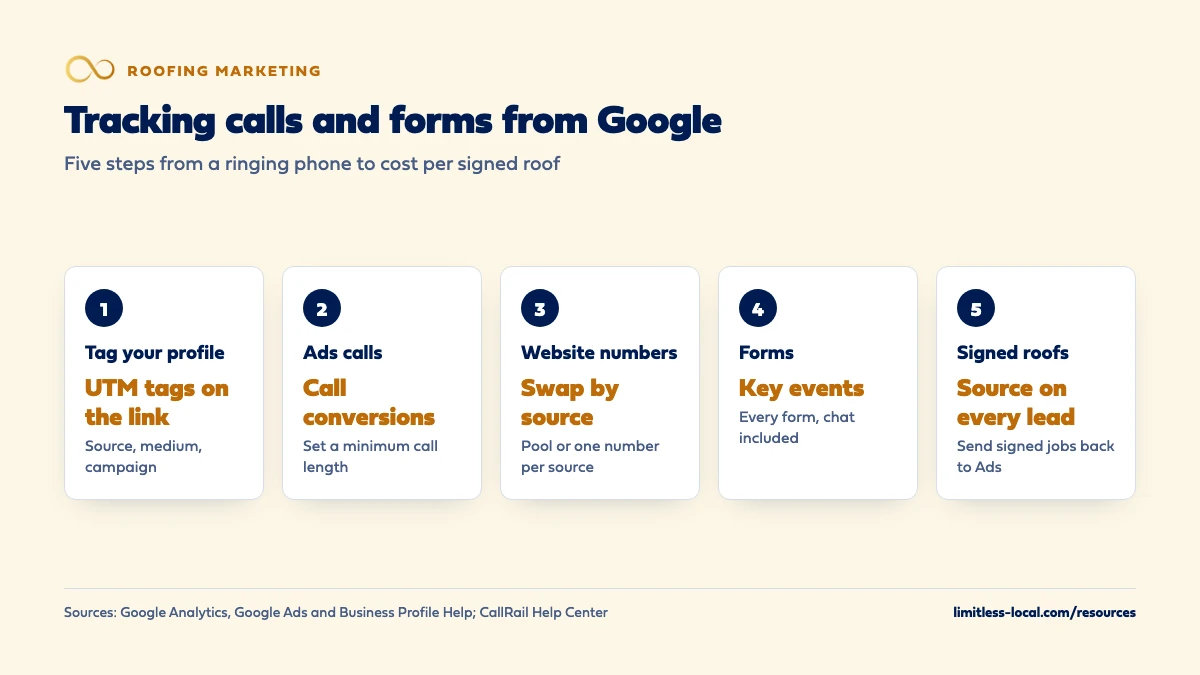
Give each Google source its own way to be counted: add tracking tags to the website link on your Google Business Profile, turn on Google Ads conversion tracking for calls from ads and from your website, use call tracking numbers that change by visitor source, and mark form submissions as key events in Google Analytics. Then record the source on every lead in your CRM or field software and follow it to a signed roof, because Google’s own reports count calls and form fills, not which ones became jobs.
The point of all this is one number per source: what each signed roof cost. Call, web and form tracking with source tagging is part of every package in our roofing marketing work, alongside the local SEO and Google profile work that produces many of these calls in the first place. The roofing marketing guide covers where the calls come from, and the roofing marketing questions library goes deeper on each channel.
What can Google already tell me about calls and forms?
More than most owners check, but less than you need. Your Google Business Profile has a Performance report that Google says covers views, searches and actions from both organic results and Google Ads. Two of the numbers matter most for a roofer:
- Calls: “the number of times a customer clicked on the call button on your Business Profile.”
- Website clicks: how many times people clicked the website link on your profile.
Google’s Business Profile performance help page notes this data is available only for verified profiles, and you can set a date range or download it as a spreadsheet. What it can’t tell you is whether the call was answered, whether it was a homeowner wanting a roof, or whether it signed. A tap on the call button is a tap. For that, you need the steps below.
Step 1: How do I tag my Google Business Profile link?
Visitors who click through from your Google profile often get lumped in with all other Google search traffic. Adding UTM tags to the website link on your profile separates them. Google Analytics’ URL builder guidance says that when you add UTM parameters, the values show up in the Traffic acquisition report, and that you should always use utm_source, utm_medium and utm_campaign.
A tagged profile link might look like this: yourroofingsite.com/?utm_source=google&utm_medium=organic&utm_campaign=gbp. The exact labels are up to you; Google notes values are case sensitive (so Google and google count as different sources), so pick lowercase names and use them everywhere. If you have a second location, give its profile its own campaign name.
Step 2: How do I track calls from Google Ads?
Google Ads lists five ways to track phone call conversions, and a roofer running search ads usually wants the first two:
- Calls from ads: calls placed straight from a call asset or call-only ad, using a Google forwarding number. You set a minimum call length, and every call at least that long counts.
- Calls to a phone number on your website: calls from people who clicked your ad, then called the Google forwarding number shown on your site. This needs the Google tag and a phone snippet on the site.
The other options are worth knowing. “Clicks on a number on your mobile website” counts taps, not calls, and Google says so. “Import call conversions” lets you bring in calls tracked in another system, such as a CRM, so you can count only calls that included a sale. For a roofer, the minimum call length is the first setting to get right: set it long enough that a wrong number or a quick hang-up isn’t counted as a lead.
Step 3: How do tracking numbers on my website work?
Google Ads only tracks calls that came from its ads. (If you’re still deciding whether you need call tracking at all, start with what call tracking is and whether a roofing company needs it.) To see calls from your Google profile, organic search and everything else, most roofers use a call tracking tool that swaps the phone number on the website based on where the visitor came from. CallRail’s help center describes the method, called dynamic number insertion: a script on each page detects your phone number and swaps it with the matching tracking number, then stores the visitor’s source in a cookie so they see the same number when they come back.
Two setups are common. A source tracking number is one fixed number for one source, such as a yard sign or an ad extension. A website pool is a set of numbers that rotate by visitor, which CallRail says can capture details like pages visited and paid keywords. Some tools can also put a tracking number on your Google profile itself. CallRail’s Google Business Profile integration swaps the primary number on the profile for a tracking number and keeps your real business number as a secondary one, to keep your listings consistent. Before you change any number on your profile, read whether your roofing company info needs to match on every listing.
Curious what your marketing is actually booking?
Get a free visibility audit — no obligation, no sales pitch.
Step 4: How do I track estimate request forms?
In Google Analytics, a form submission is an event, and you can mark it as a key event, which Google defines as an event that measures “an action that’s particularly important to the success of your business.” Once it’s marked, Google’s key events help page says many reports, including Landing pages and User acquisition, show a Key events column, so you can see which pages and sources produce estimate requests. You can also create a Google Ads conversion from a key event, so Ads and Analytics count the same thing.
Most call tracking tools can track forms too. Either way, make sure every form on the site (the main estimate page, any short forms on service pages, and the chat if you have one) is counted, or you’ll undercount what certain pages produce. Which pages should carry a form is covered in what pages a roofing website should have to bring in leads.
Step 5: How do I put a source on every lead?
Tracking tools tell you where a call or form came from. Your CRM or field software is where you find out what happened next. Every new lead should get a source field filled in before anyone quotes it: Google Ads, Google profile, organic search, Local Services Ads, referral, yard sign, door knocking, repeat customer.
Where tracking can’t tell, ask. In our judgement, a one-line question on every call (“How did you hear about us?”) still catches what software misses: the neighbor who saw your truck, the homeowner who found you on Google but dialed the number off a yard sign. If you don’t have a system that holds this yet, whether a roofing company needs a CRM to follow up on leads covers when it’s worth one.
Step 6: How do I connect signed roofs back to Google Ads?
This is the step most roofers skip, and it’s the one that tells Google Ads which clicks actually made money. Google’s help on offline conversion imports describes it: Google Ads gives each ad click a unique ID called a GCLID, you save that ID with the lead’s information, and when the person later converts offline, “by signing a contract, for example,” you send the ID back to Google Ads with the details. Google now recommends that advertisers who haven’t adopted offline conversion import start with enhanced conversions for leads, which it describes as an upgraded version that is easier to set up.
Timing matters for roofing. Google’s conversion window help says the default window is 30 days after an ad interaction, and that a longer window suits businesses whose buying cycle doesn’t fit the default. A replacement that signs after an insurance adjuster visit can easily fall outside it, so check your window before you judge any campaign. The full path from first call to signed contract, including Local Services Ads leads, is covered in how to track which roofing leads turn into signed jobs.
What should a roofer count as a lead?
Not every tracked call is a lead. Before you total anything, take out calls under your minimum length, wrong numbers and spam, existing customers calling about a job in progress, suppliers and job seekers, and requests for work or towns you don’t serve. Call recordings make this quick to check. The longer version, with how to sort and stage each lead, is in how to track which roofing leads turn into signed jobs.
How do I check my tracking is working?
Test it yourself, from each source, before trusting any report:
- Search for your business on a phone, open your Google profile, tap the website link, and check the visit shows your UTM tags in Analytics.
- From that visit, call the number on the site and confirm the call tracking tool logs it with the right source.
- Submit your estimate form and confirm it shows up as a key event and in your CRM.
- Call the number on your Google profile and check where it’s logged.
Give number changes time. CallRail’s integration FAQ says Google can take up to three days in some cases to show an updated number in search results and Maps. After that, repeat the test every few months and any time someone touches the website.
What tracking mistakes cost roofers the most?
- Counting taps as calls. Button clicks and call taps are useful, but they aren’t conversations.
- Leaving out the forms. If a chat widget or a second form isn’t tracked, the pages that use it look worse than they are.
- One number everywhere. If the truck, the yard signs, the website and the profile all show the same number, you can’t separate them later.
- A conversion window too short for how long a roof takes to sign.
- No source in the CRM. Tracking without a source on the lead record means you can count calls but never cost per signed roof.
Once the setup is right, the next question is whether the work is paying off. How to know if your roofing marketing agency is getting results covers what to look for in the monthly numbers.
Not sure which of these is costing you jobs?
A free visibility audit checks the Google profile, reviews, site and tracking, and shows what to fix first.
What's different about call tracking for roofing companies
Long gaps between first call and signature. Inspection, estimate, sometimes an insurance adjuster, then a decision. In our judgement, a roofer needs the source on the lead record more than most trades, because the signed contract may come weeks after anything a tracking tool sees.
Storm spikes. After hail, call volume jumps from every source at once. Without tracking you can’t tell whether the extra calls came from your ads, your profile or the yard signs, so the budget decisions you make in the next storm are guesses.
Offline sources that still use Google. Door knocking and yard signs often send homeowners to Google to check you out before they call. That’s why a lead-source question on the phone matters alongside the software.
Repair versus replacement. A repair call and a replacement call from the same source are worth very different amounts. Tag job type as well as source, so cost per signed roof isn’t blurred by small jobs.
A worked example: from tracked calls to cost per signed roof
These numbers are made up to show the math. They’re not a benchmark, a forecast or a client result. Say a roofer spends $2,000 in one month on Google Ads, and the tracking shows:
- Google Ads: 28 tracked calls and forms. After removing short calls, spam and existing customers, 20 are real leads, and 4 sign over the following weeks. $2,000 / 4 = $500 per signed roof in ad spend.
- Google Business Profile: 16 real leads from the profile’s tracking number and tagged website visits, 3 signed. There’s no ad spend here, but there is the cost of the work on the profile and reviews.
- No source: 6 leads nobody tagged. Those are the gap to close next month.
Without the tracking, the roofer would know only that the phone kept ringing. With it, they know where the signed roofs came from, and which leads still need a source.
How we’d handle it: every package includes monthly reports with a cost-per-lead breakdown, call tracking with recording and transcription, form and chat lead tracking, and source tagging, plus a real-time dashboard. Essentials ($3,500 a month) includes call, web and form tracking with basic attribution; Growth ($4,500 a month) adds advanced attribution. Ad spend is paid to Google separately.
Frequently asked questions
Is call tracking free?
Partly. Call conversion tracking in Google Ads, UTM tags and key events in Google Analytics are features of accounts you likely already have. Call tracking tools that swap numbers across your whole site are separate paid services with their own pricing.
Can I put a tracking number on my Google profile?
Some call tracking tools do this. CallRail’s integration, for example, makes the tracking number the profile’s primary number and keeps your real business number as a secondary one for consistency. In our judgement, keep your main number identical on every other listing.
Can I see which keyword led to a roofing call?
For calls from your ads, Google Ads reports by keyword, ad and campaign. Call tracking tools with a website number pool can also capture paid keywords for website visitors who call.
Should I record calls?
In our judgement, recordings are the quickest way to judge lead quality and how your office handles calls. Check the call-recording consent rules where you work before turning it on; this isn’t legal advice.
How often should I look at the tracking numbers?
Check lead counts weekly during busy season and judge cost per signed roof over a few months, since many roofs sign weeks after the first call.
What if a homeowner calls the number on my truck after finding me on Google?
Software will credit the truck, so ask how they found you and note both in the CRM. That’s the main reason the lead-source question still matters.
Key takeaways
- Google profile reports count taps on the call button, not answered calls or signed roofs.
- Tag the profile’s website link, track Ads calls with a minimum call length, and swap website numbers by source.
- Mark every estimate form as a key event in Google Analytics, including chat and short forms.
- Put a source on every lead in your CRM, and ask callers how they found you.
- Send signed roofs back to Google Ads and check the conversion window fits how long roofs take to sign.
Want a second set of eyes on your setup?
We'll look at how you show up locally and where calls are leaking, then send you a plain-English breakdown.
More in this section
- How do I track which roofing leads turn into signed jobs?
- How quickly can a Google Business Profile bring in roofing calls?
- What is call tracking, and does a roofing company need it?
- How do I get commercial roofing leads with Google Ads?
- How should a roofer reply to Google reviews?
Sources
- Understand your Business Profile performance & insights — Google Business Profile Help
- URL builders: Collect campaign data with custom URLs — Google Analytics Help
- About phone call conversion tracking — Google Ads Help
- About key events — Google Analytics Help
- Dynamic number insertion overview — CallRail Help Center
- Google Business Profile integration — CallRail Help Center
- About offline conversion imports — Google Ads Help
- About conversion windows — Google Ads Help