
Do reviews, response time and GBP affect restoration Maps and LSAs?
- How do reviews, answering speed and the Google profile change where a restoration company shows?
- What decides where a restoration company shows up in Google Maps?
- How do reviews affect my Maps ranking?
- Does replying to reviews help my Maps ranking?
- Does answering the phone fast help my Maps ranking?
- How are Local Services Ads ranked?
- How do reviews affect my Local Services Ads?
- How does response time affect my Local Services Ads?
- What does my Google Business Profile have to do with my LSAs?
- Which habits help Maps, which help LSAs, and which help both?
- What should a restoration company fix first?
- What's different for restoration companies
- A worked example: what missed calls cost on Local Services Ads
- Frequently asked questions
- Key takeaways
- More in this section
- Sources
The short version
- Maps: relevance, distance and popularity; more reviews and positive ratings can help.
- Local Services Ads: bid, responsiveness, relevance and profile quality, including rating, review count and response time.
- Missed calls may hurt your Local Services Ads ranking; Google doesn't name answering speed as a Maps factor.
- Your Google Business Profile's reviews, hours and details carry into both.
For restoration owners trying to work out which habits move them up in Google Maps, which move them up in Local Services Ads, and which do both.
Get a free visibility audit · Book a growth call
How do reviews, answering speed and the Google profile change where a restoration company shows?
Yes, but not in the same way. In Maps, Google says local results are mainly based on relevance, distance and popularity, and that more reviews and positive ratings can help your ranking; it doesn’t list how fast you answer the phone as a factor. In Local Services Ads, Google’s auction weighs your bid against how likely your ad is to produce a lead, which includes your responsiveness (missed calls may count against you), your rating, number of reviews and average response time. Your Google Business Profile, often called your GBP, feeds both: its details drive Maps relevance, and its reviews and hours carry into your Local Services Ads.
Google Business Profile management, review response and basic review generation are included in Essentials, at $3,500 a month for one location. Local Services Ads management starts in Growth, at $4,500 a month, and ad spend is paid to Google separately. Our local SEO page covers the profile and Maps side, and our restoration marketing page covers how it fits for water, fire and mold companies. The restoration marketing guide lays out every channel, and the restoration marketing library answers the rest question by question.
What decides where a restoration company shows up in Google Maps?
Google’s local ranking help page says local results are mainly based on relevance, distance and popularity:
- Relevance is how well your Business Profile matches what someone searched. Google says complete and detailed business info helps it match you to relevant searches.
- Distance is how far you are from the person searching, or from the location Google thinks they’re in.
- Popularity, which Google describes under the heading of prominence, is how well-known your business is, based on information such as how many websites link to you and how many reviews you have.
Google also says verified businesses are more likely to show up, that businesses with complete and accurate info are more likely to show up in local results, and that there’s no way to request or pay for a better local ranking. Notice what’s not on the list: how quickly you answer calls or messages. Google doesn’t name responsiveness as a Maps ranking factor anywhere on that page.
How do reviews affect my Maps ranking?
Directly, according to Google. On the same page it says more reviews and positive ratings can help your business’s local ranking, and lists how many reviews you have among the information that shapes prominence. Google doesn’t publish a target number.
Reviews also matter after you show up. Google’s review tips say reviews can help your business stand out and give potential customers helpful information, and that a mix of positive and negative feedback often feels more trustworthy. For a homeowner choosing between three restoration companies at 1 a.m., the reviews are often the deciding read.
How many you need depends on the companies you’re up against; how many Google reviews a restoration company needs walks through finding your number.
Does replying to reviews help my Maps ranking?
Google doesn’t say it does. Its local ranking page lists “respond to reviews” as a tip and explains it this way: replying shows that you value customer feedback, and positive reviews and helpful replies can help your business stand out. That’s a statement about how customers see you, not a ranking factor.
Google’s review tips also ask you to respond in a timely manner, because a prompt response shows you value feedback. In our judgement, reply speed on reviews is worth keeping up for the customers reading them, but there’s no Google source saying a reply within a day moves you up the map. For restoration in particular, what you say matters more than how fast you say it: no claim details, no health statements, no customer’s private information. How a restoration company should reply to Google reviews covers the wording.
Does answering the phone fast help my Maps ranking?
Not according to anything Google publishes about local ranking. Distance, relevance and popularity are the factors it describes, and none of them is about answering speed.
That doesn’t make answering speed unimportant for Maps. In our judgement it works on Maps indirectly: a homeowner who gets through books the job, a booked job is a chance at a review, and reviews are part of popularity. A homeowner who reaches voicemail calls the next company in the map pack, and that company gets the job and the review. So fast answering doesn’t move your pin on its own, but over months it decides who collects the reviews that do.
How fast a restoration company needs to answer emergency calls covers what that means for staffing.
Curious what your marketing is actually booking?
Get a free visibility audit — no obligation, no sales pitch.
How are Local Services Ads ranked?
Differently. Google’s ad rankings page says Local Services Ads are ordered by an auction that takes into account your bid and your overall profile quality. Beyond the bid, the auction looks at how likely your ad is to result in a lead, which Google says is based on factors including:
- Responsiveness to customer inquiries and requests. Google says missed calls may negatively affect your responsiveness.
- What the customer is searching for, including the service, time, location and how relevant your services and business bio are.
- Profile quality: your rating, number of reviews, average response time, use of high-quality images, the verification checks you’ve completed and other information that may influence what customers prefer.
Google adds that higher quality profiles, including those with images, may rank higher and may also pay lower costs per lead. So with Local Services Ads, responsiveness and reviews aren’t only good habits. They’re named inputs to where you show and, possibly, what each lead costs.
How do reviews affect my Local Services Ads?
Google’s Local Services reviews page says star ratings and number of reviews affect how your business is ranked within Local Services Ads, and that providers with higher star ratings and more reviews stand out and typically book more jobs. Its performance tips recommend 5 or more reviews and say that, depending on your business type, you may need 5 reviews for your ad to show.
These are the same reviews as your Maps reviews. Google says Local Services reviews are managed through Google Business Profile Manager, not your Local Services Ads account, and are governed by the same Maps content policies. Every genuine review you earn from a finished water or fire job counts toward both. Buying reviews or offering anything in return for one breaks Google’s rules for both, too.
How does response time affect my Local Services Ads?
In three ways that Google describes:
- Missed calls. They may negatively affect your responsiveness in the auction. They can also cost money: Google charges for a missed call during your business hours if the caller stays on the line for more than 20 seconds.
- Message reply speed. If you’ve had 2 or more message leads in the last 90 days, Google may show an estimated messaging response time in your ad, ranging from “a few minutes” to “one day.” Google calculates it from your average reply time during your business hours over the last 90 days, if you’ve set business hours, weighted toward recent leads.
- Overall habit. Google says it’s highly recommended to respond to leads as soon as they come in, and that a consistently fast response time could improve your ad’s ranking.
Google also says turning on message and booking leads gives customers more ways to reach you, especially at night and on weekends when you can’t answer the phone, which can increase the likelihood of receiving a lead.
What does my Google Business Profile have to do with my LSAs?
More than most owners expect:
- Reviews live in the Business Profile and show in your ads.
- Business hours set in your Business Profile are the hours Google uses to decide when an unanswered call is charged. If those hours say you’re open around the clock, a missed call at 3 a.m. can be charged when your ads are scheduled to run then and the caller stays on the line for more than 20 seconds.
- Photos: your ad may include images from your Business Profile.
- The move into Google Ads. Google is moving Local Services Ads into Google Ads as Performance Max campaigns with pay-per-lead goals. After the move, your business name, address and hours sync one way from your Business Profile, and the campaign is set up from its details. Restoration isn’t named in the first phase that began in August 2026; Google says the migration expands in late 2026 to broader groups, including service-area businesses without storefronts.
So a profile with the wrong hours, an old name or no reviews hurts you in Maps and in your ads at once. How to optimize a restoration company’s Google Business Profile covers each setting.
Which habits help Maps, which help LSAs, and which help both?
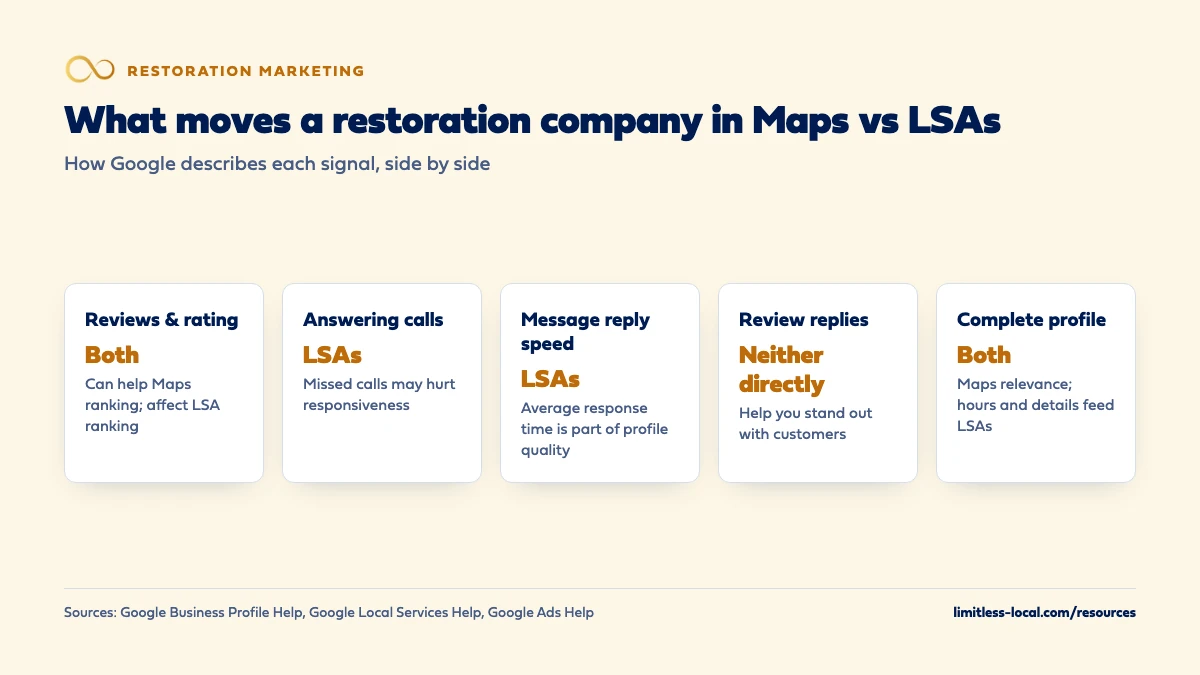
- Both: earning steady, genuine reviews with a good rating; a complete, accurate profile with real photos; verification.
- Mostly Local Services Ads: answering calls during your listed hours, replying to message leads fast, your bid and budget, and the job types and areas you select.
- Mostly Maps: distance from the searcher, links from other websites, and a profile whose categories and services match what people search.
- Neither directly, but it shows: replying to reviews. Google presents it as a way to stand out with customers, not as a ranking factor.
In our judgement, the one habit that pays off in both places is answering every call. It’s a named factor in Local Services Ads, and in Maps it’s how you turn calls into the jobs and reviews that popularity is built on.
What should a restoration company fix first?
- Hours. Make the hours on your Business Profile match the hours someone will really pick up the phone.
- Call coverage. Decide who answers at night and on weekends, and test it by calling your own ad number.
- Message leads. Turn them on if you run Local Services Ads, and make one person responsible for replying fast during business hours.
- Reviews. Ask every customer at the end of every job, the same way each time.
- The profile itself. Accurate name, categories, services and service area, plus real photos of your crews and equipment, without homeowners’ faces or addresses.
If you haven’t started with Local Services Ads yet, getting a restoration company verified for LSAs covers the screening first.
Want to see where your company stands?
A free visibility audit shows where you show up on Google, Maps and AI answers, and what it's costing you in calls.
What's different for restoration companies
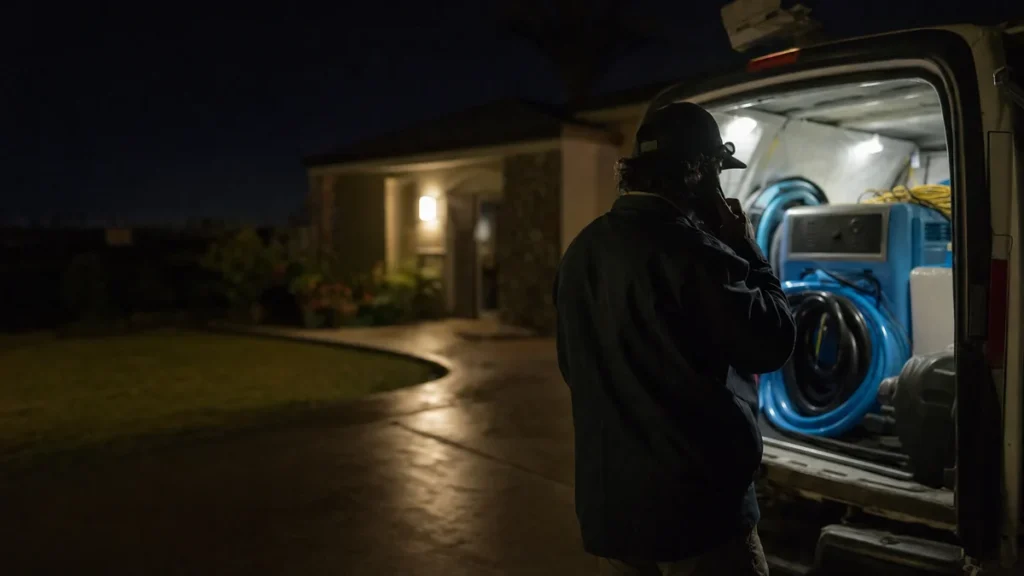
Your busiest hours are your hardest hours. Burst pipes and sewage backups don’t wait for office hours, so the calls Local Services Ads may judge you on come at night, on weekends and during storms, when your crews are already out. Set your Business Profile hours to the hours you can really cover.
Surges test responsiveness. After a freeze or a storm, call volume can jump overnight. In our judgement, that’s when missed calls pile up, both the ones you may be charged for and the ones that may count against your responsiveness. Plan who takes the overflow before the season, not during it.
Review timing is awkward. A water job can run for days, and the customer is dealing with an insurer. Asking at the end of the job, once the house is dry and the equipment is out, tends to work better than asking on day one.
Review content is sensitive. Replies should never mention the claim, the insurer, health effects or anything private about the home.
A worked example: what missed calls cost on Local Services Ads
These numbers are made up to show the math, not a benchmark for your market. Say a restoration company’s Local Services Ads bring in 30 calls in a month. Its Business Profile hours say it’s open around the clock, but nobody covers the phone well overnight, and 6 of those calls are missed while the caller stays on the line for more than 20 seconds.
Under Google’s rules, all 6 can be charged as valid leads, because they happened during the listed business hours while the ads were scheduled to run. If a lead costs $90 in this market, that’s $540 for calls nobody spoke to. On top of the money, Google says missed calls may negatively affect responsiveness, which is one of the factors in where the ad shows.
The fix isn’t to shorten the hours and hope. It’s to decide whether the company really can answer at night. If it can, put someone on the phone. If it can’t, set honest hours, turn on message leads for after-hours contact, and reply first thing.
Frequently asked questions
Do Local Services Ads reviews and Google Maps reviews count separately?
No. Google says Local Services reviews are managed through Google Business Profile Manager, not your Local Services Ads account, so the reviews customers leave on your profile are the ones your ads use.
Will a bad review knock me out of Local Services Ads?
Google’s help pages on Local Services reviews and ad rankings don’t give a rating cutoff. They say rating and number of reviews affect ranking, and Google recommends 5 or more reviews. In our judgement, one bad review among many good ones is far more likely to nudge you down than to take you out.
Does Google count the time it takes me to reply to a review?
Google asks businesses to reply to reviews in a timely manner, but doesn’t say reply speed is a ranking factor for Maps or Local Services Ads.
If I run Local Services Ads, will I rank higher in Maps?
Google’s local ranking page says there’s no way to request or pay for a better local ranking, and it doesn’t list ads among the factors it describes.
Can I hide my response time in my ad?
Google says the estimate may appear once you have 2 or more message leads in the last 90 days. The way to improve what shows is to reply faster during your business hours, since that’s what the estimate is based on.
Do photos matter for Local Services Ads?
Google lists high-quality images as part of profile quality and says higher quality profiles, including those with images, may rank higher. Real photos of your team, work or equipment are what it suggests.
Key takeaways
- Maps ranking: relevance, distance and popularity; more reviews and positive ratings can help.
- Local Services Ads ranking: your bid plus how likely your ad is to produce a lead, including responsiveness, rating, review count and average response time.
- Missed calls may hurt your Local Services Ads ranking and can be charged if they happen during your listed hours.
- Your Google Business Profile’s reviews, hours and details carry into your Local Services Ads.
- Answering every call is the habit that pays off in both places.
Not sure what's working right now?
Start with a free visibility audit: rankings, Google profile, reviews and tracking, checked against your service area.
More in this section
- How hard is it for a restoration company to get verified for LSAs?
- Should a restoration company run Google Ads, LSAs or both?
- How does a restoration company recover when its reviews drop?
- Should a restoration company budget for content and reviews?
- Does a GBP get restoration leads faster than a website?
Sources
- Tips to improve your local ranking on Google — Google Business Profile Help
- Tips to get more reviews — Google Business Profile Help
- About ad rankings — Google Local Services Help
- Reviews and Ratings on Local Services Ads — Google Local Services Help
- Improve your Local Services Ads performance — Google Local Services Help
- Manage leads and jobs — Google Local Services Help
- How leads work — Google Local Services Help
- Local Services Ads transition to Performance Max campaigns with pay-per-lead goals — Google Ads Help