
How should a restoration company reply to Google reviews?

- What should a restoration company say, and not say, when it replies to Google reviews?
- Why should a restoration company reply to reviews at all?
- What should never go in a reply to a restoration review?
- How should I reply to a five-star review?
- How should I reply to a negative review about our work?
- How do I reply when the review is really about the insurance claim?
- What if the reviewer mentions mold or a health problem?
- What if the reviewer isn't the person who hired us?
- Who on my team should write the replies?
- How quickly should a restoration company reply to a review?
- Can I edit my reply after the problem is fixed?
- What's different about review replies for restoration companies
- A worked example: rewriting a reply that says too much
- Frequently asked questions
- Key takeaways
- More in this section
- Sources
The short version
- Reply to every review, briefly and in your own words, not one copied thank-you.
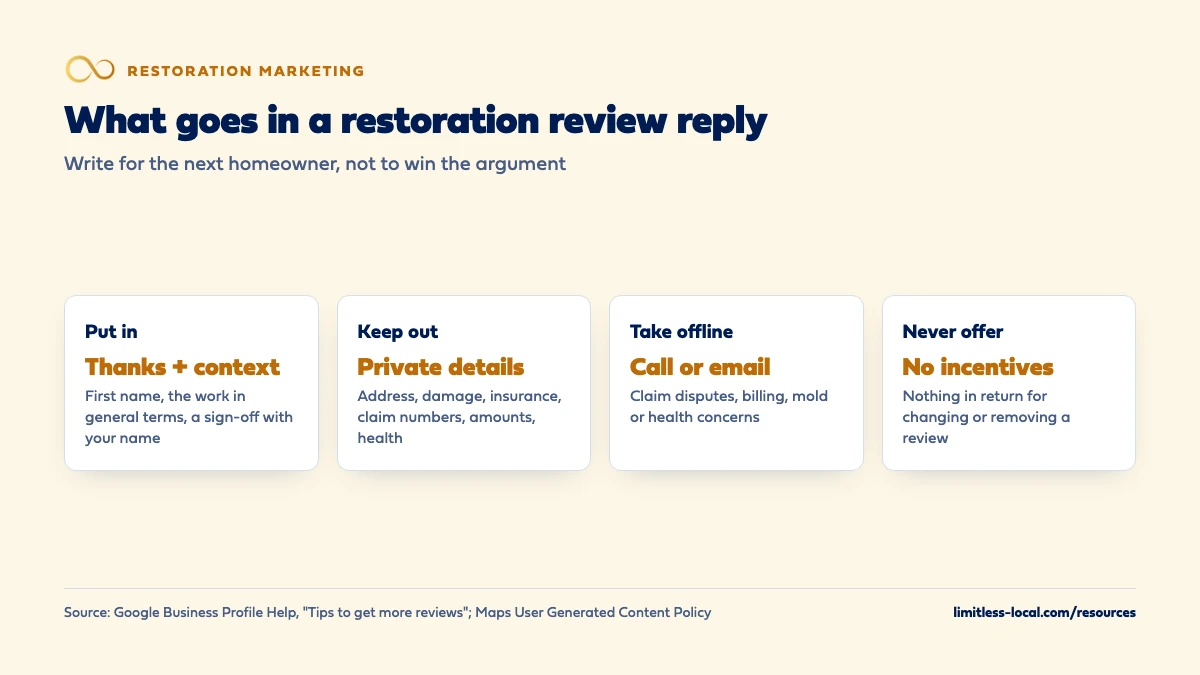
- Keep addresses, damage details, insurance, claim numbers, amounts and health issues out of every reply.
- On complaints: acknowledge, explain what you control, invite them to call or email.
- Write for the next homeowner reading your profile, not to win the argument.
For restoration owners who reply to reviews themselves and want wording that sounds human, protects the homeowner’s privacy and stays out of the insurance claim.
Get a free visibility audit · Book a growth call
What should a restoration company say, and not say, when it replies to Google reviews?
Reply to every review, good and bad, with a short, personal note that thanks the customer and refers to the work in general terms, such as drying out a basement, without naming their street, what was damaged, their insurance company or anything about the claim. On a negative review, acknowledge the concern, explain calmly what you can and can’t control, and ask them to call or email so you can sort it out privately. Never argue, never share private details, never discuss health effects or claim amounts, and never offer anything in return for changing the review.
Replies are part of how a profile earns calls, and calls that turn into jobs are what we measure. Review response is included in every package of our local SEO work for restoration companies, and the restoration marketing guide shows where reviews fit among the other channels. More questions like this one are in the restoration marketing questions library.
Why should a restoration company reply to reviews at all?
Because the homeowner reading your profile at midnight with water on the floor is reading your replies too. Google’s local ranking help page says replying to reviews shows you value customer feedback, and that positive reviews and helpful replies can help your business stand out. Google’s help page on managing customer reviews adds three facts worth knowing before you write a word:
- Your reply is public and posted under the review.
- The reviewer is notified when you reply, and can change their review after reading it.
- Google checks replies against its content policies. Replies usually take up to 10 minutes to review, but sometimes it takes up to 30 days, and a reply that isn’t approved has to be edited.
You also need a verified Business Profile before you can reply at all. If you haven’t verified, that’s the first job: see optimizing your restoration Google Business Profile.
What should never go in a reply to a restoration review?
Restoration replies carry a privacy risk most trades don’t. You’ve been inside the customer’s home on a bad day, often with an insurance claim open. Google’s Maps content policy, which Google checks replies against, doesn’t allow posting personal information without consent, and it lists examples including someone’s full or last name, their face in a photo, and financial or medical information. Google’s reply tips also say never share a reviewer’s private information.
In our view, that adds up to a firm list for restoration replies. Leave out:
- The address, street, neighborhood or building name.
- What was damaged or lost: the nursery, the finished basement, family photos.
- The cause, if it could embarrass them: a toilet overflow, a sewage backup, a fire they started.
- The insurance company, adjuster, policy number, claim number, deductible or any amount.
- Anything about health, including mold exposure or anyone getting sick.
- Their last name, or names of family members or tenants.
A detail that helps the next reader, such as “getting things dried out after a late-night call,” is fine. A detail that identifies the homeowner’s situation isn’t.
How should I reply to a five-star review?
Short, specific and different every time. Google’s tips for review replies say to keep replies short and simple, to avoid sending the same “thank you” to everyone, and to be conversational, not promotional: no deals or promotions in the reply. Google also suggests addressing the reviewer by name and signing off with your name or initials.
Examples:
- “Thanks, Dana. Middle-of-the-night calls are never fun, and we’re glad the crew could get there quickly and get everything dried out. Take care. – Chris”
- “Appreciate you taking the time, Mark. Glad the daily moisture checks and updates helped it feel less stressful. – Chris, owner”
Use the first name they show on the review, not one from your job file. And mention the work in the general terms they used themselves, not new details from your records.
How should I reply to a negative review about our work?
Google’s tips for negative reviews are a good outline: protect privacy and avoid personal attacks, acknowledge any mistakes without taking responsibility for things outside your control, explain what you can and can’t do, apologize where it’s earned, personalize it, and respond promptly. If the situation is complex, ask the reviewer to contact you by phone or email to resolve it privately.
A reply built that way:
“Jordan, I’m sorry the drying took longer than we told you at the start. That’s on us, and we’ve changed how we set expectations on the first visit. I’d like to go over the rest with you directly. Please call our office and ask for me. – Chris, owner”
What it does: owns the part that was yours, says what changed, and moves the rest offline. What it doesn’t do: list dates and readings to prove the reviewer wrong, or describe their house. Even if you’re right on every point, a long rebuttal reads as defensive to the homeowner deciding who to call next, in our judgement.
Curious what your marketing is actually booking?
Get a free visibility audit — no obligation, no sales pitch.
How do I reply when the review is really about the insurance claim?
This is the restoration reply that goes wrong most often, because the homeowner is angry about a carrier decision and you’re the company with a Google profile. Google’s advice to not take responsibility for things outside your control fits it exactly. In our view, the reply should do three things: show you heard them, state that coverage decisions aren’t yours to make, and offer a person to talk to.
“Sam, I understand how frustrating the claim process has been, and I’m sorry you’re dealing with it on top of the damage. Coverage decisions are made by the insurance company, not by us, but we’re glad to help you understand our part of the paperwork. Please call our office and ask for me. – Chris”
Leave out who the carrier is, what was approved or denied, what you billed and anything that sounds like a promise about what insurance will pay. If you want homeowners to understand the process before they’re in it, explaining the claims process on your website does that job better than a public reply can. This is general guidance, not legal or insurance advice.
What if the reviewer mentions mold or a health problem?
Don’t discuss it in public. Medical information is one of the types of personal information Google’s content policy lists, and a reply that confirms or disputes someone’s health complaint puts their private situation on your profile. It also risks you making a health claim you can’t support.
Keep the reply to concern and contact: “Pat, I’m sorry to hear you’re dealing with this. I’d like to understand what happened and talk it through with you directly. Please call our office and ask for me.” Then handle it by phone, with whatever documentation your company keeps. If your website talks about mold, what a restoration website should say about mold covers how to keep those claims sourced. This is general guidance, not legal or medical advice.
What if the reviewer isn't the person who hired us?
Restoration jobs involve tenants, property managers, family members and neighbors, so a reviewer you can’t match to an invoice isn’t automatically fake. A tenant who let your crew in at night had a real experience with your company.
If you can’t place the reviewer, a neutral reply is safest: “Thanks for the feedback. We can’t find this job under your name, and we’d like to look into it. Please call our office so we can understand what happened.” That avoids confirming or denying details about any customer.
If the review clearly breaks Google’s policies, for example it comes from a competitor or a former employee, or includes someone’s personal information, report it. Google’s page on reporting inappropriate reviews says only reviews that violate its policies are eligible for removal, and not to report a review just because you disagree with it. If several land at once, recovering when your reviews drop covers the full process.
Who on my team should write the replies?
One person who knows the jobs and can stay calm, usually the owner or an office manager. Google’s managing reviews page says your reply appears as the business, and your personal name isn’t shown, so a sign-off with a first name or initials, as Google’s tips suggest, is what makes it feel human.
A few rules we’d set for whoever writes them:
- Check the job file first, then write from what the reviewer said, not from the file.
- Nothing gets posted the same hour as an angry review. Sleep on the negative ones, then reply the next business day.
- No templates pasted word for word. Keep a short list of example replies as a guide, then write each one fresh.
- Anything involving a claim dispute, an injury or a threat of legal action goes to the owner before a reply goes up.
How quickly should a restoration company reply to a review?
Google’s tips say a prompt response shows you value the feedback, without giving a deadline. In our judgement, within a business day or two is a good standard for a restoration company: fast enough that the reply sits next to the review while it’s new, slow enough that nobody replies to a one-star review in anger at 2 a.m.
Positive reviews can wait for a weekly batch if you’re stretched during a storm surge. Negative ones shouldn’t. A complaint with no reply for weeks reads to the next homeowner as a company that doesn’t answer, which is the one thing nobody wants from a restoration company. How fast you answer the phone matters even more: see how fast to answer emergency calls.
Can I edit my reply after the problem is fixed?
Yes. Google lets you edit or delete your reply from your Business Profile under Read reviews. If you resolve a complaint offline, a short update helps the next reader: “Update: we spoke with Jordan and have resolved this. Thanks for giving us the chance.” Only add it if the customer agrees it’s resolved.
Google’s tips say constructive replies and follow-up may even encourage a customer to update their review, and customers can change their review after reading your reply. You can invite that once, with nothing attached. What you can’t do is offer anything for it: Google’s policy doesn’t allow incentives, such as payment, discounts or free services, in exchange for revising or removing a negative review. In our reading, on a restoration job that would include waiving part of a deductible.
Not sure which of these is costing you jobs?
A free visibility audit checks the Google profile, reviews, site and tracking, and shows what to fix first.
What's different about review replies for restoration companies
Every job is private. A plumber’s reply can mention a water heater. Yours could expose that a family lost their kitchen, had a sewage backup or filed a claim. The default for restoration replies is less detail, not more.
A third party is in the story. Many complaints are about the insurance carrier’s decisions. Your reply has to separate what you did from what the carrier decided, without naming the carrier or the numbers.
Health comes up. Mold, sewage and smoke jobs lead to health worries. Those conversations belong on the phone, never in a public reply.
Readers are in a hurry. The next homeowner scrolls your reviews quickly before calling. Calm, consistent, short replies tell them you’ll answer the phone the same way, which is the impression you want them to have, in our view.
A worked example: rewriting a reply that says too much
This review and reply are made up to show the rewrite. A two-star review says: “They dried out our basement but then the insurance only paid part of it and we got stuck with a bill. Not happy.”
A first draft many owners would write:
“We completed the mitigation at your Oak Street home per IICRC standards. Your carrier approved most of our invoice and the balance is your deductible plus the non-covered contents cleaning, as explained in the work authorization you signed. We followed every step.”
What’s wrong with it: it names the street, discusses what insurance approved, talks about the deductible and what the customer owes, and argues. All of it is accurate, and all of it should come out.
The rewrite:
“Alex, I’m sorry the end of the claim left you with a bill you didn’t expect. That’s a frustrating spot to be in. Coverage decisions are made by the insurance company, but I want to make sure you understood our charges and had every document you needed. Please call our office and ask for me. – Chris, owner”
Same facts on your side, no private details in public, and a clear next step. If you’d rather not write these yourself, review response is part of our Essentials package at $3,500 a month and every package above it.
Frequently asked questions
Should I reply to reviews that only have stars and no text?
A short thank-you is fine, but Google’s tips suggest focusing your effort on reviews where you can share a helpful update or answer a question, rather than sending the same thank-you to everyone.
Can I use AI to write my review replies?
Google’s tips don’t address it. If you use a tool to draft, read and edit every reply before it goes up, and check it doesn’t pull in details from your job records.
Can I mention the homeowner's insurance company if the review names it first?
We’d still leave it out. Repeating it keeps the claim front and center on your profile, and Google’s tips advise not taking responsibility for things outside your control.
Does the reviewer see my reply?
Yes. Google says the reviewer is notified when you reply, and the reply is posted publicly under their review, shown as coming from your business.
Should I reply to a review I've reported to Google?
Usually yes, briefly and calmly. Google says review evaluation typically takes several days, and future customers will see the review and your reply in the meantime.
Can I offer a discount in my reply to win a customer back?
No. Google’s tips say replies should be conversational, not promotional, and its policy doesn’t allow incentives in exchange for changing or removing a review.
Key takeaways
- Reply to every review with a short, personal note, never one copied thank-you.
- Keep addresses, damage details, insurance, claim numbers, amounts and health issues out of every reply.
- On a claim complaint, separate what you did from what the carrier decided and invite them to call.
- Sleep on angry reviews and reply within a business day or two.
- You can update a reply once a complaint is resolved, but never trade anything for a changed review.
Want a second set of eyes on your setup?
We'll look at how you show up locally and where calls are leaking, then send you a plain-English breakdown.
More in this section
- How does a restoration company recover when its reviews drop?
- How do I get detailed Google reviews after a water damage job?
- How do I optimize my restoration company's Google Business Profile?
- How should a restoration company run Google Ads for fire damage?
- Do job photos on Google help a restoration company rank?
Sources
- Tips to get more reviews — Google Business Profile Help
- Manage customer reviews — Google Business Profile Help
- Prohibited & restricted content — Maps User Generated Content Policy Help
- Report inappropriate reviews on your Business Profile — Google Business Profile Help
- Tips to improve your local ranking on Google — Google Business Profile Help