
Is my plumbing website turning visitors into calls?
- How can I tell if my plumbing website is designed to turn local visitors into calls and booked jobs?
- Step 1: What does my site show on a phone's first screen?
- Step 2: Does the phone number dial on one tap?
- Step 3: How fast does the site load on a phone?
- Step 4: Is anything covering the page?
- Step 5: Does each service page match what people searched for?
- Step 6: Is the request form easy to finish on a phone?
- Step 7: How do I count calls and forms from the website?
- Step 8: How do I read the numbers once I have them?
- Is it the website, or is it something else?
- What should I fix first?
- What's different about plumbing websites
- A worked example: finding the page that leaks calls
- Frequently asked questions
- Key takeaways
- More in this section
- Sources
The short version
- Test it on your own phone: what you fix, where, and a number that dials on one tap.
- Check speed with PageSpeed Insights and remove pop-ups that cover the page.
- Track calls and forms from the site, page by page.
- Match those contacts to booked jobs before deciding the site works.
A self-check for plumbing owners who already have a website and want to know whether it’s doing its job.
Get a free visibility audit · Book a growth call
How can I tell if my plumbing website is designed to turn local visitors into calls and booked jobs?
Check it from a phone the way a customer would: the first screen should say what you fix and where, with a tap-to-call number that dials on one tap, and the page should load fast with no pop-up in the way. Then look at the numbers: count calls and form requests from the site, page by page, and match them to booked jobs. If service pages get visits but almost no calls, or calls come in but rarely book, the site is leaking work even if it looks fine.
If the check turns up more than a few fixes, that’s the kind of work our website builds are for: a themed site is $3,750 ($3,000 with any Limitless Engine package) with up to 25 pages, and a custom site starts at $5,000. Every package also includes call, web and form tracking, so you can see which pages produce calls. The details are on our website design page, how it fits a plumbing shop is on our plumbing marketing page, and the rest of the plumbing marketing questions library covers the other channels.
Step 1: What does my site show on a phone's first screen?
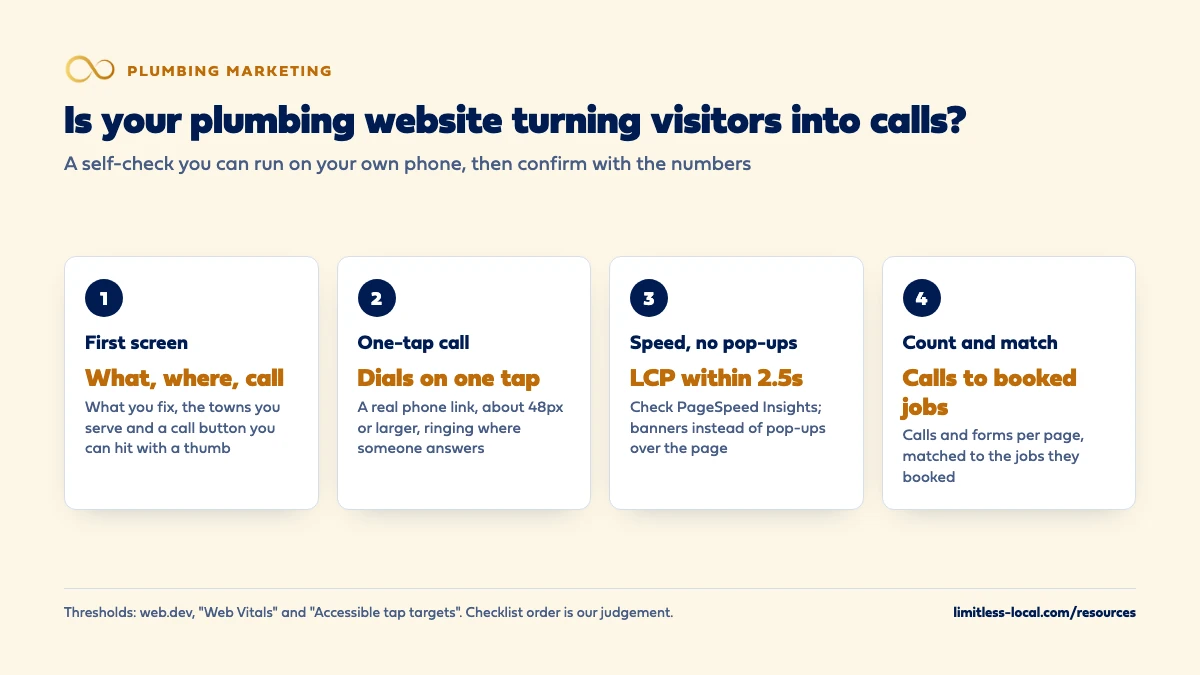
Open your site on your own phone, on mobile data rather than the shop Wi-Fi, and look at the first screen before you scroll. In our judgement, a plumbing site that turns visitors into calls shows three things there: what you fix, the towns you serve, and a phone number or call button big enough to hit with a thumb.
If the first screen is a big photo, a slogan and a menu, the visitor has to work to find out whether you do drains in their town. Many won’t. Google’s guide to mobile landing pages advises that a mobile site be free of clutter, easy to read and quick to load (Google Ads: 5 things to consider when optimizing your mobile landing page). What a plumbing company website should include covers the full list of pages and sections.
Step 2: Does the phone number dial on one tap?
Tap your own number from the header, the footer and every service page. It should open the phone’s dialer with the number filled in. If it does nothing, it’s text, not a link, and every visitor has to copy it or type it by hand.
Then check the size. web.dev’s guidance on accessible tap targets gives a minimum recommended touch target size of around 48 device-independent pixels, and suggests adding padding to bring a tap target up to 48px (web.dev: Accessible tap targets). A tiny number squeezed between menu links is easy to miss with a thumb. Make sure it’s the number that rings where someone answers, at the hours your site says you’re open.
Step 3: How fast does the site load on a phone?
Run your home page and your top service pages through PageSpeed Insights. Google says it reports on the user experience of a page on both mobile and desktop, using real-user data where available and lab data for diagnostics (Google for Developers: About PageSpeed Insights).
The real-user numbers to read are the Core Web Vitals. web.dev’s recommended thresholds are a Largest Contentful Paint within 2.5 seconds, an Interaction to Next Paint of 200 milliseconds or less, and a Cumulative Layout Shift of 0.1 or less, measured at the 75th percentile of page loads (web.dev: Web Vitals). If your pages miss those, the usual suspects are oversized photos, sliders and heavy add-ons. A homeowner with a leak on a weak signal won’t wait for a slider to load.
Step 4: Is anything covering the page?
Pop-ups for coupons, newsletter sign-ups and chat windows that open over the page all stand between a visitor and your phone number. Google’s Search documentation says intrusive interstitials and dialogs obstruct the view of content, may frustrate users and erode their trust, and can make it hard for search engines to understand your content; it recommends banners that take up only a small part of the screen instead (Google Search Central: Avoid intrusive interstitials and dialogs).
In our judgement, the test is simple: on a phone, can someone call you within one tap of landing, without closing anything first? If not, move the offer into a banner or onto the page itself.
Curious what your marketing is actually booking?
Get a free visibility audit — no obligation, no sales pitch.
Step 5: Does each service page match what people searched for?
Someone who searched “water heater replacement” should land on a page about water heater replacement, not your home page. Google’s mobile landing page guide makes the same point about relevance: the page people land on should answer what they clicked the ad to find, without forcing them to start their search over (Google Ads).
Read each main service page as a customer would. Does it say what the job involves, which towns you cover, roughly how you price, and why to call you, with the call button near the top and again after the main points? If several services share one thin page, how many service pages a plumbing website needs covers how to split them.
Step 6: Is the request form easy to finish on a phone?
Fill in your own form on your phone. Count the fields, check that the keyboard switches to numbers for the phone field, and send it. Then check where it went: an inbox someone reads, a text to the on-call phone, or straight into ServiceTitan, Housecall Pro or Jobber.
Google’s guide notes that on mobile, forms are inconvenient and can cause visitors to leave before they finish (Google Ads). In our judgement, a plumbing request form needs a name, a phone number, the town or ZIP code and a short description of the problem, and little else. A form that lands in an unread inbox is worse than no form, because the customer thinks they’ve reached you.
Step 7: How do I count calls and forms from the website?
You can’t judge the site without counting what it produces. Three common ways:
- Google Analytics key events. Any event you collect, such as a tap on your phone link or a form submission, can be marked as a key event, and reports like Landing pages then show how many times each page produced one (Analytics Help: About key events).
- Google Ads website call tracking. For visitors who arrive from your ads, Google can swap your number for a Google forwarding number at no cost to you and count a call as a conversion when it lasts longer than a minimum length you set (Google Ads Help: Tracking calls to a phone number on a website).
- Call tracking software that swaps numbers for every visitor and tags each call by source.
Keep website calls separate from Google profile calls. Google Business Profile performance counts the times a customer clicked the call button on your profile, and website clicks separately (Google Business Profile Help: Understand your Business Profile performance). Tracking which plumbing marketing books jobs covers connecting calls to jobs.
Step 8: How do I read the numbers once I have them?
Look page by page, not just at the site total. For each main page, note the visits, the calls and form requests it produced, and how many of those became booked jobs. In our judgement, three patterns tell you where to look:
- Visits but almost no calls: the page doesn’t answer the question, the call button is hard to find, or it loads slowly.
- Calls but few booked jobs: the page attracts the wrong work, the prices or towns aren’t clear, or the calls aren’t being answered and followed up.
- Few visits at all: it’s a traffic problem for your SEO or ads, not a page problem.
Don’t compare your rate with a number from someone else’s website. Compare your pages with each other, and each page with itself before and after a change.
Is it the website, or is it something else?
Sometimes the site gets the blame for a problem that starts elsewhere. If your ads get clicks but no calls, check the search terms and the towns before redesigning anything. If calls come in but don’t book, listen to a few recordings: the issue may be how calls are answered or how quickly quotes go out. Why plumbing Google Ads get clicks but no calls works through the ad side.
In our judgement, the website is the likely problem when people reach the right pages and still don’t call, or when the steps above turned up a dead phone link, slow pages or a form nobody receives.
What should I fix first?
Fix the cheap, high-impact problems before anything else. In our judgement, the order is: a number that doesn’t dial or doesn’t ring through, a form that goes nowhere, pop-ups covering the page, the first phone screen, then speed, then service pages that don’t match searches. The first three are often an hour’s work and can be the difference between a site that gets calls and one that doesn’t.
The offer on the page matters too. What offer gets more people to call a plumbing company covers the wording, and what an emergency plumbing page should include covers the page that matters most for urgent calls.
Not sure which of these is costing you jobs?
A free visibility audit checks the Google profile, reviews, site and tracking, and shows what to fix first.
What's different about plumbing websites
Emergency visitors call; they don’t browse. Someone with water on the floor wants the number now. In our judgement, emergency pages should be built around one action, the call, and nothing should slow it down.
Planned-work visitors compare. Someone pricing a water heater or a repipe may read several pages and fill in a form at night. Those pages need more detail, prices or price ranges where you can give them, and a form that reaches someone in the morning.
After-hours calls test the site’s promises. If the site says you answer around the clock, the number has to ring through to a person at 2 a.m. A site that promises it and a phone that doesn’t deliver it costs you the call and the review.
A worked example: finding the page that leaks calls
These numbers are made up to show the method, not a benchmark for your website. Say a month of tracking shows:
- Emergency plumbing page: 200 visits, 14 calls and forms, about a 7% contact rate.
- Home page: 500 visits, 15 calls and forms, a 3% contact rate.
- Water heater replacement page: 150 visits, 1 call, under one contact for every 100 visits.
The water heater page gets real traffic but almost nobody calls from it. Checking it on a phone shows why: the number isn’t a tap-to-call link and the page is a short paragraph with no price guidance. Fixing those two things and tracking it for another month tells you whether the page was the problem. A free visibility audit can run the same check across your site, your Google profile and your tracking.
Frequently asked questions
Should my website show a phone number or a booking button first?
In our judgement, for emergency work the phone number comes first, because people with an urgent problem want to talk to someone. For planned work, offering both a call button and a booking or request form makes sense.
Does a chat widget help a plumbing website get more calls?
It can help visitors who won’t call, but a chat window that opens over the page on a phone gets in the way of the call button. If you use one, keep it small until someone taps it.
How often should I re-run this check?
In our judgement, after any change to the site, and at least once a season. Updates, new plugins and expired forms can break a working site without anyone noticing.
Do I need Google Analytics to know if my site works?
It helps, because key events show which pages produce calls and forms. Call tracking and your booked-job records matter more, because they show whether those contacts became work.
Will a faster site get me more calls?
Not on its own if the page doesn’t answer the question or make calling easy. Speed removes a reason to leave; the content and the call button give people a reason to call.
Key takeaways
- Check the site on your own phone: what you fix, where, and a number that dials on one tap.
- Aim for web.dev’s Core Web Vitals thresholds and remove pop-ups that cover the page.
- Match each service page to what people search for, and keep forms short.
- Count calls and forms page by page, and keep website calls separate from Google profile calls.
- Judge the site by booked jobs, and compare your pages with each other, not with someone else’s rate.
Want a second set of eyes on your setup?
We'll look at how you show up locally and where calls are leaking, then send you a plain-English breakdown.
More in this section
- How long does plumbing SEO take to bring in calls?
- Why are my plumbing Google Ads getting clicks but no calls?
- How do I get more plumbing leads?
- How do I keep plumbing calls coming in during slow months?
- What offer gets more people to call a plumbing company?
Sources
- 5 things to consider when optimizing your mobile landing page — Google Ads
- Accessible tap targets — web.dev
- About PageSpeed Insights — Google for Developers
- Web Vitals — web.dev
- Avoid intrusive interstitials and dialogs — Google Search Central
- About key events — Google Analytics Help
- Set up Tracking calls to a phone number on a website — Google Ads Help
- Understand your Business Profile performance & insights — Google Business Profile Help