
Can a CRM help a roofer track marketing ROI?

- Can a roofing CRM show which marketing actually pays for itself?
- What does a CRM add that call tracking and Google's reports don't?
- What does a roofing CRM need before it can show ROI?
- Which lead sources should a roofer set up in the CRM?
- How do I make sure every roofing lead actually gets a source?
- Should a roofer measure ROI on revenue, cash collected or gross profit?
- How do I count roofs that sign weeks after the first call?
- Can my CRM send signed roofs back to Google Ads?
- What should the monthly ROI report from my CRM show?
- What can't a CRM tell me about marketing ROI?
- Is a spreadsheet enough, or does a roofer need a CRM for this?
- What if my CRM data is a mess right now?
- What's different about tracking ROI for a roofing company
- A worked example: two sources, one month, read three ways
- Frequently asked questions
- Key takeaways
- More in this section
- Sources
The short version
- Google and call tracking count calls and forms; the CRM connects them to signed roofs and revenue.
- ROI needs three inputs: a source on every lead, the spend per source, and the value of each signed job.
- Report by the month the lead came in, because roofs often sign weeks later.
- Judge sources on cost per signed roof and gross profit, not on lead counts.
For roofing owners who already log leads somewhere and want that software to tell them which marketing dollars turn into signed roofs.
Get a free visibility audit · Book a growth call
Can a roofing CRM show which marketing actually pays for itself?
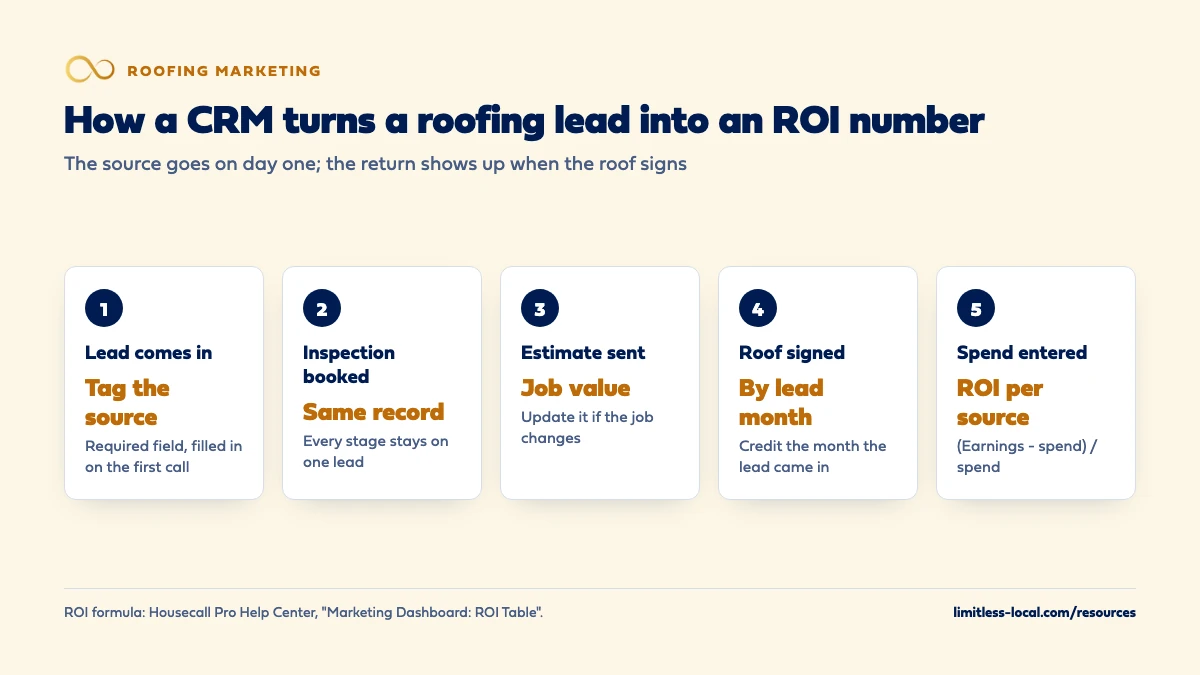
Yes. A CRM is the one place a roofing lead’s source, inspection, estimate and signed contract sit on the same record, so it’s where marketing ROI actually gets worked out. Call tracking and Google’s reports stop at the call or the form; the CRM carries that lead all the way to the signed roof and what it paid. It only works if every lead gets a source the day it comes in, you enter what each source cost, and you report by the month the lead arrived.
That’s the same scoreboard we work from: every one of our packages includes reporting with a cost-per-lead breakdown, call tracking with recording, and source tagging on calls, forms and chats, and our automation add-ons, including a lead tracking dashboard, plug into any tier. See how it fits a roofing company on our roofing marketing page. For every channel side by side, the roofing marketing guide lays them out, and the roofing marketing questions library goes one question at a time.
What does a CRM add that call tracking and Google's reports don't?
Google Ads, your Google Business Profile and a call tracking tool are good at one thing: counting the calls and form fills each source sends you. None of them knows that the call from Tuesday became an inspection on Thursday, an estimate the week after and a signed $18,000 roof a month later. That part lives in your office, in the CRM.
So think of it as two halves. Tracking tells you where the lead came from; tracking calls and forms from Google covers that half. The CRM tells you what the lead turned into. Put both on one record and you can see which marketing paid for itself last quarter.
What does a roofing CRM need before it can show ROI?
Three things, and most roofing CRMs only have one of them filled in on day one:
- A source on every lead. Google Ads, Maps, website, referral, yard sign, canvassing. No source, no ROI.
- What each source cost. The software doesn’t know what you paid Google or a lead platform until someone types it in, month by month.
- What each signed job was worth. The contract value, updated when the job changes, and ideally the gross profit too.
Housecall Pro’s ROI table shows how this works in practice: you enter the marketing spend for each lead source and date range, and it works out ROI as earnings minus spend, divided by spend. If no spend has been entered for a source, the ROI column just shows a dash. The report is only as good as the numbers your office keys in.
Which lead sources should a roofer set up in the CRM?
Set up one source for each thing you pay for or work at, and no more. A list that works for most roofing companies:
- Google Ads
- Local Services Ads
- Google Business Profile (Maps)
- Website, found through regular search
- Facebook or Instagram
- Referral from a past customer
- Yard sign or truck
- Door knocking or canvassing
- Each lead platform you buy from, named separately
- Repeat customer
Most tools let you build your own list; JobNimbus, for example, lets an admin create custom lead sources under its settings. Two rules keep the list useful. Never use a catch-all like “Internet” or “Online”, because it lumps your cheapest and most expensive sources together. And split anything you pay for separately, so Google Ads and Local Services Ads each get their own row.
How do I make sure every roofing lead actually gets a source?
Make it part of taking the lead, not a month-end cleanup:
- Make the source field required so a lead can’t be saved without one.
- Let tracking fill it in where it can. Calls to a tracking number, web forms and online bookings can be tagged automatically. How call tracking works for a roofing company explains the numbers behind that.
- Ask the homeowner as a backup. “How did you find us?” on the first call catches referrals, yard signs and trucks that no tracking tool can see.
- Check the blanks every week. Leads with no source pile up into a “no lead source” row that makes every real source look worse than it is. Fix them while the office still remembers the call.
If two sources both seem right, say a homeowner saw your yard sign and then searched your name on Google, pick a rule and stick to it. Crediting the first thing that put you on the homeowner’s radar is a fine rule, as long as everyone in the office uses it.
Should a roofer measure ROI on revenue, cash collected or gross profit?
Use gross profit to make decisions, and keep revenue for the headline. A $15,000 roof isn’t $15,000 of return; once materials, labor and dump fees come out, the money left over to pay for marketing is a fraction of that. ROI worked out on revenue makes almost every roofing source look like a winner, which is exactly why it’s a poor tool for deciding what to cut.
Cash collected matters too, since insurance jobs and big replacements are often paid in stages. If your report can switch between invoiced revenue and amount paid, judge sources on the first and plan cash with the second.
One catch to check in your own software: some lead source reports only count the first invoice tied to a lead. Jobber’s lead source report, for one, shows the total from the first invoice linked to a lead, not any revenue after it. For a roofer, that means a $400 repair that turned into a full replacement later may only get credit for the $400.
Curious what your marketing is actually booking?
Get a free visibility audit — no obligation, no sales pitch.
How do I count roofs that sign weeks after the first call?
Report by the date the lead was created, not the date the contract was signed. A storm lead from March that signs in May belongs to March’s spend. Count it in May and March looks like a waste while May looks brilliant, and you’ll move money in exactly the wrong direction.
Most CRMs can filter lead source reports by the lead’s creation date, and that’s the view to use. The trade-off is that recent months keep changing as late signings come in, so the last month or two will always look a little weak at first. Rerun the last three months each time you review, and only make big budget calls on months that have had time to close. Tracking which roofing leads turn into signed jobs goes deeper on stages and reporting by lead month.
Can my CRM send signed roofs back to Google Ads?
Yes, and it’s one of the most useful things a CRM can do for a roofer running Google Ads. Google Ads gives every ad click a unique ID called a GCLID. If your website form saves that ID with the lead, you can later give it back to Google Ads when the homeowner signs a contract, and Google records that sale against the ad and keyword that started it (Google Ads Help). The same page covers importing conversions from calls, so phone leads can be matched too.
Google now recommends enhanced conversions for leads over the older import method, because it also uses details like the email address from your form to match the sale to the ad. Either way, the payoff is the same: you see which keywords produce signed roofs instead of which ones produce form fills, and your bidding can learn from signed jobs instead of every tire-kicker who filled out a form.
It takes some setup on the website and the CRM, so it’s worth doing once a wrong keyword costs you real money.
What should the monthly ROI report from my CRM show?
One row per source, with these columns, in this order:
- What you spent (ad spend plus any fees for that channel)
- Leads
- Inspections booked
- Estimates sent
- Roofs signed
- Revenue from signed roofs
- Cost per signed roof (spend divided by roofs signed)
- Return, on gross profit if you can get it
Roofing software has reports built for this. AccuLynx describes a marketing spend report that shows what you spend on each program, how many leads it produces and how many of those leads your sales team closes. Whatever tool you use, the cost per signed roof column is the one to circle, because it accounts for both what leads cost and how well they close. What cost per booked job a roofer should aim for shows how to set your own target from your margins.

What can't a CRM tell me about marketing ROI?
A CRM is only as smart as what gets typed into it, and some of what marketing does never shows up as a source:
- Help from other channels. A homeowner might see your truck, read your reviews and click an ad before calling. One source gets the credit.
- Slow-building work. SEO and reviews build over months. A source that looks thin this month can be the reason your Maps calls are strong next spring.
- Costs nobody entered. Agency fees, software and photography belong in the spend column, or the ROI is overstated.
- Referrals that started with marketing. A neighbor who refers you because of a roof you got from Google shows up as a referral, not as Google.
So read it as a strong signal, not a court ruling, and watch the trend over several months.
Is a spreadsheet enough, or does a roofer need a CRM for this?
A spreadsheet works for ROI if you get a handful of leads a month and one person handles all of them. Columns for date, name, source, inspection, estimate, signed and job value give you the same math, and the SBA makes the point that tracking can be as simple as reminding your team to ask new customers where they learned about your business (SBA).
It stops working when more than one person takes leads, when you pay for several sources, or when insurance jobs sit open for weeks and nobody updates the row. That’s when the CRM earns its keep, because the source is attached the moment the lead is entered and the job value updates as the work moves. Whether a roofing company needs a CRM for follow-up covers the other half of that decision.
What if my CRM data is a mess right now?
Don’t try to fix three years of it. Pick the first of next month as day one, clean up the lead source list, make the source required, and start entering monthly spend from that date forward. Bulk-update the open leads you’re still working so they have a source, and leave the closed history alone.
After about three months you’ll have enough clean data to compare sources, and after six you’ll have seen enough late signings to trust it.
Want to see where your company stands?
A free visibility audit shows where you show up on Google, Maps and AI answers, and what it's costing you in calls.
What's different about tracking ROI for a roofing company
Big tickets, few of them. A roofer might sign a handful of replacements a month, so one roof more or less swings a source’s numbers a lot. Look at three months together before you decide anything.
Insurance jobs change value. The number on the first estimate isn’t always the number on the final invoice once the claim is settled. Update the job value in the CRM before you read the report, or your best sources will look worse than they are.
Storms scramble the sources. After hail or wind, canvassing, yard signs and storm searches all spike at once. Give storm canvassing its own source so a busy storm month doesn’t make your year-round marketing look better or worse than it is.
Repairs lead to replacements. A small repair today can be a full roof in two years. If your software only credits the first invoice, tag repair customers so the later replacement still traces back to the source that found them.
A worked example: two sources, one month, read three ways
These numbers are made up to show the math, not a benchmark for your market. Say a roofer’s CRM shows this for leads created in March, checked again in June so late signings have come in:
- Google Ads: $2,500 spent, 30 leads, 12 inspections, 4 roofs signed, $56,000 in contracts.
- Facebook ads: $800 spent, 15 leads, 3 inspections, 1 roof signed, $9,000 in contracts.
Cost per signed roof: Google Ads is $2,500 divided by 4, or $625. Facebook is $800 for 1, or $800.
Return on revenue: Google Ads is ($56,000 minus $2,500) divided by $2,500, or about 21 times what was spent. That looks spectacular and misleads.
Return on gross profit: if 30% of each contract is left after materials and labor, Google’s roofs left $16,800. ($16,800 minus $2,500) divided by $2,500 is about 5.7 times the spend. Facebook’s roof left $2,700, so ($2,700 minus $800) divided by $800 is about 2.4 times. Both made money; Google made a lot more per dollar.
Read in April, before the late signings, the same March leads might have shown 2 Google roofs and no Facebook roof, and Facebook would have looked like a total loss. That’s why you report by lead month and re-check.
Frequently asked questions
Should agency fees count as marketing spend in my CRM?
Yes. Enter ad spend and management fees for each channel together, or the ROI for that channel is overstated. If one agency runs several channels, split its fee across them in proportion to the work.
Does my CRM have to connect to call tracking?
It doesn’t have to, but it helps a lot. When calls from a tracking number create a lead with the source already filled in, your office has one less thing to remember, and fewer leads end up with no source.
What's a good marketing ROI for a roofer?
There isn’t one number, because it depends on your job size, margins and close rate. What ROI a roofer should expect walks through working out your break-even point instead.
Should I track ROI on door knocking and referrals too?
Yes. Give canvassing its own source and enter what it costs in pay and commissions. Referrals cost little, but tracking them shows you how much of your work comes from past customers, and that tells you how hard to push for reviews.
How often should I look at the ROI report?
Monthly is enough for most roofers. Weekly numbers are too small to mean much with high-ticket jobs.
Can a CRM tell me which keyword sold a roof?
Only if your website saves the Google click ID with each form lead, or your call tracking passes keyword details into the CRM, and you send signed jobs back to Google Ads. Without that, the CRM knows the lead came from Google Ads but not which search.
Key takeaways
- A CRM is where a roofer’s ROI gets worked out, because it’s the only place the lead source and the signed roof share a record.
- It needs a source on every lead, the spend for every source, and a job value for every signed roof.
- Report by the month the lead came in and rerun recent months as late signings arrive.
- Judge sources on cost per signed roof and gross profit, not revenue or lead counts.
- Sending signed jobs back to Google Ads shows which keywords actually sell roofs.
Not sure what's working right now?
Start with a free visibility audit: rankings, Google profile, reviews and tracking, checked against your service area.
More in this section
- Does a roofing company need a CRM to follow up on leads?
- What ROI should a roofer expect from a monthly marketing budget?
- How do I know if my roofing marketing agency is getting results?
- What share of revenue should a roofer put into marketing?
- What does a roofing marketer actually do each month?
Sources
- Marketing Dashboard: ROI Table — Housecall Pro Help Center
- Lead Source Report — Jobber Help Center
- How Do I Create Custom Lead Sources? — JobNimbus Support
- 3 Reports to Help Contractors Better Understand Roofing Lead Performance — AccuLynx
- About offline conversion imports — Google Ads Help
- How to Get the Most From Your Marketing Budget — U.S. Small Business Administration