
Should an electrical company hide its address on Google?
- Should my electrical company show or hide its address on its Google Business Profile?
- What is a service-area business on Google?
- Should my electrical company hide its address?
- When should an electrician show the address?
- What if I run my electrical business from home?
- Does hiding my address hurt my Google Maps ranking?
- How do I hide my address and set a service area?
- Can I use a virtual office, P.O. box or co-working space?
- Do I still need an address to get verified?
- Which towns should go in my service area?
- What about my website and directory listings?
- What changes if I open a real shop or a second location?
- What's different about the address question for electricians
- A worked example: three electrical shops, three setups
- Frequently asked questions
- Key takeaways
- More in this section
- Sources
The short version
- A service-area business goes to its customers and doesn't serve them at its own address.
- Most electricians are service-area businesses, so Google says to hide the address.
- Show it only if customers come to a staffed location with permanent signage.
- Virtual offices and P.O. boxes aren't allowed as your address on Google.
For electrical contractors setting up or cleaning up a Google Business Profile, especially those running the business from home or from a shop customers never visit.
Get a free visibility audit · Book a growth call
Should my electrical company show or hide its address on its Google Business Profile?
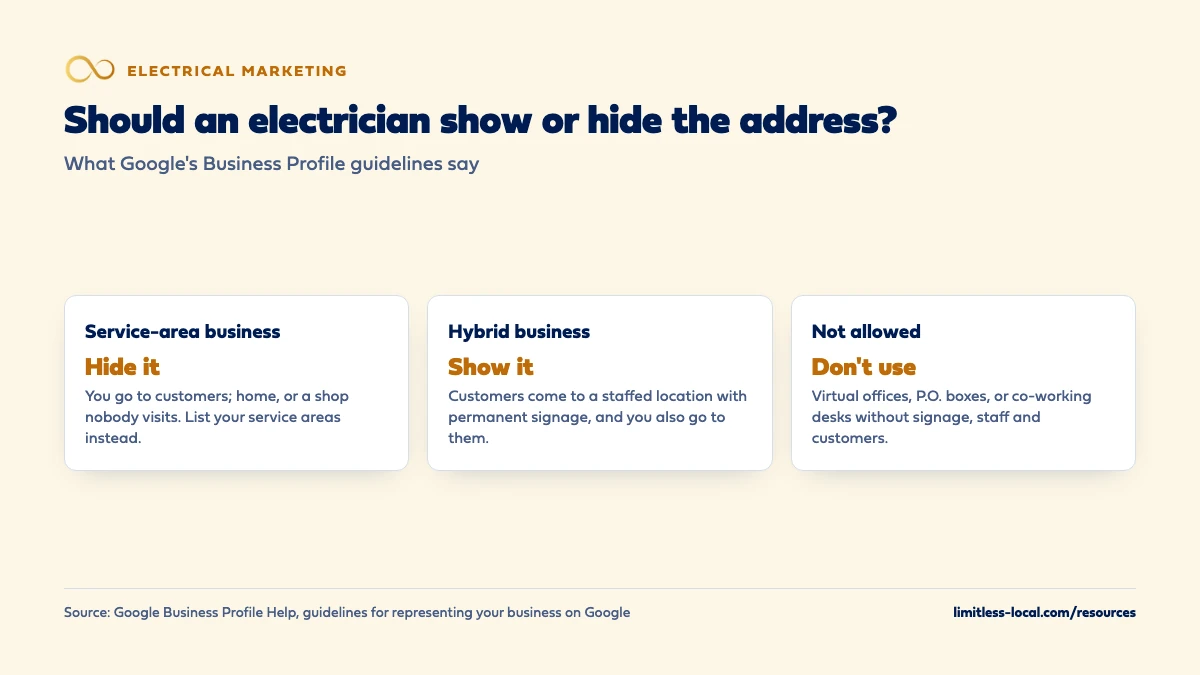
Yes, if customers don’t come to you. Google treats an electrician who goes to customers’ homes and businesses as a service-area business, and its guidelines say a service-area business should hide its address and list the areas it serves instead. Show the address only if you actually serve customers there, with your staff on site during your listed hours and permanent signage with your business name, which makes you a hybrid business that can show both an address and a service area.
Getting the address and service area right is part of the profile cleanup we do in our local SEO work, along with matching your details across the directories that list you. Our electrical contractor marketing page shows how it fits together for electricians, and the rest of the electrical marketing questions library goes question by question.
What is a service-area business on Google?
Google sorts businesses into three types on a Business Profile:
- Storefront: customers come to you at your address.
- Service-area business: you visit or deliver to customers directly but don’t serve them at your business address. Google’s own examples include cleaning services and plumbers.
- Hybrid business: you serve customers at your address and also go to them.
Google’s service area help page adds one detail that settles a lot of cases: if your business doesn’t have permanent on-site signage, it isn’t eligible as a storefront and should be listed as a service-area business.
For most electricians, the answer is obvious once you put it that way. Your work happens at the customer’s panel, not at your shop.
Should my electrical company hide its address?
If you’re a service-area business, yes. Google’s guidelines for representing your business say a service-area business should hide its business address from customers, and the service area page says plainly that if you don’t serve customers at your business address, you should remove it from your profile.
That covers most electrical contractors:
- Running the business from home.
- A shop or warehouse where trucks load up but customers never come in.
- An office where the only visitors are the occasional builder dropping off plans.
Hiding the address doesn’t hide your business. Your profile still shows your name, phone, hours, reviews, photos and the areas you serve. What disappears is a pin on your street, which, for a service-area business, mostly tells strangers where your house or yard is.
When should an electrician show the address?
When customers actually come to it. That might be a lighting showroom, a generator display room, or a counter where homeowners and contractors come in to meet with your team. In that case you’re a hybrid business: you can show your address, set hours for when staff are there, and add a service area for the work you do on the road.
Google’s guidelines set a high bar for showing an address:
- The location should be staffed by your team and able to receive customers during its stated hours.
- Businesses showing their address should keep permanent fixed signage of the business name at the address.
If you can’t say yes to both, hide the address. A shop with no sign and nobody at the counter is a service-area business, even if it has a street number.
What if I run my electrical business from home?
Then hide the address. Google’s example in its guidelines is almost exactly your situation: a plumber who runs the business from a residential address should clear the address from the Business Profile.
There’s a practical reason too. Google says the address on your Business Profile is public. Every homeowner, competitor and stranger searching for an electrician could otherwise see where you and your family live, and some will show up at your door expecting a shop.
Being home-based doesn’t make you look smaller on Google. Plenty of service-area businesses run from home, and the profile looks the same either way: name, service area, reviews and photos of your work.
Does hiding my address hurt my Google Maps ranking?
Google doesn’t say it does, and hiding the address is exactly what Google tells service-area businesses to do.
Distance still matters, though. Google says local results are mainly based on relevance, distance and popularity, and that distance is how far each business is from the customer who’s searching. Hiding your address from customers doesn’t change where your business is based, so don’t expect showing or hiding it to move you into towns farther from home base.
How location, service areas and distance play out for electricians on Maps is covered in detail in whether shop location or service area affects an electrician’s Maps ranking. If you’ve lost ground recently, getting your electrical company into the map pack walks through the other levers.
Curious what your marketing is actually booking?
Get a free visibility audit — no obligation, no sales pitch.
How do I hide my address and set a service area?
- Open your Business Profile and edit your business address.
- Turn off “Show business address to customers” and save. Google notes that if you hide the address and don’t enter a service area, a local area is chosen for you, so don’t skip the next step.
- Add your service areas by city, postal code or another type of area. You can set up to 20.
- Keep it realistic. Google says the boundaries of your overall area shouldn’t be more than about 2 hours of driving time from where your business is based, and to be as specific and accurate as possible.
You can’t set a radius around your shop anymore; areas have to be named places. Google says approved service area edits may take up to 48 hours to show on your profile.
Can I use a virtual office, P.O. box or co-working space?
Not to get a pin in a bigger city. Google’s guidelines are specific:
- Virtual offices: if you rent a mailing address but don’t operate out of it, that location isn’t eligible for a Business Profile. Service-area businesses can’t list a virtual office unless it’s staffed during business hours.
- P.O. boxes and remote mailboxes aren’t acceptable as an address.
- Co-working spaces only count if the office has clear signage, receives customers during business hours and is staffed by your own people during those hours.
Owners try these to look closer to a big market. It’s against Google’s rules, and it puts the whole profile at risk. If you want to reach a town far from home base, ads are the honest way to do it.
Do I still need an address to get verified?
Yes. Google asks for a business address it can find so it can verify your business, even if you’re going to hide it afterwards. Hiding it controls what customers see; it doesn’t mean Google doesn’t know it.
Use your real address, home or shop, exactly as the post office knows it. If Google can’t find it, you can pin the location on the map. After verification, turn off the public address and add your service areas.
Changes to your profile usually take about 10 minutes to show up, but Google says some can take up to 30 days. Don’t keep switching the address on and off while you wait; it just creates more edits to review.
Which towns should go in my service area?
The ones you actually want to drive to, not every town you’d go to for the right job. A tight, honest service area does three things:
- It tells homeowners in those towns you’ll come to them.
- It keeps calls from places you’d turn down, which waste your office’s time.
- It matches what you set in Local Services Ads and Google Ads, so all three tell the same story.
Start with the towns where you already do the most work and have the most reviews, then add neighboring ones you serve regularly. Pair the service area with a services list that names the jobs you want, such as panel upgrades, EV chargers and generators. Optimizing your electrician Google Business Profile covers the rest of the setup.
What about my website and directory listings?
Keep them consistent with what you show on Google. If your Business Profile hides the address, don’t plaster your home address across your website footer and every directory either. Show your business name, phone number and the city or region you’re based in, and list the towns you serve.
Some directories insist on a full address. Use the same real address you verified with on Google, and hide it from public view where the directory allows. What matters is that your name and phone number match everywhere, and that no listing shows an old address from before you moved. Local citations and directories for electricians covers which listings matter and how to clean them up.
What changes if I open a real shop or a second location?
A shop customers visit, with signage and staff during your hours, can switch you to a hybrid business. Add the address back, keep your service area, and set your hours to when someone is at the counter.
A second location is a different question. Google’s guidelines say a service-area business gets one profile for its whole area, but if you have different locations with separate service areas and separate staff at each one, you’re allowed one profile for each location. A second address with no staff of its own doesn’t qualify, however handy it would be for ranking in the next town over.
Want to see where your company stands?
A free visibility audit shows where you show up on Google, Maps and AI answers, and what it's costing you in calls.
What's different about the address question for electricians
Almost all the work happens at the customer’s place. Service calls, panel upgrades, EV chargers and generator installs are done at the house or the job site, which puts most electricians firmly in the service-area group.
Lots of shops start at home. A one- or two-truck electrical business is often run from the owner’s house and garage. That’s exactly the case Google says to hide.
Some shops do have a counter. A lighting showroom or a counter where builders and homeowners meet your team can make you a hybrid business, as long as it’s staffed during your listed hours and signed.
Your trucks are your signage on the road. With no storefront to point to, a marked truck in a customer’s driveway does the job a shop sign would. How much to spend on wraps, uniforms and flyers covers that side.
A worked example: three electrical shops, three setups
These shops are made up to show how the rules apply.
- Shop A is one truck, run from the owner’s house. Customers never come by. It hides the address, verifies with the home address, and lists 12 nearby towns as its service area.
- Shop B has a warehouse in an industrial park where the crews load up each morning. There’s no sign out front and nobody at a counter. It’s still a service-area business, so the address stays hidden.
- Shop C runs a small lighting showroom with a permanent sign, staffed weekdays during its listed hours, and sends crews out for installs. It’s a hybrid business: address shown, hours set to when the showroom is open, and a service area for the work on the road.
All three use the same name and phone number everywhere they’re listed. Business listing cleanup and buildout and Google Business Profile management are part of our Essentials package at $3,500 a month, and we sync name, address and phone across 50+ directories. A free visibility audit shows whether your profile, service area and listings are telling Google the same story.
Frequently asked questions
Will customers trust me less if my address is hidden?
Homeowners hiring an electrician care more about reviews, photos of your work and how fast you answer than about a pin on the map. Your profile still shows your service area, so they can see you work in their town.
Can I show my address just to look more established?
Only if you serve customers there with staff during your listed hours and permanent signage. Otherwise Google says a service-area business should hide it.
How many service areas can I add?
Up to 20, by city, postal code or another type of area. Google says the whole area shouldn’t stretch more than about 2 hours of driving from where you’re based.
Can I list a radius around my shop instead of towns?
No. Google no longer lets you set a service area as a radius around your business; you have to choose named areas like cities or postal codes.
I moved my shop. What should I update?
Update the address on your Business Profile first, even if it stays hidden, then fix every directory and your website so none of them show the old one. Expect the profile change to take anywhere from minutes to a few weeks to show.
Do I need separate profiles for each town I serve?
No. A service-area business gets one profile for its whole area. Separate profiles are only for separate locations with their own staff and service areas.
Key takeaways
- Most electricians are service-area businesses, and Google says those should hide their address.
- Show the address only for a location that’s staffed during your hours, signed and open to customers.
- Virtual offices and P.O. boxes aren’t eligible; co-working spaces need signage, staff and customers.
- Set up to 20 named service areas, kept within about 2 hours of driving from where you’re based.
- You still verify with a real address; hiding it only controls what customers see.
Not sure what's working right now?
Start with a free visibility audit: rankings, Google profile, reviews and tracking, checked against your service area.
More in this section
- How do I get my electrical company into the Google map pack?
- Why is a competitor electrician ranking above me on Google Maps?
- How do I optimize my electrician Google Business Profile?
- Should electricians show prices on their website?
- Do electricians need separate landing pages for Google Ads?
Sources
- Manage your service areas for service-area & hybrid businesses — Google Business Profile Help
- Guidelines for representing your business on Google — Google Business Profile Help
- Manage your business address — Google Business Profile Help
- Tips to improve your local ranking on Google — Google Business Profile Help