
How do plumbers find the keywords homeowners really search?

- How can a plumber find the exact words local homeowners type when they have a plumbing problem?
- Why don't homeowners search the words plumbers use?
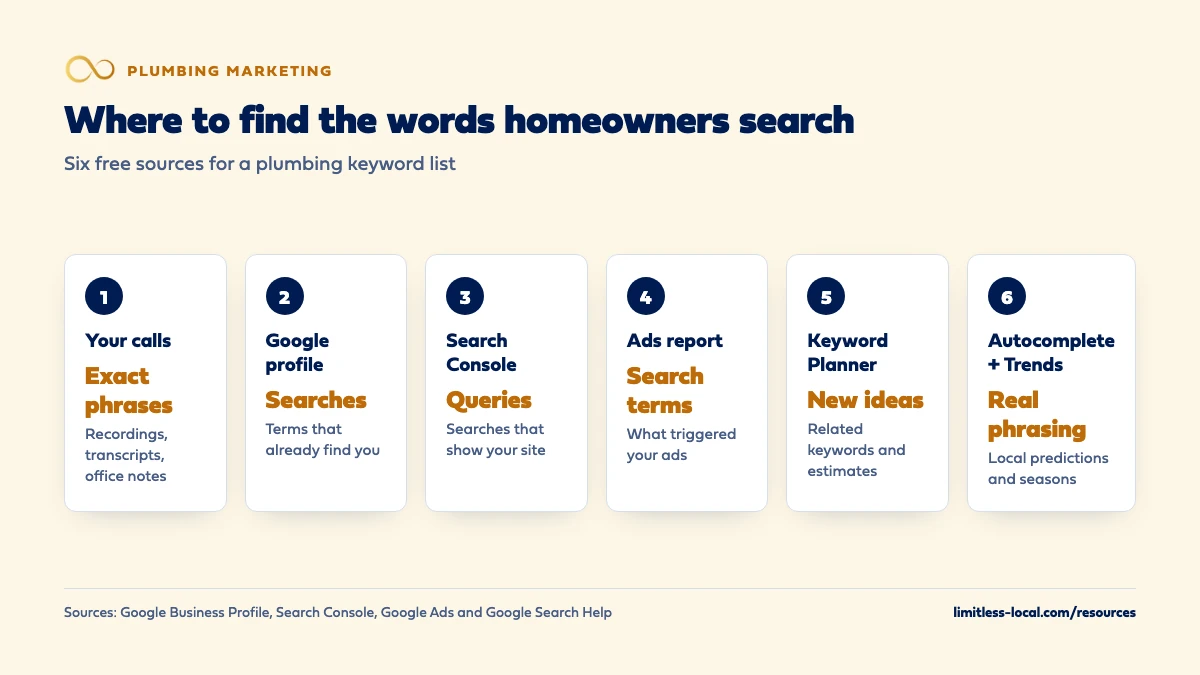
- Step 1: What are customers already saying on the phone?
- Step 2: What searches already find my Google profile?
- Step 3: What searches already show my website?
- Step 4: What searches triggered my ads?
- Step 5: How do I use Google's Keyword Planner?
- Step 6: What can Google's autocomplete tell me?
- Step 7: How do I spot seasonal plumbing searches?
- Can AI tools help me find the keywords homeowners use?
- How do I sort the list into emergency and planned keywords?
- What do I do with the keywords once I have them?
- What's different about keyword research for plumbing companies
- A worked example: one week of calls becomes a keyword list
- Frequently asked questions
- Key takeaways
- More in this section
- Sources
The short version
- Your phone calls are the best keyword research you already own.
- Your Google profile, Search Console and ads reports show the searches that already find you.
- Keyword Planner, autocomplete and Trends widen the list and show seasonal swings.
- Use AI to brainstorm and sort, then check every idea against real Google data.
For plumbing owners building a website, a Google profile or an ad campaign who want it written in the words customers actually use, not trade talk.
Get a free visibility audit · Book a growth call
How can a plumber find the exact words local homeowners type when they have a plumbing problem?
Start with the words customers already use with you: listen to call recordings and read your office notes, then check the search terms in your Google Business Profile’s Performance report, Search Console and your Google Ads search terms report. Next, widen the list with Google’s free tools: Keyword Planner for related ideas and search estimates, autocomplete for the phrases people really type near you, and Google Trends for seasonal swings like freezes. AI chat tools are handy for brainstorming and sorting the list, but they don’t have Google’s search data for your towns, so check every idea against those sources before you build a page or an ad around it.
Content based on what people actually search, not guesswork, is part of our local SEO work, and every package includes call tracking with recording and transcription, which doubles as a running list of the words your customers use. Our plumbing marketing page shows how that feeds the website, the Google profile and the ads, and the rest of the plumbing marketing questions library goes one question at a time.
Why don't homeowners search the words plumbers use?
Because they describe the problem, not the fix. You say PRV, main line, slab leak or water heater flush. A homeowner types “water pressure too high”, “sewer backing up into tub”, “warm spot on floor” or “no hot water”. They say “hot water heater” even though you know it heats cold water.
That gap matters everywhere you show up. A website page titled “Hydro-Jetting Services” may never match the homeowner who searched “kitchen drain keeps clogging”. A Google profile that lists only trade terms can miss the searches that bring calls. The fix is to collect the homeowner’s words first, then decide which ones deserve a page, a service listing or an ad.
Step 1: What are customers already saying on the phone?
This is the best keyword research you already own, and it costs nothing. For one or two weeks, write down the first sentence every new caller says about their problem, word for word. If you use call tracking with recordings and transcripts, you can skip the notebook and read the transcripts instead.
Ask your techs too. They hear how homeowners describe a problem at the door, and they’ll tell you which words come up over and over. You’re not counting anything yet. You’re building a list of real phrases: “water heater leaking from the bottom”, “toilet won’t stop running”, “smells like sewer in the basement”. Those phrases become the raw material for every other step.
Step 2: What searches already find my Google profile?
Open your Business Profile and click Performance. The Searches section lists the search terms people used to find your business (Understand your Business Profile performance and insights). It updates at the start of each month, can take up to 5 days to show, and is only available for verified profiles.
Read it for two things. First, the job searches that already find you, which tell you what Google thinks you’re relevant for. Second, what’s missing: if you want water heater work and no water heater searches show up, that’s a gap in your profile’s services and your website. Checking whether your plumbing company shows up in Google Maps searches covers how to test those gaps from the customer’s side.
Step 3: What searches already show my website?
If your site is set up in Google Search Console, its Performance report shows which queries bring traffic to your site and which queries are most likely to show it, with a Queries tab that groups the data by what people typed (Performance report (Search results)). Sort by impressions to see searches where you show up but rarely get clicked: those are pages worth improving.
One catch worth knowing: a query in your list doesn’t mean you’ll see your site when you search it yourself, because results are specific to the time, place, device and recent history of the person searching. Use the report for the words, not as a ranking check.
Step 4: What searches triggered my ads?
If you run Google search ads, the search terms report shows how your ads performed when triggered by actual searches (About the search terms report). It’s the closest thing to a list of what paying customers typed before they called.
- Searches that booked jobs are keywords to keep and build pages around.
- Searches you’d never want (parts, jobs, do-it-yourself) are negative keywords, which the negative keywords that stop wasted plumbing ad spend covers.
- Surprising phrasing that converts is gold for your website copy too.
Some low-volume searches are left out of the report to protect privacy, so the list won’t be complete, but it’s still real searches from your area.
Curious what your marketing is actually booking?
Get a free visibility audit — no obligation, no sales pitch.
Step 5: How do I use Google's Keyword Planner?
Keyword Planner is free inside a Google Ads account, and Google describes it as a tool to discover new keywords related to your business and view estimates of the searches they receive and the cost to target them (Use Keyword Planner). Two ways in:
- Start with keywords: enter a few of the phrases from your calls, like “water heater replacement” or “sewer line repair”.
- Start with a website: enter a site and Google looks for keywords related to its content. Try your own site, then the site of a plumber who beats you in Maps.
Add the useful ideas to a plan and check the search estimates. Keep your expectations right: keywords with very low search volume aren’t shown at all, and the estimates are estimates. Many small-town plumbing searches will look tiny or missing even though real homeowners type them, so don’t throw out a phrase you heard on ten calls just because the Planner can’t see it.
Step 6: What can Google's autocomplete tell me?
Start typing “water heater” or “sewer” into Google and watch the suggestions. Google says autocomplete predictions reflect real searches that have been done on Google, and that they take into account the language and location of the search, trending interest and your own past searches (How Google autocomplete predictions work).
So do it from a phone in the towns you serve, in a private window so your own history doesn’t steer it. Type the start of a problem (“toilet”, “drain”, “water heater”, “pipe”) and write down the endings. You’ll often find the exact questions homeowners ask, like whether a leaking water heater is dangerous, which make good short sections on your service pages.
Step 7: How do I spot seasonal plumbing searches?
Google Trends shows how interest in a search rises and falls over time and by place, down to city level. It doesn’t show search counts. Each data point is scaled from 0 to 100 against all searches in that place and time, and searches made by very few people show up as zero (FAQ about Google Trends data).
For a plumber, that’s perfect for timing. Compare “burst pipe”, “frozen pipes”, “sump pump” and “water heater” over the past few years in your state and you’ll see when each one climbs. Use it to plan when to raise ad budgets and when to have pages ready, as preparing plumbing marketing for a winter freeze explains.

Can AI tools help me find the keywords homeowners use?
Yes, for the grunt work. An AI chat tool is good at:
- Turning trade terms into the ways a homeowner might describe the same problem.
- Pulling the repeated phrases out of a pile of call transcripts.
- Sorting a long, messy list into groups: emergencies, planned jobs, towns, do-it-yourself searches.
What it can’t do is tell you what people in your towns actually search or how often. It doesn’t have Google’s search data for your area, and it can sound confident about phrases nobody types. Treat everything it gives you as a list of ideas to check in Keyword Planner, autocomplete and your own reports. Which AI tools are actually useful for plumbing marketing covers the rest of the AI question.
How do I sort the list into emergency and planned keywords?
Put every phrase into one of five buckets:
- Emergencies: burst pipe, sewer backup, water leak, no hot water. The customer wants someone now.
- Planned jobs: water heater replacement, tankless install, repipe, water softener. The customer is comparing.
- Hiring searches: plumber, plumber near me, emergency plumber.
- Town searches: any of the above plus a town name.
- Not for you: how-to, parts, jobs, and services you don’t offer.
Emergencies and hiring searches belong on your Google profile and in your ads. Planned jobs deserve their own website pages, because those customers read before they call. The last bucket becomes your negative keyword list. What keywords plumbing Google Ads should target covers turning the first four into a campaign.
What do I do with the keywords once I have them?
- Website: one page per main job type, written in the homeowner’s words, with the problem phrases as headings and short answers.
- Google profile: list each service in plain words, and make sure the description says what you do and where.
- Ads: group keywords by job type so each ad and landing page matches the search.
- Phone scripts: when your office hears a phrase again and again, make sure the website answers it.
Then repeat the research every few months. New phrases show up, seasons change what people search, and your reports fill in as you get more calls.
Not sure which of these is costing you jobs?
A free visibility audit checks the Google profile, reviews, site and tracking, and shows what to fix first.
What's different about keyword research for plumbing companies
Problems first, services second. A homeowner with an emergency searches the symptom: water on the floor, no hot water, gurgling drains. Plumbing keyword lists need far more problem phrases than trades where the customer already knows what they want to buy.
Two very different customers. The burst-pipe caller at midnight and the homeowner pricing a tankless water heater use different words, search at different times and need different pages. Keep their keyword lists separate from the start.
Local words vary. Some areas say rooter, some say drain cleaning; rural customers may search septic where city customers search sewer. Your own call notes are the only reliable guide to what your area says.
A worked example: one week of calls becomes a keyword list
These numbers are made up to show the process, not a benchmark. A two-truck plumber has the office write down the first sentence of every new caller for one week: 38 calls.
- Repeated phrases: “no hot water” comes up 7 times, “water heater leaking” 5 times, “toilet keeps running” 4 times, “sewer smell” 3 times. The website has none of those phrases on any page.
- Google profile Performance: most searches are the company name; “water heater” searches barely appear.
- Keyword Planner: confirms “water heater replacement” and “water heater repair” as separate ideas, and suggests “tankless water heater installation”, which the owner wants more of.
- Autocomplete: typing “water heater” in the main town suggests endings about leaking and making noise.
The result: a rewritten water heater page that leads with “No hot water? Water heater leaking?”, a separate tankless page, two new services on the Google profile, and an ad group for water heater repair. A month later the owner checks the Performance report again to see whether water heater searches start finding the profile.
Frequently asked questions
Do I need a paid keyword tool to research plumbing keywords?
Not to start. Your calls, your Google profile’s Performance report, Search Console, Keyword Planner, autocomplete and Google Trends are all free and cover what most small shops need.
Should I use "plumber near me" on my website?
Write naturally about the towns you serve instead of repeating the phrase. Homeowners type “near me” to get nearby results, and Google uses the searcher’s location for that even with personalization off (Personalization & Google Search results).
Why does Keyword Planner show no searches for a phrase my customers use?
Keywords with very low search volume aren’t shown, which is common in smaller towns. If you hear a phrase on calls again and again, it still belongs on your site.
How often should a plumber redo keyword research?
A light check every few months is plenty: reread your Performance report, Search Console queries and ads search terms, and add any new phrases from calls.
Should I target keywords for towns I don't serve?
No. Showing up there only brings calls you’ll turn down. Build pages and ads around the towns where you’ll actually send a truck.
Can I copy the keywords a competitor's website uses?
You can use their site as a starting point in Keyword Planner to see related ideas, but write your own pages in your own words, around the jobs you actually want.
Key takeaways
- Homeowners search the problem, not the fix, so collect their words before you write anything.
- Calls, your Google profile’s Performance report, Search Console and your ads search terms show the words that already work.
- Keyword Planner and autocomplete widen the list; Google Trends shows when each search peaks.
- AI tools help brainstorm and sort, but only Google’s own data shows what people in your towns really type.
- Sort keywords into emergencies, planned jobs, hiring searches, towns and not-for-you, then match each to a page, a service listing or an ad.
Want a second set of eyes on your setup?
We'll look at how you show up locally and where calls are leaking, then send you a plain-English breakdown.
More in this section
- What keywords should my plumbing Google Ads target?
- How do I see what my plumbing competitors are doing online?
- How long does plumbing SEO take to bring in calls?
- Why does plumbing SEO take months when I need jobs this month?
- How does competition affect how fast plumbing SEO works?
Sources
- Understand your Business Profile performance & insights — Google Business Profile Help
- Performance report (Search results) — Search Console Help
- About the search terms report — Google Ads Help
- Use Keyword Planner — Google Ads Help
- How Google autocomplete predictions work — Google Search Help
- FAQ about Google Trends data — Google Trends Help
- Personalization & Google Search results — Google Search Help