
What should pool builder website forms and calls include to get leads?
- Once a homeowner taps call or hits submit, what has to happen for it to become a lead?
- What has to happen between a homeowner's click and your first call?
- How should the phone number work once someone taps it?
- Where should a consultation request go after it's submitted?
- How do I stop homeowners giving up halfway through the form?
- Should the form book a consultation time or ask for a call back?
- What should the thank-you page say?
- What should the first reply say, and how fast should it come?
- How do I give homeowners who aren't ready yet a reason to reach out?
- How do I make sure every lead shows where it came from?
- How do I test the whole path the way a homeowner would?
- How do I tell whether a change to the path helped?
- What's different about the lead path for pool builders
- A worked example: what a second, smaller offer adds
- Frequently asked questions
- Key takeaways
- More in this section
- Sources
The short version
- A tap-to-call number on every page that rings where someone answers during your listed hours.
- A short form that lands in your job software and alerts a named person, not a personal inbox.
- A thank-you page and a quick reply that say who calls next and roughly when.
- A smaller option for homeowners who aren't ready, a source tag on every lead, and a monthly test of the whole path.
For pool builders whose site already gets visits, and who want every call and consultation request to reach a person, get a clear next step and keep its source.
Get a free visibility audit · Book a growth call
Once a homeowner taps call or hits submit, what has to happen for it to become a lead?
Every call and form on a pool builder’s website should reach a named person the same day, tell the homeowner what happens next, and carry a tag showing where the lead came from. That means a tap-to-call number that rings where someone answers, a short form that drops straight into your job software, a thank-you page that says who will call and when, and a quick real reply. Add a smaller option for homeowners who aren’t ready to book a consultation, then test the whole path on your own phone every month.
Every website we build includes click-to-call buttons and quote request forms placed to turn visitors into leads and leads into booked jobs, and every marketing package adds call, web and form tracking with source tagging, so each consultation traces back to the marketing that produced it. We’ve built it from the builder’s side too: we were an equity partner in a pool construction company, where we built the lead-generation engine and ran sales and marketing. Our website design page covers build options and timelines, our pool builder marketing page shows how the site fits with Google, Maps and ads, and the pool builder marketing questions library takes the rest one question at a time.
What has to happen between a homeowner's click and your first call?
More than most owners check. A homeowner who likes your work still has to tap a number that rings, or fill in a form that reaches someone, then hear back before they cool off or call the next builder. Each of those handoffs can break without anyone noticing, because a lead that never arrives doesn’t complain.
What the pages themselves should show, like your projects, your process and where the consultation button sits, is covered in what a pool builder website needs to get more consultations.
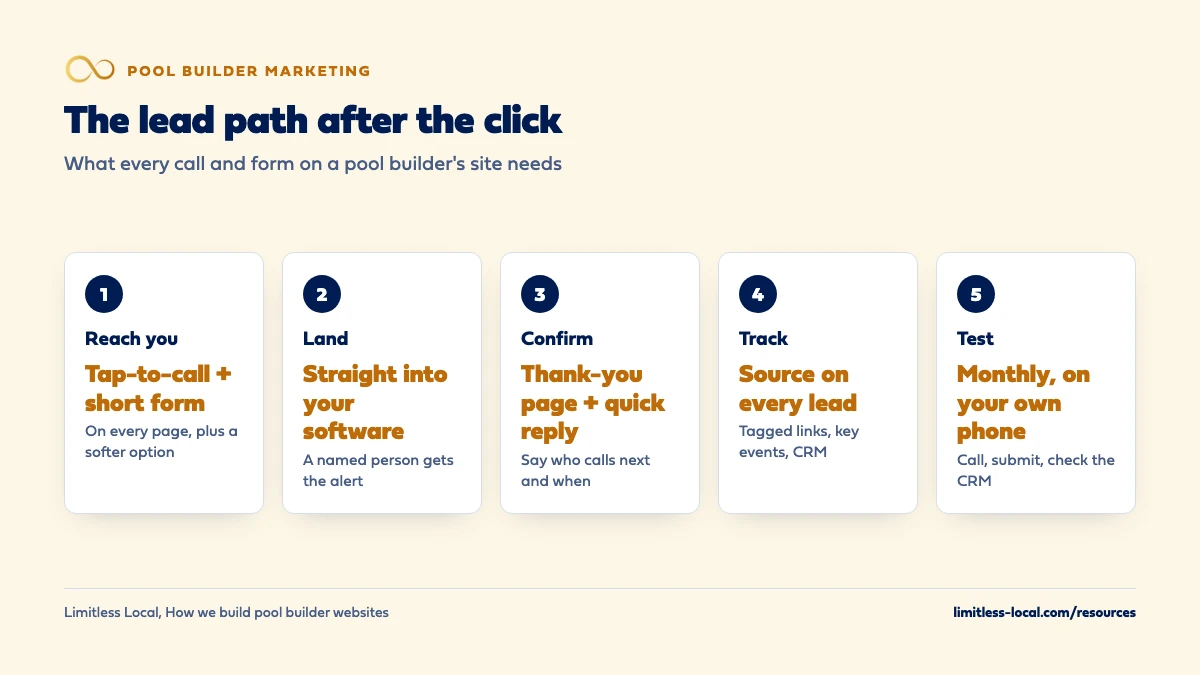
The path has five parts: the call, the form, the thank-you page and first reply, the source tag, and a regular test. Each one needs a person on your team who owns it.
How should the phone number work once someone taps it?
It should ring somewhere it gets answered during the hours you list. Make it a tap-to-call link in the header of every page and keep it visible as visitors scroll. A pool shopper who gets voicemail at 2 p.m. on a Tuesday usually has other builders’ sites open in other tabs.
Then decide how you’ll count calls. Google’s page on phone call conversion tracking lists several ways. Counting taps on the number on your mobile site, after someone clicked your ad, only tells you someone tapped, not that a call happened. Counting calls to a Google forwarding number shown on your site, after someone clicked your ad, counts real calls that last at least a minimum length you choose. Importing calls from another system lets you count only the calls that became sales.
A quick call asking whether you do liner replacements isn’t a call that books a design consultation, so set that minimum length with care and record calls so you can hear which is which. Call tracking for pool builders covers the options in more detail.
Where should a consultation request go after it's submitted?
Straight into the system your team already works in, with a named person told right away. Not a shared inbox, not the email of whoever built the site, and never an address only the owner checks on weekends.
If you run your jobs in Jobber, its request and booking forms can sit on your website and your Facebook page, and each submission appears in Jobber right away, so the request is already where you schedule. If you use other job software, check whether it offers the same.
Whatever the tool, set it up so that:
- One person owns new requests, with a backup named for days off.
- The alert reaches that person’s phone, not just a desktop.
- The request arrives with everything the homeowner typed, plus the page they sent it from.
- Nobody has to copy it by hand from an email into the CRM.
How do I stop homeowners giving up halfway through the form?
Make it short and easy with a thumb. Ask only what you need for a first call; everything else can wait for the consultation.
Then build it so it doesn’t fight people on a phone:
- Labels that stay visible while people type, not grey hints that vanish.
- The number keypad for the phone field and the email keyboard for the email field.
- Error messages that say what to fix and never wipe what’s already entered.
- Spam protection that doesn’t make a real homeowner solve a puzzle three times.
If you want to see whether people start the form and quit, how to tell if your website is turning visitors into leads shows how to measure it.
Should the form book a consultation time or ask for a call back?
It depends on how steady your designer’s calendar is. Letting homeowners pick a time online removes a round of phone tag.
That only works if the slots are real. If schedules change daily, a request form plus a fast call back beats bookings you’ll have to move.
A middle path suits plenty of pool builders: the form asks for a preferred day and time of day, and the call back confirms it.
Curious what your marketing is actually booking?
Get a free visibility audit — no obligation, no sales pitch.
What should the thank-you page say?
Exactly what happens next: who will call, roughly when, and what the homeowner can do to get ready, such as taking a few photos of the backyard or finding their property survey. A homeowner who knows a call is coming answers the phone when it rings.
Keep it plain: your number, a line about how the first conversation works, and a couple of finished projects to look at while they wait.
The thank-you page also does a job for you. It gives you one clean page to count as a lead. Google’s guide to setting up web conversions describes counting a page load as a conversion, using a rule such as the page address containing “thank-you”. That’s the simplest way to tell Google Ads which clicks turned into requests.
What should the first reply say, and how fast should it come?
An automatic confirmation by email or text is fine as a first touch, as long as it sounds like your company and a person follows up soon after. Say the request arrived, who will call, and when. After hours or on weekends, say when that call will come instead of pretending someone’s at a desk.
Then make the real call, with the request already open, so the first question is about their backyard, not their name.
How soon matters more than most owners think, and how fast a pool builder should respond to a new lead covers it.
How do I give homeowners who aren't ready yet a reason to reach out?
Give them a second, smaller step. A pool is a long decision, and many of the people on your site in the fall are planning for next summer. If the only option is a design consultation, a lot of them leave for good.
Options that fit a pool builder:
- Get on next season’s build calendar. A short form for homeowners who want a slot in spring, with a promise to call when design season opens.
- A planning guide. What to decide before a consultation, how the process works with you and what drives the cost, sent by email.
- Send us your backyard. A few photos and a short description, and you’ll tell them what’s possible.
Each of these is a lead, just an earlier one. Tag it differently from a consultation request so it doesn’t muddy your numbers, and put it into a follow-up sequence instead of the sales call list. How to nurture leads who plan to build next year covers what to send them.

How do I make sure every lead shows where it came from?
Tag the links, count the requests, and write the source on the lead. In practice that’s three habits:
- Tag the links you control. Add tracking tags to the website link on your Google Business Profile, your Facebook and Instagram profiles and the links in your emails. Google Analytics’ help page on collecting campaign data with custom URLs explains the tags: always use source, medium and campaign, and keep the spelling identical every time, because the values are case sensitive.
- Count the requests. Mark the consultation request (or the thank-you page) as a key event in Google Analytics. Google’s page About key events says reports like Landing pages then show a key events column, and you can turn the same key event into a conversion in Google Ads, so both tools count the same thing.
- Keep the source on the lead. Have the form pass the source into your CRM, or ask on the first call and record it there.
A pool sale can take months, and the source has to still be on the lead when the contract signs. Tracking which marketing produces signed pool contracts walks through it.
How do I test the whole path the way a homeowner would?
Once a month, and every time anyone changes the site, run through it on your own phone, on cellular data, away from the office:
- Search for “pool builder” plus your town, and click through to your site.
- Tap the phone number. Does it ring, and does someone answer?
- Fill out the consultation form with a test name. Do you land on the thank-you page? Did the confirmation arrive?
- Check the CRM. Did the request arrive, with the source attached? Did the right person get the alert?
- Try it after hours. Does the auto-reply say the right thing?
It catches what no report shows: a form plugin broken by an update, a changed forwarding rule, alerts going to an employee who left.
How do I tell whether a change to the path helped?
Change one thing at a time and give it long enough to judge. Change three things in one week and you won’t know which one did the work.
Write down the date of each change, then compare consultation requests per month, by source, before and after. Because pool demand swings with the seasons, compare against the same months last year where you can, not just the month before. And look past the request count: a change that brings more requests but fewer booked consultations hasn’t helped.
Not sure which of these is costing you jobs?
A free visibility audit checks the Google profile, reviews, site and tracking, and shows what to fix first.
What's different about the lead path for pool builders
The lead is a consultation, not a service call. A plumber’s site mostly needs the phone to ring today. Yours needs to book a meeting that can lead to a signed contract months later, so the form, the thank-you page and the first reply carry more weight than the phone number alone.
Many visitors are early. Homeowners often start looking a season or more before they build, so a path with only one option, book a consultation now, loses the people who’ll sign next year.
Spring is when it all gets tested. A form that broke in the fall costs you a spring of consultations, so run the homeowner test before the rush.
A worked example: what a second, smaller offer adds
These numbers are made up to show the math, not a benchmark for your market. Say your website gets 1,500 visits a month and 1% of visitors request a design consultation. That’s 15 consultation requests a month.
Now say you add a “get on next season’s build calendar” form for homeowners who aren’t ready, and it brings in 6 sign-ups a month. Over a year that’s 72 homeowners on your list (6 times 12) who would otherwise have left without a trace. If 1 in 8 of them books a consultation once they’re ready, that’s 9 more consultations a year (72 divided by 8) from the same traffic, without a single extra click bought.
Whether that’s worth doing depends on how many of those consultations sign, which is why each kind of lead gets its own tag. For reference, our themed websites are $3,750, or $3,000 with any of our marketing packages, with up to 25 pages; custom sites start at $5,000, and concept to launch takes 100 days or less.
Frequently asked questions
Should my pool website show my phone number or only a form?
Both. Some homeowners want to talk right away and some would rather fill in a form at night, so give each of them a way in on every page, and make sure each one reaches a person.
What if a homeowner submits the form twice?
Treat it as one lead and call once. A double submit usually means the confirmation wasn’t clear, so check that the thank-you page loads and says plainly that the request went through.
Do my Google Ads landing pages need a different form?
They can use the same form, as long as it lands in the same place and tags the lead as coming from ads. What matters is that every form feeds one system, so no request sits somewhere nobody looks.
Who on my team should get the alert for a new request?
The person who will make the first call, plus a named backup for days off. Sending every alert to the whole office tends to mean everyone assumes someone else has it.
How do I get leads from my Google Business Profile to my website?
Link your profile’s website button to the page that fits best, often the home page or a town page, and add tracking tags to that link so the visits and requests show up under your Google profile in your reports.
Key takeaways
- Every call and form should reach a named person the same day, with a backup for days off.
- Send form requests straight into your job software, with the source attached, never to a personal inbox.
- Use a thank-you page that says who calls next and when, and count it as your lead in Google Ads and Analytics.
- Give homeowners who aren’t ready a smaller step, like getting on next season’s build calendar.
- Test the whole path monthly on your own phone, and change one thing at a time.
Want a second set of eyes on your setup?
We'll look at how you show up locally and where calls are leaking, then send you a plain-English breakdown.
More in this section
- What should a pool builder website include to get more consultations?
- Is a pool builder's website turning visitors into leads?
- How do pool builders qualify leads before the design consultation?
- How should pool builders follow up on leads during a long sales cycle?
- How long does pool builder SEO take to bring in leads?
Sources
- About phone call conversion tracking — Google Ads Help
- Add your Request and Booking Forms to your Website and Social Media — Jobber Help Center
- Set up your web conversions — Google Ads Help
- URL builders: Collect campaign data with custom URLs — Analytics Help
- About key events — Analytics Help