
What are Local Services Ads for roofers and how do they work?
- How do Google's pay-per-lead Local Services Ads work for a roofing company?
- What is a Local Services Ad, in plain terms?
- Where do Local Services Ads show up when a homeowner searches?
- How does pay-per-lead work for a roofer?
- Which roofing leads don't you pay for?
- How does Google decide which roofer shows first?
- How do budgets and bids work in Local Services Ads?
- What does a roofer need before the ads can run?
- What changes now that Local Services Ads are moving into Google Ads?
- How are Local Services Ads different from regular Google Ads?
- What happens after a homeowner contacts you through the ad?
- What's different about Local Services Ads for roofers
- A worked example: from budget to cost per signed roof
- Frequently asked questions
- Key takeaways
- More in this section
- Sources
The short version
- LSAs are Google's pay-per-lead ads, shown only on Search and Maps.
- Homeowners call, message or book you straight from the ad; they don't need your website.
- You pay for valid leads, not clicks, and spam and duplicates aren't charged.
- Your bid, your responsiveness and your reviews decide where you show.
For roofing company owners who keep hearing about LSAs and want to know what they are, where they show, and what you actually pay for.
Get a free visibility audit · Book a growth call
How do Google's pay-per-lead Local Services Ads work for a roofing company?
Local Services Ads are Google’s pay-per-lead ads for local service businesses, and roofers are one of the eligible categories. Your listing shows prominently on Google Search and on Maps, with your rating, reviews and a Google Verified badge, when a homeowner searches for roofing work in the areas you’ve chosen. The homeowner calls, messages or requests a booking straight from the ad, and you pay for each valid lead instead of each click. There are no keywords to pick: you set job types, service areas and a budget, and Google orders the ads by your bid, how responsive you are and how strong your profile is.
Local Services Ads are one piece of the local ads work we run for roofers, alongside Google Ads search campaigns, and we judge both by the same number: what each signed roof cost. LSA management sits in the Growth and Scale tiers of our roofing marketing packages. For how ads fit with SEO and the rest, the roofing marketing guide covers every channel, and the roofing marketing questions library takes them one at a time.
What is a Local Services Ad, in plain terms?
It’s a paid listing for your roofing company that Google shows prominently in Search results when someone looks for a service you offer in an area you’ve chosen. Instead of a headline and a link to your website, the homeowner sees a short profile card: your business name, star rating, review count and, once you’ve passed Google’s screening, a Google Verified badge.
From that card, the homeowner can call you, send a message or request a booking without ever visiting your website. As Google’s getting-started page for Local Services Ads puts it, customers pick your profile out of the rest, and you pay only for leads related to your business and the services you offer. Roofers are on Google’s list of eligible business types in the United States.
Where do Local Services Ads show up when a homeowner searches?
On Google Search and Google Maps, and nowhere else. They don’t run on YouTube, Gmail or other websites, and that stays true after the move into Google Ads, where the ads keep the same positions on Search and Maps as before.
What triggers them is the search, matched against the categories, job types and areas you’ve set. A homeowner in your service area typing “roof leak repair” or “roof replacement” is the kind of search the ad is built for. You’re also opted in by default to broad category searches that don’t name a specific service. Google’s page on industries, service areas and job types uses “plumber near me” as its example; for you, think “roofer near me”. You can switch broad search off if you only want leads from searches for specific services, but expect fewer leads if you do.
The map pack under the ads is separate, and can’t be bought. What the map pack is and why roofers need it explains how the two differ.
How does pay-per-lead work for a roofer?
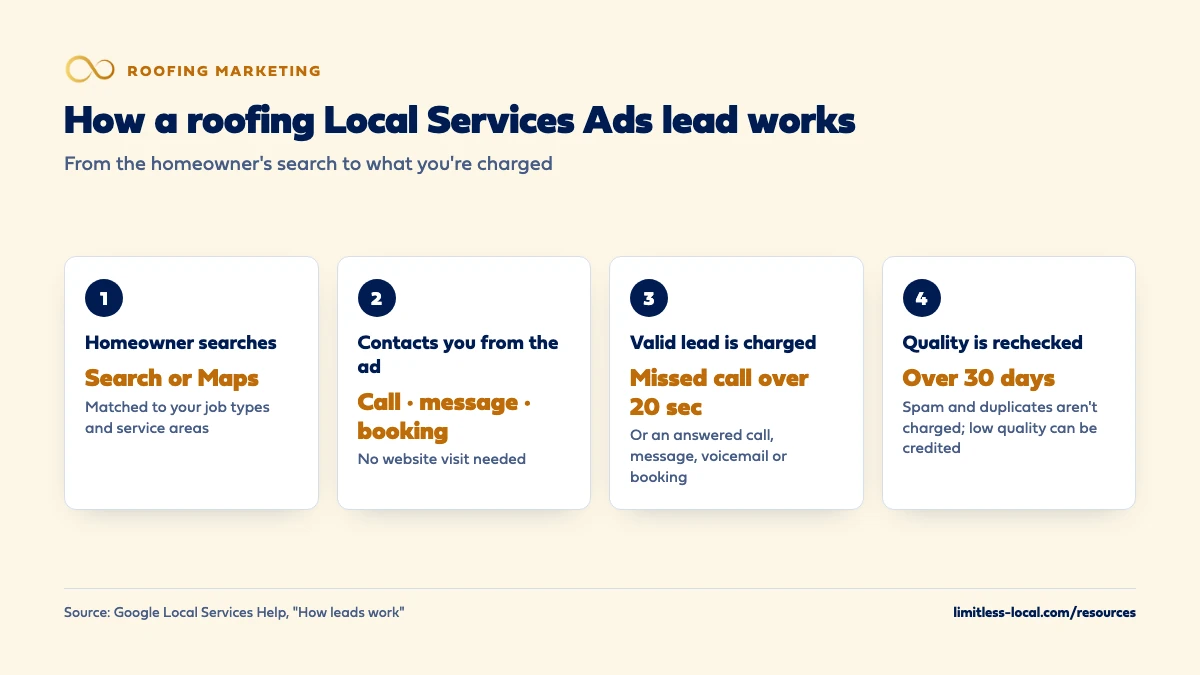
You’re charged for each valid lead, not for clicks or views. Google’s explanation of how leads work counts these as valid:
- You answer a call, or call the homeowner back and speak with them.
- You miss a call during your business hours and the caller stays on the line for more than 20 seconds.
- The homeowner sends a text message or email through the ad.
- The homeowner leaves a voicemail.
- The homeowner sends a booking request.
A few details catch roofers out. A call that goes to voicemail or an automated greeting during your business hours counts as a connected call, and it’s charged once the caller stays on more than 20 seconds, whether or not they leave a message. “Business hours” means the hours on your Google Business Profile, so if your profile says you’re open Saturday, a missed Saturday call can be charged.
Lead prices vary with location, job type, lead type and bidding. Message leads are usually cheaper than phone leads, though not always. Google prices a message partly on whether the homeowner has already contacted other advertisers, which matters in a trade where people often collect more than one roofing quote.
Which roofing leads don't you pay for?
Google screens every lead when the homeowner first makes contact, and leads it decides are invalid or low quality, such as spam or duplicate contacts, aren’t charged. Charged leads keep being checked over a 30-day period, and ones later judged low quality can be credited back to your account automatically. Each lead shows as Charged, Not charged, In review or Credited.
Repeat contact is free for a while, too. Once a lead is charged, follow-up calls or messages from the same phone number or email aren’t charged again as long as there’s been contact within 15 days. If 15 days pass with no activity, a new call from that homeowner counts as a new lead.
There’s one exception that costs roofers money. According to Google’s page on automated lead credits, it no longer gives credits for leads about a job type you don’t service or an area you don’t serve. If your settings include gutter work you hand off, or towns your crews won’t drive to, those leads are yours to pay for. List only the roofing work you want and the areas you’ll actually send a crew, knowing narrower settings can mean fewer leads.
Curious what your marketing is actually booking?
Get a free visibility audit — no obligation, no sales pitch.
How does Google decide which roofer shows first?
Local Services Ads are ordered by an auction, with the highest-ranked ads showing first. Google’s page on Local Services ad rankings says the auction weighs your bid against how likely your ad is to produce a lead, and lists what goes into that second part:
- Responsiveness. How you respond to inquiries; missed calls can hurt it.
- Relevance. The service and area the homeowner searched, and how well your services and business bio match.
- More ways to reach you. Turning on message and booking leads can raise your chances of a lead, especially at night and on weekends when you can’t answer.
- Profile quality. Your rating, number of reviews, average response time, good images and the verification checks you’ve completed. Higher-quality profiles may rank higher and may also pay lower costs per lead.
So a roofer with a bigger bid doesn’t automatically win. One with strong reviews who answers every call can outrank them, and pay less per lead doing it.
How do budgets and bids work in Local Services Ads?
The original Local Services Ads dashboard used an average weekly budget with a monthly max. After the move into Google Ads, it becomes a daily budget: your average weekly budget is divided by seven, and your monthly spend is capped at the daily average times 30.4, the average number of days in a month. Spend can run higher on busy days without passing that monthly limit.
For bidding, Google’s page on how bidding works lists three modes:
- Maximize leads, where Google sets your bid to get the most leads for your budget. Google recommends it, along with a budget of at least 10 leads a week.
- Target cost per lead, where you give Google a target that’s around the average you’d pay.
- Max per lead, where you set the most you’d pay for any lead yourself.
That third option doesn’t survive the move: manual bidding isn’t supported in Google Ads. Whatever mode you use, give it about two weeks before you judge it; that’s how long the model takes to learn your business.
What does a roofer need before the ads can run?
- A Google Business Profile. After the move into Google Ads, your business name, address and hours sync one way from your profile, so get them right there first.
- Google’s screening. Google’s screening and verification page says it varies by category and location and can include background, business registration, insurance and license checks. How long LSA verification takes for a roofing company covers what’s checked and how to avoid delays.
- Reviews. Some categories need a minimum before the ad will show, and reviews feed your ranking either way.
- Billing and a budget. Set up before the ad goes live.
- Job types and service areas. Only the roofing work you want, only where your crews go.
You don’t have to wait for every check to finish. Pre-badge ads can start bringing leads once you’ve passed the preliminary checks, while you complete the rest. The catch is placement: Google puts pre-badge listings below providers that have finished onboarding and earned the badge.
What changes now that Local Services Ads are moving into Google Ads?
Google is moving Local Services Ads into the main Google Ads platform as Performance Max campaigns with pay-per-lead goals. Its transition page names roofing in the first phase, which began in August 2026 for select home and storefront service advertisers in the United States. Service-area businesses without a physical storefront are scheduled for late 2026, so a roofer working from home may move in the second wave.
What stays the same: you pay per valid lead, the ads show only on Search and Maps, and targeting runs on service categories and areas, not keywords. What changes:
- You manage budgets, targeting and replies in Google Ads.
- Your old performance reports don’t carry over, so screenshot or download them before your account moves. Your past leads, messages and call recordings do transfer.
- Big changes to your business name, storefront address or primary category trigger a review that typically takes 24 to 48 hours, and the campaign may pause meanwhile.
The account administrator gets an email 14 days before the move, and performance can take up to two weeks afterwards to settle.
How are Local Services Ads different from regular Google Ads?
They’re built differently and they do different jobs:
- What you pay for. LSAs charge per valid lead. Standard Google Ads campaigns charge per click, whether or not the person contacts you.
- How you target. LSAs have no keywords; you choose categories, job types and areas. Search campaigns run on keywords you pick, so you control which searches you pay for.
- Where the homeowner goes. LSAs connect the homeowner to you straight from the ad. Search ads send them to a page on your website, which you also control.
- The badge. Only LSAs carry the Google Verified badge.
You can run both: LSAs for calls from the top of the page, and search ads aimed at full replacements, which LSAs can’t single out by keyword. How to split a budget between Google Ads and LSAs walks through that decision.
What happens after a homeowner contacts you through the ad?
You get a notification by email, text or both, and the lead lands on the Leads page, which in Google Ads sits under Goals, then Conversions. From there you can read and reply to messages, listen to call recordings, rate the lead and download your leads to bring into your CRM.
From that point, the lead is yours to turn into a signed job. Respond to as many contacts as you can, even the ones you’ll turn down, because regularly missing calls or ignoring messages can hurt your ranking. How fast a roofing company should call back a new lead covers what to aim for.
Use the lead feedback survey for leads that weren’t a fit; Google uses it to send you more of the leads you want. Whether all of this adds up for your company is its own question: whether Local Services Ads are worth it for a roofing company goes through when they pay off and when they don’t.
Want to see where your company stands?
A free visibility audit shows where you show up on Google, Maps and AI answers, and what it's costing you in calls.
What's different about Local Services Ads for roofers
Storms change demand overnight. Raise the budget ahead of storm season rather than mid-week once the phones are ringing. Stretching your service area to chase a storm two counties over is the riskier move, because leads from areas you don’t serve aren’t credited.
The crew can’t answer from the roof. A missed call during business hours still costs you once the caller waits past 20 seconds. Somebody on the ground or in the office has to own the phone, and message leads give homeowners a way to reach you when nobody can.
Repairs and replacements aren’t worth the same. A small leak repair and a full tear-off both arrive as one lead. Set your job types on purpose and track which kind each lead turned into, or a cheap cost per lead can hide a poor cost per signed job.
A worked example: from budget to cost per signed roof
These numbers are made up to show the math, not a benchmark for your market. Say your average weekly budget was $840 before the move into Google Ads. Divided by seven, that’s a daily average budget of $120, and your monthly spend is capped at $120 times 30.4, or $3,648.
Now say a month brings 28 charged leads at $110 each, so you spend $3,080. You inspect 9 roofs and sign 2. Your cost per signed roof is $3,080 divided by 2, or $1,540. Whether that’s good depends on what you signed: two full replacements and the channel paid for itself; two small repairs and it probably didn’t.
If you’d rather have help running it, Local Services Ads management isn’t in our Essentials package ($3,500 a month). It’s in Growth, at $4,500 a month, which also covers Google Ads management up to $5,000 a month in ad spend, and in Scale, which is custom. Ad spend is paid to Google separately.
Frequently asked questions
Can a roofer choose which keywords trigger Local Services Ads?
No. Local Services Ads are keywordless. You choose service categories, job types and service areas, and Google matches your ad to searches from there. If you want to pick keywords, that’s a regular Google Ads search campaign.
Will I pay twice if the same homeowner calls back?
Not within 15 days. Once a lead is charged, follow-up calls or messages from the same phone number or email aren’t charged again as long as there’s contact within that window.
Can I pause Local Services Ads when my crews are booked out?
Yes. In Google Ads you set the campaign to Paused, and switch it back to Enabled when you want leads again.
What does the Google Verified badge show homeowners?
That your business passed Google’s screening process. The profile also shows the specific verification checks you completed.
Do I need a website to run Local Services Ads?
The ad doesn’t send homeowners to a website; they call, message or book from it. A website still helps with homeowners who look you up before calling.
Key takeaways
- Local Services Ads are Google’s pay-per-lead ads, shown only on Search and Maps, and roofers are an eligible category.
- You pay for valid leads: answered calls, missed calls over 20 seconds during business hours, messages, voicemails and bookings.
- Google doesn’t credit leads for job types or areas you don’t serve, so your settings decide what you pay for.
- Ranking weighs your bid against responsiveness, relevance and profile quality, including reviews.
- Judge the channel by cost per signed roof, not cost per lead.
Not sure what's working right now?
Start with a free visibility audit: rankings, Google profile, reviews and tracking, checked against your service area.
More in this section
- Do Local Services Ads help a roofer rank on Google Maps?
- Are Google Local Services Ads worth it for a roofing company?
- Can a roofer target specific neighborhoods with ads?
- Do LSAs or Google Ads work better for roof repair vs replacement?
- How does a roofing company get links from local websites?
Sources
- How leads work — Google Local Services Help
- About ad rankings — Google Local Services Help
- Getting started with Local Services Ads – United States — Google Local Services Help
- Local Services Ads transition to Performance Max campaigns with pay-per-lead goals — Google Ads Help
- How bidding works for Local Services Ads — Google Local Services Help
- About Automated Local Services Ads lead credits — Google Local Services Help
- Edit your industries, service areas, and job types — Google Local Services Help
- Understand the screening and verification process — Google Local Services Help