
What can I fix fast if I get junk electrical leads and have no time?

- What can I change quickly if I'm getting too many junk electrical leads and have no time to spare?
- Where is the junk coming from? (Start here, it takes minutes)
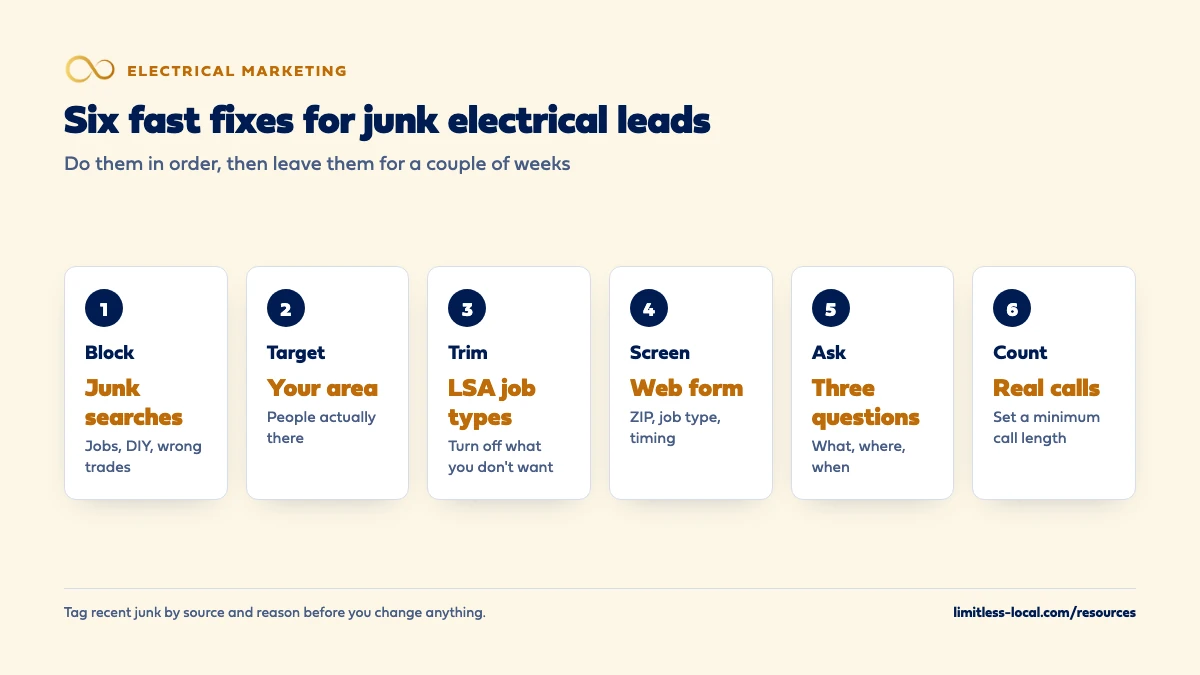
- Fix 1: Block the junk searches in Google Ads
- Fix 2: Show ads only to people actually in your area
- Fix 3: Trim your Local Services Ads job types and areas
- Fix 4: Make your web form screen for you
- Fix 5: Give whoever answers three screening questions
- Fix 6: Stop counting junk calls as wins in Google Ads
- What if I only have fifteen minutes?
- What if the junk comes from Angi, Thumbtack or other lead sites?
- What shouldn't I do in a hurry?
- How do I tell if the fixes worked?
- When is junk a sign of a bigger problem?
- What's different about junk leads for electricians
- A worked example: one hour of fixes
- Frequently asked questions
- Key takeaways
- More in this section
- Sources
The short version
- Find the source first: tag recent junk leads by channel and reason.
- Block job, DIY and wrong-trade searches with negative keywords.
- Target people in your area and trim Local Services Ads job types.
- Screen with a better web form and three questions on the phone.
For busy electrical owners drowning in job seekers, DIY questions and out-of-area calls, who have an hour, not a week, to fix it.
Get a free visibility audit · Book a growth call
What can I change quickly if I'm getting too many junk electrical leads and have no time to spare?
Spend an hour on the fixes that cut the most junk: block junk searches like jobs, DIY and work you don’t do in Google Ads, set your ads to reach people actually in your service area, turn off Local Services Ads job types and towns you don’t want, add a ZIP code and job-type field to your web form, and give whoever answers three screening questions. Then rate bad Local Services Ads leads so Google learns. These cut junk without cutting the real jobs.
If you’d rather not spend that hour yourself every month, it’s part of the job on our local ads management: search term checks, negative keyword lists, location settings and Local Services Ads job types, with call tracking and source tagging so junk is counted, not guessed. Google Ads management is in every package and Local Services Ads management comes with Growth. We don’t guarantee lead counts; nobody honestly can. See how we work with electrical shops on our electrical contractor marketing page, or browse more electrical marketing questions.
Where is the junk coming from? (Start here, it takes minutes)
Before changing anything, pull up your last few weeks of leads and give each junk one a source and a reason. You only need two columns:
- Source: Google Ads, Local Services Ads, website form, Google profile, a lead site.
- Reason: job seeker, out of area, DIY question, sales pitch or robocall, work you don’t do, price shopper.
Usually one or two reasons from one or two sources make up most of the junk. That tells you which of the fixes below to do first and which to skip. If you’re not sure what counts as junk, how electricians tell a junk lead from a real job draws the line.
Fix 1: Block the junk searches in Google Ads
If Google Ads is the source, this is usually the biggest single fix. Google’s page on using the search terms report shows how to see the actual searches that triggered your ads and add the bad ones as negative keywords in a few clicks.
Look for the usual electrical junk:
- Job hunters: jobs, hiring, salary, apprentice, school, license test.
- DIY: how to, wiring diagram, youtube, yourself.
- Work you don’t do: appliance repair, low voltage or solar, if those aren’t yours.
- Wrong places: town names well outside your area.
Google’s page on negative keywords notes they don’t match close variants, so add both forms where it matters (“job” and “jobs”). Put the list at the account level so it covers every campaign. Which negative keywords electricians should add first has a fuller starting list.
Fix 2: Show ads only to people actually in your area
Out-of-area calls often come from a default setting. Google’s page on advanced location options says location targeting by default reaches people in or regularly in your area plus people who’ve shown interest in it. The other option, called Presence, reaches only people who are likely to be in or regularly in your targeted locations.
Google recommends the broader default for most advertisers, but for an electrician who has to drive to the house, Presence usually makes more sense. Switch it in the campaign’s location settings, and check that the area itself matches where you’ll really send a truck. The same page warns that location targeting is Google’s best effort and isn’t accurate every time, so expect a few strays.
How to set up an electrician’s service area in Google Ads covers radius versus town targeting.
Fix 3: Trim your Local Services Ads job types and areas
If the junk is coming from Local Services Ads, the fix is in the settings, not the budget. Google’s page on how Local Services Ads leads work says that if you’re getting unwanted leads, you can refine your service areas, categories and service types, and that narrowing them can bring better-fitting customers, though it may reduce lead volume.
Turn off job types you don’t want more of and trim towns you rarely win work in. The same page says leads judged invalid or low quality aren’t charged, charged leads are reassessed over a 30-day period and can be credited automatically, and you can rate poor leads in the feedback survey. Rating them takes seconds and tells Google what you don’t want.
Fix 4: Make your web form screen for you
Spam and vague requests often come in through the website form. A few small changes cut them without scaring off real customers:
- Ask for the job address or ZIP code, so out-of-area requests show up before anyone calls back.
- Add a dropdown for the type of work: panel upgrade, EV charger, generator, repair or troubleshooting, other.
- Ask when they need it: today, this week, just planning.
- Turn on the spam filter your website builder or form plugin offers.
Keep it to a handful of fields. Every extra question loses some real customers too.
Curious what your marketing is actually booking?
Get a free visibility audit — no obligation, no sales pitch.
Fix 5: Give whoever answers three screening questions
Whoever picks up, you, a tech or the office, asks the same three things before booking a visit:
- What’s going on? The job, in their words.
- Where’s the job? The address or at least the town.
- When do you need it? Now, this week, or just getting prices.
Those three questions sort out most junk in under a minute without being rude to anyone. Write them on a card by the phone or in your field software’s call notes. For tire-kickers specifically, how to stop price shoppers from wasting your electrical estimates goes further.
Fix 6: Stop counting junk calls as wins in Google Ads
If Google Ads counts every call as a conversion, it learns to find more of whatever called, junk included. Google’s page on phone call conversion tracking says that for calls from ads you set a minimum call length, and every call that lasts at least that long is counted as a conversion.
Set that minimum long enough to skip robocalls and wrong numbers, then check it isn’t so long that short real bookings drop out. Better still, once you have time, import booked jobs back into Google Ads so it learns from real work instead of rings.
What if I only have fifteen minutes?
Do the one fix that matches your biggest junk reason from the tagging step:
- Mostly job seekers or DIY questions: add negative keywords in Google Ads. It’s the quickest change with the biggest effect.
- Mostly out-of-area calls: switch location targeting to Presence and trim the towns in Local Services Ads.
- Mostly spam forms: turn on the form’s spam filter and add a ZIP code field.
- Mostly price shoppers: start asking the three questions on every call today. It costs nothing to set up.
Come back to the rest when you get a slow afternoon.

What if the junk comes from Angi, Thumbtack or other lead sites?
The same idea applies with fewer controls. Narrow the job types and service area in your account settings so you stop receiving requests for work and towns you don’t want, and learn the site’s rules for disputing or getting credit on bad leads, then use them every time.
If the junk share stays high after that, compare that site’s cost per real job with your other channels before renewing. Whether electricians should pay for leads on Angi or Thumbtack walks through that decision.
What shouldn't I do in a hurry?
- Don’t pause everything. Junk is annoying, but turning off a channel also turns off the good calls it was sending.
- Don’t block words real customers use. Blocking “cheap” or “cost” can cut homeowners who are ready to book and just want a ballpark.
- Don’t cut the budget to fix quality. A smaller budget sends fewer leads of the same mix.
- Don’t change everything at once. Make the changes, then leave them alone for a couple of weeks so you can tell what worked.
How do I tell if the fixes worked?
Keep tagging leads the same way for the next few weeks and compare:
- The share of leads that are junk, by source.
- The number of real leads, which shouldn’t drop much.
- Cost per real lead, which is your spend divided by leads that weren’t junk.
If junk drops and real leads hold steady, you’re done for now. Recheck the search terms once a month; new junk searches appear over time.
When is junk a sign of a bigger problem?
A bit of junk is normal for every electrician. If it stays high after these fixes, something structural is off:
- The campaign is showing ads beyond search, on websites or apps, where clicks are often accidental.
- Keywords are too broad, so a search for an electrician’s salary looks like a match.
- The landing page reads like a jobs page or a DIY article.
- A lead site is reselling the same lead to several electricians.
Those take more than an hour to sort out. How a large electrical company filters out junk leads shows the fuller setup once you have the time or the help.
Not sure which of these is costing you jobs?
A free visibility audit checks the Google profile, reviews, site and tracking, and shows what to fix first.
What's different about junk leads for electricians
Job seekers are a big share. “Electrician” is a career search as much as a service search, so apprentice, salary and school searches hit electrical ads more than most trades.
DIY questions are common. Homeowners search how to wire an outlet or reset a breaker. Those searches look like service searches until you read them.
Low-voltage and solar overlap. Homeowners lump security cameras, network cabling and solar in with electrical work. If you don’t do them, block them.
Emergency calls can’t wait for a callback. Screening has to be quick and done by whoever answers, not saved for a form review at the end of the day.
A worked example: one hour of fixes
These numbers are made up to show the math, not a forecast for your business. An electrician spends $1,800 a month on Google Ads and Local Services Ads and gets 32 leads.
- Tagging them shows 12 junk: 5 job seekers, 4 out of area, 3 DIY questions. That leaves 20 real leads, or $90 per real lead.
- The owner spends an hour: adds job and DIY negatives, switches location targeting to Presence, and turns off two job types in Local Services Ads.
- Next month, the same $1,800 brings 28 leads, 6 of them junk. That’s 22 real leads, or about $82 per real lead.
Total leads went down; real leads went up. That’s what a good junk fix looks like.
Frequently asked questions
Do I pay for junk Local Services Ads leads?
Leads judged invalid or low quality aren’t supposed to be charged, and charged leads can be credited automatically later. Rate bad ones in the feedback survey anyway.
Should I turn off my website form to stop spam?
No. Add a spam filter and a ZIP code field instead. Some homeowners will only ever fill in a form, especially after hours.
Will negative keywords cut my real leads?
Not if you block words only junk searches use, like jobs, salary or wiring diagram. Avoid blocking price words real customers type.
Can an answering service screen junk for me?
Yes, if you give it the same three questions and tell it which jobs and towns you take. Check its notes for a few weeks to be sure it screens the way you would.
How often should I check for new junk searches?
Once a month is enough for most small shops. Do it more often right after launching a new campaign or adding keywords.
Key takeaways
- Tag recent junk by source and reason before changing anything.
- Negative keywords for job, DIY and wrong-trade searches are usually the biggest fix.
- Target people in your area, and trim Local Services Ads job types and towns.
- A ZIP code field and three phone questions screen out most of the rest.
- Judge the fix on real leads and cost per real lead, not total leads.
Want a second set of eyes on your setup?
We'll look at how you show up locally and where calls are leaking, then send you a plain-English breakdown.
More in this section
- How do electricians tell a junk lead from a real job?
- How do I get more electrical leads in a slow season?
- How can a large electrical company filter out junk leads?
- How fast should my office answer electrical calls before I lose them?
- Can an electrician get enough leads without paid ads?
Sources
- Get negative keyword ideas using the search terms report — Google Ads Help
- About negative keywords — Google Ads Help
- About advanced location options — Google Ads Help
- How leads work — Local Services Help
- About phone call conversion tracking — Google Ads Help