
At 5 city pages, am I too small to compete in restoration SEO?
- Can a restoration website with only five city pages still rank against companies with dozens?
- Is five city pages too few for a restoration website?
- Why do competitors with dozens of city pages sometimes outrank me?
- What actually decides whether I rank in those five towns?
- How do I check whether my five pages are pulling their weight?
- What makes one city page stronger than several thin ones?
- Are my service pages more important than my city pages?
- When should I add a sixth city page?
- When would more city pages hurt me?
- Does my Google profile service area need to match my city pages?
- What should I fix before writing more pages?
- What's different about city pages for restoration companies
- A worked example: reading five city pages in Search Console
- Frequently asked questions
- Key takeaways
- More in this section
- Sources
The short version
- Page count isn't a ranking factor; what's on the page and who's searching from where is.
- Five honest pages for towns you serve fast beat fifty near-copies.
- Your Google profile, reviews and water damage page usually matter more than another town page.
- Add a town page when calls, searches or jobs show that town is worth it.
For restoration owners with a handful of town pages, looking at competitors with a page for every town in the county.
Get a free visibility audit · Book a growth call
Can a restoration website with only five city pages still rank against companies with dozens?
No. Five city pages is enough to compete if they cover the towns your crews really reach fast and each one says something true and specific about working there. Google doesn’t rank restoration companies by how many pages they have: Maps results depend mainly on relevance, distance and how well-known the business is, and Google’s spam policies treat near-identical pages aimed at different cities as doorway abuse. What decides it is your Google profile and reviews, strong service pages, and how close you are to the people searching, so fix those first and add a sixth page only when a real town earns one.
Most restoration sites don’t need more pages so much as better ones. Our Essentials package includes a content sprint of up to 10 pages, along with Google Business Profile management and business listing cleanup, so the pages you add come with the work that helps them rank. SEO typically takes 3-6 months to show meaningful organic growth, and we don’t guarantee rankings. See our local SEO work and our restoration marketing page, read the restoration marketing guide, or browse more restoration marketing questions.
Is five city pages too few for a restoration website?
Not if they’re the right five. A restoration company doesn’t compete as one site against another site; it competes town by town, search by search. In each of your five towns, the question is whether your company looks like the best, closest, most trusted answer for someone with water on the floor. Fifty pages for towns you can’t reach in an hour don’t help you there.
Five is a reasonable number for a single-office company. Most owners serve a core of towns where crews arrive fast, plus a ring of towns they’ll go to when it’s worth it. Pages for the core towns earn their keep; pages for the outer ring often don’t. How many service and city pages a restoration website needs covers the starting count; this page is about whether the count you already have is holding you back.
Why do competitors with dozens of city pages sometimes outrank me?
Usually for reasons that have nothing to do with the page count. Look for these first:
- Their office is closer to the searcher, which matters a lot in Maps.
- They have more reviews, newer reviews or a better rating.
- Their site is older and better known, with more local sites linking to it.
- Their service pages are stronger. A detailed water damage page with real job photos can carry a whole site.
- They answer the phone better, so their calls turn into jobs and reviews that keep the cycle going.
The pile of city pages may even be dead weight. Google’s spam policies describe doorway abuse as pages created to rank for specific, similar search queries, with pages targeted at specific regions or cities that funnel users to one page as an example. The same policies describe scaled content abuse as many pages generated mainly to manipulate rankings and not to help users. Copying that approach is a risk, not a shortcut.
What actually decides whether I rank in those five towns?
Two different results, two different sets of reasons.
In Maps, Google’s page on improving your local ranking says local results are mainly based on relevance, distance and popularity, and that more reviews and positive ratings can help. It also says there’s no way to request or pay for a better local ranking. Distance is the one you can’t change: a town 45 minutes from your office is hard to win in Maps no matter how good the page is. City pages help Maps indirectly, by giving Google and homeowners more detail about where and what you do.
In the regular results, your pages compete on how useful and specific they are, and on how well-known your site is. Here a strong town page can win searches like “water damage restoration” plus the town name, even when your office isn’t the closest. That’s the job your five pages are doing.
How do I check whether my five pages are pulling their weight?
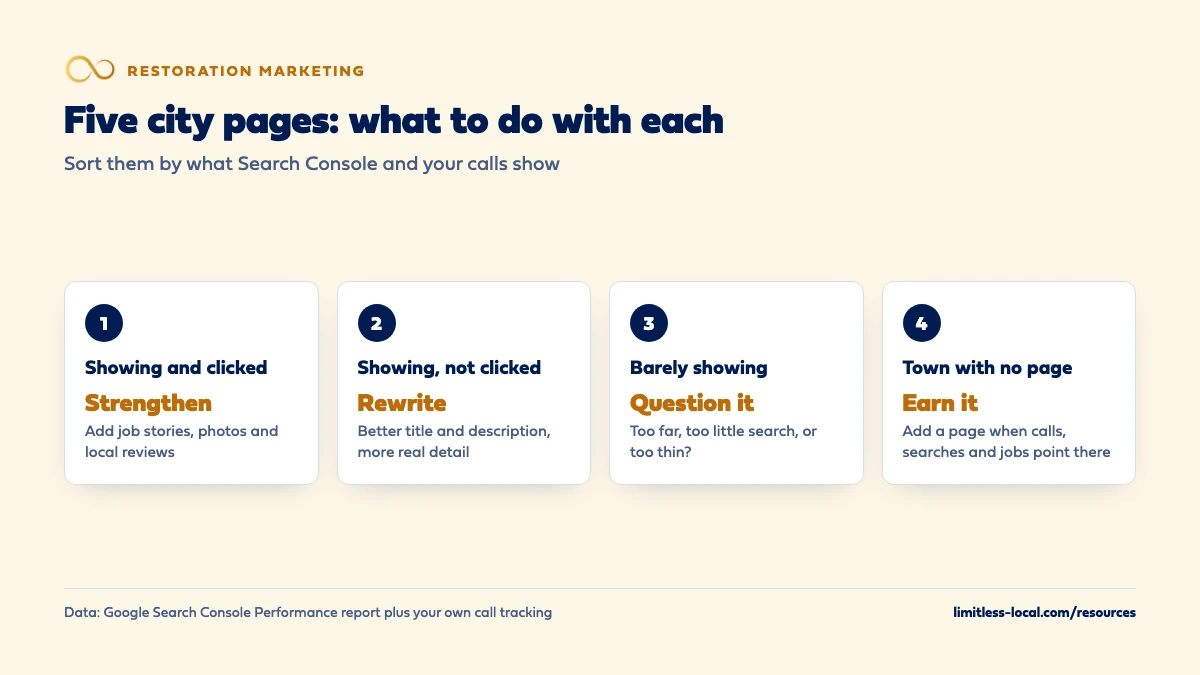
Open Google Search Console and look at the Performance report with the Pages tab selected. For each city page, note impressions (how often it showed up) and clicks over the last three months. Then switch to Queries for each page to see which searches it showed for.
You’ll usually find one of three patterns:
- Showing and getting clicks. The page works. Add job stories and photos to make it stronger.
- Showing but not clicked. The title and description aren’t convincing, or the page ranks too low. Improve the title and content first.
- Barely showing at all. Either the town is too far from you, there’s little search there, or the page is too thin to compete. Decide which before writing anything new.
Then check your call tracking or job software. A page that drives calls and booked jobs is worth more than one with lots of impressions.
Curious what your marketing is actually booking?
Get a free visibility audit — no obligation, no sales pitch.
What makes one city page stronger than several thin ones?
Specifics nobody else can copy. For a restoration company that means:
- Which office and crew responds, and roughly how fast they usually get there.
- Real jobs done in that town: the kind of loss, the kind of home or building, what the crew did. Leave out anything that identifies the customer.
- Photos from those jobs, with your trucks and equipment.
- Local details that matter for the work, like older housing stock, slab or basement homes, or a stretch of town that floods.
- Reviews from customers in that town.
- Links to your water, mold, fire and sewage pages, and a phone number that works in one tap.
Google’s guidance on helpful, people-first content asks whether content provides original information, and lists producing lots of content on many different topics in the hope some of it performs as a warning sign. A page built from your own jobs passes that test without trying. How to build restoration city pages that rank covers the full layout.
Are my service pages more important than my city pages?
Often, yes. Most of your best searches are service searches, like water damage restoration, mold remediation or sewage cleanup, and the person searching is usually near you. Google shows them results based partly on where they are, so your water damage page and your Google profile do much of the work in your home area without any town name at all.
If your service pages are thin, a sixth city page won’t fix much. A water damage page that explains what you do in the first hours, shows real jobs and makes the phone number easy to tap usually pulls more calls than any one town page. Strengthen those first, then point each city page at them.
When should I add a sixth city page?
Add one when a town shows you it’s worth it, not to hit a number. Good signs:
- You’re getting calls or booked jobs from a town that doesn’t have a page.
- Search Console shows your service pages getting impressions for searches with that town’s name in them.
- Your crews can reach it fast and you’d happily take more work there.
- You have real jobs and photos from that town to put on the page.
If a town only meets one of those, it’s probably better served by a mention on an existing page. Which cities to target without spam pages covers how to choose the next towns.
When would more city pages hurt me?
- Towns you can’t reach fast. Calls from them turn into slow arrivals, lost jobs and bad reviews.
- Near-copies. Pages that swap the town name and change nothing else fall into the doorway abuse described above.
- Thin pages that compete with each other. Two pages aimed at neighboring towns with the same content can split attention instead of building one strong page.
- Pages nobody maintains. Old phone numbers, old photos and services you no longer offer make the whole site look neglected.
Five maintained pages beat twenty you’ll never update.
Does my Google profile service area need to match my city pages?
They should agree, but they don’t need to match one for one. Google’s help page on managing service areas lets you set up to 20 service areas by city, postal code or other area, and says the overall area shouldn’t be more than about 2 hours of driving time from where your business is based.
So your profile can list more towns than your website has pages for. What matters is that your five pages are all inside that service area, and that you don’t list towns on either one that your crews won’t actually go to.
What should I fix before writing more pages?
- Your Google Business Profile: correct categories, services, hours, service areas and fresh photos.
- Reviews: a request after every job, so new reviews keep coming in. How many Google reviews a restoration company needs shows how to set the target for your market.
- Service pages: one strong page per service you sell.
- Mobile speed and the call button: the page loads fast on a phone and the number is one tap away.
- Consistent name, address and phone across your site and the directories you’re listed in.
- Tracking: so you can see which page and which town brought each booked job.
Then improve the five pages you have. Only after that does a sixth page usually make sense.
Not sure which of these is costing you jobs?
A free visibility audit checks the Google profile, reviews, site and tracking, and shows what to fix first.
What's different about city pages for restoration companies
Emergency searches favor the nearby. Someone with a burst pipe searches from the house that’s flooding and calls one of the first companies they see. That makes your core towns, close to the office, worth far more than distant ones, and it’s why a short list of close-in town pages is a sensible shape for a restoration site.
Different services travel differently. Water and sewage work has to happen fast, so it’s tied to drive time. Mold, fire and contents work can often be scheduled, so you may reasonably cover a wider area for those. If you do, say so on the service page rather than building a set of extra town pages.
Storms create local spikes. A hailstorm or a flood in one town can bring a burst of searches there. A town page that’s already strong and current is ready for that; one written the day after the storm usually isn’t.
A worked example: reading five city pages in Search Console
These numbers are made up to show the method, not a benchmark.
Say your five city pages got these clicks over three months: Town A 22, Town B 18, Town C 9, Town D 4 and Town E none. That’s 22 plus 18 plus 9 plus 4, or 53 clicks, and the top two towns account for 40 of them, about 75%.
Here’s what you’d do with that. Towns A and B are working, so you add recent job stories and photos to both. Town C shows up but rarely gets clicked, so you rewrite its title and add a real job from that town. Town E gets almost no impressions; you check the drive time and find it’s your farthest town, so you leave it and stop expecting it to rank. Meanwhile, your water damage page has been showing for searches with a sixth town’s name in them, and you’ve booked jobs there. That town gets the next page.
You’re not short of pages. You have two strong ones, two to improve and one to stop worrying about.
Frequently asked questions
Does Google count how many pages my site has?
There’s no page count to hit. Google’s guidance on helpful content asks whether each page offers original information, so near-copies of the same page add risk, not strength.
Should every city page have the same layout?
A shared layout is fine and makes the site easy to use. What has to differ is the substance: the crew, the jobs, the photos and the local details.
Can one page cover several small towns?
Yes. If a few small towns are served by the same crew and you don’t have much to say about each one, one area page that names them can be stronger than several thin pages.
How long until improved city pages show results?
SEO typically takes 3-6 months to show meaningful organic growth. Watch impressions in Search Console first; calls usually follow later.
Do city pages help me show up in the Maps 3-pack?
Indirectly. Maps results lean on your Google profile, reviews and distance. City pages add detail about what you do and where, which supports relevance, but they won’t overcome a long drive.
Should I build pages for towns I only reach after big storms?
Usually not. Mention storm coverage on your water damage page instead, and keep town pages for the places your crews serve every week.
Key takeaways
- Five city pages is enough to compete if they cover towns your crews reach fast and each is specific.
- Competitors with dozens of pages usually win on distance, reviews or stronger service pages, not page count.
- Use Search Console to sort your pages into strengthen, rewrite or question before adding any.
- Fix your Google profile, reviews and service pages before writing a sixth town page.
- Add a page when calls, searches and booked jobs show a town has earned it.
Want a second set of eyes on your setup?
We'll look at how you show up locally and where calls are leaking, then send you a plain-English breakdown.
More in this section
- How should a restoration company build city pages that rank?
- How many service and city pages does my restoration website need?
- Which cities should a restoration company target without spam pages?
- How do I tell if my website can outrank local restoration rivals?
- Is paying for SEO worth it for a restoration company?
Sources
- Tips to improve your local ranking on Google — Google Business Profile Help
- Spam policies for Google web search — Google Search Central
- Creating helpful, reliable, people-first content — Google Search Central
- Performance report (Search results): Overview and basic setup — Search Console Help
- Manage your service areas for service-area & hybrid businesses — Google Business Profile Help