
How to structure restoration website city and service pages?

- What site structure helps Google see which restoration services you offer in which towns?
- What does a well-structured restoration website look like?
- Should service pages or city pages lead the site?
- What web addresses should service and city pages use?
- Where does a service-in-a-town page go when one earns a spot?
- How should service and city pages link to each other?
- What goes in the main menu, and what goes in the footer?
- Where do sub-services like burst pipes or basement flooding fit?
- Do breadcrumbs help a restoration website?
- How far from the homepage should each page sit?
- How do I restructure an existing site without losing what it ranks for?
- What structure mistakes should a restoration company avoid?
- What's different about site structure for restoration companies
- A worked example: the site map for a one-office restoration company
- Frequently asked questions
- Key takeaways
- More in this section
- Sources
The short version
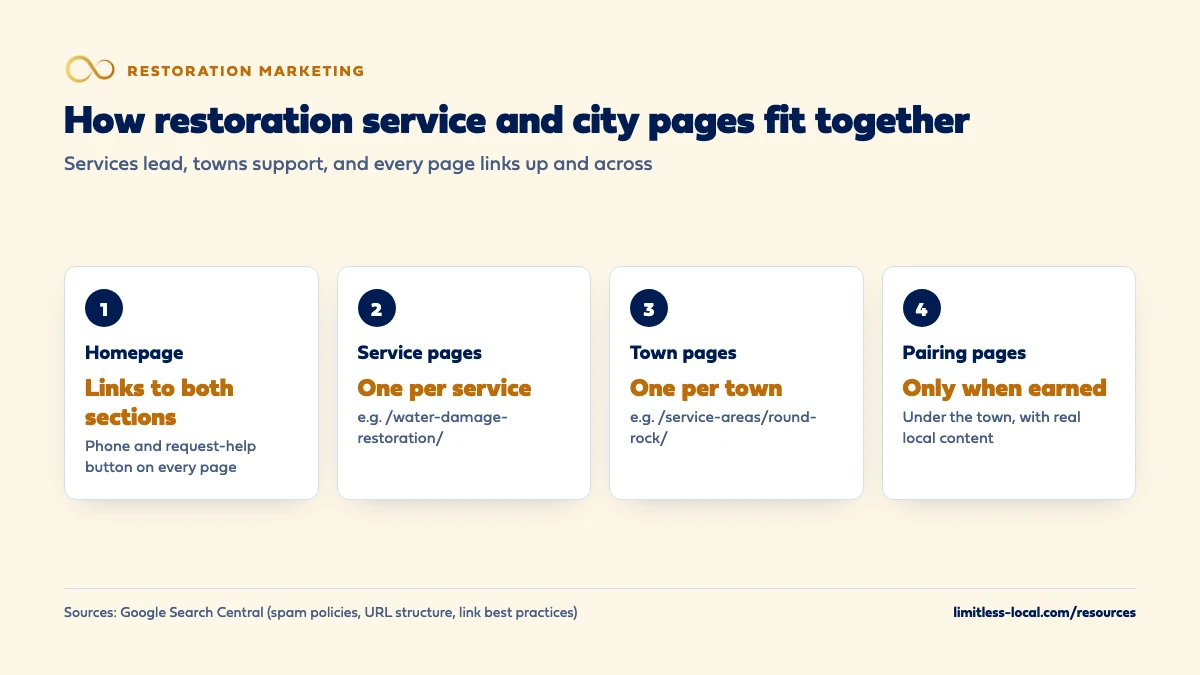
- Services are the spine; town pages hang off a service-areas section.
- Short, readable addresses: /water-damage-restoration/ and /service-areas/round-rock/.
- Link services to towns and towns to services, with descriptive link text.
- A service-in-a-town page only when it has real local content, in one consistent folder.
For restoration owners building or rebuilding a website who want service and town pages organized so homeowners and Google can tell exactly what you cover, and where.
Get a free visibility audit · Book a growth call
What site structure helps Google see which restoration services you offer in which towns?
Build the site in three layers: a homepage that links to a services section and a service-areas section, one page per service (water damage, fire and smoke, mold, sewage) inside the services section, and one page per town you really cover inside the service-areas section. Link every service page to the towns it covers and every town page to the services offered there, with plain link text like “water damage restoration in Round Rock”. Give a service-in-a-town page its own spot only when it has real local content, always under the same folder pattern, so nothing sits orphaned or looks like a copy of another page.
This is the layout we build through our website work: a themed website is $3,750, or $3,000 with any Limitless Engine package, with up to 25 pages, and custom builds start at $5,000. Our Essentials package, at $3,500 a month, includes a content sprint of up to 10 pages to fill the gaps in a site you already have. See how we work with restoration companies, read the restoration marketing guide, or browse more restoration marketing questions.
What does a well-structured restoration website look like?
Picture three layers, like the shelves in your trailer: the stuff you grab most sits at the front.
- Top layer: the homepage, plus the pages every visitor needs (about, reviews, contact, insurance and billing).
- Middle layer: two section pages. A services page that lists everything you do, and a service areas page that lists every town you cover, in sentences.
- Bottom layer: the detail pages. One page per service under services, and one page per town under service areas.
Everything links down from the homepage, back up to its section, and across to its matching pages. Google’s spam policies list “creating substantially similar pages that are closer to search results than a clearly defined, browseable hierarchy” as an example of doorway abuse, so a site that reads like a tidy hierarchy is on the right side of that line by design.
How many pages go in each layer is a separate question, covered in how many service and city pages a restoration website needs. This page is about where they sit and how they connect.
Should service pages or city pages lead the site?
Service pages lead. A homeowner with water on the floor searches for the problem first and the town second, and your service pages are where you explain the work, the response time and the insurance side. They’re the pages that sell.
Town pages play a supporting role. They prove you really work in that town, show nearby jobs and point to the services you offer there. So in the main menu, services get the dropdown, and service areas get one link to the section page. If you flip it and make towns the top-level menu with services repeated under each one, you end up with dozens of near-copies and a menu no one on a phone can use.
The one exception is a company with two or more staffed offices. Then each office gets a location page near the top of the site, and town pages sit under the office that serves them. Setting up a website and Google profile for a second restoration location covers that build.
What web addresses should service and city pages use?
Short, readable and predictable. Google’s URL structure guidelines recommend readable words instead of long ID numbers, words in your audience’s language, and hyphens instead of underscores to separate words.
A pattern that works for most restoration sites:
- Services: /water-damage-restoration/, /fire-damage-restoration/, /mold-remediation/, /sewage-cleanup/
- Service areas section: /service-areas/
- Towns: /service-areas/round-rock/, /service-areas/georgetown/
Use the words homeowners use. “Water damage restoration” beats “water mitigation services” in an address, even if your crew says mitigation all day. Leave out the year, the word “best” and your business name, and never stack the same keyword twice, such as /water-damage/water-damage-round-rock/.
Pick the pattern once, before you build, so you never need a round of redirects to fix it.
Where does a service-in-a-town page go when one earns a spot?
Sometimes a pairing deserves its own page, such as water damage in your biggest city, where you’ve done enough jobs to fill a page with local detail: neighborhoods with older plumbing, typical arrival times from your shop, photos from real jobs. When that happens, put it under the town: /service-areas/austin/water-damage-restoration/.
Nesting under the town keeps the town page in charge of everything local, and it keeps your service pages clean, because the service page never has to become a list of thirty town links. Whichever way you go, use one pattern for every pairing. A site with /austin-water-damage/ in one place and /water-damage/round-rock/ in another is hard for anyone to follow, Google included.
Link the pairing page from three places: its town page, its service page and, if it’s a big market, the homepage. If you can’t think of anything to say on it that isn’t already on the town page and the service page, don’t build it. That’s the test.
How should service and city pages link to each other?
Every page links in three directions: up to its section, across to its matching pages, and out to the next step (call or request help). In practice:
- Each service page lists the towns it covers in a short paragraph and links each town name to its town page.
- Each town page lists the services offered there and links each one to its service page, or to the town’s pairing page if one exists.
- Both link back up to their section page, and both carry the phone number and a request-help button.
The link text matters. Google’s link best practices say good anchor text is “descriptive, reasonably concise, and relevant”, warn against generic text like “click here”, and say “every page you care about should have a link from at least one other page on your site.” They also advise against chaining links right next to each other. So write “we handle sewage cleanup in Pflugerville around the clock”, not a block of twenty town names jammed together.
Keep the links as plain HTML links in the page text. Town lists that only appear inside a map widget or a script-driven dropdown may not be followed.
Curious what your marketing is actually booking?
Get a free visibility audit — no obligation, no sales pitch.
What goes in the main menu, and what goes in the footer?
The menu is for a stressed homeowner on a phone. Keep it to what they need to act:
- Services, with a dropdown of your main services
- Service areas, one link to the section page
- About, reviews, and insurance or billing
- The phone number and a request-help button, always visible
Don’t put forty towns in the menu. A long dropdown on a small screen is a wall, and it buries the phone number. The service-areas page is where the full town list lives.
The footer can carry your main services, a link to the service-areas page and your top few towns. Resist the urge to list every town you’ve ever driven to there, each one a link with “water damage restoration” repeated in front of it. Google’s spam policies count “blocks of text that list cities and regions that a web page is trying to rank for” as keyword stuffing.
Where do sub-services like burst pipes or basement flooding fit?
Most of them are sections on the parent page, not separate pages. Burst pipes, appliance leaks, basement flooding and ceiling leaks are all water damage. A good water damage page covers each in its own short section, so the homeowner finds their situation and Google sees the full range.
A sub-service earns its own page, under the parent, when the job is genuinely different in how you handle it, who calls for it or how it’s paid. For restoration, that usually means:
- Sewage cleanup: different hazards, equipment and urgency, so it stands alone. What a sewage cleanup page should say covers the content.
- Commercial water damage: a different buyer, often a property manager, with different questions.
- Storm and flood damage: if you run storm response, it gets its own page so you can update it when storms hit.
Mold and fire usually get their own top-level service pages already. Whether a restoration website should cover mold and fire damage walks through that choice. Keep each sub-service under its parent’s address, such as /water-damage-restoration/commercial/, so the family stays together.
Do breadcrumbs help a restoration website?
They help, and they’re cheap. A breadcrumb is the small trail near the top of a page, such as Home › Service Areas › Round Rock. Google’s breadcrumb documentation says a breadcrumb trail indicates the page’s position in the site hierarchy and “may help users understand and explore a site effectively”, and that Google Search uses breadcrumb markup in the body of a page to categorize the information from the page in search results. It notes the search feature is available on desktop.
Make the trail show the path a person would typically take to the page, not a copy of the web address. For a pairing page, that’s Home › Service Areas › Austin › Water Damage Restoration. Most website builders and WordPress SEO plugins can add the trail and the markup together; check it with Google’s Rich Results Test after it’s live.
How far from the homepage should each page sit?
Close. Your service pages should be one click from the homepage, and every town page should be one click from the service-areas page. The more clicks it takes to reach a page, the less important it looks.
Google says as much in its guidance on site navigation structure: it can use “the number of links it needs to follow to reach a page and the number of links to a page to infer the relative importance of a page”. The guide is written for online stores, but the logic carries over: the pages that bring you water damage calls should be the easiest to reach and the most linked to.
A quick check: open your site on your phone and try to reach your mold page and your smallest town page from the homepage. If either takes more than a couple of taps, or you can only find it through the site search, add a link.
How do I restructure an existing site without losing what it ranks for?
- List every current page and what it ranks for. Search Console’s Pages and Performance reports show which addresses get impressions and clicks.
- Map old to new. Every old address that changes gets one matching new address. Merge thin near-duplicate town pages into the closest real one.
- Redirect permanently. Google’s redirects documentation recommends a permanent server-side redirect whenever possible when a page’s address changes, and treats it as a signal that the new address should be the main one.
- Update your own links in the menu, footer and page text so they point straight to the new addresses, not through a redirect.
- Update the address on your Google Business Profile if its website link pointed at a page that moved.
- Submit the new sitemap in Search Console and watch the reports for a few weeks.
If your restoration website won’t rank for reasons beyond structure, fix those in the same pass.
What structure mistakes should a restoration company avoid?
- Town pages with no way in. Pages built in a batch and never linked from anywhere except the sitemap.
- Every service in every town. A grid of near-identical pages with the town name swapped.
- Mixed address patterns. Some towns under /service-areas/, others at the top level, others under a service.
- A town page that only links to the contact page. That’s a page that funnels visitors somewhere else, which is the doorway pattern.
- A footer stuffed with town links.
- A separate website for each town or service. Multiple domain names aimed at specific cities are one of the doorway examples.
- Service pages buried three menus deep while the blog sits on the homepage.
- Changing addresses without redirects.
Not sure which of these is costing you jobs?
A free visibility audit checks the Google profile, reviews, site and tracking, and shows what to fix first.
What's different about site structure for restoration companies
Emergencies decide the menu. Most restoration visitors land in a crisis. The structure has to get them to the right service and the phone number in a tap, so the menu is shorter and the phone more prominent than on a remodeler’s site.
Services differ more than towns do. Water, fire, mold and sewage jobs differ in equipment, hazards, insurance questions and who calls. That’s why services carry the structure and towns support it, not the other way around.
Commercial work has a different buyer. Property managers and facility managers look for a commercial section, not a town page. One commercial page under each relevant service usually beats a separate commercial website.
A worked example: the site map for a one-office restoration company
This is a made-up company with one shop, four main services and six towns where its crews arrive fast, to show the structure, not a template to copy word for word.
- / (homepage): links to all four service pages, the service-areas page, reviews and contact.
- /water-damage-restoration/, /fire-damage-restoration/, /mold-remediation/, /sewage-cleanup/: each lists the towns it covers and links to their town pages.
- /water-damage-restoration/commercial/: added because the company runs a commercial crew and gets calls from property managers.
- /service-areas/: all six towns in sentences, each linking to its page.
- /service-areas/[town]/ times six: local jobs, arrival times, the services offered there, each linked.
- /service-areas/[largest town]/water-damage-restoration/: the one pairing page, because that town brings the most water calls and the company has the local jobs to fill it.
That’s four service pages, one commercial sub-page, one section page, six town pages and one pairing page: thirteen pages, all within a couple of clicks of the homepage, each with something of its own to say.
Frequently asked questions
Should my town pages live under /service-areas/ or /locations/?
Either works. Use /service-areas/ if you have one shop and go to the customer, and /locations/ for staffed offices. What matters is using one pattern for every town.
Can a blog post stand in for a town page?
Not well. A blog post about a storm in one town is useful, but it should link to that town’s page and the right service page, not replace them.
Should the homepage link to every town page?
No. Link to the service-areas page and maybe your biggest towns. The service-areas page links to the rest.
Do I need a separate page for residential and commercial water damage?
Only if you actively do commercial work and want those calls. Then one commercial sub-page under the service usually covers it.
Should old city pages I'm deleting just return an error?
If a page had traffic or links, redirect it permanently to the closest live page, usually the town it covered or the service-areas page. Pages with no traffic and no links can simply be removed.
Key takeaways
- Build three layers: homepage, a services section and a service-areas section, then the detail pages.
- Let services lead the menu; town pages support them from one service-areas section.
- Use short, readable addresses and one pattern for every town and every pairing.
- Link services to towns and towns to services with descriptive link text, never a wall of names.
- Redirect every changed address when you restructure, and update your own links to match.
Want a second set of eyes on your setup?
We'll look at how you show up locally and where calls are leaking, then send you a plain-English breakdown.
More in this section
- How many service and city pages does my restoration website need?
- How should a restoration company build city pages that rank?
- What should my restoration website say about services and areas?
- When to split restoration service areas into location pages?
- Which cities should a restoration company target without spam pages?
Sources
- Spam Policies for Google Web Search — Google Search Central
- URL Structure Best Practices for Google Search — Google Search Central
- SEO Link Best Practices for Google — Google Search Central
- How To Add Breadcrumb (BreadcrumbList) Markup — Google Search Central
- Ecommerce Website Navigation Structure — Google Search Central
- Redirects and Google Search — Google Search Central