
Why won’t my restoration website rank, and what should I fix?

- My restoration website isn't showing up on Google: what should I check first?
- Where exactly is my restoration website not showing up?
- Step 1: Is Google indexing my site at all?
- Step 2: Is something on the site telling Google to stay away?
- Step 3: Has Google penalized the site?
- Step 4: Do I have a page for each job I want to rank for?
- Step 5: Do my pages actually answer what a homeowner needs?
- Step 6: Are near-copy city pages dragging the site down?
- Step 7: Does the site work properly on a phone?
- Step 8: Does anyone else link to my site?
- Step 9: Is my Google profile backing up the website?
- Did a website rebuild or move break my rankings?
- What if everything checks out and it still won't rank?
- What's different when a restoration website won't rank
- A worked example: auditing one restoration site in an afternoon
- Frequently asked questions
- Key takeaways
- More in this section
- Sources
The short version
- First check that Google has indexed your site with a site: search.
- Look for leftover noindex tags or robots.txt blocks from the site build.
- Give every service its own real page; cut near-copy city pages.
- Earn local links and keep your Google profile backing up the site.
A troubleshooting checklist for restoration owners whose website isn’t showing up on Google, worked from the most basic problem to the slowest.
Get a free visibility audit · Book a growth call
My restoration website isn't showing up on Google: what should I check first?
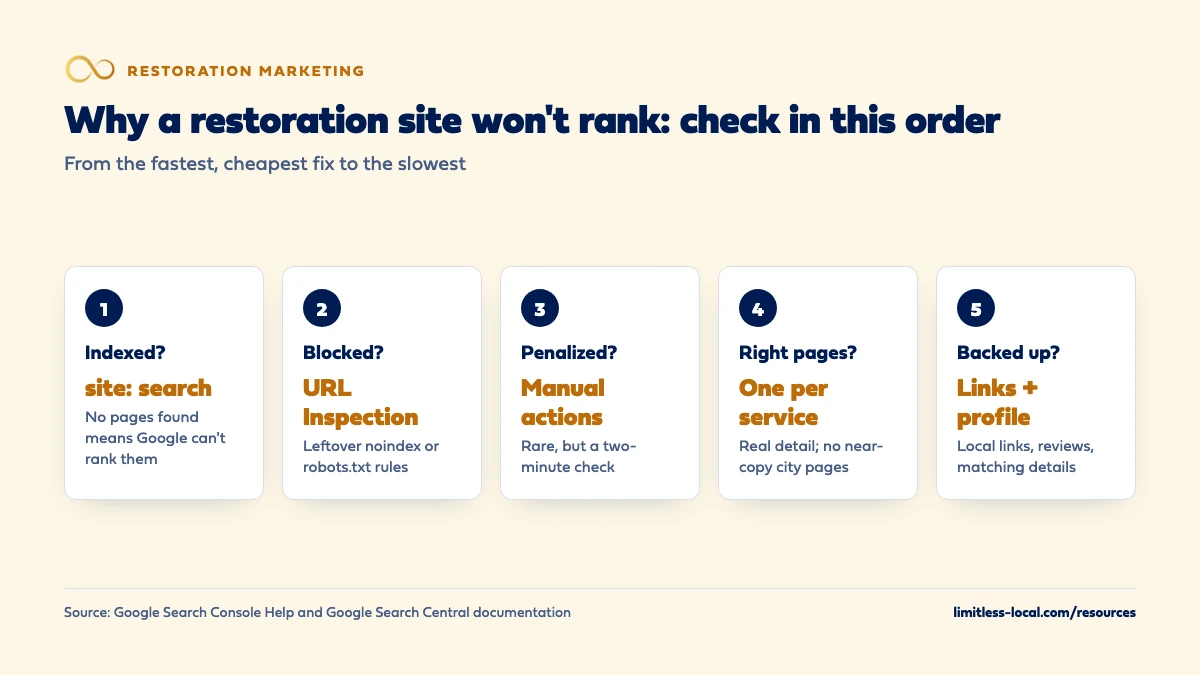
A restoration website usually won’t rank for one of five reasons: Google hasn’t indexed it, something on the site is blocking Google, it has no strong page for each service you want calls for, near-copy city pages are dragging it down, or it’s backed by too few local links and reviews. Check them in that order, starting with a free site: search and Google Search Console’s URL Inspection tool, because a page Google can’t see can’t rank no matter how good it is. If everything checks out, it’s likely a matter of time, since SEO typically takes 3-6 months to show meaningful organic growth.
Most of these checks are part of the first month of our local SEO work: tracking, a clean online presence and fixing whatever stops Google from seeing your pages, before anything new gets built. The restoration marketing page shows how that fits water, fire and mold companies. For the bigger picture, read the restoration marketing guide, or browse more restoration marketing questions.
Where exactly is my restoration website not showing up?
Before you fix anything, pin down what “won’t rank” means for you. It’s usually one of three things, and each has a different fix.
- Your own business name doesn’t bring up your site. That points to an indexing or technical problem. Start with steps 1 to 3.
- Your name works, but “water damage restoration” plus your town doesn’t. Google knows your site exists but doesn’t see it as the best answer. That’s pages, content and links: steps 4 to 8.
- You’re missing from the Maps results. That’s mostly your Google Business Profile, reviews and listings, not the website. Jump to step 9.
Search from a phone, in incognito mode, from a job site in the town you want work in. Searching from your office tells you how you rank at your office, which isn’t where your customers are.
Step 1: Is Google indexing my site at all?
A page that isn’t in Google’s index can’t rank, full stop. The quick check is free: search Google for site:yourdomain.com. If nothing comes back, Google doesn’t have your site. If your homepage shows but your water damage page doesn’t, search for that page’s exact address the same way.
Google’s Page indexing report help says a site with fewer than 500 pages probably doesn’t need the full report; those searches are enough for most restoration sites. It also says a brand-new page or site can take a week or so before Google starts crawling and indexing it, and that Google needs a way to find a page, either a link from a page it already knows or a sitemap.
If you haven’t set up Google Search Console, do it now. It’s free, it’s Google telling you directly what it sees, and nearly every step below uses it.
Step 2: Is something on the site telling Google to stay away?
This is the most common reason a site that looks fine to you is invisible to Google, and it’s often left over from the site build. Developers block search engines while a site is under construction, and sometimes the block never comes off.
Open the URL Inspection tool in Search Console and paste in your homepage and your main service pages. “URL is on Google” means the page is eligible to appear, though not guaranteed to. “URL is not on Google” means it can’t appear, and the tool tells you why. The usual culprits are a noindex tag on the page or a robots.txt rule blocking it. Both are quick for a web developer to remove.
Once it’s fixed, use the same tool to request indexing for your most important pages instead of waiting for Google to notice.
Step 3: Has Google penalized the site?
Rare, but check it in two minutes. Search Console’s Manual actions report shows whether a human reviewer at Google has decided pages on your site break Google’s spam policies. If the site has a manual action, some or all of it won’t be shown in search results. If you’re clean, you’ll see a green check mark.
Manual actions usually trace back to things like bought links, copied or auto-generated pages, or hacked content. If a past SEO provider ran a link scheme on your site, this is where it shows up. Google’s help also notes that if you recently bought a site that broke the rules before you owned it, you fix the issues and say so in your reconsideration request.
While you’re in Search Console, look at the Security issues report too. A hacked restoration site can carry spam pages you never wrote.
Step 4: Do I have a page for each job I want to rank for?
A lot of restoration sites have a homepage that lists water damage, mold, fire, smoke, sewage and storm work in one paragraph, and nothing else. That gives Google one page to rank for six different services, and it usually ranks for none of them.
Each service you want calls for needs its own page, written for the person searching for it. A homeowner with a burst pipe at 11 p.m. needs very different information from a property manager comparing mold remediation vendors.
How many pages that adds up to, across services and towns, is covered in how many service and city pages a restoration website needs. Start with your highest-value service and build outward.
Curious what your marketing is actually booking?
Get a free visibility audit — no obligation, no sales pitch.
Step 5: Do my pages actually answer what a homeowner needs?
Google’s guide to helpful, people-first content asks whether your content clearly shows first-hand expertise, and whether someone leaves feeling they’ve learned enough to reach their goal. It flags content made mainly to attract visits from search engines as a warning sign.
For a water damage page, people-first looks like this: what to do in the first hour, how fast you can get a crew out, which towns you cover, how drying and moisture checks work, what the homeowner should expect on the bill and the paperwork, and photos of your own crews and equipment on real jobs. Thin pages with a stock photo and two paragraphs of “we’re the best” don’t give Google much to rank.
Titles matter too. Each page needs a clear title that says the service and the area. The full walkthrough for one page is in how to rank in Google for water damage restoration in your city.
Step 6: Are near-copy city pages dragging the site down?
This one trips up a lot of restoration companies. Someone builds 40 city pages, each the same text with the town name swapped. Google’s spam policies describe doorway abuse as pages targeted at specific regions or cities that funnel users to one page, and scaled content abuse as many pages generated mainly to manipulate rankings without helping users.
Pages like that rarely rank, and a pile of them can make the whole site look low-value. The fix is to cut them down to the towns where you really have something to say, such as jobs you’ve done there, local conditions like older homes or flood-prone areas, and your response time, and merge or remove the rest.
How to build restoration city pages that rank covers what makes a city page worth keeping.
Step 7: Does the site work properly on a phone?
Google uses the mobile version of a site’s content for indexing and ranking; its mobile-first indexing guide calls this mobile-first indexing. If your phone version hides service details, loads half the page, or drops content the desktop version shows, that’s the version Google is judging.
Most restoration customers find you on a phone in a hurry anyway. Check that the mobile version carries the same text, headings and photos as the desktop one, that the phone number is a tap-to-call link near the top, and that pages load quickly on a normal cell connection.
The specific fixes worth paying for are in which mobile speed fixes a restoration website needs.
Step 8: Does anyone else link to my site?
A site can be technically perfect, full of good pages, and still sit on page three because nothing on the web points to it. Links from other sites help Google find your pages and show that your business is known. Google’s local ranking help page says prominence is partly based on how many websites link to your business and how many reviews you have.
For a restoration company, the best links come from the people around your work: plumbers and roofers you trade jobs with, property managers, your chamber of commerce, trade associations and local news. Skip anything sold as a link package. Bought links count as link spam.
Where to find those links, and how to ask, is in how a restoration company can build local links and authority.
Step 9: Is my Google profile backing up the website?
If the problem is Maps, the website is only part of it. Google says local results are mainly based on relevance, distance, and popularity, and that businesses with complete, accurate information are more likely to show up. A verified profile, the right primary category, real photos, a steady flow of reviews and replies all count.
Make sure the profile links to your site and that your business name, address and phone number match exactly on the site, the profile and the big listing sites. A profile that says one phone number and a website that shows another sends mixed signals.
Distance is the one you can’t change. A homeowner across the metro may simply see companies closer to them, which is normal for a service-area business.
Did a website rebuild or move break my rankings?
If rankings dropped right after a new site went live, look here first. When page addresses change, every old address needs a permanent redirect to its new match. Without them, the links and history the old pages built up go nowhere. Google’s guide to site moves says to expect temporary ranking fluctuations during a move, and that a small to medium-sized site can take a few weeks for most pages to move.
Ask your web developer for the list of old addresses and where each one now points. Check a few of your old service page addresses in a browser yourself. If they land on a 404 page or the homepage, that’s your fix.
What if everything checks out and it still won't rank?
Then it may be a time problem, not a broken one. SEO typically takes 3-6 months to show meaningful organic growth, and newer pages in a crowded metro can take longer. If your pages are indexed, clean, specific and backed by a good profile and a few local links, give them time and watch Search Console’s Performance report for impressions starting to climb before calls show up.
A realistic 3, 6 and 12 month restoration SEO timeline shows what to expect at each stage. And while you wait, ads or Local Services Ads can keep the phone ringing.
Not sure which of these is costing you jobs?
A free visibility audit checks the Google profile, reviews, site and tracking, and shows what to fix first.
What's different when a restoration website won't rank
Six services crammed onto one page. Restoration companies are more likely than most to list everything they do on the homepage and stop there. Water, mold, fire, smoke, sewage and storm each have their own searches, so each needs its own page.
City page sprawl. Because restoration crews cover wide areas, owners are often sold dozens of swapped-name city pages. They’re the first thing to audit when a site won’t rank.
Emergency searches put organic results lower on the page. On a phone, a water damage search often shows ads, Local Services Ads and the map pack before the first organic result. Ranking well organically can still mean sitting below the fold, so track calls, not just positions.
Mold and health content needs care. Pages about mold and contamination should say only what your own work and trusted public health sources support. Overblown health claims hurt trust with homeowners and do nothing for rankings.
A worked example: auditing one restoration site in an afternoon
This company is made up to show the order of checks. Its owner says the site “doesn’t show up anywhere.”
- Site search:
site:shows the homepage and 3 blog posts, but none of the service pages. - URL Inspection: the water damage, mold and fire pages all say “URL is not on Google” because of a
noindextag left on from the last redesign. Fix: remove it, request indexing. - Manual actions: green check mark. Nothing to fix.
- Service pages: the three that exist are about 150 words each with stock photos. Fix: rewrite water damage first with real job photos, response times and towns served.
- City pages: 40 pages with the same text and the town name swapped. Fix: keep the 6 towns with real jobs and local detail, redirect the other 34 to the closest real page.
- Links and profile: no links from local businesses; the Google profile shows an old phone number. Fix: update the number everywhere, then start on partner links.
The noindex fix could show up within days. The page rewrites and links are the slower part, measured in months. That’s why the order matters: the cheap, fast fixes go first.
Frequently asked questions
How do I check if Google has indexed my restoration website?
Search Google for site: followed by your domain. If nothing comes back, Google doesn’t have your site yet. For a single page, use the URL Inspection tool in Search Console.
Can a new restoration website rank right away?
Not usually. Google says it can take a week or so to start crawling and indexing a new site, and ranking for competitive searches takes much longer than being indexed.
How long after I remove a noindex tag will my pages show up?
Google says new content can take a few days to be indexed. Request indexing for your key pages in the URL Inspection tool rather than waiting, then check again with a site: search.
Will adding more blog posts fix a site that won't rank?
Not if the problem is indexing, a block or missing service pages. Fix those first. Blog posts help most when they answer real homeowner questions and point readers to your service pages.
Should I delete old blog posts that don't rank?
Not automatically. Keep posts that are useful to homeowners and point them to your service pages. Thin or duplicate posts can be merged into a stronger page with a redirect.
Does my web host or website builder affect rankings?
It can if pages load slowly or the builder blocks search engines by default. Check that pages are indexed and load fast on a phone; the brand of builder matters less than those two things.
Key takeaways
- Work out whether the problem is indexing, organic ranking or Maps before fixing anything.
- Check indexing first with a site: search and the URL Inspection tool; leftover noindex tags are common after a redesign.
- Give each restoration service its own detailed page, and cut near-copy city pages.
- Earn local links and keep your Google profile, site and listings saying the same thing.
- After a rebuild, make sure every old page address redirects to its new match.
- If everything checks out, give it time: SEO typically takes 3-6 months to show meaningful organic growth.
Want a second set of eyes on your setup?
We'll look at how you show up locally and where calls are leaking, then send you a plain-English breakdown.
More in this section
- How should a restoration company build city pages that rank?
- Why is my restoration website getting clicks but no calls?
- How can a restoration company build local links and authority?
- How many service and city pages does my restoration website need?
- Can a restoration owner do their own SEO instead of hiring someone?
Sources
- Page indexing report — Search Console Help
- URL Inspection tool — Search Console Help
- Manual actions report — Search Console Help
- Spam Policies for Google Web Search — Google Search Central
- Creating Helpful, Reliable, People-First Content — Google Search Central
- Mobile-first Indexing Best Practices — Google Search Central
- Tips to improve your local ranking on Google — Google Business Profile Help
- Site Moves and Migrations — Google Search Central