
How do I follow up on electrical quotes automatically?

- How can an electrical contractor set up automatic follow-up on unsigned estimates?
- What does automatic quote follow-up actually do?
- Which software can follow up on electrical quotes for me?
- Step 1: Send every quote from your software
- Step 2: Get permission to text when you take the request
- Step 3: Set a follow-up schedule that fits the job
- Step 4: Write follow-ups that sound like you
- Step 5: Decide which quotes get a phone call from a person
- Step 6: Close out quotes that go cold
- Should follow-up be different for service quotes and commercial bids?
- How do I know if automatic quote follow-up is working?
- What should happen after the quote turns into a job?
- What's different about following up on electrical quotes
- A worked example: what follow-up can be worth
- Frequently asked questions
- Key takeaways
- More in this section
- Sources
The short version
- Send every quote from your field service software so it can track the status.
- Turn on the quote follow-up automation and set the schedule and wording.
- Get permission to text when the customer first asks for a quote.
- Have a person call on big quotes, and track your quote conversion rate.
For electrical contractors whose estimates go out and then go quiet, and who want follow-up to happen without someone remembering to do it.
Get a free visibility audit · Book a growth call
How can an electrical contractor set up automatic follow-up on unsigned estimates?
Send every quote from your field service software and turn on its quote follow-up automation, which sends text or email reminders on a schedule until the customer approves, declines or the quote is closed out. Jobber, Housecall Pro and ServiceTitan all offer a version of this, with timing and wording you can edit. Get the customer’s permission to text when you take the request, keep a person calling on the high-value quotes like panel upgrades and commercial bids, and check your quote conversion rate to see whether it’s working.
Follow-up that runs on its own is part of our automation work for local service businesses: follow-up sequences on estimates, appointment reminders and a CRM integrated with the tools you already use. It’s one piece of how we approach electrical contractor marketing, because the leads you already paid for are the cheapest jobs to win. The rest of the electrical marketing questions library covers getting those leads in the first place.
What does automatic quote follow-up actually do?
It watches every quote you’ve sent, and when a customer hasn’t responded after a set number of days, it sends them a reminder by text or email. When the customer approves, the reminders stop. In some tools, a quote that still hasn’t been answered after the last reminder can be closed out automatically so it isn’t cluttering your list.
Jobber’s description of its quote follow-up automation is a good example. It sends follow-ups to clients about quotes you haven’t heard back on, on a schedule based on the number of days since the quote was sent, and it sends them the same way as the quote: a quote sent by text gets a text reminder. Nobody in the office has to remember which estimates went quiet.
Which software can follow up on electrical quotes for me?
If you already use one of the big field service platforms, you probably have this feature and may just need to turn it on:
- Jobber: two quote follow-up automations, so a client can get up to two reminders about a quote awaiting response. You set the number of days after the original quote, up to a maximum of 90, and the message text. Jobber says quote follow-ups are available on its Connect plan and up.
- Housecall Pro: Pipeline automations resend the estimate after a set number of days and move it through First, Second and Third Follow-Up, then decline it if it’s still not approved. Housecall Pro says the automations come with a recommended cadence and suggested wording you can change.
- ServiceTitan: with Marketing Pro, you can build unsold estimate campaigns that send automatic text reminders and follow-ups, and customers can accept their estimates by text.
Plans and features change, so check what your own plan includes. If you’re on a tool without quote follow-up, that’s worth weighing next time you review your software.
Step 1: Send every quote from your software
Automation can only follow up on quotes it knows about. A quote written on a notepad, texted from a personal phone or emailed as a PDF outside the system has no status to watch, so nothing happens when it goes quiet. Jobber’s own quotes report notes that quotes converted to jobs without being sent, or marked as sent, have no sent date and drop out of the conversion calculation.
So the first step is a rule for the whole team: every estimate, from a two-outlet job to a commercial bid, goes out through the software, with the customer’s mobile number and email filled in. It’s a habit change more than a tech change, and it’s the one that makes everything after it work.
Step 2: Get permission to text when you take the request
Most homeowners answer a text faster than an email, but automated texts come with rules. The FCC’s consumer guide to unwanted robocalls and texts says callers need consent before making an autodialed or prerecorded call or text to a wireless number, that commercial texts require written consent, and that people can opt out of any robotext at any time in any reasonable way.
The practical step is simple: when someone requests an estimate, by phone, web form or in person, ask whether you can text them about it, and record the answer in your software. Housecall Pro’s own lead automations describe sending texts after you’ve gotten the customer’s approval. For email, the FTC’s CAN-SPAM guide treats messages that facilitate an already agreed-upon transaction differently from commercial ones, but a reminder that also pushes a promotion can fall under the commercial rules. If you’re unsure, ask your attorney; we’re not giving legal advice here.
Step 3: Set a follow-up schedule that fits the job
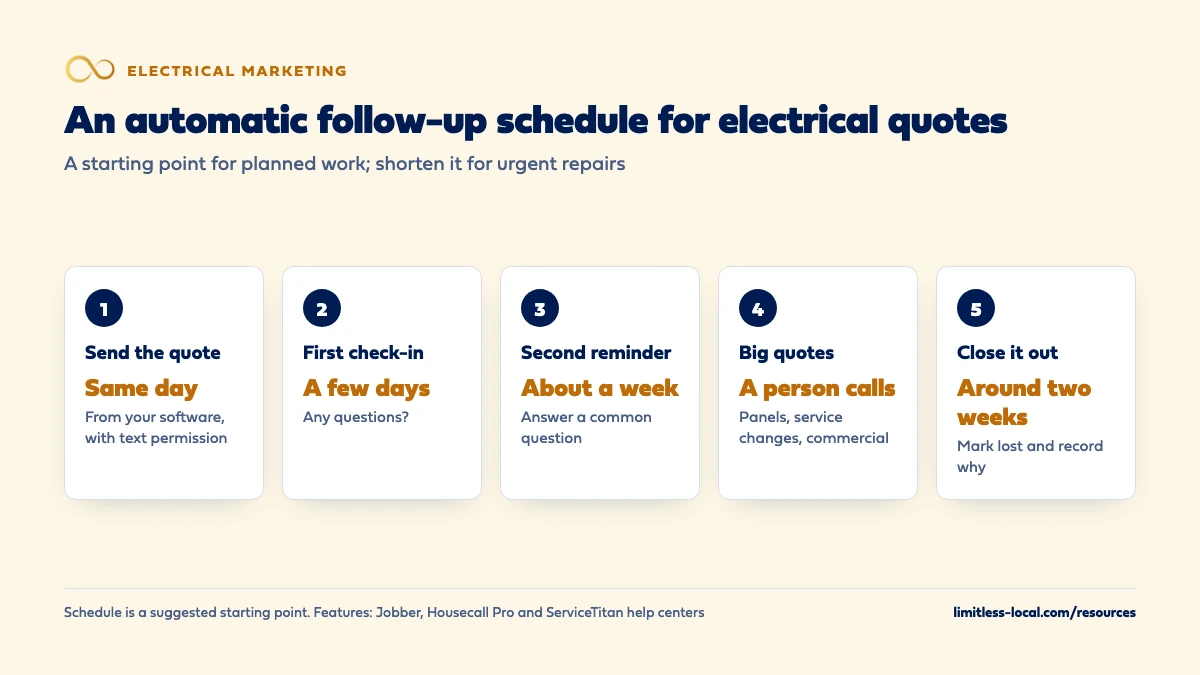
The software will suggest a schedule. Treat it as a starting point and adjust it to how electrical customers actually decide. In our judgement, a workable default for planned work looks like this:
- Same day: the quote itself, with a short note on what’s included and how to approve it.
- A few days later: a check-in asking whether they have questions.
- About a week later: a second reminder, ideally with an answer to a question customers commonly ask about that job.
- Around two weeks: a final note, then close the quote out.
Quotes for urgent repairs need a shorter clock, because the customer will hire someone within a day or two. Panel upgrades, EV chargers and generators often take longer, while the homeowner compares estimates, checks financing or waits on a car delivery, so a longer gap between reminders makes sense there.
Curious what your marketing is actually booking?
Get a free visibility audit — no obligation, no sales pitch.
Step 4: Write follow-ups that sound like you
A reminder that reads like a collection notice does more harm than no reminder. Keep each one short, name the job, and make the next step easy. For example:
- “Hi Dana, it’s Mike from the electrical company. Just checking whether you had any questions on the panel upgrade quote. Happy to walk through the options.”
- “Hi Dana, a quick note on the EV charger estimate: we handle the permit and the inspection, so you don’t have to. Reply here or tap the link to approve when you’re ready.”
Use the customer’s name and your own, don’t invent deadlines or discounts you won’t honor, and keep the tone the same as your techs use on site. Customers who feel pressured stop replying; customers who feel helped often come back even if this quote doesn’t sign.
Step 5: Decide which quotes get a phone call from a person
Automation handles the routine quotes well. It shouldn’t be the only follow-up on your biggest ones. Jobber, for example, can send you a notification when a new auto-drafted quote comes in above your average quote value, so you can follow up quickly and personally.
Set your own line: above a certain dollar amount, or for panel upgrades, service changes and commercial bids, someone calls after the first reminder. A five-minute call answers the question the customer didn’t want to type out, and that’s often the question that was holding up the signature. Getting more of those bigger jobs in the first place is covered in getting more panel upgrade and EV charger jobs.
Step 6: Close out quotes that go cold
A list of three hundred “pending” quotes is useless. Housecall Pro has an estimate automation that declines an estimate after its third follow-up, and Jobber can archive quotes automatically after a set number of days in awaiting-response status. Turn one of those on so your open list only shows quotes still in play.
When you close a quote, record why if you know it: price, timing, went with someone else, never replied. After a few months, those reasons tell you whether the problem is the follow-up, the price or the leads themselves. Lost quotes aren’t dead either. A homeowner who wasn’t ready for a panel upgrade in the spring may be ready when the EV arrives.
Should follow-up be different for service quotes and commercial bids?
Yes. Residential service and repair quotes are usually decided by one person in a day or two, so speed matters most. Planned residential work is a week-or-more decision with a spouse or a budget involved. Commercial bids often go to a property manager, owner or general contractor comparing several electricians on a set timeline, and in our judgement they deserve a personal call and a follow-up timed to their decision date, not a generic reminder. Marketing to commercial customers covers that side of the business.
How do I know if automatic quote follow-up is working?
Look at your quote conversion rate before and after you turn it on. Jobber’s quotes report shows a quote conversion rate, the value of quotes sent and converted each month, and how many quotes sit in each status; Housecall Pro and ServiceTitan have their own versions. If more quotes convert, or convert faster, with the same lead flow, the follow-up is paying for itself.
Go one step further and tie each quote back to where the lead came from, so you can see which marketing produces quotes that actually sign. Tracking which electrical marketing brings in real jobs walks through that setup.
What should happen after the quote turns into a job?
The same software can keep working after the job is done: a thank-you message, a review request, and a reminder for future maintenance or upgrades. Review requests sent automatically after every completed job are the easiest way to keep new reviews coming in, and getting more Google reviews for your electrical business covers how to ask without breaking Google’s rules.
Not sure which of these is costing you jobs?
A free visibility audit checks the Google profile, reviews, site and tracking, and shows what to fix first.
What's different about following up on electrical quotes
A wide spread of quote sizes. One electrical company might send a small repair quote, a panel upgrade and a commercial tenant buildout bid in the same week. One follow-up schedule for all of them is too slow for the first and too impersonal for the last. Most field service platforms let you set conditions or separate automations by job type, so use them.
Customers compare licensed electricians with cheaper options. A follow-up is a good place to remind the customer what’s included that a cheaper quote may not be: permits, inspection, warranty, licensed and insured work. Licensing rules vary by state, so describe your own credentials rather than making claims about the law.
Planned work waits on other things. EV charger and panel upgrade quotes often stall on something outside your control, like a car delivery date or a utility appointment. A reminder that asks about that timing gets a better answer than one that just asks for a signature.
A worked example: what follow-up can be worth
These numbers are made up to show the math, not a benchmark for your business. Say an electrician sends 50 quotes a month and 12 of them sign without any follow-up, a conversion rate of 24%. After turning on automatic follow-up, 16 of the next 50 sign, or 32%. That’s 4 more jobs a month from leads that were already paid for. If those jobs average $1,500, that’s $6,000 a month in work that would otherwise have gone to whoever followed up.
Your own numbers will differ, which is why the quotes report matters: it shows your real before and after. On our side, follow-up automation is an add-on that plugs into any of our packages, with pricing shared on the discovery call. Every package includes call, web and form tracking, so you can see which marketing produced the quotes in the first place. A free visibility audit is a good place to start.
Frequently asked questions
Can automatic quote follow-ups go out by text?
Yes. Jobber sends follow-ups the same way the quote was sent, and Housecall Pro and ServiceTitan support text follow-up too. Get the customer’s permission to text when they ask for the quote, and honor opt-outs.
Will automatic follow-ups annoy customers?
Not if they’re short, spaced out and stop when the customer answers. A few friendly reminders about a quote the customer asked for is ordinary service; daily messages or invented deadlines are what annoy people.
Do follow-ups stop when the customer approves the quote?
They should. Jobber’s quote follow-ups go to quotes still awaiting response, and Housecall Pro moves an estimate through follow-up statuses only while it’s unapproved. Test it with your own phone number before you rely on it.
Can customers approve an electrical estimate by text?
In some tools, yes. ServiceTitan says customers can accept their estimates through text messages in its Marketing Pro unsold estimate campaigns.
How many follow-ups should I send on an electrical quote?
Jobber allows up to two automatic reminders and Housecall Pro’s estimate automations run through three follow-ups, so two or three is a reasonable starting point. After that, close the quote out and record the reason rather than keep messaging.
Do I need ServiceTitan to automate quote follow-up?
No. Jobber and Housecall Pro both have quote follow-up automations, though availability depends on your plan. Check your plan’s features before paying for a separate tool.
Key takeaways
- Send every quote from your field service software, or nothing can follow up on it.
- Turn on the quote follow-up automation you probably already have in Jobber, Housecall Pro or ServiceTitan.
- Get permission to text when the customer asks for a quote, and honor opt-outs.
- Keep a person calling on panel upgrades, service changes and commercial bids.
- Measure quote conversion rate before and after, and close out quotes that go cold.
Want a second set of eyes on your setup?
We'll look at how you show up locally and where calls are leaking, then send you a plain-English breakdown.
More in this section
- How do I track which electrical marketing brings in real jobs?
- What should an electrician's website have to get more calls?
- How should a new electrical contractor get its first customers?
- How do I get more panel upgrade and EV charger jobs?
- How should an electrical contractor market to commercial customers?
Sources
- Automations — Jobber Help Center
- Quotes Report — Jobber Help Center
- Getting Started with Pipeline — Housecall Pro Help Center
- Create Unsold Estimates Campaigns using SMS — ServiceTitan Help
- Stop Unwanted Robocalls and Texts — Federal Communications Commission
- CAN-SPAM Act: A Compliance Guide for Business — Federal Trade Commission