
Are Google Local Services Ads worth it for a roofing company?
- Are Local Services Ads worth the money for roofers now that they live in Google Ads?
- How do Local Services Ads work for a roofing company now?
- What counts as a roofing lead I pay for?
- What happens to junk leads, out-of-area calls and jobs I don't do?
- What decides where my roofing company shows up?
- What does Google check before a roofer can run Local Services Ads?
- What happened to Google Guaranteed for roofers?
- How much do roofing Local Services Ads leads cost?
- When are Local Services Ads worth it for a roofer?
- When are Local Services Ads a waste of money for a roofing company?
- Do Local Services Ads work better than Google Ads for roof repair and replacement jobs?
- What should a roofer set up before turning Local Services Ads on?
- What's different about LSAs for roofing companies
- A worked example: from cost per lead to cost per signed roof
- Frequently asked questions
- Key takeaways
- More in this section
- Sources
The short version
- You pay for valid leads (answered calls, longer missed calls, messages, bookings), not clicks.
- Google no longer credits leads for job types or areas you don't serve, so roofing settings decide what you pay for.
- Ranking weighs your bid, how responsive you are, and your rating and review count.
- Judge LSAs on cost per signed roof, not cost per lead.
For roofing company owners deciding whether to turn on, keep or rework Local Services Ads after Google moved them into Google Ads.
Get a free visibility audit · Book a growth call
Are Local Services Ads worth the money for roofers now that they live in Google Ads?
For most roofing companies, Local Services Ads are worth it when you can answer calls fast, your job types and service area match the roofs you actually want, and you can tell which leads became signed jobs. You pay per valid lead, not per click, and Google doesn’t charge for leads it screens out as spam or duplicates. They stop paying off when calls ring out, the service area is stretched to chase storms, or a repair-heavy lead mix never turns into replacements.
Cost per signed roof is how we judge Local Services Ads too, because a cheap lead that never becomes a contract is not cheap. Local Services Ads management is part of our local ads work in the Growth and Scale tiers of our roofing marketing packages. If you’re still weighing regular Google Ads against SEO, whether Google Ads are worth it for roofers covers that decision, and the rest of the roofing marketing questions library goes question by question.
How do Local Services Ads work for a roofing company now?
Local Services Ads are the listings Google shows on Search and Maps when a homeowner looks for a roofer in an area you’ve chosen. They carry your business name, your rating and, once you’ve passed Google’s checks, a Google Verified badge. The homeowner calls you, sends a message or requests a booking straight from the ad, and you pay when that contact counts as a valid lead.
The big change is where you manage them. Google is moving Local Services Ads into Google Ads as Performance Max campaigns with pay-per-lead goals, and roofing is named in the first phase, which began in August 2026 for select home service advertisers; service-area businesses without a storefront are scheduled for late 2026. Most roofers work out of a shop or a home office, so your account may move in either wave. Google emails the account administrator 14 days before the move.
What stays the same: you still pay per lead, the ads still show only on Google Search and Maps, and targeting still runs on service categories and areas instead of keywords. What changes: budgets go from weekly to daily, manual bidding (setting your own maximum price per lead) is no longer supported, and your old performance reports don’t carry over to Google Ads. Save or screenshot them first; your past leads and messages do transfer.
What counts as a roofing lead I pay for?
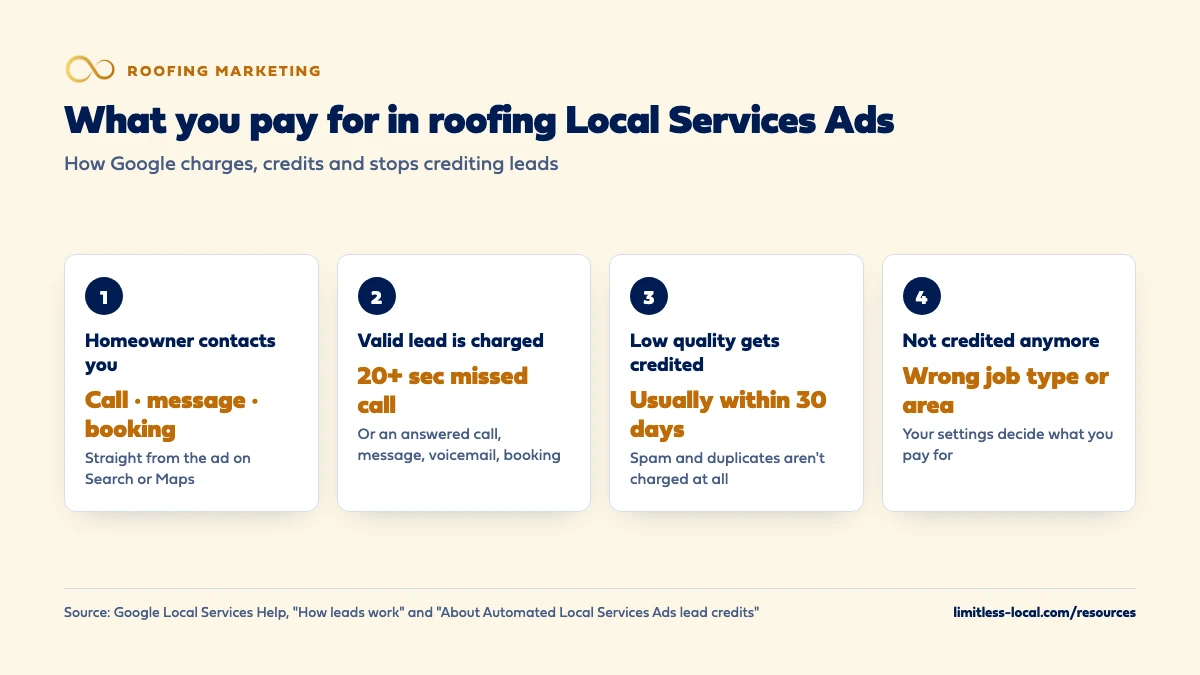
Google charges for a valid lead, which it describes as one of these:
- You answer a call, or call the customer back and speak with them.
- You miss a call during your business hours and the caller stays on the line for more than 20 seconds.
- A customer sends a text message or email through the ad.
- A customer leaves a voicemail.
- A customer sends a booking request.
Two details matter more for roofers than for most trades. First, if a call goes to voicemail or an automated greeting during your business hours, Google treats it as a connected call and charges it once the caller stays on more than 20 seconds, whether or not they leave a message. A crew lead on a roof can’t answer, so someone on the ground or in the office has to. Second, “business hours” means the hours on your Google Business Profile, so hours that say you’re open on Saturday mean missed Saturday calls can be charged.
Message leads are typically priced lower than phone leads, though Google says that isn’t always true. Google bases a message lead’s price partly on whether the customer has contacted other advertisers, which matters in a trade where homeowners often collect several roofing quotes.
What happens to junk leads, out-of-area calls and jobs I don't do?
Google screens leads when the customer first makes contact and doesn’t charge for ones it decides are invalid or low quality, such as spam or duplicate contacts. Charged leads keep being reassessed, and in most cases credits for low-quality leads land on your balance within 30 days. Each lead is marked Charged, Not charged, In review or Credited.
The change that catches roofers out: Google no longer gives credits for leads about a job type you don’t service or an area you don’t serve. If your profile includes gutter work you hand off, or commercial flat roofs you don’t touch, those leads are yours to pay for. Google’s advice for unwanted leads is to tighten service areas, categories and job types, while warning that it can reduce lead volume. For a roofer, that trade is usually worth making.
What decides where my roofing company shows up?
Local Services Ads are ordered by an auction that weighs your bid against how likely your ad is to produce a lead. Google lists what goes into that second part:
- Responsiveness. Missed calls can hurt it. Turning on message and booking leads gives homeowners another way to reach you on nights and weekends.
- Relevance. The service and area the homeowner searched, and how well your services and business bio match it.
- Profile quality. Your rating, number of reviews, average response time, photos and the verification checks you’ve completed. Google says higher-quality profiles may rank higher and may pay lower costs per lead.
Google recommends 5 or more reviews, and some business types need 5 before the ad shows. Your rating and review count feed profile quality, so the review requests your office sends after each finished roof help your ads as well as your Google profile. If reviews are the gap, start with getting reviews after a roof replacement.
What does Google check before a roofer can run Local Services Ads?
Google’s screening list for roofing in the United States can include a business and owner background check, business registration checks, proof of general liability insurance, and business and owner licenses at the state level. Google marks each of these as applying to select advertisers, and adds that requirements can depend on your business type and the state you work in. You also need a public, verified Google Business Profile.
Google says screening takes 3 to 4 weeks on average after you submit your documents, so start before you need the leads, not the week after a hailstorm. Once your account has moved to Google Ads, Google says insurance and license reverification are no longer required, though it may still ask for other business-level checks.
Curious what your marketing is actually booking?
Get a free visibility audit — no obligation, no sales pitch.
What happened to Google Guaranteed for roofers?
Google replaced its old badges with a single Google Verified badge, which shows a business has passed Google’s screening and lists the checks it completed. Advertisers who were already verified got it automatically, and the verified status carries over when your account moves into Google Ads.
Google also discontinued the money-back guarantee that came with the old Google Guarantee badge. Reimbursement requests only cover services booked through Local Services Ads before December 7, 2025. If your website or sales script still tells homeowners Google backs your work, that’s out of date.
How much do roofing Local Services Ads leads cost?
There’s no honest single number. Google says lead prices vary with your location, the job type, the type of lead and how you bid, and a roof replacement lead in a crowded metro after a storm season won’t price like a gutter repair lead in a small town.
Your own number is easy to find once the campaign runs. In Google Ads, Conversions shows the leads you were charged for and Cost / conv. is your average cost per lead. The number that decides whether to keep going is one step further down: what each signed roof cost, which the worked example below walks through. Before you can see that, you need a way to track which leads sign.
When are Local Services Ads worth it for a roofer?
They tend to pay off when most of these are true:
- Calls get answered during the hours on your profile, even when every crew is on a roof.
- You have a solid rating and a steady flow of new reviews from finished jobs.
- Your job types are set to the work you want (replacement, repair, or both) and your service area is where you’ll actually send a crew.
- You have the capacity to inspect and quote quickly. A lead you can’t get to this week often signs with someone else.
- You can trace each lead to an inspection, an estimate and a signed contract, so you judge cost per signed job, not cost per lead.
When are Local Services Ads a waste of money for a roofing company?
The same list in reverse. LSAs tend to disappoint when calls go to voicemail, when the service area gets stretched to pick up storm work two counties over, when the profile has few reviews, or when nobody can connect a lead to a signed contract. In each case you rank lower, pay for leads you can’t use, or can’t tell whether it worked.
Speed is the usual culprit, because a homeowner with a leak tends to call the next listing if the first one doesn’t pick up. How fast to call back a new lead covers what to aim for. None of these is a reason to never run LSAs; each is something to fix first.
Do Local Services Ads work better than Google Ads for roof repair and replacement jobs?
They do different jobs. Regular Google Ads search campaigns charge per click, you choose the keywords, and the ad sends people to your website. Local Services Ads charge per lead, you choose categories, job types and areas instead of keywords, and the homeowner contacts you straight from the ad. Search ads give you more control over exactly which searches you pay for, such as full replacements, and over the page the homeowner lands on. LSAs give you a simpler setup and the Verified badge.
You can run both. If your search ads are getting clicks that never turn into calls, why ads get clicks but no calls is the place to start, and the roofing Google Ads guide covers the break-even math for search ads.
What should a roofer set up before turning Local Services Ads on?
- Your Google Business Profile. Business name, address and hours sync one way from your profile into Google Ads, so fix them there first. Big changes to your name, address or primary category can pause the campaign for a 24 to 48 hour review.
- Screening documents. Insurance, licenses and registration, sent in early.
- Job types and service area. Only the roofing work you want, only where your crews go.
- Call routing. The number the ad rings should be answered during your listed hours. In Google Ads you can change that number yourself.
- Message and booking leads. Turn them on so homeowners can reach you after hours.
- Photos. Real photos of your crews and finished roofs. Google’s guidance mentions photos of your team, work and equipment.
- Tracking. Decide how you’ll mark which leads became inspections, estimates and signed jobs before the first lead arrives.
Want to see where your company stands?
A free visibility audit shows where you show up on Google, Maps and AI answers, and what it's costing you in calls.
What's different about LSAs for roofing companies
Storm spikes. Demand can jump overnight after hail or high wind. After the move to Google Ads, budgets are daily averages, and Google caps a month’s spend at your daily average budget times 30.4, so spend can run higher on busy days without passing that monthly limit. When the schedule is full, you can pause the campaign and set it back to Enabled later. Widening your service area to chase a storm is the riskier move, because leads from areas you don’t serve are no longer credited.
Repair versus replacement. Google describes roofing as installing, repairing and maintaining shingles, gutters and venting. A leak repair and a full tear-off are worth very different amounts to you, so set job types on purpose and track which kind each lead became. In our judgement, a lead mix heavy on small repairs can look cheap per lead and still lose money per job.
Category searches. Google opts advertisers into general category searches that don’t name a specific service (its example is “plumber near me”; for you, think “roofer near me”). In the Local Services Ads settings you can turn that broad search option off to get leads only from searches for specific services, but Google warns that it can reduce lead volume.
A long road to a signature. A roofing lead often needs an inspection, an estimate and sometimes an insurance adjuster before anyone signs. Count the contract, not the call, when you judge the channel.
A worked example: from cost per lead to cost per signed roof
These numbers are made up to show the math, not a benchmark for your market. Say a month of Local Services Ads brings 18 charged leads at $100 each, so the month costs $1,800. Five of those leads turn into inspections, and 2 sign contracts. Your cost per signed job is $1,800 divided by 2, or $900.
Whether $900 is good depends on what was signed. If both were replacements, the channel probably paid for itself several times over. If both were small leak repairs, it may not have.
Now the cost of help. Local Services Ads management is not in our Essentials package ($3,500 a month). It’s in Growth, which is $4,500 a month and includes Local Services Ads along with Google Ads management up to $5,000 a month in spend, and in Scale, which is custom. Ad spend is paid to Google separately. A free visibility audit runs the same cost-per-signed-job math on your market.
Frequently asked questions
Do I need a Google Business Profile to run Local Services Ads as a roofer?
Yes. Google requires a public, verified Google Business Profile, and after the move into Google Ads your business name, address and hours sync from that profile.
Can I still set a maximum price per roofing lead?
Not after your account moves to Google Ads. Manual bidding, such as a maximum cost per lead, is no longer supported there; you can still review and adjust the campaign’s bidding targets.
Can I pause Local Services Ads when my crews are booked out?
Yes. In Google Ads you set the campaign to Paused and switch it back to Enabled when you want leads again.
Will a homeowner who calls me three times be charged three times?
No. Once a lead is charged, follow-up calls or messages from the same phone number or email within 15 days aren’t charged again.
Can I report a bad roofing lead?
Yes. Each lead has a feedback survey, and Google says it uses that feedback to send more of the leads you want. Credits for low-quality leads are mostly automatic, and Google may also credit leads you report.
Do Local Services Ads show on Google Maps?
Yes. They show on Google Search and Google Maps only, not on YouTube, Gmail or other sites.
Key takeaways
- You pay per valid lead, and a missed call during business hours counts once the caller waits more than 20 seconds.
- Google no longer credits leads for roofing job types or areas you don’t serve, so tight settings protect your budget.
- Answering fast and collecting reviews from finished jobs help decide where you rank.
- Start Google’s screening early; it averages 3 to 4 weeks after you submit documents.
- Judge LSAs on cost per signed roof, and track repairs and replacements separately.
Not sure what's working right now?
Start with a free visibility audit: rankings, Google profile, reviews and tracking, checked against your service area.
More in this section
- Why are my roofing ads getting clicks but no calls?
- Is door knocking or online marketing better for a roofing company?
- How should a roofing company market commercial roofing?
- Why isn't my roofing company showing up on Google Maps?
- How does a roofing company get recommended by ChatGPT?
Sources
- How leads work — Google Local Services Help
- About Automated Local Services Ads lead credits — Google Local Services Help
- About ad rankings — Google Local Services Help
- Improve your Local Services Ads performance — Google Local Services Help
- About Google Verified badge — Google Local Services Help
- Local Services Ads transition to Performance Max campaigns with pay-per-lead goals — Google Ads Help
- Business screening and verification requirements (United States) — Google Local Services Help
- Edit your industries, service areas, and job types — Google Local Services Help