
Why isn’t my roofing company showing up on Google Maps?
- Why can't homeowners find my roofing company in the Google map pack?
- Is my roofing company missing from Maps, or just not showing for the searches I care about?
- Has Google suspended my roofing company's profile?
- Did an edit I made, or one Google made, knock my profile out?
- Is my roofing company set up as a service-area business the right way?
- Could a duplicate profile be hiding my roofing company?
- Is my business name breaking Google's rules?
- Is my Google Business Profile category right for a roofing company?
- My profile is live. Why do other roofers outrank me in my own town?
- Will running ads get my roofing company onto Google Maps?
- In what order should a roofer work through all this?
- What's different about Google Maps for roofing companies
- A worked example: one roofer, three problems
- Frequently asked questions
- Key takeaways
- More in this section
- Sources
The short version
- First search your exact business name. If you don't appear at all, it's a profile problem, not a ranking problem.
- Suspensions, duplicates and unapproved edits hide a profile; appeal or fix the profile, never create a new one.
- Roofers who work from home should hide the address and list a service area instead.
- If you're live but low, Google says local results come down to relevance, distance and popularity.
A step-by-step check for roofing owners whose Google listing is missing, suspended, or buried below other roofers in the towns they work.
Get a free visibility audit · Book a growth call
Why can't homeowners find my roofing company in the Google map pack?
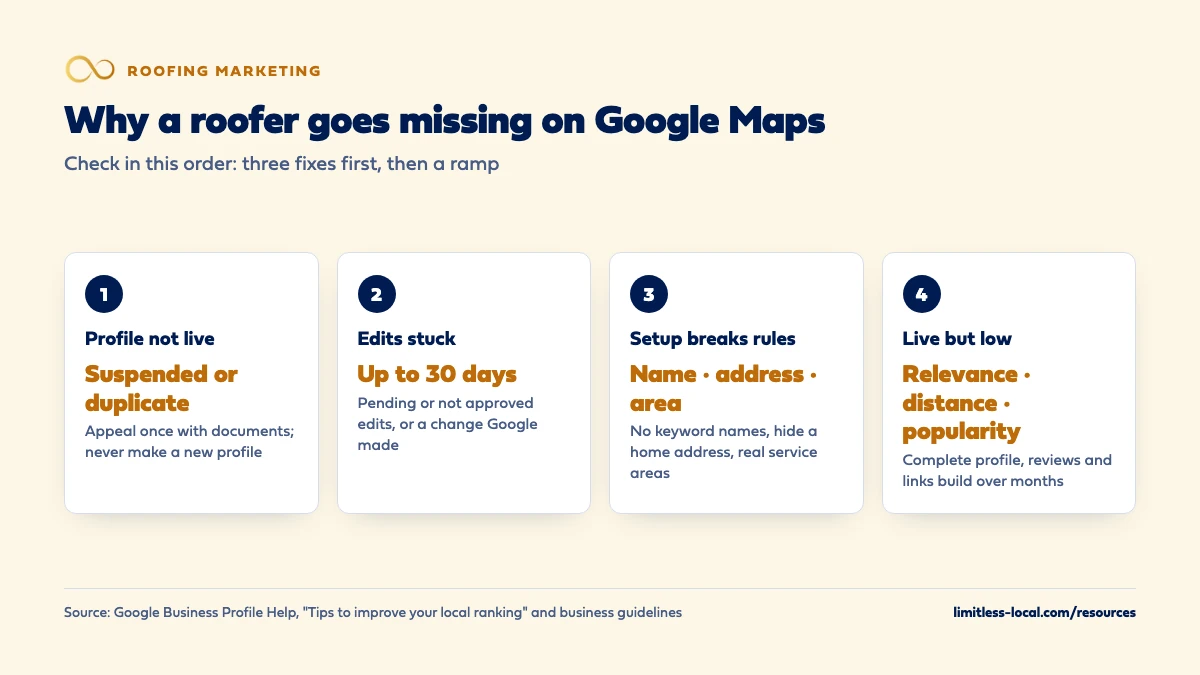
Usually one of three things is going on: your Business Profile isn’t verified or live (suspended, a duplicate, or an edit Google didn’t approve), it’s set up against Google’s rules (a keyword-stuffed name, a home address shown when you don’t see customers there, or a service area far beyond where you work), or it’s live but losing on what Google says decides local results: relevance, distance and popularity. Check them in that order: the first two are fixes, while the third is a ramp built with a complete profile, steady reviews and a stronger presence in each town you want.
Getting a roofer’s profile clean, compliant and consistent across the web is the first phase of our local SEO work, and it’s included in every tier of our roofing marketing packages. The roofing marketing guide shows where Maps fits with ads, reviews and your website, and the rest of the roofing marketing questions library goes question by question.
Is my roofing company missing from Maps, or just not showing for the searches I care about?
Start with the fastest test. Search Google Maps for your exact business name. If your profile doesn’t come up at all, you have a profile problem: it may be unverified, suspended, merged into a duplicate, or waiting on an edit. Work through the next few sections.
If your name search finds you but a search like “roofer” or “roof repair” doesn’t, your profile is live and you’re losing on ranking. That’s a different fix, covered further down.
One caution before you panic: Google ranks local results partly on distance from the person searching, and when someone doesn’t share their location Google uses what it knows about it. A search from your shop and a search from a homeowner’s kitchen across town can show different roofers. Check from the towns you actually want work in, or ask a customer there what they see.
Has Google suspended my roofing company's profile?
Google says it may suspend or disable Business Profiles that don’t follow its guidelines. If yours was suspended, the Business Profile appeals tool shows the decision, the date, the reason, a link to the policy you broke and whether it can be appealed.
The fix order matters:
- Fix what broke the rules first. Read the linked policy and change the profile to match it.
- Gather evidence. Google lists business registration, a business license, tax certificates and utility bills (electricity, phone, water, internet) as evidence that can help. The business name and address on them should match the profile.
- Submit one appeal. Google says appeals can only be submitted once, so attach everything the first time.
Don’t create a new profile for the same business. Google says so directly, and a second profile becomes a duplicate problem on top of the suspension.
Did an edit I made, or one Google made, knock my profile out?
Edits to a verified profile are reviewed before they show. Google says that usually takes up to 10 minutes but can take up to 30 days, and an edit can come back Accepted, Pending or Not approved. A rename, a new address or a category change sitting in Pending can make the profile look wrong or stale in the meantime.
Category changes deserve extra care: Google says adding or editing a category might trigger a request to verify again. Make category changes on purpose, not while experimenting.
Google can also change your profile itself when it gets reports that your information isn’t accurate. When that happens you’ll get a notification and an alert in the Edit profile section. Check it after any sudden drop, because a wrong phone number or address added by someone else can sit there unnoticed.
Is my roofing company set up as a service-area business the right way?
Most roofers don’t take customers at their office; they go to the house. Google calls that a service-area business, and the rules are specific:
- Hide your address if customers don’t come to it. Google’s own example is a plumber running the business from home: clear the address and list a service area instead.
- No virtual offices. A rented mailing address you don’t operate from isn’t eligible, and a service-area business can’t list a virtual office unless it’s staffed during business hours. P.O. boxes aren’t acceptable either.
- One profile for the whole area, unless you have separate locations with separate service areas and separate staff.
- Service areas by city or postal code, not a radius. You can set up to 20, and Google says the overall area shouldn’t extend farther than about 2 hours of driving time from where you’re based, though it allows that larger areas may suit some businesses.
A profile that shows a home address with no signage, or lists towns three states away, is the kind of setup that invites problems. If the same address shows inconsistently elsewhere online, how AI tools find roofers covers why consistent details matter beyond Maps too.
Curious what your marketing is actually booking?
Get a free visibility audit — no obligation, no sales pitch.
Could a duplicate profile be hiding my roofing company?
Google allows one Business Profile per business, and says that if a profile is treated as a duplicate, it won’t show on Search or Maps. Common ways roofers end up with duplicates:
- A former office manager or an old agency created a second profile.
- The business moved and someone made a new profile instead of updating the address. Google says to update the existing one.
- Separate profiles for separate services, such as one for roofing and one for gutters. Google says to list services on one profile instead.
If a duplicate you created by mistake exists, you can remove it without affecting your verified profile. If two profiles for your business both sit on Maps, you can request a merge through a suggested edit on Google Maps, and Google says merged profiles keep their combined reviews, though review replies may be lost. If someone else owns a verified profile for your business, you can request ownership; the current owner has 3 days to respond.
Is my business name breaking Google's rules?
This one is common in roofing. Google says your profile name should match your real-world name as it appears on your signage, stationery and other branding, and that adding unnecessary information to it isn’t permitted and could get the profile suspended. Its own list of things a name must not include covers marketing taglines, service or product information, phone numbers, hours and, without real-world proof, legal terms like LLC.
So “Summit Roofing” is fine if that’s your name. “Summit Roofing | Storm Damage & Free Inspections” is the kind of name Google’s examples rule out, even if a competitor down the road is getting away with it for now. If a competitor’s listing looks fake, such as a stuffed name, no real business behind it, or a phone number that goes somewhere suspicious, Google Maps has a “Suggest an edit” path for reporting misleading business info, and a separate Business Redressal Complaint form for suspected fraud.
If what’s really bothering you is a review rather than the listing itself, what to do about an unfair review covers your options.
Is my Google Business Profile category right for a roofing company?
Google says the categories you choose affect your local ranking, and its guidance is to pick a primary category that’s as specific as possible and use as few categories as you can. A good test from Google’s guidelines: a category should finish the sentence “This business IS a…”, not “This business HAS a…”. Don’t use categories as keywords for every service you offer; that’s what the services list is for.
For most roofing companies, that points to a specific roofing category as the primary, with an additional category only for a real second line of business you’d stand behind, like gutters or siding if you run it as its own service. That last part is our judgement; the list of categories is Google’s.
My profile is live. Why do other roofers outrank me in my own town?
Google says local results are mainly based on three things, and that there’s no way to request or pay for a better local ranking:
- Relevance: how well your profile matches the search. Complete, detailed information helps Google match you to searches like “roof replacement” or “roof leak repair”.
- Distance: how far your business is from the person searching. A service-area roofer based in one town usually has a harder time in a town 40 minutes away, which is our reading of how the distance factor plays out.
- Popularity: how well known you are. Google says this includes how many websites link to your business and how many reviews you have, and that more reviews and positive ratings can help.
Google’s own tips for better local ranking are to verify, keep your information complete and accurate, respond to reviews and add photos. For roofers, reviews from finished jobs are usually the lever with the most room; getting more reviews after a roof replacement covers a system for that.
Will running ads get my roofing company onto Google Maps?
Google says there’s no way to request or pay for a better local ranking, so we treat ads as a separate placement, not a way to buy a higher spot in the map results. What ads can do is put you in front of homeowners while the profile work takes hold; Google’s own service-area help points those businesses to Local Services Ads, which bring calls or messages from people who find the ad. If you’re weighing that, whether LSAs are worth it for roofers walks through it.
The honest timeline: ads can bring calls within days of launch, while SEO, including the work that lifts a Maps listing, typically takes 3 to 6 months to show meaningful growth.
In what order should a roofer work through all this?
- Search your exact name on Maps. Not there at all? Go to step 2. There, but low? Skip to step 6.
- Check for a suspension in the appeals tool. Fix the cause, gather documents, appeal once.
- Check pending or rejected edits and any Google-made changes in Edit profile.
- Look for duplicates and old profiles; remove, merge or claim them.
- Fix the setup: real business name, hidden home address if customers don’t come to you, accurate service areas, a specific category.
- Build relevance and popularity: complete services and photos, a steady flow of reviews, replies to reviews, and a website that backs up the towns and services you list.
- Check from the towns you want, not just from your office.
Not sure which of these is costing you jobs?
A free visibility audit checks the Google profile, reviews, site and tracking, and shows what to fix first.
What's different about Google Maps for roofing companies
Home-based crews. Plenty of roofers run the business from a house or a yard with no customer-facing signage. Google’s guidelines say a business without permanent signage that travels to customers should be listed as a service-area business with the address hidden. Showing a residential address you don’t receive customers at is a setup we’d fix first.
Storm work far from home. After a big hail or wind event, it’s tempting to add the hit towns to your service area or set up a local address there. Google says service areas should reflect where you really work, roughly within 2 hours of driving from your base, and that a rented mailing address you don’t operate from isn’t eligible. A second location gets its own profile only with its own service area and its own staff.
Out-of-town listings. Roofers deal with crews that show up after storms. If a listing looks fake or misleading, report it through Google Maps rather than copying the tactic.
Separate services. Gutters, siding and repairs belong in the services on one profile, not on separate profiles, which Google treats as duplicates.
A worked example: one roofer, three problems
This is a made-up roofer to show how the steps work, not a real client. Summit Roofing runs out of the owner’s house, and its profile shows that home address. Its name on Google reads “Summit Roofing Storm Damage Experts”. A previous office manager also created a second profile when the company moved two years ago, and its service area lists 20 cities, several of them well past a 2-hour drive from where the crews are based.
Working the steps in order: search the exact name and find two listings, so the duplicate comes first; merge or remove it. Then fix the setup: rename the profile to the real business name, hide the home address and list a service area, and trim the service areas to towns the crews actually serve. Only then does work on relevance and popularity (services, photos, reviews, a website that matches) start to count, and that part is a ramp, typically 3 to 6 months before organic growth is meaningful.
How we’d handle it: our Essentials package ($3,500 a month, one location) includes business listing cleanup and Google Business Profile management, and our listings work syncs your name, address and phone across 50+ directories. As one past result, not a forecast: a roofing client got 3x map pack visibility in its target towns; better presence and consistent info across the web increased inbound calls. We don’t guarantee a Maps position for you; nobody honestly can, since Google says ranking can’t be bought. A free visibility audit shows which of these problems your profile has.
Frequently asked questions
Should a roofer who works from home show the home address on Google?
No. Google’s guidelines say a service-area business that doesn’t serve customers at its address should clear the address from the profile and list a service area instead.
Can I make a separate Google profile for each town I roof in?
Only for real locations with their own service area and staff. Google allows one profile per business otherwise, and extra profiles for the same business are treated as duplicates that don’t show on Search or Maps.
How many service areas can a roofing company list?
Up to 20, set by city, postal code or other area, not as a radius. Google says the overall area shouldn’t be more than about 2 hours of driving time from your base.
Can I pay Google to rank higher on Maps?
No. Google says there’s no way to request or pay for a better local ranking. Paid ads such as Local Services Ads are a separate placement, not a way to buy a higher organic spot.
How long does a Google Business Profile edit take to show?
Google says edits usually take up to 10 minutes to review, but sometimes up to 30 days.
My profile was suspended. Should I just start a new one?
No. Google says not to create a new profile for the same business. Fix the cause and submit an appeal through the Business Profile appeals tool.
Key takeaways
- Search your exact business name first to tell a profile problem from a ranking problem.
- Suspended or duplicate profiles don’t show; fix and appeal, merge or remove, but never start over with a new profile.
- Roofers without a customer-facing office should hide the address and list real service areas.
- Keyword-stuffed business names break Google’s rules and can get a profile suspended.
- Once you’re live, relevance, distance and popularity decide placement, and that part builds over months.
Want a second set of eyes on your setup?
We'll look at how you show up locally and where calls are leaking, then send you a plain-English breakdown.
More in this section
- Do Local Services Ads help a roofer rank on Google Maps?
- How do I set up Google Maps for a second roofing location?
- How can my roofing company stand out from other roofers online?
- Why are my roofing ads getting clicks but no calls?
- How does a roofing company get links from local websites?
Sources
- Tips to improve your local ranking on Google — Google Business Profile Help
- Guidelines for representing your business on Google — Google Business Profile Help
- Manage your service areas for service-area & hybrid businesses — Google Business Profile Help
- Manage your business category — Google Business Profile Help
- Fix suspended or disabled profiles — Google Business Profile Help
- Resolve duplicate profiles & ownership issues — Google Business Profile Help
- Understand what happens to your Business Profile edits — Google Business Profile Help
- Report a business on Google Maps — Google Maps Help