
How do I fix my HVAC company’s name, address and phone online?

- How do I fix my HVAC business name, address and phone number across all the different online directories?
- Why does it matter if my name, address and phone don't match everywhere?
- What exactly has to match across my listings?
- Where should I start fixing my listings?
- How do I find the listings that are wrong?
- What do I do about an old number or a call tracking number?
- I run the business from home. Do I have to show my address?
- What if I moved or changed my company name?
- How do I get rid of duplicate listings?
- How long do the changes take to show up?
- Why does this matter more now that LSAs run through Google Ads?
- What's different for HVAC companies
- A worked example: cleaning up after a move and a new phone system
- Frequently asked questions
- Key takeaways
- More in this section
- Sources
The short version
- Decide on one official name, address and phone, then make every listing match it.
- Google Business Profile first: it now feeds your Local Services Ads too.
- Search every old number and address to find the listings that are wrong.
- Hide a home address and show a service area; remove or merge duplicates.
For HVAC owners whose old phone number, old address or a duplicate profile is still floating around Google, Apple Maps, Bing and the directories.
Get a free visibility audit · Book a growth call
How do I fix my HVAC business name, address and phone number across all the different online directories?
Fix your Google Business Profile first, then Apple Business, Bing Places, Yelp, the BBB, Facebook and the main business-data providers, using the exact same name, address and phone number everywhere. Find the wrong listings by searching your company name, every old phone number and every old address. Service-area businesses should hide their home address and show a service area instead, and duplicate profiles should be removed or merged, not left alone. Most edits show within days, but it can take weeks to months for every directory to catch up.
Getting this right is part of the foundation work we do before turning on lead flow for an HVAC company: in our local SEO work, business listing cleanup and buildout means your name, address and phone get synced across 50+ directories, and it’s included in our Essentials and Growth HVAC marketing packages. For where listings fit in the bigger picture, the map pack section of our HVAC marketing guide covers it, and the rest of the HVAC marketing questions library goes question by question.
Why does it matter if my name, address and phone don't match everywhere?
Every place your business is listed online, from your Google profile to Yelp to some directory you’ve never heard of, is a citation: a mention of your company name, address and phone number together. Owners and agencies shorten that trio to NAP. Search engines and map apps compare those mentions to decide what’s true about your business, and they don’t always trust what you tell them over what everyone else says.
Bing says it plainly. Its Bing Places help explains that your listing is built from Bing Places plus many outside data sources, and that changes to your name, address, phone, hours and category “are only applied if they align with trusted external data.” If the rest of the web still shows your old number, your update may not publish, or may get overwritten. Google’s guidelines for representing your business make the same point from the other side: your name should match how you’re known in the real world, on your trucks, invoices and website.
The practical cost is simpler than any ranking theory. A homeowner with no heat at 9 p.m. who calls a disconnected number from an old listing usually doesn’t try twice. They call the next company.
What exactly has to match across my listings?
- Business name. Use the name on your trucks, invoices and website, and use it the same way everywhere. Google doesn’t allow extra words in the name field, like “24/7 AC Repair,” a tagline or a phone number. It also doesn’t allow “LLC” or “Inc.” unless your real-world signage and paperwork consistently show it.
- Address. One format, including the suite number, written the same way each time. Google won’t accept a P.O. box or a virtual office as a business address.
- Phone number. One main local number that you control. Google asks for a local number over a central call center line where possible.
- Website and hours. Not strictly NAP, but fix them in the same pass.
Pick your “official” version of each before you touch a single listing, and write it down. Small differences like “Street” versus “St.” are, in our judgement, much less of a problem than a wrong phone number or an old address, so spend your time on the errors that would send a customer to the wrong place.
Where should I start fixing my listings?
- Google Business Profile. It feeds Google Search, Maps and, as Local Services Ads move into Google Ads during 2026, your LSAs too. Sign in, select Edit profile, fix the name, address or service area, phone, hours and website, and save. Google’s edit your Business Profile page covers each field. If your profile needs more than corrections, getting more calls from your Google profile goes further.
- Apple Business (formerly Apple Business Connect). It controls your place card in Apple Maps.
- Bing Places for Business. It feeds Bing search and maps.
- Yelp, BBB and Facebook. In our experience, these are the sites homeowners most often check when they look you up by name.
- The data aggregators. In our experience, a handful of business-data companies supply listing data to many smaller directories and apps, so fixing your record with them tends to clean up the small sites over time, instead of you chasing each one.
Google comes first because, for most HVAC companies, it’s where the most calls start.
How do I find the listings that are wrong?
Start with a search for your company name, then search each of the following on its own, in quotes:
- Every phone number you’ve ever used for the business, including old cell numbers, a number from before you switched phone providers, and any tracking numbers from past ad campaigns.
- Every past address, including your house if you ran the business from there.
- Any old business name, a former partner’s name on the company, or the name of a company you bought.
Put every listing you find in a spreadsheet: site, what it shows, and whether you can log in. That’s your to-do list and your later check that the fixes held. Also search Google Maps for your business name and street; a second pin for your company is a duplicate (more on that below).
Curious what your marketing is actually booking?
Get a free visibility audit — no obligation, no sales pitch.
What do I do about an old number or a call tracking number?
Old numbers are the most expensive mistake on this list, because a wrong address still gets a call but a dead number gets nothing. If you can, keep the old line forwarding to your office while the listings update. Don’t cancel it the same week you change your listings.
Tracking numbers are worth having, because they tell you which marketing made the phone ring. The rule to follow is in Google’s business guidelines: the phone number must be under your direct control and must reach your business, and you can list additional numbers beyond the main one. Google’s profile editor allows a main number plus 2 more. A common setup, and in our view the safest one, is a tracking number you own as the main number on your Google profile, with your regular local number added as an additional number, so the number customers see in other directories still appears on your profile. On Yelp, Facebook and the directories, keep your main local number so the citations agree.
Whatever numbers you use, someone has to answer them. Tracking whether your marketing pays off covers how to tie those numbers to booked jobs.
I run the business from home. Do I have to show my address?
No, and Google says you shouldn’t. A business that goes to its customers, which is nearly every HVAC company, is a service-area business. Google’s guidelines use a plumber working from a home address as the example: clear the address from the profile and show a service area instead. You still enter the real address when you set up and verify the profile; you just turn off Show business address to customers, which Google’s address help page walks through.
Two more rules from Google’s guidelines:
- Draw your service area as the towns or zip codes you really serve. The whole area shouldn’t extend more than about 2 hours of driving from where you’re based.
- Only show an address if customers can actually come there during your listed hours and it has permanent signage. A rented mailbox or virtual office doesn’t qualify.
Bing works the same way: its help page lets you hide your address once you add service areas. On directories that require a street address, use the same one consistently rather than a different one on each site.
What if I moved or changed my company name?
Here the platforms disagree with each other, so follow each one’s own rule:
- Google, after a move: update the existing profile with the new address. Don’t create a new one. Google’s duplicate profiles page is direct about this. You’ll need to verify the business again at the new address.
- Google, after a name change: a minor change, where the main words and the services in the name stay the same and the category doesn’t change, can be made on the existing profile. A real change of name counts as a new business: Google says to mark the old profile closed and create a new one.
- Bing, after a move or name change: Bing’s Bing Places help recommends the opposite of Google. Create a new listing with the new name and address, then mark the old listing closed, because editing an old listing “may lead to data conflicts over time.”
- Yelp: routine edits go through Yelp for Business, but Yelp’s support page points moves and closures to a separate process for substantial changes.
If you bought another HVAC company, decide which name survives before you touch anything, and keep its old numbers ringing for a while.

How do I get rid of duplicate listings?
Google allows one Business Profile per business, and says a profile it treats as a duplicate won’t show on Search or Maps. The fix depends on how the duplicate got there, per Google’s guide to resolving duplicate profiles:
- You made it by mistake (say, a second profile for a second service, or a tech created one): remove it from your account. Removing it deletes its content and managers, so be sure you’re removing the right one.
- It’s on Google Maps but nobody manages it: report it as a duplicate through Google Maps and ask for a merge. Merged profiles combine their reviews, though replies to reviews may be lost.
- Someone else owns it, such as a former employee or an old marketing vendor: request ownership. The current owner has 3 days to respond, and if they don’t, you may get the option to claim it.
Don’t create separate profiles for heating, cooling and duct cleaning. Google’s rule is one profile, with your services listed on it. On Bing, search for your business when you claim it and report any duplicates you find.
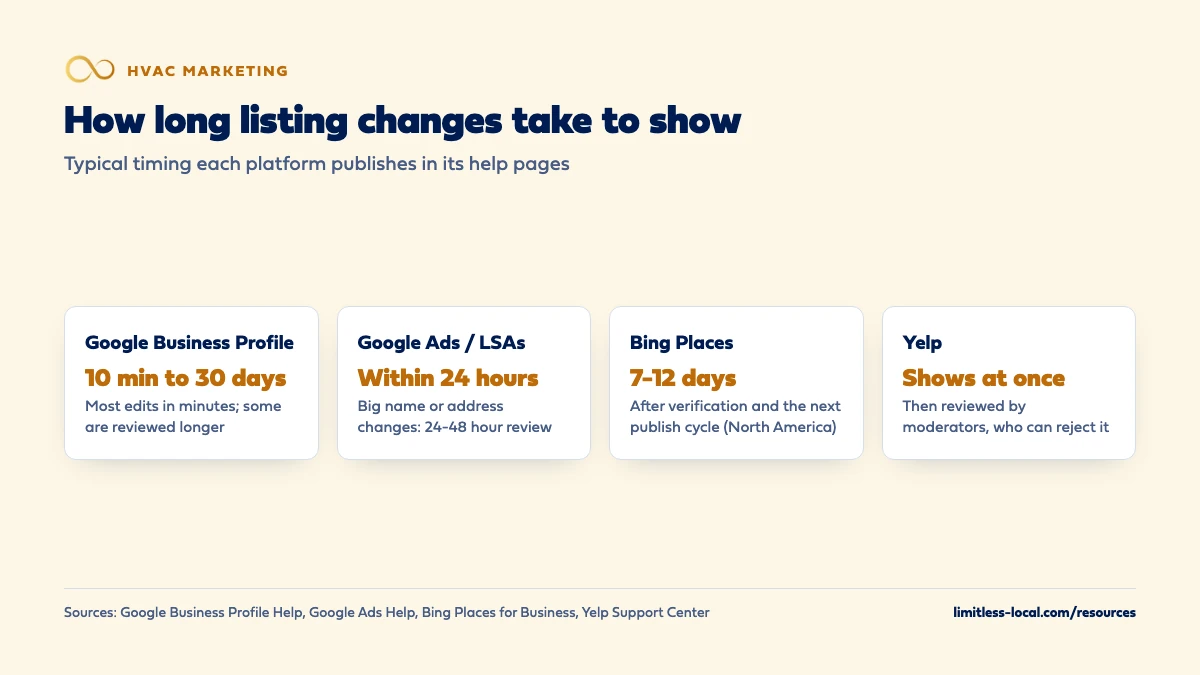
How long do the changes take to show up?
Longer on some platforms than others, and none of them gives you a fixed date:
- Google Business Profile: edits usually show in about 10 minutes, but some take up to 30 days, according to Google’s address help page. Google reviews edits before they go live.
- Google Ads and Local Services Ads: Google syncs your Business Profile into Google Ads daily. Hours, phone and minor name changes sync within 24 hours; big name, address or category changes need verification, which typically takes 24 to 48 hours, per Google’s LSA transition page.
- Bing: changes publish only after verification and the next publish cycle, typically 7-12 days in North America.
- Apple: Apple can edit your name, status or hours itself when customers report a problem, and emails you when it does. Contesting a name change goes to review, which can take up to five business days, per Apple Business help.
- Yelp: edits from Yelp for Business show immediately, but moderators review them and can reject them, per Yelp’s support page.
The smaller directories that copy their data from other sources are slower and less predictable. In our experience it’s a matter of weeks to months before most of the web catches up, which fits the slow, steady ramp described in how long HVAC SEO takes.
Why does this matter more now that LSAs run through Google Ads?
In 2026 Google is moving Local Services Ads into Google Ads as Performance Max campaigns with pay-per-lead goals. In the new setup, your business name, address and hours sync one way from your Google Business Profile into Google Ads, and you can’t edit them there. If your profile is wrong, your ads are wrong.
There’s a second catch in Google’s transition page: a significant change to your business name, storefront address or primary category triggers a verification review, and your campaign may pause while it happens. Make big profile changes in a slow week, not in the first heat wave. The phone number your ad leads ring to can be changed separately in Google Ads, so a tracking number for LSA leads doesn’t have to touch your profile. If you’re weighing LSAs at all, whether LSAs are worth it covers the rest.
Not sure which of these is costing you jobs?
A free visibility audit checks the Google profile, reviews, site and tracking, and shows what to fix first.
What's different for HVAC companies
Most HVAC shops are service-area businesses. If you started out of a garage or still run dispatch from home, that address may be on old listings. Hide it on Google and Bing, and track down the directories that picked it up.
Seasonal hours and emergency service. If you take no-heat and no-cool calls after hours, say so consistently. Set your regular hours to when someone answers, and use special hours for holidays, so a homeowner doesn’t see “Closed” on Google and “Open 24 hours” on Yelp. Your Google hours now flow into your Local Services Ads too.
Lots of phone numbers. HVAC companies tend to collect numbers: a dispatcher’s cell, a number from a past lead service, a tracking number per campaign, a number from a company you bought. Each one that ends up on a listing is a call that can go to the wrong place. A quick search of each one, once a year, catches most of the drift.
Who owns the logins. Keep listing accounts in the business’s name, managed by the owner or office manager. A tech who makes a new Google profile, or a past vendor who holds the only login, is how most duplicates and locked-out profiles start.
A worked example: cleaning up after a move and a new phone system
These details are made up to show the process, not a benchmark. Say an HVAC company moved its shop across town and switched phone providers last year. A search turns up the business on 25 sites: 14 show the old address, 6 show the old number, and Google Maps has two pins, one at each address.
- Week one: update the address on the existing Google profile (not a new profile) and verify it again, report the old Maps pin as a duplicate, and fix Apple Business and Yelp. On Bing, create a listing at the new address and mark the old one closed. Keep the old phone line forwarding to the office.
- Weeks two and three: work down the spreadsheet: BBB, Facebook, the business-data providers, then the smaller directories you can log in to.
- Each month after: re-run the searches for the old number and address and mark what has changed. When those searches mostly come back clean, cancel the old line.
If you’d rather hand it off, business listing cleanup and buildout is part of our Essentials package at $3,500 a month, along with Google Business Profile management, reviews, content and Google Ads management; a free visibility audit will show whether your listings are the problem in the first place.
Frequently asked questions
Should I put "LLC" or "Heating & Air" in my Google business name?
Only if it’s part of your real name as it appears on your trucks, signs and invoices. Google doesn’t allow legal terms like LLC unless your real-world branding consistently shows them, and it doesn’t allow added service words, taglines or phone numbers in the name.
Can I use a P.O. box or a virtual office as my business address?
Not on Google. Its guidelines don’t accept P.O. boxes, remote mailboxes or virtual offices that aren’t staffed during business hours. If you work from home, hide the address and show a service area.
Will fixing my listings get me into the map pack?
Nobody can promise that. Accurate listings remove a reason for Google, Bing and Apple to distrust your information, but where you show also depends on your reviews, your distance from the searcher and what competitors are doing.
Apple changed my business hours on Maps. Can I change them back?
Yes. Apple can edit your name, status or hours when customers report a problem, and emails your team when it does. You can accept the change in Apple Business, or edit it to the correct hours; a name change you contest goes to Apple for review.
Do I have to keep my Bing listing updated if I already fixed Google?
It helps. Bing says other data sources can take priority if your Bing Places information hasn’t been updated in more than 6 months, or if they conflict with it.
What happens to my reviews if I merge duplicate Google profiles?
Google says the reviews are combined when profiles are merged, but your replies to those reviews may be lost.
Key takeaways
- Pick one official name, address and phone number, and make every listing match it exactly.
- Fix Google Business Profile first: in 2026 its name, address and hours also sync one way into your Local Services Ads.
- Search every old phone number, address and business name to find the listings that are wrong.
- Service-area HVAC companies should hide a home address and show the towns they serve.
- After a move, update your Google profile instead of making a new one; Bing asks for a new listing and the old one marked closed.
- Most edits show within days, but the whole web can take weeks to months to catch up.
Want a second set of eyes on your setup?
We'll look at how you show up locally and where calls are leaking, then send you a plain-English breakdown.
More in this section
- How do I make my HVAC company look trustworthy online?
- How do I recover after a run of bad reviews on my HVAC company?
- How do I get HVAC service pages to rank for repair and install?
- What can I do myself to improve my HVAC company's Google ranking?
- What pages should an HVAC company website have?
Sources
- Guidelines for representing your business on Google — Google Business Profile Help
- Resolve duplicate profiles & ownership issues — Google Business Profile Help
- Manage your business address — Google Business Profile Help
- Edit your Business Profile — Google Business Profile Help
- Local Services Ads transition to Performance Max campaigns with pay-per-lead goals — Google Ads Help
- Bing Places for Business: Manage your listing — Bing Places for Business
- Maintain location information accuracy with Apple Business — Apple Support
- How do I suggest changes to the general business info? — Yelp Support Center