
How do I track which plumbing marketing books jobs?

- How can a plumbing company see which marketing brings in booked jobs, not just calls?
- What counts as a job booked by marketing?
- How do I tell which marketing made the phone ring?
- How do I keep repeat customers from inflating my marketing numbers?
- How do I connect a call to a booked job in ServiceTitan, Housecall Pro or Jobber?
- Why might my reports undercount the big plumbing jobs?
- What about calls taken after hours?
- Can Google Ads see which calls turned into plumbing jobs?
- How do I track calls from my Google profile?
- How do I work out cost per booked job for each channel?
- What does tracking cost, and is it worth it for a small shop?
- What's different about tracking for plumbing companies
- A worked example: two channels, two different answers
- Frequently asked questions
- Key takeaways
- More in this section
- Sources
The short version
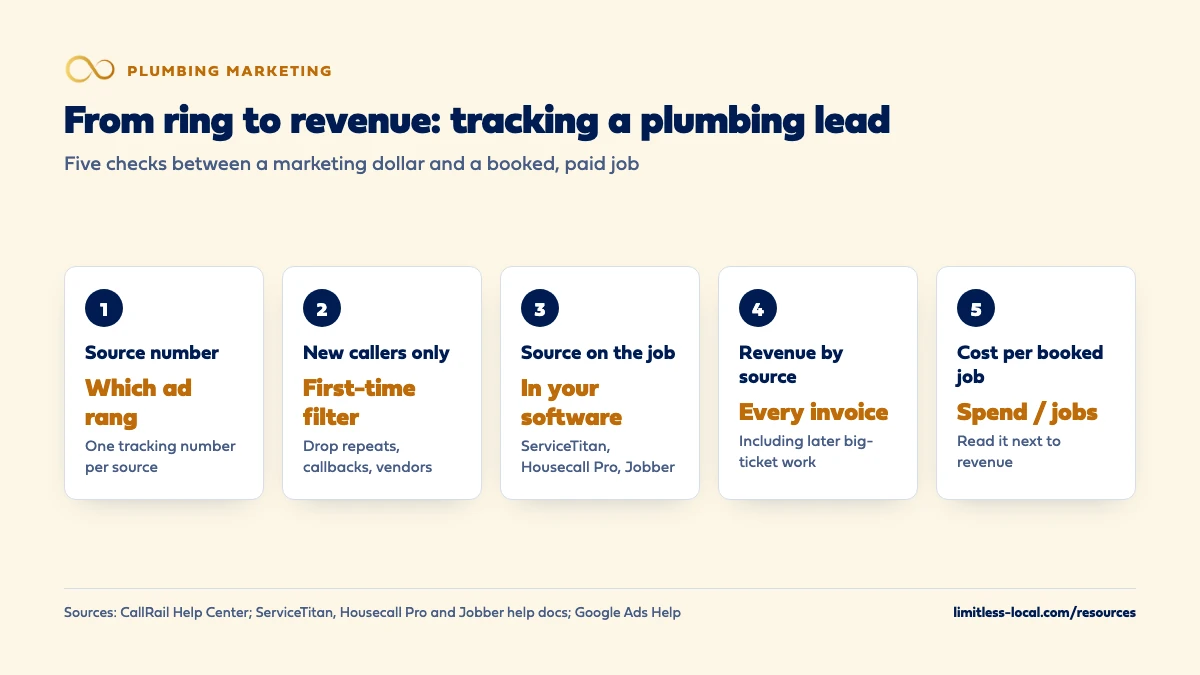
- A tracking number per source shows which marketing made the phone ring.
- Filter out repeat customers, callbacks and vendors so they don't count as marketing wins.
- The lead source has to live on the job and the estimate in your field software, or the trail stops at the phone call.
- Compare channels on cost per booked job and the revenue behind it, not on call counts.
For plumbing owners who are paying for ads, a Google profile, mailers or a wrapped truck and want to know which ones actually put jobs on the schedule.
Get a free visibility audit · Book a growth call
How can a plumbing company see which marketing brings in booked jobs, not just calls?
Give each marketing source its own tracking phone number, count only first-time callers asking for work you do, and make sure every booked job and estimate in ServiceTitan, Housecall Pro or Jobber carries the lead source. Then once a month divide what each channel cost by the jobs it booked, and check the revenue behind those jobs, because one repipe can outweigh a dozen drain calls. A channel with more calls isn’t the winner if its calls don’t book.
Tracking is where we start with every client, because nothing else can be judged without it. Call tracking with recording, form and chat tracking, source tagging and a monthly report with cost per lead are part of every one of our packages, and our plumbing marketing page says we measure success by service calls booked, not impressions. The rest of the plumbing marketing questions library goes question by question.
What counts as a job booked by marketing?
Before any software, settle the definitions, because most tracking arguments are really arguments about words. In our judgement, a plumbing company needs three:
- A lead is a first-time caller, form or text asking for work you do, in an area you serve. A homeowner you fixed a faucet for last year isn’t a new lead from this month’s ads, and neither is a supplier or a warranty callback.
- A booked job is a lead that ended with a time on the schedule: a service call, or an estimate appointment for bigger work.
- A sold job is one that was invoiced. For service calls that’s usually the same day. For a repipe, a sewer line replacement or a tankless conversion, the estimate books first and the sale comes later, if it comes.
Track all three by source. Calls alone flatter the noisy channels, and booked jobs alone hide the difference between a clogged sink and a whole-house repipe.
How do I tell which marketing made the phone ring?
With a separate tracking number for each source, all forwarding to your main line. CallRail’s help docs describe it simply: if you want to track calls from Google visitors, a directory ad and a mailer, you create three tracking numbers, one per source, and forward each to your business phone (Source tracking basics). It recommends one tracking number per campaign so the reports stay accurate.
The same docs list offline uses too: flyers, signs, business cards, and TV or radio. For a plumber, in our judgement, that covers the truck wrap, yard signs, door hangers, fridge magnets and any home-show or radio spot. Each call then arrives with the tracking number that received it, the date and time, the caller ID, the city and the call length.
On your website, a script can swap in a number based on how the visitor arrived, so organic search, Google Ads and your Google profile each get credit. If you put a tracking number on the profile itself, set it up the way optimizing your plumbing Google profile describes, so your main number stays on Google too.
How do I keep repeat customers from inflating my marketing numbers?
Plumbing companies get a lot of calls that aren’t new business: past customers, warranty callbacks, members on a maintenance plan, suppliers, other trades. In our judgement, if those calls count as leads, the channel your past customers happen to use, often the Google profile or the number on the truck, looks far better than it is.
Two tools help:
- First-time caller filters. CallRail’s Call Log can be filtered to show only first-time callers, and its attribution data usually shows the contact’s first touch: how they reached you the first time (Call Log).
- Call reasons in your field software. In ServiceTitan, a call reason with “Is Lead” turned off marks the call Not a Lead. ServiceTitan warns that if you don’t set up call reasons, any call longer than 60 seconds is classified as a lead, which makes call data and marketing reports unreliable (Understand call classifications).
The goal is a lead count that only includes people who found you through marketing and asked for work.
How do I connect a call to a booked job in ServiceTitan, Housecall Pro or Jobber?
The tracking number tells you which marketing made the phone ring. Your field software is where you find out whether it turned into money, so the lead source has to travel with the customer into it.
- ServiceTitan classifies each call by outcome. When the CSR books a job, the call becomes a Booked Call; answered calls over 60 seconds with no job booked are Unbooked Calls; calls no one answers, or that the CSR didn’t click into, are Abandoned and can’t be tied to a customer or job (Understand call classifications).
- Housecall Pro has a Lead Source field that can be set on customers, jobs and estimates, so a repipe estimate can carry the source of the drain call that led to it (How to Use Lead Sources).
- Jobber’s Lead Source Report shows, for each source, how many leads came in and how many went on to a request, quote, job and invoice, plus invoice value (Lead Source Report).
Whichever you run, the habit is the same: whoever books the job picks the source from a short, fixed list at the moment of booking. Long lists get skipped.
Curious what your marketing is actually booking?
Get a free visibility audit — no obligation, no sales pitch.
Why might my reports undercount the big plumbing jobs?
Because big plumbing work often arrives in two invoices. Jobber, for example, says its Lead Source Report counts the amount from the first invoice linked to a lead, on the reasoning that the first payment is what counts for a lead source (Lead Source Report). For plenty of trades that’s right. For a plumber, in our judgement, it can miss the real value: a drain call that ends in a camera inspection and a small first invoice, followed weeks later by a sewer line replacement on a second one.
Three ways to keep the big jobs visible:
- Carry the lead source onto the estimate and the replacement job, not just the first service call.
- Once a month, list your five largest invoices and check by hand where each customer first came from.
- Report revenue by source next to booked jobs, so a channel that brings fewer but larger jobs isn’t judged on count alone.
What about calls taken after hours?
After-hours calls are where tracking most often breaks, in our judgement. The tracking number still logs the call, but if an answering service or an on-call tech books the job on paper or in a text thread, the job lands in your software the next morning with no source attached.
Fix it with a rule rather than a tool: every after-hours booking gets entered with its source before the job is dispatched, and the next-morning check matches the night’s tracked calls to the jobs created. If calls at night are going unanswered altogether, the bigger loss isn’t tracking; stopping lost after-hours calls covers that.
Can Google Ads see which calls turned into plumbing jobs?
Out of the box, only partly. Google Ads can count calls from your ads and calls to the Google forwarding number on your website as conversions when they last at least a minimum length you set, and it can count taps on your phone number on a mobile site, though then it only sees the tap, not the call (About phone call conversion tracking).
A long call isn’t a booked job, though. The closer option is importing call conversions: Google says you can count calls as conversions only when they include sales, and include the value of those sales, which shows which ads drive the most valuable calls. For a plumber, in our judgement, that’s worth setting up once Google Ads is a big line in the budget, because it lets the campaign learn from booked water heater and sewer jobs instead of from every two-minute price question. If your ads get plenty of clicks and few calls in the first place, start with why Google Ads get clicks but no calls.
How do I track calls from my Google profile?
Your Business Profile’s Performance report counts Calls, the number of times someone tapped the call button, along with website clicks, searches and views (Understand your Business Profile performance). Two cautions: a tap isn’t a conversation, and Google says the performance data includes activity from both organic results and Google Ads, so if you run ads, the profile isn’t the only thing moving that number.
A tracking number on the profile, ringing your office, fixes the first problem. Matching those calls to booked jobs in your software fixes the second.
How do I work out cost per booked job for each channel?
Once a month, for each channel:
- Cost: ad spend plus management fees and any software for that channel.
- New leads: first-time callers, forms and texts from that source.
- Booked jobs: from your field software, by lead source.
- Revenue: what those jobs were invoiced for, including later invoices for the big work.
- Cost per booked job: cost divided by booked jobs.
Read the last two together. A channel with a higher cost per booked job can still be the better one if it brings water heater replacements while another brings drain clears. Small numbers swing a lot, so in our view, judge a channel on a few months, not one. How cost per job rolls up into what each new customer costs you is covered in working out your customer acquisition cost, and what that means for lead prices in how much you can afford to pay for a lead.
What does tracking cost, and is it worth it for a small shop?
Most of the cost is habit, not software. The tracking numbers do their part automatically; the work is someone in the office picking a lead source on every booking and correcting the ones that are wrong. CallRail, for example, lets you score a call as a lead, tag it and record a value with Keypad Scoring as soon as the call ends, or qualify leads automatically with Automation Rules if transcript intelligence is on (How to qualify leads in CallRail).
For a one- or two-truck shop, in our judgement, the minimum that works is a tracking number on each paid channel, a lead source field filled in on every job, and a monthly look at booked jobs and revenue by source. That’s enough to stop paying for a channel that only makes the phone ring. Bigger shops spending on several channels get more from full attribution and imported conversions, because the money at stake is larger.
Talk it through with someone who runs this every day
A 15-minute growth call: your market, your numbers, and what a realistic budget looks like. No pressure.
What's different about tracking for plumbing companies
Two kinds of booked job. An emergency service call books and sells the same day. A repipe, sewer replacement or water heater upgrade books an estimate, then sells or doesn’t later. Tracking that stops at the first booking treats them the same; in our judgement, plumbing shops need the estimate and its result tracked by source as well.
Lots of non-marketing calls. Repeat customers, maintenance plan members, warranty callbacks and suppliers all call the same numbers. Without first-time filters and lead flags, they make whatever number they dial look like great marketing.
A wide spread in ticket size. A drain clear and a whole-house repipe are both one booked job. Cost per booked job is the starting point, but revenue by source is what tells a plumber which marketing is worth more money.
A worked example: two channels, two different answers
These numbers are made up to show the math, not a benchmark for your market. In one month, Google Ads costs $2,400 in spend and brings 48 first-time calls, of which 16 book, for $9,600 in invoices. Local Services Ads cost $1,500 and bring 30 leads, of which 12 book, for $4,200 in invoices.
Cost per booked job: Google Ads is $2,400 divided by 16, or $150. LSAs are $1,500 divided by 12, or $125. On that number alone, LSAs win.
Revenue tells a different story. Every dollar in Google Ads brought back $4 in invoices; every LSA dollar brought back $2.80, because in this example the search ads were aimed at water heater and repipe searches while the LSA leads were mostly small service calls. Neither number says to cut the other channel. Together they say what each one is for.
For comparison, our Essentials package is $3,500 a month and includes call, web and form tracking with basic attribution, Google Ads management and a monthly report, with ad spend paid to Google separately. Local Services Ads management starts in the Growth tier.
Frequently asked questions
Do I need call tracking if I only advertise in one place?
Usually yes, at least one number for that channel. Without it, every call looks like it came from the one thing you pay for, including the repeat customers and referrals that would have called anyway.
How long should a call last to count as a lead?
There’s no single right length. Google Ads lets you set a minimum call length for counting call conversions, and ServiceTitan treats unclassified calls over 60 seconds as leads, but in our judgement what was said matters more than how long the call lasted (Google Ads Help).
Can I score calls without listening to every recording?
Yes. CallRail’s Keypad Scoring lets whoever took the call mark it as a lead and record a value right after hanging up, and its Automation Rules can qualify calls automatically when transcript intelligence is on.
How far back can I look at my call history in CallRail?
CallRail says the maximum time any communication record is held is 25 months, so export what you want to keep for longer comparisons (CallRail Help Center).
Should I still ask "how did you hear about us?"
Yes, as a backup. In our judgement, answers like “Google” are loose, since that can mean an ad, the map results or an LSA, so use the question to fill gaps, not to replace tracking numbers.
Which field software tracks lead sources best for plumbers?
Any of the three main ones can do it: ServiceTitan through call classifications and campaigns, Housecall Pro through its Lead Source field on customers, jobs and estimates, and Jobber through its Lead Source Report. What matters more is that every booking gets a source.
Key takeaways
- Give every marketing source its own tracking number, online and offline.
- Count only first-time callers asking for work you do; repeat customers and callbacks aren’t marketing wins.
- Put the lead source on the job and the estimate in your field software, including after-hours bookings.
- Watch for reports that only count the first invoice; big plumbing jobs often come on the second.
- Compare channels on cost per booked job and revenue together, over a few months.
Ready to compare options?
Book a short growth call and we'll walk through the math for your service area, including when we're not the right fit.
More in this section
- Should I hire a plumbing marketing agency or do it myself?
- How do I get more plumbing leads?
- How much should a plumbing company spend on marketing each month?
- How do I work out my plumbing customer acquisition cost?
- How should a new plumbing company get its first customers?
Sources
- Source tracking basics — CallRail Help Center
- Call Log — CallRail Help Center
- How to qualify leads in CallRail — CallRail Help Center
- Understand call classifications — ServiceTitan Help
- How to Use Lead Sources — Housecall Pro Help Center
- Lead Source Report — Jobber Help Center
- About phone call conversion tracking — Google Ads Help
- Understand your Business Profile performance & insights — Google Business Profile Help