
Why are my plumbing Google Ads getting clicks but no calls?
- What causes plumbing Google Ads to get plenty of clicks and almost no phone calls?
- Are my ads really getting no calls, or are the calls not being counted?
- Who is actually clicking my plumbing ads?
- Which negative keywords should a plumbing company add?
- Are my ads showing to people outside my service area?
- Are my ads running when nobody answers the phone?
- Are people calling but giving up before anyone answers?
- Is my landing page losing the click?
- What's a normal click-to-call rate for plumbing ads?
- Should I switch to Local Services Ads instead?
- In what order should I fix this?
- What's different about plumbing Google Ads
- A worked example: the same budget, cleaned up
- Frequently asked questions
- Key takeaways
- More in this section
- Sources
The short version
- First make sure calls are being counted: call reporting, website call tracking and your own phone log should agree.
- The search terms report shows the real searches you paid for; plumbing ads attract DIY, job-seeker and supply searches.
- Check location settings and ad hours, because a click from out of town or at 2 a.m. to voicemail can't become a job.
- Send each ad to a page about that job, with a phone number people can tap.
For plumbing owners paying for Google Ads clicks that don’t seem to turn into ringing phones, and wanting to know where the money is going before they spend more.
Get a free visibility audit · Book a growth call
What causes plumbing Google Ads to get plenty of clicks and almost no phone calls?
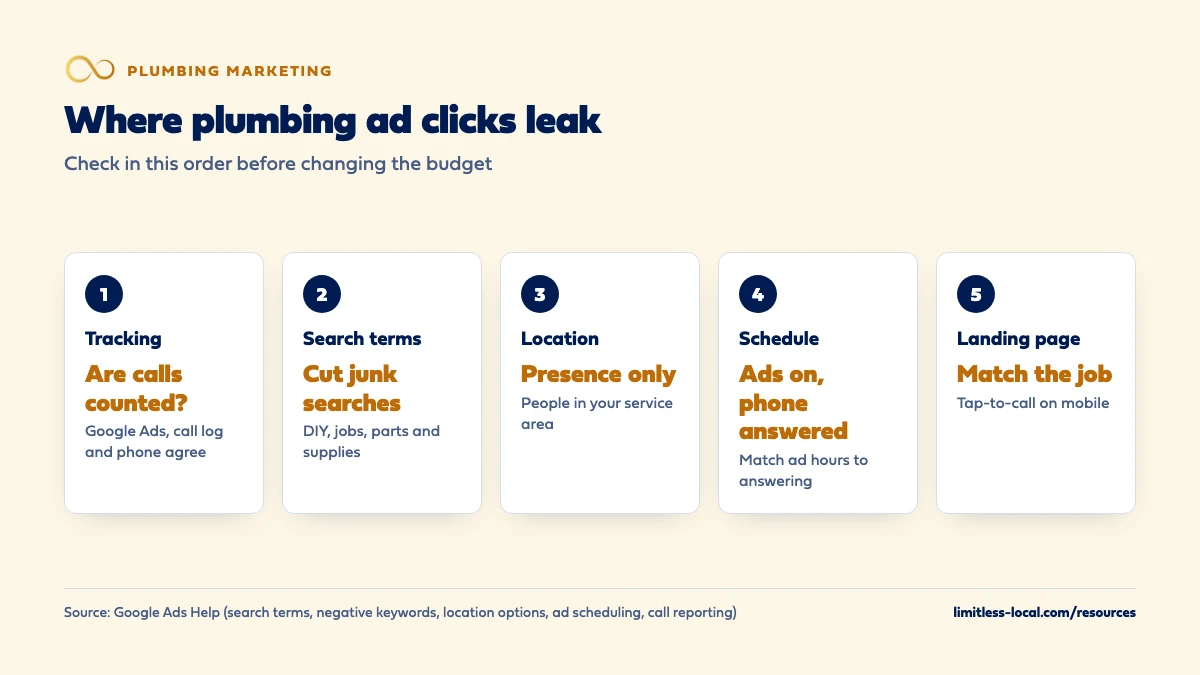
Usually one of five things: calls are happening but aren’t being counted, the ads are matching DIY, job-hunting or supply-store searches, they’re showing to people outside your service area, they’re running at hours when nobody answers, or the page people land on doesn’t make calling easy. The search terms report shows the actual searches behind your clicks, and your call reporting and phone log show whether calls connected. Check tracking first, then searches, location, schedule and landing page, in that order, before you raise or cut the budget.
Those are the first checks we run on any Google Ads account, because they cost nothing to fix and they make every later dollar count. Google Ads management, a landing page and call tracking are part of our local ads work for plumbing companies, and the rest of the plumbing marketing questions library goes question by question.
Are my ads really getting no calls, or are the calls not being counted?
Check this first, because it’s the cheapest problem to have. Google Ads only knows about calls it can see, and there are several ways that can break (About phone call conversion tracking):
- Calls straight from the ad are tracked through a Google forwarding number, which needs call reporting turned on. Google says turning call reporting off shows your own number but stops Google Ads from tracking those calls (About call reporting).
- Calls to the number on your website need the Google tag and a specific event snippet set up correctly.
- Taps on a phone number on your mobile site can be counted, but Google can only see the tap, not whether a call happened.
If you use a call tracking service instead of Google’s numbers, the calls may be sitting in that system and not in Google Ads at all. Put the three side by side for the same week: Google Ads conversions, your call tracking log and your phone system. If the phone log shows calls Google doesn’t, the ads aren’t the problem; the counting is. Getting every call matched to a booked job is covered in tracking which plumbing marketing books jobs.
Who is actually clicking my plumbing ads?
The search terms report answers it. It lists the actual searches that triggered your ads, with clicks and conversions for each, and its Keyword column shows which of your keywords matched each search (About the search terms report). Google’s own example is a florist whose broad keyword “flowers” matched searches for roses and orchids it didn’t sell.
For plumbing ads, in our judgement, the clicks that never call tend to fall into a few groups:
- Do-it-yourselfers: how to unclog a drain, how to fix a running toilet, how to relight a water heater.
- Job seekers: plumber jobs, plumbing apprenticeship, plumber salary.
- Parts and supplies: plumbing supply store, PVC fittings, water heater parts.
- Work you don’t do: septic pumping, well pumps or commercial work, if those aren’t yours.
- Early research: cost to replace a water heater, repipe cost. These can become jobs, but they call later, if at all.
Download the last 30 days and sort by cost. The top of that list usually explains the missing calls.
Which negative keywords should a plumbing company add?
Negative keywords stop your ads from showing for searches you don’t want. Google’s example is an optometrist who sells eyeglasses excluding “wine glasses” and “drinking glasses” (About negative keywords). A few rules from Google matter when you build a plumbing list:
- Negative keywords don’t match close variants, so you need to add singular and plural forms and synonyms yourself.
- A negative broad match keyword blocks your ad only when the search contains all of its words, in any order.
- An account-level negative list applies across all eligible search inventory in your account, so you build it once.
A starting list for most plumbing shops, in our judgement: jobs, job, salary, apprentice, apprenticeship, school, license, course, how to, DIY, video, parts, supply, supplies, big-box store names, and the services you don’t offer. Be careful with words that cut both ways. Excluding “cost” blocks people researching a water heater replacement, which some shops want and some don’t.
Then make it a habit: check the search terms report every week for the first month, then monthly.
Are my ads showing to people outside my service area?
Quite possibly, because that’s Google’s default. Location targeting starts on Presence or Interest, which reaches people in or regularly in your area and also people who have shown interest in it, through their searches, recent visits or the content they view (About advanced location options). Switching to Presence limits ads to people likely to be in or regularly in your targeted locations. Google recommends the default as a best practice for most Search campaigns, says to consider Presence when you only want people in specific locations, and notes that most campaigns see fewer impressions after switching away from the default.
For emergency plumbing, in our judgement, Presence is usually the better setting: a homeowner with a leak is searching from the house that’s leaking. The exception is someone arranging a job for a parent or a rental from out of town. Those calls are real, so if you see good ones in your call log, keep a separate campaign for them rather than opening the main one to everyone.
Also check the map itself. A radius drawn wide to get more volume pulls clicks from towns your trucks don’t want to drive to.
Curious what your marketing is actually booking?
Get a free visibility audit — no obligation, no sales pitch.
Are my ads running when nobody answers the phone?
Ad scheduling lets you pick the days and hours your ads show, for example only during the hours you can take calls (About Ad Scheduling). Call assets, the phone number that shows with your ad, have their own control: Google says you can set numbers to appear only when your business can accept calls, and schedule the asset to show only when your business is answering (About call assets).
For a plumber the decision is real money either way. Night and weekend searches are some of the most urgent ones, in our judgement, and they’re the ones you most want. But if those calls roll to voicemail, the click is paid for and the homeowner calls the next ad. Either answer the phone at those hours, or keep the ads and call button to the hours you do. Stopping lost after-hours calls covers the options for answering.
Are people calling but giving up before anyone answers?
That looks like no calls from the owner’s chair, but it’s a different problem. With call reporting turned on, Google Ads shows each call’s start time, duration and whether it was connected, plus the caller’s phone number for calls over 15 seconds (About call reporting). Your call tracking service and phone system will show the same.
If the log shows short, unconnected calls at busy times of day, the ads are working and the phone isn’t. In our judgement that’s common in small plumbing shops where the owner is under a sink when the phone rings. Call back every missed number within minutes, and look at whether calls should roll to the office or an answering service before they ring out.
Is my landing page losing the click?
If the searches are right, the area is right and the phone is answered, look at where the click goes. Google rates landing page experience on how relevant and useful the page is likely to be to someone who clicked your ad, and says pages rated higher are usually well organized, with text that relates to the person’s search (Landing page experience: Definition). You can see the rating per keyword: above average, average or below average.
The plumbing versions of a bad landing page, in our judgement:
- A water heater ad that lands on the homepage, where the visitor has to hunt for water heaters.
- A phone number that’s an image or tiny text, so it can’t be tapped on a phone.
- A page that loads slowly on mobile, when the visitor is standing in a wet basement.
- A form as the only option on an emergency page.
Fix the page for your highest-spend keyword first, then compare calls per click before and after.
What's a normal click-to-call rate for plumbing ads?
We won’t quote one, because we haven’t found a published figure we trust for plumbing in your market, and averages from other markets can send you chasing the wrong number. Your own numbers are more useful: for each campaign, divide calls (or booked jobs) by clicks, and compare campaigns and months against each other.
What you can afford is a different calculation: what a lead is worth to you depends on how many of them book and what the average job brings in. How much you can afford to pay for a plumbing lead walks through that math, and it’s the right number to hold your ads to.
Should I switch to Local Services Ads instead?
Maybe, but not as a way around the problems above. Local Services Ads are bought and targeted differently from search ads, which in our judgement may cut down some of the bad searches, but they still depend on answering the phone, an honest service area and the jobs you list. If calls aren’t being answered or tracked today, they won’t be on LSAs either.
For many plumbing companies, in our judgement, the answer is both, each doing its own job. Whether LSAs are worth it for plumbers covers how they work and what they cost.
In what order should I fix this?
- Tracking. Make sure the calls you’re getting are counted. Otherwise every later decision is based on bad numbers.
- Search terms and negatives. Cut the DIY, jobs and supply searches. This usually frees the most money fastest.
- Location. Switch to Presence and tighten the map to where your trucks go.
- Schedule and answering. Match ad hours to the hours someone picks up, or fix the answering.
- Landing page. Send each ad to a page about that job with a tappable number.
- Budget and bids. Only now decide whether to spend more or less.
Change one thing at a time and give it a couple of weeks, so you can tell what worked. In our judgement, most accounts with this problem find it in the first three steps.
Want to see where your company stands?
A free visibility audit shows where you show up on Google, Maps and AI answers, and what it's costing you in calls.
What's different about plumbing Google Ads
DIY searches look like plumbing searches. Plumbing problems are the kind homeowners try to fix themselves first, so a lot of searches with plumbing words in them come from people holding a plunger, not a phone. That makes negative keywords more important for plumbers than for most trades, in our judgement.
Emergency and planned jobs need different handling. A burst pipe search wants a phone number and an answer now. A repipe or tankless water heater search wants information first and calls later. Putting both in one campaign with one landing page tends to serve neither well, so split them.
Job seekers search the same words. Plumbing is a trade people search to get into, so plumber, plumbing and apprentice searches from job seekers can show up in your search terms. Exclude them early.
A worked example: the same budget, cleaned up
These numbers are made up to show the math, not a benchmark for your market. Say a plumbing campaign gets 200 clicks in a month at an average of $12 a click, or $2,400, and produces 14 calls. That’s about $171 per call.
After adding negative keywords for DIY, jobs and supply searches, switching location to Presence and pausing ads at hours nobody answered, the next month gets 150 clicks at the same average price, or $1,800, and 21 calls. That’s about $86 per call, for less money.
If about 1 in 3 of those calls books, that’s 7 booked jobs, or about $257 per booked job. Whether that’s good depends on your tickets, not on the ad account.
For comparison, our Essentials package is $3,500 a month and includes Google Ads management for up to $2,500 a month in ad spend, one landing page, and call, web and form tracking. Ad spend is paid to Google separately. Many of the fixes above you can make yourself in an afternoon; what management adds is doing them every week.
Frequently asked questions
Do I pay when someone taps the call button on my ad?
Yes. Google says a tap on a call asset on mobile, or the Call us button on desktop, costs the same as a click on the headline (Google Ads Help).
Why does Google show my ad for searches I never added?
Your keywords match a range of searches, not just the exact words. The search terms report shows which keyword matched each search, and negative keywords stop the ones you don’t want.
Can I see who called from my ad?
With call reporting on, Google Ads shows each call’s start time, duration and whether it connected, and the caller’s number for calls over 15 seconds.
How long should a call last to count as a conversion?
You choose the minimum length. Google’s own example is a travel agent who found calls over 2 minutes tended to lead to sales. In our judgement, check your booked jobs against call lengths and set the minimum from that.
Could competitors be clicking my plumbing ads?
It happens, but in our judgement it’s rarely the main reason clicks don’t turn into calls. Work through tracking, search terms, location and schedule first; those explain most missing calls.
Can I fix this myself?
Most of it, yes. Negative keywords, location settings and ad schedules are settings you can change in an afternoon. Whether to hire an agency or do it yourself covers when outside help is worth paying for.
Key takeaways
- Check tracking first: calls may be happening without being counted in Google Ads.
- The search terms report shows the DIY, job-seeker and supply searches you’re paying for; exclude them with negatives.
- Switch location targeting to Presence for emergency plumbing campaigns.
- Only run ads and call buttons at hours someone answers, or fix the answering.
- Judge the result on cost per booked job, not clicks or calls alone.
Not sure what's working right now?
Start with a free visibility audit: rankings, Google profile, reviews and tracking, checked against your service area.
More in this section
- Are Google Local Services Ads worth it for plumbers?
- How do I get more plumbing leads?
- Should my plumbing company start with LSAs, Google Ads or SEO?
- How do I get my plumbing company into the Google map pack?
- How do I get more Google reviews for my plumbing company?
Sources
- About the search terms report — Google Ads Help
- About negative keywords — Google Ads Help
- About advanced location options — Google Ads Help
- About Ad Scheduling — Google Ads Help
- About call assets — Google Ads Help
- About call reporting — Google Ads Help
- About phone call conversion tracking — Google Ads Help
- Landing page experience: Definition — Google Ads Help