
How can a pool builder cut junk calls from paid ads?

- How do I stop paying for wrong-service and out-of-area calls on my pool ads?
- What counts as a junk call for a pool builder?
- Step 1: Where are my junk calls actually coming from?
- Step 2: How do I block the searches behind wrong-service calls?
- Step 3: How do I stop calls from towns I don't build in?
- Step 4: Can my ads say what I don't do?
- Step 5: How do I stop Google from chasing more junk calls?
- Step 6: Can my forms filter before they send?
- Step 7: What do I do about job seekers and sales calls?
- Step 8: What should my office ask in the first minute?
- What about spam and bot clicks on my ads?
- Can I cut junk calls too far?
- What's different about junk calls for pool builders
- A worked example: two weeks of tagging, one month of fixes
- Frequently asked questions
- Key takeaways
- More in this section
- Sources
The short version
- Tag every ad call for two weeks: what they wanted, where they live.
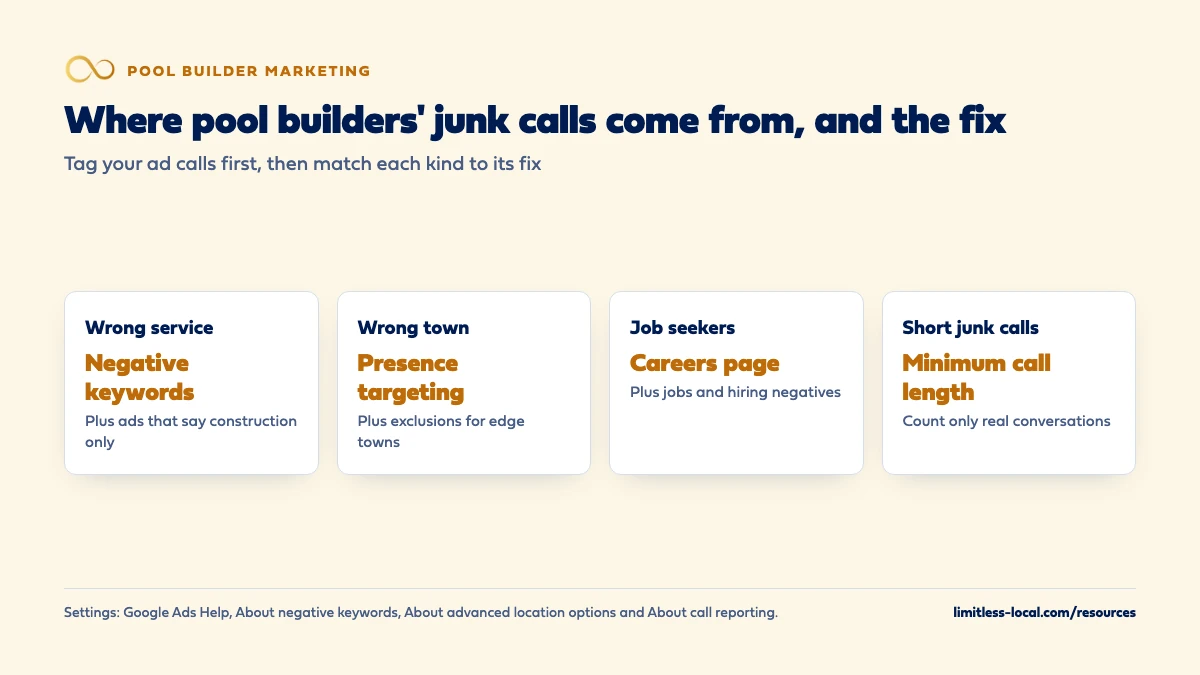
- Wrong service: negative keywords and ads that say what you build.
- Wrong town: switch location targeting to people in your area.
- Count only real-length calls as conversions so Google learns the difference.
For pool builders whose ad calls keep turning out to be pool cleaning, repairs, above-ground kits, job seekers and towns they don’t build in.
Get a free visibility audit · Book a growth call
How do I stop paying for wrong-service and out-of-area calls on my pool ads?
Start by tagging a couple of weeks of ad calls by what the caller wanted and where they live, because each kind of junk has its own fix. Wrong-service calls (cleaning, repairs, above-ground kits) are cut with negative keywords and ad copy that says what you build; out-of-area calls with tighter location settings; job seekers with a careers page and their own negatives. Then count only calls long enough to be real conversations as conversions, so Google stops chasing short junk calls, and have whoever answers ask three quick questions before booking anything.
Keeping junk out of the account is part of the weekly work in our local ads management, alongside call tracking with recording and transcription, so you can hear what each call was about and see which ones became consultations. Google Ads management is in every package, from Essentials ($3,500 a month, up to $2,500 a month in ad spend) to Growth ($4,500 a month, up to $5,000), with ad spend paid straight to Google. See how it fits our pool builder marketing, or browse the pool builder marketing questions library.
What counts as a junk call for a pool builder?
A junk call is any call from your ads that could never become a signed pool contract. For pool builders, they tend to fall into a few groups:
- Wrong service: weekly cleaning, green pool clean-ups, pump repairs, leak detection, openings and closings, if you don’t sell them.
- Wrong product: above-ground pools, kits, hot tub moves, pool table installs.
- Wrong place: homeowners an hour past where your crews will drive.
- Not a customer at all: job seekers, subcontractors looking for work, vendors, and sales calls about your marketing.
- Not a person: robocalls and bot clicks.
Price shoppers are a different problem, because they do want a pool; they just want the cheapest one. Stopping price shoppers covers that. This page is about the calls that were never going to be your customer.
Step 1: Where are my junk calls actually coming from?
Don’t guess. For two weeks, have whoever answers the phone jot down three things for every call that came from an ad: what the caller wanted, what town they’re in, and whether it’s worth a consultation. A notes field in your CRM or job software is enough.
If your ads use call reporting, Google helps here too. Google’s page About call reporting says it routes calls through a Google forwarding number so you can see details like call duration, call start time and the caller’s area code, and caller ID still works. A tracking number from a call tracking tool does the same job and usually adds recordings.
At the end of two weeks you’ll know your mix. Most builders find one or two groups make up most of the junk, which tells you which step below to do first. Call tracking for pool builders covers the tools.
Step 2: How do I block the searches behind wrong-service calls?
Most wrong-service calls start with a search you didn’t mean to pay for. Open the search terms report, which Google’s About the search terms report describes as showing how your ads performed when triggered by actual searches. Look for the words behind your junk: cleaning, service, repair, green, opening, closing, above ground, kit, hot tub.
Add those as negative keywords. Google’s About negative keywords says negatives don’t match close variants, so you need to add plurals and other forms yourself: clean, cleaning, cleaner and cleaners are four separate entries. It also warns that too many negatives can shrink your reach, so block the service words, not words like small or cost that real buyers use. Which negative keywords pool builders should add has a full starting list.
Step 3: How do I stop calls from towns I don't build in?
Check your location setting before anything else. Google’s page About advanced location options says the default, Presence or Interest, reaches people in or regularly in your area and people who’ve shown interest in it. That second group can include a homeowner two counties over who searched your town’s name.
Switching to Presence shows ads only to people likely to be in or regularly in your targeted areas. Most campaigns see fewer impressions once they move away from the default, which is fine when the impressions you lose are from towns you won’t drive to.
Then draw the area honestly. List the towns or ZIP codes your crews will actually build in, not the whole metro. If a few edge towns keep producing calls you turn down, exclude them. Exclusions keep ads from people likely to be in those areas, though people located outside them may still see your ads.
Step 4: Can my ads say what I don't do?
Yes, and it’s one of the cheapest fixes. The headline and description are the last thing a homeowner reads before they tap call, so use them to filter:
- Say what you build: New Inground Pools, Designed and Built.
- Say what you don’t: Construction only, no weekly service.
- Say where: Building in [your county and the next one over].
You’ll get fewer calls from people who skim. That’s the point. A homeowner looking for someone to clear a green pool will read construction only and keep scrolling, and you won’t pay for the click or the five minutes on the phone.
Curious what your marketing is actually booking?
Get a free visibility audit — no obligation, no sales pitch.
Step 5: How do I stop Google from chasing more junk calls?
This step gets missed a lot. If Google Ads counts every call as a conversion, a 15-second wrong number looks exactly as good as a 20-minute design conversation, and any automated bidding will happily find you more of the short ones.
Set a minimum call length so only real conversations count. If you find that calls over 2 minutes tend to be real buyers, count only those as conversions. Pick your own cut-off by listening to a few weeks of calls. Better still, mark calls as junk or real in your CRM and count only the real ones.
It also helps to show your number only when someone can answer. Google’s About call assets says you can schedule call assets to show only on certain days and hours, such as when your business is answering calls. After-hours callers can still use your form.
Step 6: Can my forms filter before they send?
Forms let you ask before anyone picks up the phone. On your website form, ask the questions a junk caller can’t answer well: what kind of project (new pool, renovation, something else), the property’s town or ZIP, and roughly when they want to swim. Keep it to three or four questions so real buyers still finish it. Qualifying leads before the design consultation has the full set of questions.
On Facebook and Instagram lead ads, the form type matters. Meta’s page About Instant Form Types says the default, More volume, is designed to generate a larger number of leads, while Higher intent adds a review screen where people confirm their information, to bring more intentional submissions. Higher intent forms show only in Facebook and Instagram feeds on mobile.
Step 7: What do I do about job seekers and sales calls?
Spring is hiring season for pool crews too, and people looking for work often search the same words homeowners do. Three fixes:
- Add jobs, job, careers, hiring, salary and similar as negative keywords.
- Put a careers page on your website with its own form or email, and link it in the footer, so job seekers have somewhere better to go than your sales line.
- Keep your ad number off directory sites and vendor lists. Use your main number there, so sales calls about your marketing don’t land in your ad tracking and skew it.
Step 8: What should my office ask in the first minute?
Some junk will always get through. A short script stops it from taking a consultation slot:
- What are you looking to do? New pool, renovation, or something else.
- Where’s the property? Town or ZIP.
- When are you hoping to swim? This season, next year, or just looking.
A caller who wants weekly cleaning or lives three counties away gets a polite answer and, if you have one, the name of someone who can help. Then mark the call as junk so it counts against the ad that sent it. The goodwill matters; that homeowner may know someone who wants a pool next year.
What about spam and bot clicks on my ads?
Some of what looks like junk is not people at all. Google’s page About invalid traffic says Google detects and filters traffic that doesn’t represent genuine interest, that you aren’t charged for invalid traffic it detects before billing, and that you get credits, where appropriate and possible, if it finds some after you’ve been billed.
What Google won’t refund is a real person who clicked and called about the wrong thing. That cost is on your settings, which is why the steps above matter more than worrying about bots.
Can I cut junk calls too far?
Yes. Every filter also catches a few real buyers. Signs you’ve gone too far:
- Total calls dropped a lot and consultations dropped with them.
- Your search terms report has gone thin, with your best searches showing fewer clicks.
- A negative like repair is blocking pool repair and remodel searches, and you do remodels.
The goal is fewer junk calls per consultation, not the fewest calls. Judge each change by consultations and signed contracts over the next few weeks, and roll it back if real leads fall with the junk. The skills a pool builder needs to run its own ads covers the weekly routine that catches this early.
Not sure which of these is costing you jobs?
A free visibility audit checks the Google profile, reviews, site and tracking, and shows what to fix first.
What's different about junk calls for pool builders
One word, many businesses. Pool covers construction, cleaning, supplies, repair, jobs and billiards. That one word pulls in a lot of unrelated searches, so pool builders get wrong-service calls from day one.
Service calls aren’t always junk. If you run a service route, a cleaning call is a lead for a different part of the business. Send it there instead of blocking it. Whether to offer pool service covers that choice.
The calendar shapes the junk. Pool opening calls come in spring, closing calls in fall, and job seekers when crews are hiring. Add those negatives before the season starts.
Every slot is expensive. A design consultation can take hours with travel. One junk lead that slips through to a consultation costs far more than a junk call that ends in a minute.
A worked example: two weeks of tagging, one month of fixes
These numbers are made up to show the math, not a benchmark for your market. A builder spends $2,400 a month on Google search ads and gets 60 ad calls. After two weeks of tagging, the month looks like this:
- 12 calls about cleaning, green pools and repairs.
- 6 from towns the crews won’t drive to.
- 4 job seekers.
- 2 sales calls about marketing.
That’s 24 junk calls, or 40% of the 60. The other 36 were real, so each real call cost about $67 ($2,400 divided by 36).
The builder adds service and repair negatives, switches location targeting to Presence, adds construction only to the ads, sets a minimum call length and adds a careers page. Next month, on the same $2,400, the ads bring 50 calls: 41 real and 9 junk. Junk falls to 18% of calls, and each real call now costs about $59 ($2,400 divided by 41), because money that went to cleaning searches now goes to people who want a pool built.
Frequently asked questions
Does Google refund me for junk calls?
Not for a real person who called about the wrong thing. Google doesn’t charge for invalid traffic it detects, such as bot clicks, but a genuine click from someone who wanted pool cleaning is billed like any other.
Should I turn off call assets to stop junk calls?
Usually not. Calls are how many pool buyers reach out. Schedule the call asset for hours when someone answers and fix the searches behind the junk instead.
How much junk is normal for pool ads?
There’s no reliable number that fits every market. Tag two weeks of your own calls, write down the share that’s junk, and judge each change against that starting point.
Will a higher intent form on Facebook cut my leads?
It may bring fewer submissions; Meta designs it to get more intentional ones. For a pool builder, fewer leads that actually want a pool is usually the better trade.
Should I just let the office screen out junk instead of changing the ads?
Do both. Screening saves consultation slots, but every junk call that reaches the office was already a paid click. Fixing the ads stops paying for them.
Should my ads use a different phone number from my website?
Yes. A tracking number that only appears on your ads makes tagging easy, because every call to it came from an ad. Keep your main number on your Google profile and directory listings.
Key takeaways
- Tag two weeks of ad calls by what callers wanted and where they live before changing anything.
- Cut wrong-service calls with negative keywords, including plurals, and ads that say construction only.
- Switch location targeting to Presence and list only the towns your crews will build in.
- Count only real-length calls as conversions so automated bidding stops chasing junk.
- Judge every fix by consultations and signed contracts, not by total call count.
Want a second set of eyes on your setup?
We'll look at how you show up locally and where calls are leaking, then send you a plain-English breakdown.
More in this section
- Are Google Ads worth it for pool builders?
- How should a pool builder structure Google Ads campaigns?
- What skills does a pool builder need to run its own ads?
- Should a pool builder use call tracking?
- How do pool builders stop attracting price shoppers?
Sources
- About call reporting — Google Ads Help
- About the search terms report — Google Ads Help
- About negative keywords — Google Ads Help
- About advanced location options — Google Ads Help
- About call assets — Google Ads Help
- About Instant Form Types — Meta Business Help Center
- About invalid traffic — Google Ads Help