
Can I manage an in-house restoration marketer with no experience?

- How does a restoration owner with no marketing background judge an in-house marketer's work?
- Do I need to understand marketing to manage a marketer?
- What should I write down before my marketer starts?
- Which accounts should be in my name before day one?
- How do I count calls and booked jobs without learning marketing software?
- What should a weekly check-in cover?
- What should the monthly report show me?
- How can I check the work when I can't read the dashboards?
- What should I expect in the first few months?
- What are the signs my marketer is out of their depth?
- Which decisions should stay with me?
- When should I bring in outside help to check the work?
- What's different about managing a marketer at a restoration company
- A worked example: reading a month without marketing knowledge
- Frequently asked questions
- Key takeaways
- More in this section
- Sources
The short version
- Manage the result, not the method: calls, booked jobs and cost per booked job.
- Keep every account in the company's name, with you as owner or admin.
- Write down the jobs, towns and capacity you want before day one.
- Have the office tag each lead's source and whether it booked.
For restoration owners who’ve hired, or are about to hire, a marketer and don’t know enough about marketing to tell whether the work is any good.
Get a free visibility audit · Book a growth call
How does a restoration owner with no marketing background judge an in-house marketer's work?
Yes. You don’t need to understand ad auctions or SEO to manage a marketer well, because you judge the work by what you already know: how many calls came in, how many became booked jobs, and what each booked job cost. Put every account in the company’s name, write down which jobs and towns you want, and get every lead tagged with its source and whether it booked. Then hold a short monthly review on cost per booked job by channel, and ask your marketer to explain every change in plain words.
That’s also how we’d want to be judged. Every one of our packages includes call tracking with recording and transcription, source tagging, a real-time dashboard and a monthly report with a cost-per-lead breakdown, so an owner without a marketing background can see what the spend produced. Essentials is $3,500 a month and Growth is $4,500 a month, with ad spend paid to Google separately. Our restoration marketing page covers the work for water, fire and mold companies, the restoration marketing guide covers every channel, and the restoration marketing questions library takes the narrower ones one at a time.
Do I need to understand marketing to manage a marketer?
No. You need to understand your business, and you already do. Your marketer knows how to run campaigns. You know which jobs make money, which towns your crews can reach at two in the morning, how much work the trucks can take this week, and what a good water job looks like compared with a small cleanup. None of that is in a dashboard.
Don’t try to manage the method: keyword reports, bids, every post. Manage the result. If the phones ring with the right calls and those calls turn into booked jobs at a cost you can live with, the method is working. If they don’t, no report full of clicks changes that.
What should I write down before my marketer starts?
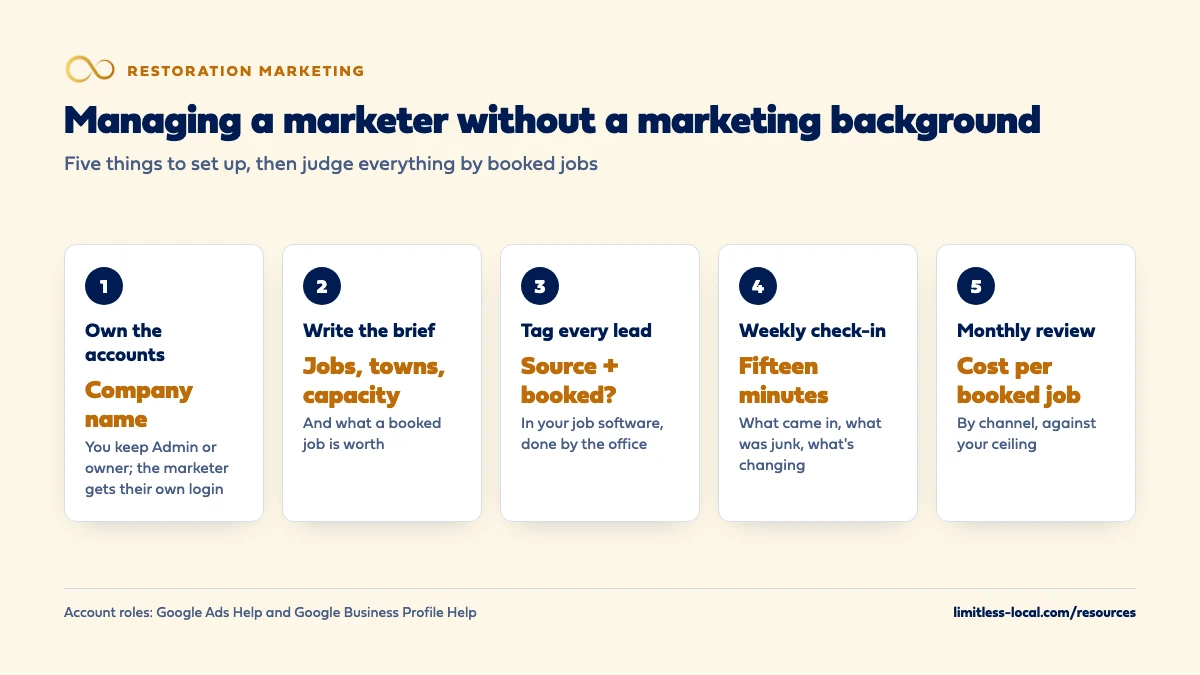
One page, in your own words. It’s the brief your marketer works from, and it’s what you’ll judge them against later.
- The jobs you want more of. Water extraction, burst pipes, sewage backups, mold, fire and smoke, rebuild. Put them in order, and say which ones you’d rather not chase.
- The towns you’ll really drive to. Especially at night. A service area drawn too wide fills the phone with calls you’ll turn down.
- Your hours and who answers. If you take emergency calls around the clock, say who picks up at night.
- Your capacity. How many new jobs a week the crews can handle in a normal week and in a storm week.
- What a booked job is worth. A rough average is enough. It sets the ceiling on what you can pay to get one.
- What you won’t say. No promises about insurance outcomes, no claims you can’t back up, no paying anyone for referrals.
Update it when something changes, like a new service or a second location.
Which accounts should be in my name before day one?
All of them. Your marketer gets their own login, at the level they need to do the job. You keep the top level. If the marketer leaves, the accounts, history and phone numbers stay with the company.
- Google Ads. Google’s page on access levels in Google Ads separates Admin from Standard: Standard users can edit campaigns, while only Admins can give account access, change access levels and unlink manager accounts. Keep Admin for yourself, and give your marketer Standard.
- Google Business Profile. A profile can have several owners but only one primary owner, and managers can do almost everything except add or remove users or remove the profile. Be the primary owner; make your marketer a manager. Google’s page on Business Profile owners and managers also notes each user needs their own Google Account, so nobody shares a password.
- Search Console and the website. In Search Console, only an owner can add users. Stay the owner; a full user can do the day-to-day work.
- Domain and hosting. Registered to the company, on a company email.
- Call tracking. The account and the numbers in the company’s name, with you as an administrator.
If any of these were set up on the marketer’s personal email, fix it now, while things are friendly. The skills to hire for in-house restoration marketing lists the full set of accounts an in-house setup needs.
How do I count calls and booked jobs without learning marketing software?
Use the software you already run the business on. Every new job in ServiceTitan, Jobber, Housecall Pro or whatever you use gets a lead source when it’s created: Google Ads, Local Services Ads, Google Maps, website, a plumber referral, a property manager, a repeat customer. At the end of the week, the list of booked jobs by source is your scorecard.
Your marketer’s job is to make that source trustworthy. That usually means a separate tracking number for each channel, so a call from the Google profile rings a different number from a call off an ad, and call recording, so someone can hear which calls were real emergencies and which were price shoppers or job seekers. Ask your marketer to set this up in the first weeks, and treat it as the first deliverable, before any new campaign.
The office tags the source, not the marketer, so nobody grades their own homework, and a lead only counts as booked once a job is on the schedule. Tracking which marketing brings booked restoration jobs walks through the setup in more detail.
What should a weekly check-in cover?
Three questions, fifteen minutes, same day every week:
- What came in? Calls and form leads by source, and how many booked.
- What was junk? Wrong service, out of area, price shoppers, sales calls. Your marketer needs this to filter it out of the ads.
- What’s changing this week, and why? One or two sentences, in plain words.
Your side is the business news: a crew out, a storm on the forecast, a service to pause. Your marketer can’t get that anywhere else.
If a check-in turns into a tour of charts, ask what it means for calls and booked jobs. How much time managing a restoration marketer takes sets out what a normal month should ask of you.
Curious what your marketing is actually booking?
Get a free visibility audit — no obligation, no sales pitch.
What should the monthly report show me?
One page you can read in five minutes. Ask for it a day before the meeting, with the same rows every month:
- Spend by channel: ad spend, tools, and anything paid to freelancers.
- Leads by channel, with junk taken out.
- Booked jobs by channel, from your job software, not from the marketer’s own count.
- Cost per booked job by channel: spend divided by booked jobs.
- What changed last month, and what it produced.
- What’s next: one or two changes, each with a reason.
Cost per booked job is the number that tells you whether to keep going. Clicks, impressions and website visits are fine for your marketer to watch, but they’re the means, not the result. If a report leads with them and buries booked jobs, ask for the order to flip. What a restoration company should count as a real conversion covers where to draw the line between a lead and a job.
How can I check the work when I can't read the dashboards?
You don’t have to take anyone’s word for it. A few checks need no marketing knowledge at all:
- Look at the change history. Google Ads keeps a record of changes to your account, campaigns and ad groups for the past two years, including who made them, so you can see whether anything is actually being worked on. Google explains how in About change history.
- Listen to a few calls. Pick five recorded calls from last week at random. Were they people with water on the floor in your towns, or something else?
- Search like a customer. From your phone, in a couple of your towns, search for water damage help. Note where you show up, and check again next month.
- Ask “show me.” When the marketer says something was fixed, ask to see it.
Google’s own advice on hiring an SEO suggests asking whether they’ll share all the changes they make, with the reasoning behind their recommendations. The same question works for an employee.
What should I expect in the first few months?
A ramp, not a switch. Ads can generate leads within days of launch, so if paid search has run for a month and nothing has booked, that’s worth a hard look. SEO typically takes 3-6 months to show meaningful organic growth, so a slow first quarter on the website and map results is normal, and a promise of fast rankings is a warning sign.
A fair first-quarter plan for a new in-house marketer looks something like this:
- First month: accounts in order, tracking numbers live, lead sources tagged in the job software, the Google profile cleaned up, and the existing ads checked for waste.
- Second month: the first full month of clean numbers, service pages improved for the jobs you want, and a routine for review requests after jobs.
- Third month: a cost per booked job you trust, and a decision on where the next dollar goes.
Judge the first month on setup and the third on booked jobs. A realistic restoration SEO timeline covers the slower channel month by month.

What are the signs my marketer is out of their depth?
None of these proves it on its own, but two or three together usually do:
- Months in, there’s still no tracking, or nobody can tell you which channel booked which job.
- Reports full of reach, clicks and followers, with nothing on calls or jobs.
- Accounts or tools set up on a personal email instead of the company’s.
- A promise of a #1 ranking. No one can guarantee a #1 ranking on Google.
- Trouble explaining last week’s changes and what they were meant to do.
- Ad spend running into the night during a freeze with nobody watching what it buys.
Raise it early, with the numbers in front of you. A new hire can often turn it around with clearer direction.
Which decisions should stay with me?
The business calls. Your marketer recommends; you decide:
- Budget. The monthly ceiling, and what happens to it in a storm week.
- Services and towns. What to push, what to pause, where to stop.
- Capacity. When the crews are full, you say so, and spend comes down.
- What the company says. Anything about insurance or response times has to be something you’ll stand behind.
- Big changes. A new website, a new channel or a switch in phone numbers needs your OK first.
Everything else, like keywords, bids, ad wording, posts and page edits, is the marketer’s job. Agree once which changes need your sign-off and which don’t, so you’re not approving every post.
When should I bring in outside help to check the work?
When the numbers stop making sense and you can’t tell why. A second opinion from someone who does this every day can tell you in an hour whether the problem is the ads, the website, the follow-up or the market. It’s worth doing at a few moments in particular:
- After three months, if cost per booked job hasn’t settled.
- Before a big spend increase, like a second location or a new service line.
- When the marketer asks for a budget or tool you can’t judge.
Some owners end up with a different setup altogether: the in-house person keeps the Google profile, reviews, photos and job tagging, and a specialist or agency handles the paid search. Whether an in-house coordinator should manage an outside agency looks at that structure.
Not sure which of these is costing you jobs?
A free visibility audit checks the Google profile, reviews, site and tracking, and shows what to fix first.
What's different about managing a marketer at a restoration company
Emergencies don’t keep office hours. A lot of the most valuable calls come at night and on weekends. Your marketer needs to know who answers then, because ads that ring an empty phone at midnight are wasted money.
Storm weeks change everything at once. A freeze or a big storm can fill the board in a day. Agree before the season what changes when it hits, and who decides.
Job values swing widely. A small cleanup and a whole-house water loss can both count as one booked job. When you can, add the job value to the source tag, so a channel that books bigger jobs gets credit for it.
A worked example: reading a month without marketing knowledge
These numbers are made up to show the math, not a benchmark for your market.
Your marketer’s report says Google Ads got 900 clicks last month and the website had a great month. You set that aside and pull three numbers instead. Ad spend was $4,200. The tracking numbers logged 52 calls from ads, and after removing junk and out-of-area calls, 30 were real leads. Your job software shows 12 of those booked.
Your cost per booked job from ads is $4,200 divided by 12, or $350. Say you’d decided, from your average job value, that you can pay up to $600 for a booked water job. At $350, the ads are working, and the question for next month is whether to raise the budget while the crews have room.
Now flip it: same spend, but only 4 booked jobs. That’s $1,050 per booked job, well over your ceiling. You don’t need to know what went wrong inside the account. Ask which of those 52 calls were junk, and what’s changing so fewer are.
Frequently asked questions
Should I take a marketing course before I hire?
Not unless you want to. A few hours with Google’s free SEO starter guide and a look around your own Google Ads and Business Profile accounts is plenty to follow the conversation. Your time is better spent on the brief and the lead tagging.
Can my office manager manage the marketer instead of me?
For the weekly check-in and the lead tagging, yes, and often better, because they see the calls. Keep the monthly budget decision and account ownership with you.
What if my marketer says results take a year?
For SEO, a long ramp is normal, but there should be signs along the way, like more calls from the Google profile and pages showing up for more searches. For ads, a year is far too long; ads can produce leads within days.
Should I let my marketer use their own tools and accounts?
Tools, fine. Accounts that hold your data, history or phone numbers, no. Those should be in the company’s name so they stay when the person leaves.
How do I set a fair cost-per-booked-job ceiling?
Start from what an average job brings in after the cost of doing it, and decide what share of that you’re willing to spend to win it. Revisit it after a few months of real numbers, and set different ceilings for water, mold and fire if their job values differ a lot.
Key takeaways
- You can manage a marketer without marketing experience by judging calls, booked jobs and cost per booked job.
- Keep every account in the company’s name, with you as Admin or primary owner and the marketer on their own login.
- Write a one-page brief: jobs, towns, hours, capacity and what a booked job is worth.
- Have the office tag each lead’s source and whether it booked, in the job software you already use.
- Expect ads to show signs within weeks and SEO over months; judge the first month on setup.
Want a second set of eyes on your setup?
We'll look at how you show up locally and where calls are leaking, then send you a plain-English breakdown.
More in this section
- What skills do I need to hire to run restoration marketing in-house?
- Should a restoration company hire an in-house marketer vs agency?
- Can one in-house person keep up with storm restoration marketing?
- How much of my time does managing a restoration marketer take?
- Can I switch my restoration marketing agency or go in-house?
Sources
- About access levels in your Google Ads account — Google Ads Help
- Manage your Business Profile owners & managers — Google Business Profile Help
- Managing owners, users, and permissions — Search Console Help
- About change history — Google Ads Help
- Do you need an SEO? — Google Search Central