
What is NAP and why does it matter for a pool builder’s marketing?
- What does NAP mean for a pool construction company's Google listings?
- What does NAP stand for, and what counts as part of it?
- Why does it matter if my details don't match everywhere?
- Does inconsistent NAP hurt my pool company's Google Maps ranking?
- What should my business name look like on every listing?
- What address should a pool builder use if I work from a yard or home?
- Which phone number should go on my pool company's listings?
- Where does a pool builder's NAP need to match?
- What happens to my NAP when my pool company moves or changes its number?
- How do I find and fix NAP mismatches myself?
- What's different about NAP for pool builders
- A worked example: a NAP cleanup for a pool builder
- Frequently asked questions
- Key takeaways
- More in this section
- Sources
The short version
- NAP is your business name, address and phone number, written the same way everywhere.
- Google and Bing pull business details from many sources, not only from you.
- A wrong number or old address costs you design consultations before it costs you rankings.
- Fix Google first, then your website, then Bing and Apple, then everything else.
For pool builders who keep hearing that their name, address and phone have to match everywhere, and want to know what that means, why it matters and what to fix first.
Get a free visibility audit · Book a growth call
What does NAP mean for a pool construction company's Google listings?
NAP stands for name, address and phone number: the three details that identify your pool company on Google, Bing, Apple Maps, Yelp, your website and every other listing. It matters because Google builds your profile from your own input plus your website, licensed data from other companies and edits from the public, so conflicting versions can put the wrong phone number or an old address in front of a homeowner. Google also says businesses with complete and accurate information are more likely to show up in local results. Keep one exact version of your name, address and phone, and fix the listings that disagree with it.
Syncing your name, address and phone across 50+ directories is part of our local SEO work, and a clean online presence is part of the foundation behind our pool builder marketing. For the rest of the setup, the pool builder marketing questions library goes question by question.
What does NAP stand for, and what counts as part of it?
NAP is short for name, address and phone number. Marketers use it to mean the core details that identify one business, wherever those details are published: your Google Business Profile, your website, other maps and directories, and industry listings.
In practice most people add a fourth item, your website address, because every listing has a field for it and it’s just as easy to get wrong after a redesign. For a pool builder that works out of a yard and hides its address, the “A” still matters: you still enter a real address when you set up each listing, and the town you’re based in still shows up in places like your website and your contracts.
NAP isn’t a Google term. Google’s help pages talk about complete and accurate business information, which is the useful way to think about it.
Why does it matter if my details don't match everywhere?
Because you aren’t the only source Google listens to. Google says the information in a Business Profile is compiled from a variety of sources: publicly available information such as your own website, licensed data from third parties, people who contribute facts such as addresses and phone numbers, and Google’s own interactions with the business. Source: Understand how Google sources & uses info in Business Profiles.
Bing says much the same. Bing Places is one of the primary sources for a Bing listing, but Bing pulls business information from multiple third-party data sources and merges them, and changes to basic details such as name, address and phone are only applied if they align with trusted external data. If inconsistencies are detected, changes may not publish or may be overwritten. Source: Bing Places for Business: Manage your listing.
So an old phone number sitting on a directory you forgot about isn’t harmless. It’s one of the inputs these platforms weigh when they decide what to show a homeowner.
Does inconsistent NAP hurt my pool company's Google Maps ranking?
Google doesn’t use the term, and it doesn’t publish a rule that says mismatched listings lower your rank. What it does say is that businesses with complete and accurate information are more likely to show up in local search results, and that if your business info isn’t accurate, your profile might not show up for relevant searches in your area. It also says local results are mainly based on relevance, distance and popularity, and that how well known a business is depends partly on how many websites link to it and how many reviews it has. Source: Tips to improve your local ranking on Google.
In our judgement, NAP consistency is basic hygiene, not a ranking lever. Fixing it won’t move you past a builder with three times your reviews. Leaving it broken, though, can undo other work, for example when a duplicate listing splits your reviews or an old address puts your pin in the wrong town. The bigger ranking picture is in how to get a pool company to rank in Google Maps.
What should my business name look like on every listing?
Use your real-world name, the one on your signs, trucks, contracts and invoices, and use it the same way everywhere. Google says your name should reflect your business’s real-world name as used consistently on your storefront, website and stationery, and that adding unnecessary information to the name isn’t permitted and could result in suspension of your profile. Its examples of what not to add include marketing taglines, phone numbers, service information and location information. Legal terms like LLC are only allowed if your real-world branding consistently shows them. Source: Guidelines for representing your business on Google.
For a pool builder, the common slip is a name that grows keywords on one site and not on another: “Smith Pools” on Google, “Smith Custom Pools & Spas, Inground Pool Builder” on a directory, “Smith Pools LLC” on the BBB. Pick the name that’s on your trucks and paperwork and match it. If you change your name, Google says you might need to verify the business again. Source: Edit your Business Profile.
Curious what your marketing is actually booking?
Get a free visibility audit — no obligation, no sales pitch.
What address should a pool builder use if I work from a yard or home?
That depends on whether homeowners come to you. Google’s guidelines say a service-area business, one that travels to customers, should hide its address, and gives the example of a plumber working from a home address clearing it from the profile. A hybrid business that serves customers at its address, such as a staffed design center with permanent signage, can show the address and also set a service area. P.O. boxes, mailboxes at remote locations and rented virtual offices aren’t eligible. Source: Guidelines for representing your business on Google.
Hiding the address on Google doesn’t mean it can be different elsewhere. Enter the same real address, formatted the same way, on every listing, and use each platform’s option to hide it if customers don’t visit. Bing, for example, lets you hide your address only when you provide the service areas you cover. Source: Bing Places for Business.
Choosing between the two setups, and which towns to list, is covered in how a pool builder should set up its Google service area.
Which phone number should go on my pool company's listings?
Your main business line, the same one everywhere it’s meant to be the main number. Google asks for a phone number that connects to your individual business location, a local number rather than a central call center line whenever possible, and a number under the business’s direct control. It doesn’t allow numbers that redirect people to someone other than the actual business, or premium-rate numbers. Source: Guidelines for representing your business on Google. Google also lets you enter up to 2 more phone numbers alongside your primary one. Source: Edit your Business Profile.
Call tracking is where this gets tricky. Tracking numbers are useful for seeing which channel made the phone ring, but in our judgement a tracking number should never quietly replace your main number across your listings, because then the number you’d be stuck with depends on a vendor. The safe setups are in whether a pool builder should use call tracking.
Where does a pool builder's NAP need to match?
Start with the places homeowners and the maps actually use, then work outward:
- Your Google Business Profile. The listing most homeowners see first.
- Your own website. Footer, contact page and any location pages. Google lists your official website as one of the places it gets business information.
- Bing Places and Apple Business. Bing Places is how you control your listing on Bing, and Apple says keeping Apple Business up to date helps customers discover you on Apple Maps.
- Yelp, the BBB, Facebook and Nextdoor. Places homeowners check a builder before they call.
- Industry and dealer listings. Manufacturer dealer locators, trade association member directories and home show exhibitor pages, which are easy to forget because someone else set them up.
- Everything with your old details. Old directory profiles, a previous website still online, an old Facebook page.
Which of these are worth your time is covered in which online listings a pool builder should have besides Google.

What happens to my NAP when my pool company moves or changes its number?
Each platform handles it differently, which is why moves and rebrands are the most common source of mismatched details.
- Google: if your business relocates, don’t create a new profile; update the existing profile with the new address. Source: Resolve duplicate profiles & ownership issues. Google says profile changes usually take about 10 minutes to show up, and in some cases up to 30 days. Source: Manage your business address. If you move after your profile is verified, Google says you must verify again. Source: Edit your Business Profile.
- Bing: the opposite. If your business changed its name or moved, Bing doesn’t recommend editing the old listing; it says to create a new listing with the new name and address and mark the old one as closed, to avoid data conflicts over time.
- Apple: customers can report problems from your place card, such as a location shown as open that turns out to be closed. Apple reviews these reports, can edit your listing’s name, status or hours, and emails your account when it does. Source: Maintain location information accuracy with Apple Business.
So after any move, work through each platform on its own terms.
How do I find and fix NAP mismatches myself?
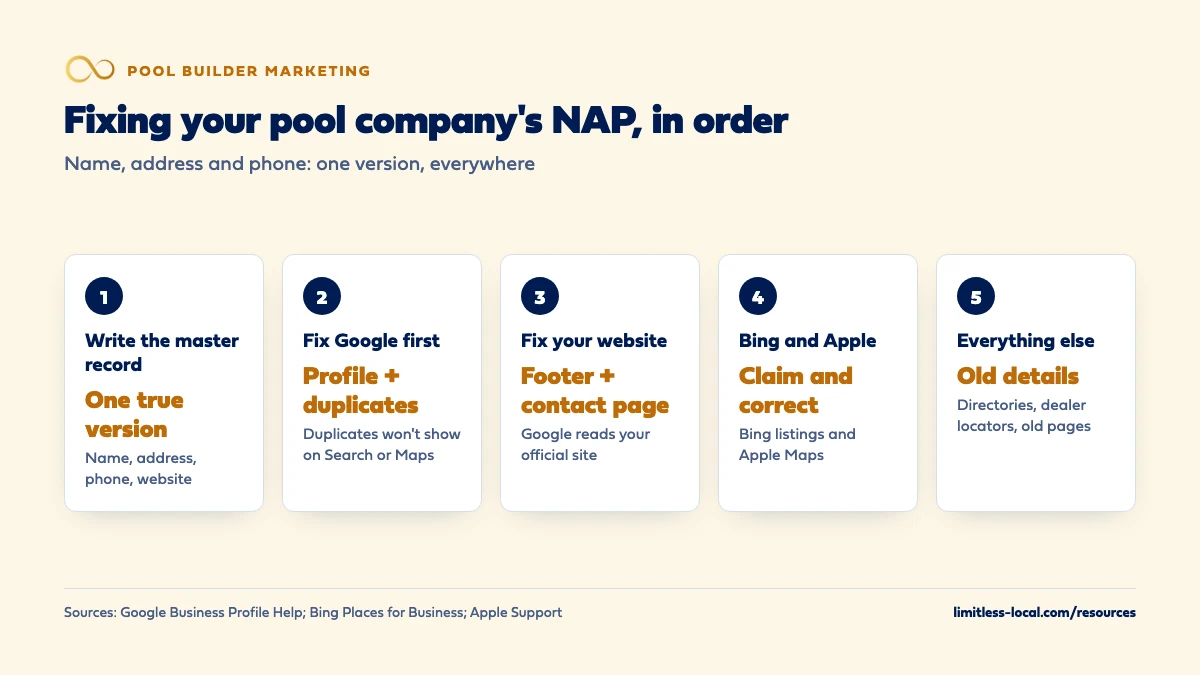
- Write the master record. Exact business name, street address with the suite written one way, main phone number, website address. Everyone who touches a listing works from this.
- Search for the old versions. Search your old phone numbers, old addresses and old name variations in quotes. Each hit is a listing to fix.
- Fix Google first. Check the name, address or service area, phone and website on your profile, and look for duplicates. Google says a profile considered a duplicate won’t show on Search or Maps, and that when duplicates are merged their reviews are combined but replies may be lost. Source: Resolve duplicate profiles & ownership issues.
- Fix your website. Footer, contact page, and any page that still lists an old number.
- Claim and correct Bing and Apple, then the directories that rank for your business name.
- Keep the logins. Record which email owns each listing, so the next fix doesn’t start with a password reset.
Duplicates are worth the extra care. Once listings are clean, the role proximity plays in where you show up in Maps is the next thing to understand.
What's different about NAP for pool builders
Homeowners look you up more than once. A pool is a months-long decision. In our judgement, a homeowner will often find you on Google, check you on Yelp or the BBB weeks later, and call from a number they saved off a yard sign. Every one of those touchpoints needs to reach the same phone.
Old numbers live on for years. Yard signs, truck wraps, warranty paperwork and home show booths carry your number long after you change it. Keep the old number forwarding until you’re confident the listings and print are updated.
Seasonal hours, not seasonal closures. Google says a seasonal business can mark itself temporarily closed in the off-season. A builder still selling winter consultations for spring builds usually shouldn’t, because the profile would tell homeowners you’re closed during the months they’re planning.
Builds and service under one roof. If you also run a pool service route, decide whether it’s the same business or a separate one before you list it. Google treats multiple profiles for the same business offering different services as duplicates.
Want to see where your company stands?
A free visibility audit shows where you show up on Google, Maps and AI answers, and what it's costing you in calls.
A worked example: a NAP cleanup for a pool builder
These details are made up to show the process, not a benchmark. A pool builder moved from a home office to a small yard two years ago and switched phone carriers at the same time. A search for the business name and the two phone numbers turns up 14 listings.
- Google: correct, but a second profile created by a former salesperson still shows the old number.
- Website: footer correct, but the contact page still lists the old number.
- Bing and Apple: both show the home address.
- Directories: 6 of the remaining listings carry the old number; 3 add “Inground Pools & Spas” to the name.
The order of work: merge or remove the duplicate Google profile first, fix the contact page the same day, then follow Bing’s process for a moved business, update Apple, and work through the 9 directory listings with the wrong number or name. The result to look for isn’t a jump in rank; it’s homeowners reaching the right phone every time, which you can check in your call logs.
Frequently asked questions
Does NAP include my website address?
Strictly, NAP is name, address and phone, but most listings also ask for your website, and it should match too. After a redesign, check that every listing points to your current domain and not an old page.
Does it matter if one listing says "Rd" and another says "Road"?
Google doesn’t say. In our judgement, small formatting differences matter far less than a wrong phone number, an old address or a different business name, so fix those first and tidy the formatting when you’re editing a listing anyway.
Will a call tracking number on my Google profile break my NAP?
It can if it replaces your main number everywhere. Google allows a primary number plus up to 2 more on your profile, so the usual setup is to keep your main number listed and add the tracking number carefully. The details are in our call tracking guide for pool builders.
How long does it take for a corrected listing to update?
On Google, profile changes usually take about 10 minutes to show up, and in some cases up to 30 days. Bing applies changes once the listing is verified and its next publish cycle is complete; Bing says publish cycles typically take 7-12 days in North America. Directories vary.
Should a pool builder put a home address on listings?
Not publicly. If homeowners don’t visit you, you’re a service-area business: enter the real address where each platform asks for it, then hide it and list your service area instead.
Does NAP matter for showing up in AI search?
Nobody outside the AI companies knows exactly which sources each assistant reads. In our judgement, consistent details across the listings and your website can only help an assistant describe you correctly. More on that in how a pool builder can show up in AI search results.
Key takeaways
- NAP is your business name, address and phone number, and it should read the same on every listing.
- Google and Bing build listings from many sources, so an old detail on a forgotten directory can resurface.
- Google says complete, accurate information makes a profile more likely to show for local searches; consistency is hygiene, not a ranking shortcut.
- Use the name on your trucks and contracts, a number you control, and hide your address if homeowners don’t visit.
- After a move or number change, handle each platform its own way: Google wants the old profile updated, Bing wants a new listing.
Not sure what's working right now?
Start with a free visibility audit: rankings, Google profile, reviews and tracking, checked against your service area.
More in this section
- Does a pool builder need a pool-specific or general marketing agency?
- What should a pool builder ask before hiring a marketing agency?
- How should a pool builder prepare marketing before peak season?
- How do I grow a pool construction business with marketing?
- What are the biggest marketing mistakes pool companies make?
Sources
- Understand how Google sources & uses info in Business Profiles & local search results — Google Business Profile Help
- Guidelines for representing your business on Google — Google Business Profile Help
- Tips to improve your local ranking on Google — Google Business Profile Help
- Edit your Business Profile — Google Business Profile Help
- Manage your business address — Google Business Profile Help
- Resolve duplicate profiles & ownership issues — Google Business Profile Help
- Bing Places for Business: Manage your listing — Bing Places for Business
- Maintain location information accuracy with Apple Business — Apple Support