
Which electrical services can I advertise on Local Services Ads?

- Which job types should an electrician turn on in Local Services Ads?
- How does Google decide which electrical jobs my ad shows for?
- Where do I see the electrical job types I can turn on?
- Is Electricians the only category an electrical contractor can use?
- Can I advertise solar, battery backup or EV charger work?
- Which job types should an electrician leave off?
- Google says to turn on every job type. Should I?
- Should I stay in broad search for "electrician near me"?
- Can I pay differently for service calls and bigger jobs?
- Does my Google Business Profile category limit what I can advertise?
- How do I tell which job types are worth keeping?
- What's different about LSA job types for electricians
- A worked example: trimming one job type
- Frequently asked questions
- Key takeaways
- More in this section
- Sources
The short version
- Your ads show for the Electricians job types you switch on, not for keywords.
- General "electrician near me" searches come through broad search, which is on by default.
- Solar, home security and home theater are separate Google categories with their own checks.
- Leads for job types you don't service aren't credited, so leave off work you don't want.
For electrical contractors deciding which jobs to switch on in Local Services Ads, which to leave off, and what falls outside the Electricians category.
Get a free visibility audit · Book a growth call
Which job types should an electrician turn on in Local Services Ads?
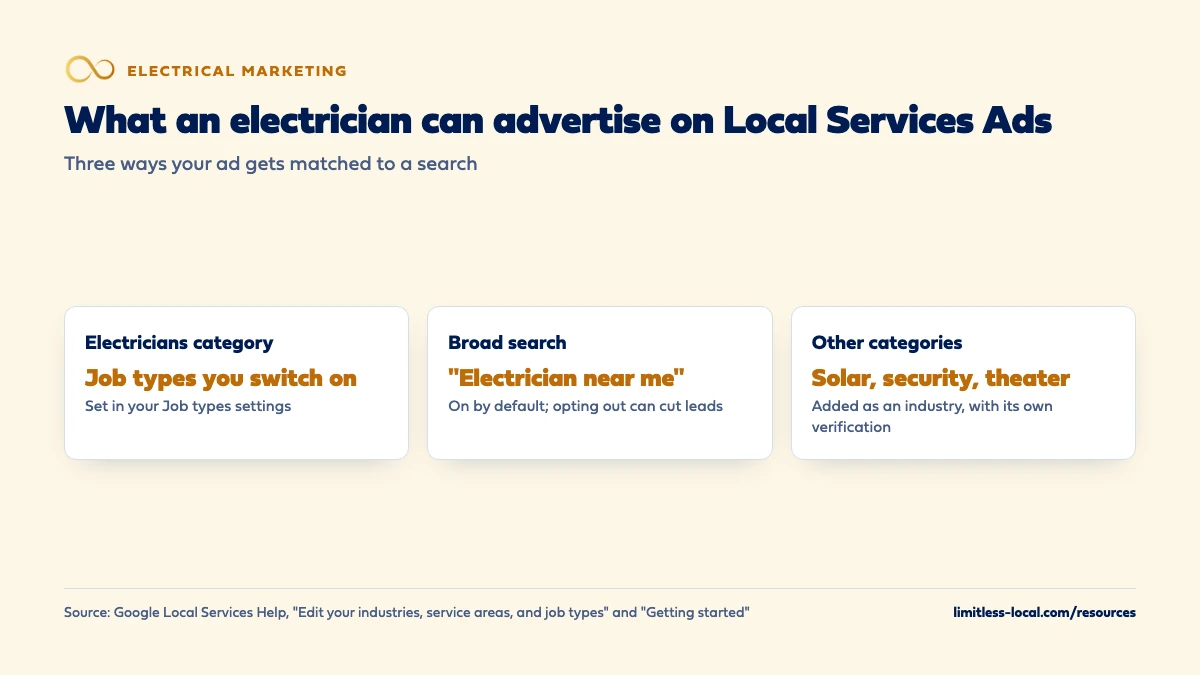
On Local Services Ads, an electrician advertises the job types listed under Google’s Electricians category, which you toggle on or off in your account’s job types settings, plus general searches like “electrician near me” unless you opt out of broad search. Related work such as solar installation, home security or home theater sits in separate Google categories, each added as its own industry with its own verification. Turn on only the jobs you want and can staff, because Google no longer credits leads for job types you don’t service.
Choosing job types is really a decision about which work you want more of, and that’s how we set up Local Services Ads for local service businesses: around the jobs and towns that book profitably, measured by cost per booked job. LSA management is part of the Growth and Scale tiers of our electrical contractor marketing, and the rest of the electrical marketing questions library goes question by question.
How does Google decide which electrical jobs my ad shows for?
Not by keywords. Local Services Ads are keywordless: Google targets them using the service categories, job types and service areas you choose, and that stays true after the move into Google Ads as Performance Max campaigns with pay-per-lead goals.
Within that targeting, Google’s ranking weighs how relevant you are to each search: the service or job the customer searched for, the time and location of the search, and how well the services you provide and your business bio match. Then it weighs responsiveness and profile quality, such as your reviews and verification.
So for an electrician, the job types you switch on decide which searches you can appear for at all, and your profile decides how often you win them. If you want to know whether LSAs are worth running in the first place, whether LSAs are worth it for electricians covers that. Sources: Local Services Ads transition to Performance Max campaigns with pay-per-lead goals and About ad rankings.
Where do I see the electrical job types I can turn on?
In your account. In the Local Services dashboard, go to Profile & Budget, open the Job types card, expand the industry and toggle on the job types that apply to your business. After your account moves into Google Ads, service types, locations and business categories live under Settings on the Campaigns page, and Google says your existing job types and categories transfer over automatically.
We couldn’t find a public Google help page that lists every job type under Electricians, so we won’t print one from memory. The list in your own account is the one that counts, and it’s worth reading line by line when you set up, because each line is a kind of search you’ll pay for.
Google’s advice is to update these settings whenever your location or services change. If you stop taking a kind of work, switch it off the same week. Sources: Edit your industries, service areas, and job types and Local Services Ads transition to Performance Max campaigns with pay-per-lead goals.
Is Electricians the only category an electrical contractor can use?
No. Google’s US category list for Local Services Ads includes Electricians, and it also lists separate categories that overlap with work some electrical shops do:
- Solar energy contractor: described as solar system installation, repair and monitoring.
- Home security: setting up and inspecting security hardware such as locks, alarms, cameras and motion detectors.
- Home theater: delivering and installing home theaters and theater parts.
- General contractor, Handyman and Appliance repair, which some shops also qualify for.
To add one, you search for the new industry in the Job types card, toggle on at least one job type and save. Google then prompts you to upload the extra verification documents that industry needs. Each of these categories has its own entry on Google’s requirements page, with background, registration, insurance and state license checks marked “select users only” and licenses “where applicable by local law”. How electricians get verified covers that process. Sources: Getting started with Local Services Ads, Edit your industries, service areas, and job types and Business screening and verification requirements.
Can I advertise solar, battery backup or EV charger work?
Solar installation has its own Google category, Solar energy contractor, so if solar installs are a real part of your business, that’s the category to add, with its own verification. Whether your licenses cover that work in your state is something to confirm locally; we won’t state any state’s rule.
For EV chargers, generators and battery backup, check the job types under Electricians in your own account to see what’s offered, and don’t assume a job type exists until you see it there. If a job you want more of isn’t in the list, Local Services Ads may not be the tool for it, and search ads, where you choose the keywords, are the usual alternative. That’s our judgement from how each is targeted.
For the marketing side of that work, see marketing battery backup and solar tie-ins. Sources: Getting started with Local Services Ads and Business screening and verification requirements.
Curious what your marketing is actually booking?
Get a free visibility audit — no obligation, no sales pitch.
Which job types should an electrician leave off?
Anything you don’t do, won’t drive to, or can’t staff. The reason is money: Google no longer gives credits for leads marked “job type not serviced” or “geo not serviced”. If you leave on a job type you never take, those leads are yours to pay for. Google’s own fix for unwanted leads is to refine your service areas, job types and categories, and it’s candid that narrowing them can mean fewer leads.
In our judgement, an electrical shop should also think twice about job types that are real work but a poor fit for paid leads right now, such as:
- Small jobs that don’t cover the cost of the lead plus a truck roll in your market.
- Work only one of your electricians is qualified or equipped for, if that person is booked weeks out.
- Commercial job types, if your crew is set up for homes and the lead will only turn into a referral.
You can switch job types back on any time, so start with what you’re sure you want. Sources: About Automated Local Services Ads lead credits and How leads work.
Google says to turn on every job type. Should I?
Read the advice closely. Google’s performance page says to select all job types you perform and to set service areas broadly, such as a whole county rather than specific postal codes. More job types and wider areas usually mean more leads, and that’s what Google is optimizing for.
The catch is the word “perform”. Turning on job types you do but don’t want, or drawing a county-wide area your trucks won’t cover in a reasonable time, buys leads you’ll pay for and can’t credit back. In our view, a sound middle ground for an electrician is to turn on every job type you’d happily take this month, set the area to the towns you’ll actually drive to, and widen either one only when the calendar has room.
Revisit the settings when the schedule changes. A shop that’s booked solid on panel upgrades for six weeks doesn’t need more panel leads this week. Sources: Improve your Local Services Ads performance and About Automated Local Services Ads lead credits.
Should I stay in broad search for "electrician near me"?
Google opts every advertiser into its industry’s general category by default, called broad search. That means your ad can show on searches like “electrician near me” that don’t name a specific job. You can opt out under Profile & Budget, in the Settings card.
Google says opting out may reduce your leads, and that it can make sense if you only want customers searching for specific services. Two details matter:
- Leads from broad search show a dash (“-“) in the Job Type column of your leads table, and you can filter spend and charged leads by Category or Direct Business in Reports. That’s how you see what broad search is costing you.
- If your account covers more than one industry, say Electricians and Home security, opting out applies to all of them.
In our judgement, most electricians who take service calls should stay in, because “electrician near me” is often how an urgent customer searches. A shop that only wants project work has a better case to opt out, and the reports will show whether broad leads book. Source: Edit your industries, service areas, and job types.
Can I pay differently for service calls and bigger jobs?
Not inside one campaign after the move into Google Ads. Google says lead prices vary with your location, the job type, the type of lead and your bidding, but with manual bidding gone there’s no price per job type for you to set. Manual bidding isn’t supported in Google Ads, and neither is vertical-level Target CPA: a single campaign-level target applies to all the categories in a campaign.
Google’s answer for different bidding by business category is separate campaigns for each vertical, its example being separate campaigns for plumbing and HVAC. For an electrical shop that also runs a solar or home security category, that could mean a campaign per category. Within the Electricians category itself, the lever you have is which job types are on.
If you need tighter control over which specific jobs you pay for, search ads let you pick keywords and set budgets by job; running Google Ads and LSAs together covers how the two fit. Sources: How leads work and Local Services Ads transition to Performance Max campaigns with pay-per-lead goals.
Does my Google Business Profile category limit what I can advertise?
Partly, after the move into Google Ads. Your business name, address and hours sync one way from your Google Business Profile into Google Ads. Google says that service areas, ad schedules and business categories in your campaign settings work independently of your profile after migration, so you can adjust ad targeting without changing your organic listing.
Changing your primary category is a different matter: Google says significant updates to your business name, storefront address or primary category require verification, and your campaign may pause for the review, which typically takes 24 to 48 hours. If you’re thinking about changing your primary category from electrician to something broader, plan for that pause.
Which Google Business Profile categories an electrician should choose covers the profile side. Source: Local Services Ads transition to Performance Max campaigns with pay-per-lead goals.
How do I tell which job types are worth keeping?
Use the job type on each lead. The leads table shows the job type a customer searched for, or a dash for broad search, so you can count charged leads by job type each month. Then add the step Google can’t do for you: mark which of those leads booked, and what the job was worth.
A simple monthly check:
- Export or list last month’s charged leads with their job type.
- Mark each one booked or not, from your job software.
- For each job type, divide what its leads cost by the jobs it booked.
- Switch off job types that cost more per booked job than the work is worth to you, and widen the ones that pay.
Google says lead prices vary by job type, so treat the averages as estimates unless your reports split cost by job type. Tracking which marketing brings real jobs covers the setup in your job software. Sources: Edit your industries, service areas, and job types and How leads work.
Not sure which of these is costing you jobs?
A free visibility audit checks the Google profile, reviews, site and tracking, and shows what to fix first.
What's different about LSA job types for electricians
Your work spans categories. In our view, electrical work overlaps with more separate Google categories than most trades: solar, home security and home theater each have their own category and verification. Decide deliberately which of them you want to be found for.
Service calls and projects arrive through the same ad. A troubleshooting call and a larger upgrade can both come from the Electricians category. In our judgement, job types are the main control an electrician has over that mix inside Local Services Ads, so they deserve more attention than they usually get at setup.
Urgent searches are general. People with a power problem often search for an electrician, not a job name. That’s broad search, and it’s why most shops that take service calls keep it on.
A worked example: trimming one job type
These numbers are made up to show the math, not a benchmark for your market, and they assume every lead cost the same, which Google says isn’t the case in practice. Say an electrician pays for 30 Local Services leads in a month at an average of $60, so $1,800.
- 14 leads come in on job types the shop wants, and 9 book.
- 10 come from broad search (a dash in the Job Type column), and 3 book.
- 6 come in on a job type the shop rarely takes, and none book.
That’s 12 booked jobs for $1,800, or $150 per booked job. The 6 leads on the unwanted job type cost $360 and booked nothing, and Google won’t credit them, because job-type-not-serviced credits are gone. Switch that job type off, and if everything else holds, the same 12 jobs cost $1,440, or $120 each.
Fewer leads, cheaper booked jobs. The broad-search leads booked at a lower rate than the specific job types here, but they still booked, so this shop would keep broad search on and recheck it next month.
On our side, Local Services Ads management is part of the Growth package at $4,500 a month, and ad spend is paid to Google separately.
Frequently asked questions
Can I add a new industry to my existing Local Services account?
Yes. Search for the industry in the Job types card, toggle on at least one job type and save. Google then asks you to upload the verification documents that industry requires.
Will turning off a job type lower my ranking?
Google doesn’t say so. It does say narrowing your service areas, job types and categories can reduce the number of leads you receive.
Do I get money back for a lead about work I don't do?
No. Google no longer supports credits for “job type not serviced” or “geo not serviced” leads, which is why your settings matter.
Do my job types carry over when my account moves to Google Ads?
Yes. Google says targeted locations, service types, business categories, budget limits, ad schedule and photos transfer automatically.
Can I see how much broad search leads cost me?
Yes. In Reports, the Total lead spend and Charged leads cards can be filtered by Category (broad search) or Direct Business.
Key takeaways
- Local Services Ads target by category, job type and area, not keywords.
- Electricians pick job types inside the Electricians category; the list is in your own account.
- Solar, home security and home theater are separate categories, each with its own verification.
- Leads for job types you don’t service aren’t credited, so switch off work you don’t want.
- Broad search covers “electrician near me”; opting out cuts leads and applies to every industry in the account.
- Keep or cut job types on cost per booked job, checked monthly.
Want a second set of eyes on your setup?
We'll look at how you show up locally and where calls are leaking, then send you a plain-English breakdown.
More in this section
- Are Google Local Services Ads worth it for electricians?
- How do electricians get verified for Google Local Services Ads?
- What Google Ads campaigns work best for electricians?
- Which keywords should an electrician bid on in Google Ads?
- Should my electrical company start with LSAs, Google Ads or SEO?
Sources
- Edit your industries, service areas, and job types — Google Local Services Help
- Getting started with Local Services Ads – United States — Google Local Services Help
- Business screening and verification requirements – United States — Google Local Services Help
- About Automated Local Services Ads lead credits — Google Local Services Help
- Improve your Local Services Ads performance — Google Local Services Help
- How leads work — Google Local Services Help
- About ad rankings — Google Local Services Help
- Local Services Ads transition to Performance Max campaigns with pay-per-lead goals — Google Ads Help