
Will Google AI Overviews take calls from my plumbing company?

- Could Google's AI Overviews cut the calls my plumbing company gets from search?
- What is a Google AI Overview, in plain terms?
- Which plumbing searches are likely to show an AI Overview?
- Will AI Overviews take my emergency plumbing calls?
- Could an AI Overview talk a homeowner out of calling a plumber?
- Which pages on my plumbing website are most at risk of losing visits?
- How do I find out whether AI Overviews are costing me calls?
- How does a plumbing company get linked inside an AI Overview?
- Do my plumbing Google Ads show up in AI Overviews?
- Should I block Google from using my pages in AI Overviews?
- What should my plumbing website say so AI answers get my company right?
- What's different about AI Overviews for plumbing companies
- A worked example: a how-to page and an emergency page, a year apart
- Frequently asked questions
- Key takeaways
- More in this section
- Sources
The short version
- AI Overviews show on some searches, mostly questions, and often don't appear at all.
- Urgent searches for a plumber still lead to local results, ads and a phone number, in our judgement.
- How-to pages, like fixing a running toilet, are the ones most likely to lose visits.
- Search Console counts AI Overview clicks with the rest of your Web search traffic, so measure calls, not clicks.
For plumbing owners who keep seeing an AI-written answer at the top of Google and want to know whether it costs them service calls, and what to watch.
Get a free visibility audit · Book a growth call
Could Google's AI Overviews cut the calls my plumbing company gets from search?
AI Overviews are unlikely to take your emergency calls, but they can take some visits from homeowners researching a fix. Google shows these AI-written summaries only when its systems decide generative AI adds something, such as complex questions that draw on several sources, and many searches don’t show one. In our judgement, a homeowner with water on the floor still needs a plumber, and Google says local results are mainly based on relevance, distance and popularity, so the bigger risk is to how-to and research pages. Judge the effect by calls and booked jobs from search, not website visits alone.
We treat AI answers as one of three places a plumbing company needs to show up, next to the regular Google results and the Maps 3-pack, and all three come from the same local SEO work. We won’t promise Google will quote your company in an AI Overview, because nobody honestly can. Our plumbing marketing page shows how that work fits with ads and follow-up, judged on booked service calls, and the rest of the plumbing marketing questions library goes question by question.
What is a Google AI Overview, in plain terms?
It’s the block of AI-written text Google puts at the top of some search results: a short answer with links to the pages it drew on. Google describes it as an AI-generated snapshot with key information and links to dig deeper, shown when its systems decide generative AI can be especially helpful, for example when someone wants to understand information from a range of sources (Google Search Help).
Two points from Google matter for a plumbing owner:
- It doesn’t show on every search. Google’s guide for site owners says AI Overviews are only shown when its systems decide they add something to classic Search, and that they often don’t trigger (Google Search Central).
- It can be wrong. Google’s help page says AI Overviews can and will make mistakes, and tells people to check important information in more than one place.
Which plumbing searches are likely to show an AI Overview?
Google gives a general rule, not a list. Its site-owner guide says AI Overviews help people get the gist of a complicated topic or question, and Google Ads Help says they trigger on queries that generally have no one right answer, or where it helps to pull information from several web pages (Google Ads Help).
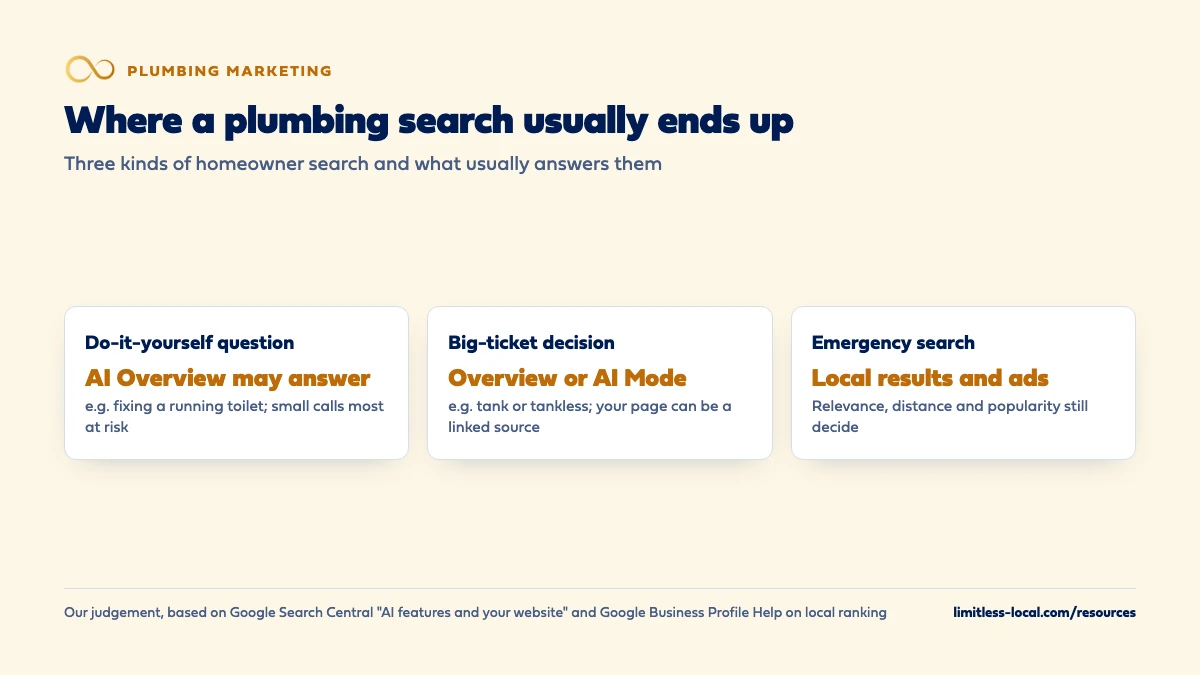
Our reading is that, for plumbing, this points at three kinds of search:
- Do-it-yourself questions: how to fix a running toilet, how to relight a water heater pilot, how to clear a slow kitchen drain.
- Big-ticket decisions: tank or tankless water heater, whether a house needs a repipe, what a sewer camera inspection shows.
- “Is this serious?” questions: why the water heater is leaking from the bottom, what a sewer smell in the basement means.
That’s judgement, not a Google rule, and it changes. The way to know is to look: from a phone in your service area, type the questions your customers ask your office and note which ones show an overview.
Will AI Overviews take my emergency plumbing calls?
In our judgement, mostly not. A homeowner with a burst pipe or a backed-up sewer line isn’t looking for a summary; they’re looking for someone who can be at the house tonight. Those searches lean on local results, and Google says local results are mainly based on relevance, distance and popularity, and that how well-known a business is depends partly on things like how many reviews you have and how many websites link to it. Google also says there’s no way to request or pay for a better local ranking (Google Business Profile Help).
So the work that wins the emergency call hasn’t changed: an accurate Business Profile, steady reviews, and a phone that gets picked up. Getting into the Google map pack covers the local side, and why the phone suddenly stopped ringing walks through the other usual causes before you blame AI.
Could an AI Overview talk a homeowner out of calling a plumber?
Sometimes, yes, and plumbing is more exposed to that than most trades because so many small jobs have a do-it-yourself answer. A homeowner who reads a clear summary on replacing a toilet flapper may never call anyone. In our judgement those were rarely the calls that kept your trucks busy: a flapper is a small ticket, and the homeowner who could do it was always going to try.
The other side is just as real. Many of those homeowners try the fix and it doesn’t work, or they find out the problem is bigger than the summary suggested. When they come back to search, they’re usually searching for a company. A page on your site that explains when a slow drain is a sewer line problem, in your words and with your phone number on it, is the kind of page that can be linked when they do.
Curious what your marketing is actually booking?
Get a free visibility audit — no obligation, no sales pitch.
Which pages on my plumbing website are most at risk of losing visits?
In our judgement, the blog posts and how-to articles that answer general questions, because those are the questions an overview can answer on the results page. Your service pages, emergency page and city pages are a different case: they serve people looking for a company, and a summary doesn’t replace a company.
That doesn’t mean deleting your how-to content. Google says people who click through from results pages with AI Overviews are higher quality visitors who are more likely to spend more time on the site, and it tells site owners to look at conversions, not only clicks (Google Search Central Blog). For a plumber, the conversion is a call or a booking. A how-to page with fewer visits but the same calls hasn’t cost you work.
How do I find out whether AI Overviews are costing me calls?
You can’t filter AI Overview traffic out on its own. Google says sites that appear in AI Overviews and AI Mode are counted in Search Console’s Performance report under the Web search type, together with everything else. Search Console’s help page explains the counting (Search Console Help):
- Clicking a link to your page inside an AI Overview counts as a click.
- Standard impression rules apply.
- An AI Overview takes up a single position on the results page, and every link inside it gets that same position.
A practical check, in this order:
- In Search Console, compare each page with the same months last year, not last month, since plumbing calls swing with the weather.
- Look for question-style searches where impressions held or rose while clicks fell.
- Check whether the pages behind those searches produced fewer phone calls, using call tracking.
- Then check what matters most: did booked jobs from search fall?
If you can’t answer the last two, fix that first. Tracking which marketing books jobs covers the call tracking and job matching that makes this check possible.
How does a plumbing company get linked inside an AI Overview?
The same way it gets into regular search results. Google says a page only needs to be indexed and eligible to be shown in Google Search with a snippet to be a supporting link in AI Overviews or AI Mode, and that there are no additional technical requirements (Google Search Central). Google adds that specific optimization isn’t required and that SEO fundamentals still apply, including:
- Letting Google crawl your site, in robots.txt and in any hosting or firewall settings.
- Linking your pages to each other so they’re easy to find.
- Putting important information in text, not only in images or videos.
- Keeping any structured data matching what the page actually says.
- Keeping your Business Profile information up to date.
Google also says both may use “query fan-out”, running several related searches to build one answer, so a narrow page, say on why a water heater makes popping noises, may get linked even when a broader page outranks it. Treat that as possible, not promised. The step-by-step for ChatGPT and other assistants as well as Google is in getting recommended by ChatGPT, and like the rest of SEO it builds over months.

Do my plumbing Google Ads show up in AI Overviews?
They can. Google Ads Help says ads are eligible to show above, below or within AI Overviews (Google Ads Help):
- Above and below, ads run through the normal auction, and ads in existing Search and Performance Max campaigns are already eligible.
- Inside the overview, text ads from existing Search and Performance Max campaigns can show, currently in English in the U.S. and some other countries. Google matches them to both the search and the content of the overview.
- You can’t aim for it or opt out, and Google Ads doesn’t break out reporting for ads shown inside an overview; they’re reported as top ads.
The catch is targeting. Google says AI Overviews trigger on complex, answer-seeking searches that advertisers are less likely to target with keywords, so it requires broad match, the keywordless targeting in AI Max for Search, Performance Max, Shopping or Dynamic Search Ads to match ads into them. For a plumbing account, in our judgement, loosening keywords to chase this placement is a real trade-off: it can reach the homeowner whose drain fix failed, and it can also pay for clicks from people who want a how-to video. If you test it, watch the search terms report closely and keep negative keywords that stop wasted spend up to date.
Should I block Google from using my pages in AI Overviews?
You can limit it, but not without touching your regular listings. Google says robots.txt rules for Googlebot control crawling for Search, and that the way to limit what’s shown is the snippet controls (Google Search Central):
- nosnippet stops a text snippet showing for the page anywhere in Search, including AI Overviews and AI Mode.
- max-snippet caps how much text can be shown.
- data-nosnippet hides one part of a page.
- noindex takes the page out of Search entirely.
In our judgement, a plumbing company should almost never do this. The same control that keeps your text out of an overview strips the description from your normal search listing, and you want homeowners to see what you do and where you work. If one part of a page shouldn’t be summarized out of context, such as a price list with conditions attached, data-nosnippet on that part is the lighter tool.
What should my plumbing website say so AI answers get my company right?
An overview can only repeat what it can find. Google’s AI features guide asks site owners to make sure important content is available as text and that Business Profile information is up to date, so put these in plain words on your pages:
- The services you do, each on its own page, and the ones you don’t.
- The towns and areas you serve.
- Your hours, and whether someone answers after hours and on weekends.
- Your license and insurance details, written as text rather than only in an image.
Your emergency page carries most of this; what an emergency plumbing page should include covers it. If an overview still gets something wrong, Google lets searchers use the thumbs-down button and Report a problem at the bottom of the overview. Open the pages it cites and correct anything out of date there, starting with your own Business Profile.
Want to see where your company stands?
A free visibility audit shows where you show up on Google, Maps and AI answers, and what it's costing you in calls.
What's different about AI Overviews for plumbing companies
Emergency work and research behave differently. A flooded basement at night is a search for a company. A homeowner reading about water heater sediment on a Sunday afternoon is doing research. In our judgement AI Overviews mostly touch the second kind, which is why your emergency page, Business Profile and phone coverage still decide the most valuable calls.
Do-it-yourself culture cuts both ways. Plumbing has more small fixes with a how-to answer than most trades, so some small calls will be answered by a summary. The same homeowners call when the fix fails, and that call is often bigger than the one you lost.
Big tickets get researched. Tankless conversions, repipes and sewer line replacements are the multi-step decisions Google says AI Mode is built for, where people ask follow-up questions and compare options. A page that explains those trade-offs honestly can be linked in the answer.
A worked example: a how-to page and an emergency page, a year apart
These numbers are made up to show the method, not a benchmark. Say your site has a how-to post on fixing a running toilet. Last January, Search Console showed it with 1,200 impressions and 48 clicks, a click rate of 4%. This January it shows 1,500 impressions and 30 clicks, a click rate of 2%. More people saw the page and fewer clicked. An AI Overview answering the question on the results page is one possible reason; a change in your listing or a new competing page are others, and Search Console won’t tell you which.
Now go one step further. Call tracking shows the how-to post produced 2 calls last January and 2 this January. Your emergency plumbing page produced 41 calls last January and 43 this January, and the share of those that booked didn’t change. Fewer visits to a how-to page, the same calls, the same booked jobs: in this example, AI Overviews cost you traffic, not work.
For context on what this work costs, our Essentials package is $3,500 a month and includes a content sprint of up to 10 pages, call, web and form tracking, and a monthly report; ad spend is paid to Google separately. Whether that’s worth it for your shop is what a free visibility audit is for.
Frequently asked questions
Do I need to sign up for anything to appear in AI Overviews?
No. Google says there are no requirements beyond a page being indexed and eligible to show a snippet in regular Search.
Is AI Mode the same thing as an AI Overview?
No. AI Mode is a separate, conversational search where people can ask follow-up questions. Google says it splits a question into subtopics and searches each one, and the links it shows can differ from an AI Overview’s.
Can homeowners turn AI Overviews off?
Not entirely. Google calls them a core Search feature, but searchers can choose the Web filter after searching to see only text links.
Do AI Overviews show up in my Google Business Profile performance numbers?
Google’s documentation doesn’t say they do. Its AI features guide says appearances in AI Overviews are counted in Search Console’s Performance report, under the Web search type.
Will AI Overviews replace Local Services Ads?
Nothing in Google’s documentation says so. Local Services Ads are moving into Google Ads as Performance Max campaigns with pay-per-lead goals, and Google says those ads will keep showing on Google Search and Google Maps in the same ad positions as before.
Key takeaways
- AI Overviews show on some searches, mostly questions, and Google says they often don’t appear.
- Emergency calls still depend on local results, ads, reviews and a phone that gets answered, in our judgement.
- How-to and research pages are the most likely to lose visits; judge them by calls, not clicks.
- There’s no special sign-up: indexed pages that are eligible for a snippet can be linked.
- Blocking snippets also weakens your regular listing, so most plumbing companies shouldn’t.
Not sure what's working right now?
Start with a free visibility audit: rankings, Google profile, reviews and tracking, checked against your service area.
More in this section
- Why are my plumbing Google Ads getting clicks but no calls?
- Are Google Local Services Ads worth it for plumbers?
- Will call tracking numbers hurt my plumbing Google rankings?
- Are LSAs or Google Ads better for emergency plumbing calls?
- How long does plumbing SEO take to bring in calls?
Sources
- AI features and your website — Google Search Central
- Find information in faster & easier ways with AI Overviews in Google Search — Google Search Help
- Tips to improve your local ranking on Google — Google Business Profile Help
- Top ways to ensure your content performs well in Google's AI experiences on Search — Google Search Central Blog
- What are impressions, position, and clicks? — Search Console Help
- About ads and AI Overviews — Google Ads Help
- Robots meta tag, data-nosnippet, and X-Robots-Tag specifications — Google Search Central
- Local Services Ads transition to Performance Max campaigns with pay-per-lead goals — Google Ads Help