
How do I filter junk leads and price shoppers from restoration ads?

- How can a restoration company cut junk leads and price shoppers without losing real jobs?
- What counts as a junk lead for a restoration company?
- Why can't I just add more negative keywords?
- How do I stop paying for leads outside my service area?
- How do I keep DIYers and wrong-service callers away?
- Should I show prices to filter out price shoppers?
- What should my team ask on the first call?
- How do I tag junk calls so I can see where they come from?
- Are short calls a sign of junk leads?
- Can I get credit for junk leads from Local Services Ads?
- How do I filter junk without losing volume?
- What's different about junk leads for restoration
- A worked example: what filtering does to cost per booked job
- Frequently asked questions
- Key takeaways
- More in this section
- Sources
The short version
- Fix who sees you first: negative keywords, service area and job types.
- Let ads and pages say what you do, where you go and what happens on the first visit.
- Screen every first call with the same four questions.
- Judge each change by booked jobs per source, not by lead count.
For restoration owners whose phones ring with DIYers, wrong-area callers, solicitors and quote collectors, and who want fewer of them without starving the crews.
Get a free visibility audit · Book a growth call
How can a restoration company cut junk leads and price shoppers without losing real jobs?
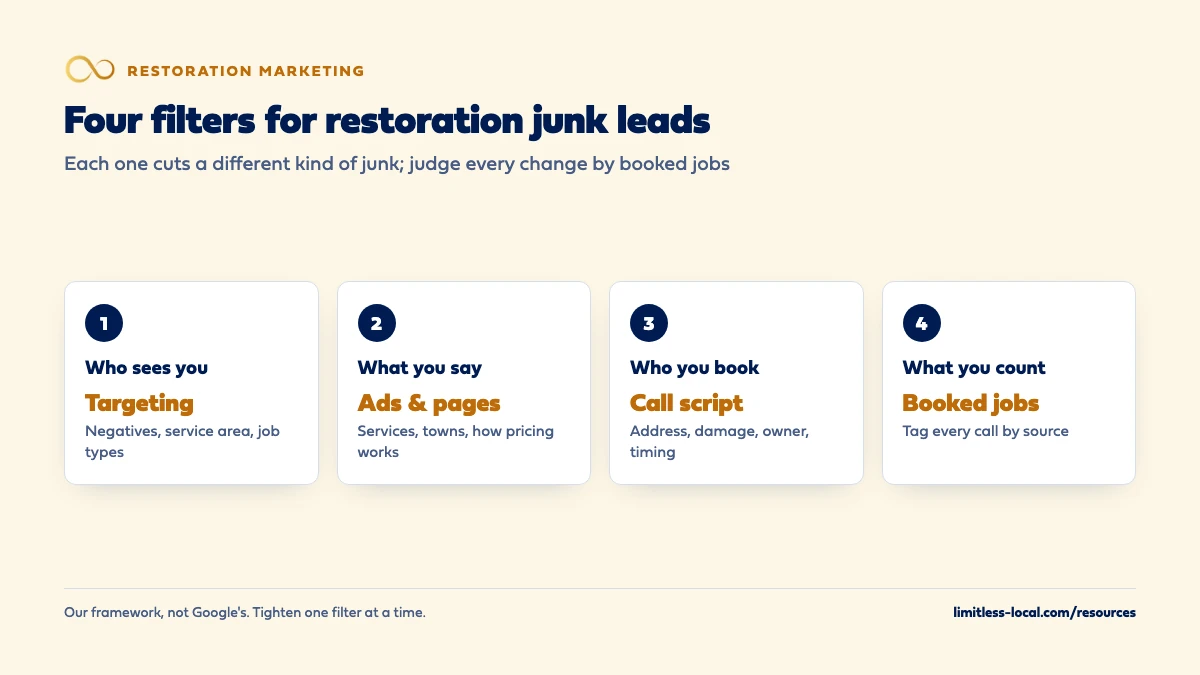
Filter junk leads at four points instead of one: who sees your ads (negative keywords, service area, job types), what your pages and ads say (the work you do, where you go, and that you handle emergencies, not quotes over the phone), how the first call is screened (a short script that confirms address, damage type and urgency), and what you count (booked jobs per source, not raw leads). Price shoppers are best handled by being clear up front rather than hiding price, so the people who only want a number self-select out. Tighten one filter at a time and watch booked jobs, because every filter also cuts some volume.
Fewer junk leads only matters if the booked jobs hold, which is why we judge marketing by cost per booked job rather than by lead count. Lead filtering runs through the ads work in our local ads service for restoration companies, and every package includes call tracking with recording and transcription so you can see which leads were junk. The restoration marketing guide covers which channels to run in the first place, and the restoration marketing questions library takes the rest one question at a time.
What counts as a junk lead for a restoration company?
Before you filter anything, write down what a junk lead is for your company, because one owner’s junk is another’s job. In our judgement, most restoration junk falls into six buckets:
- Out of area: a real job you can’t reach in time.
- Wrong service: a wet phone, a car, a leaking roof you don’t fix, a plumber’s job.
- Do-it-yourself: someone who wants to know how to dry it out themselves or rent a dehumidifier.
- Not a customer: job seekers, vendors, solicitors, robocalls and wrong numbers.
- Price-only: someone who wants a number over the phone and won’t book an inspection.
- Duplicates: the same homeowner calling twice, or calling and filling in a form.
Notice that price-only callers are not the same as people who ask about price. Almost every homeowner asks what it will cost. The junk is the caller who will only decide on a phone quote and hangs up when you explain that you need to see the damage. Treat those two groups differently, or you’ll filter out buyers.
Why can't I just add more negative keywords?
Negative keywords stop your Google Ads showing for searches you don’t want, and they matter. The live page on restoration negative keyword lists covers which words to block. But they only fix one channel, and only one kind of junk.
Negatives can’t stop a real homeowner in the wrong town, a caller who found you on Maps, a solicitor who dials the number on your website, or a price shopper who typed a perfectly good search. Those need the other filters on this page: service area settings, page copy, call screening and honest counting.
There’s also a cost to over-filtering. Google’s About negative keywords page warns that if you use too many negative keywords, your ads might reach fewer customers. Words like cost, price and insurance look like price-shopper words but often come from people about to call.
How do I stop paying for leads outside my service area?
Out-of-area leads are often the biggest bucket, in our judgement, because restoration searches happen in a panic and people call whoever shows up. Three settings do most of the work:
- Google Ads location targeting: target the towns or radius your crews can reach in your response time, and exclude the places you won’t drive. How tight to set it is covered in setting your ad service area.
- Local Services Ads service areas and job types: only select the areas and jobs you actually take. Google’s page on automated Local Services Ads lead credits says it no longer supports credits for “job type not serviced” and “geo not serviced” leads, so a wrong setting now costs you the lead.
- Your website: list the towns you serve on your service pages so a caller from two counties over can see it before dialing.
The same Google page notes that changing service areas, job types and categories could reduce the number of leads you receive. That’s the trade you’re making: fewer leads, more of them bookable.
How do I keep DIYers and wrong-service callers away?
Most of this is ad and page wording. In our judgement, these changes filter without scaring off real customers:
- Lead with the emergency, not the topic. “Round-the-clock water extraction and drying crews” attracts people with water on the floor. “Everything you need to know about water damage” attracts readers.
- Name what you don’t do where it matters, such as “we don’t repair roofs” on a storm page or “we don’t rent equipment” if equipment callers keep ringing.
- Separate the blog from the money pages. How-to articles bring DIY visitors. That’s fine for search, but don’t put them behind paid clicks or judge them by calls.
- Match the ad to the page. An ad for sewage cleanup should land on the sewage page, not the homepage.
If calls arrive but the right ones don’t, the problem may be the page itself. The live page on clicks that don’t turn into calls walks through those mistakes.
Curious what your marketing is actually booking?
Get a free visibility audit — no obligation, no sales pitch.
Should I show prices to filter out price shoppers?
Usually not as a fixed price, because restoration jobs depend on what the crew finds, and many are billed through the homeowner’s insurance claim. But being clear about how pricing works does filter, in our judgement. Things that help:
- Explain how pricing is set: an on-site inspection and moisture readings first, then a written scope before work starts.
- Say what the first visit includes and whether there’s a charge for it.
- Say whether you work with insurance claims in general terms, without promising what any policy covers. Coverage questions belong to the homeowner and their insurer, and this page isn’t insurance or legal advice.
People who only want a phone number tend to leave once they see that, and people with a real loss tend to call. What you shouldn’t do is hide every hint of how pricing works. A homeowner who can’t find any of it may call five companies to ask, which is how price-shopping calls start.
What should my team ask on the first call?
A short, consistent script is the cheapest filter you have, because it works on every channel at once. In our judgement, four questions sort most calls in under two minutes:
- Where is the property? Confirms service area before anything else.
- What happened, and is it still happening? Separates active water from old stains and other trades’ jobs.
- Is it a home or a business, and are you the owner or the tenant? Tells you who can authorize the work.
- When can we be there? Moves real emergencies straight to a booked visit.
Price questions get the same answer every time: what the inspection involves and when the crew can come. Callers who only want a number will usually say so here, and your team can end the call politely without arguing.
Speed still matters while you screen. The live page on answering emergency calls fast covers why a slow pickup loses real jobs, so screening has to be quick, not a gate.
How do I tag junk calls so I can see where they come from?
You can’t filter what you can’t see. Call tracking lets you mark each call and form as a real lead or not and tie it to the source that produced it.
CallRail’s help page How to qualify leads in CallRail describes three ways to do it: Automation Rules that qualify, score, tag or assign a value automatically (which need transcript intelligence turned on), Keypad Scoring right after a call ends, and manually marking a lead qualified or not in the app. CallRail’s Automation Rules page says the criteria can include call length, the marketing campaign the call came from and words spoken during the call, and that rules work on calls, form submissions and text messages.
A simple setup, in our judgement: tag every call with one of the six junk buckets above, or “good lead”. After a month you’ll know whether your junk is mostly out-of-area, mostly solicitors or mostly price-only, and each one has a different fix.

Are short calls a sign of junk leads?
Often, but not always. Google Ads lets you set a minimum call length for counting a call from an ad as a conversion. Google’s About phone call conversion tracking page says every call that lasts at least the length you set is counted. That keeps wrong numbers and hang-ups out of your conversion counts, which matters if Google’s bidding is learning from them.
Duration is a rough filter, though. A thirty-second call can be a homeowner confirming an address before the crew rolls, and a long call can be a vendor pitching you. Use length to clean up reporting, then use tags or a booked-job match to judge quality.
Can I get credit for junk leads from Local Services Ads?
Sometimes, automatically. Google’s About Automated Local Services Ads lead credits page says leads judged invalid or low quality aren’t charged, charged leads are reassessed over time and may be credited, and credits usually reach your account balance within 30 days, though the original charge still shows on your invoice.
Two limits matter for restoration. Google no longer credits “job type not serviced” or “geo not serviced” leads, so your own settings have to filter those. And Google asks for lead feedback through its survey, which it says helps it send leads better suited to your business. Rating leads honestly is part of the filter.
How do I filter junk without losing volume?
Change one thing at a time and judge it by booked jobs, not leads. In our judgement, this order works for most restoration companies:
- Tag a month of calls so you know which junk bucket is biggest.
- Fix the settings that cause the biggest bucket: service area, job types or negatives.
- Rewrite the page or ad that brings the wrong callers.
- Add the call script and train whoever answers.
- Compare booked jobs per source before and after, over the same number of weeks.
If leads fall and booked jobs hold, the filter worked. If booked jobs fall too, undo the last change. If junk is low but the crews are still overloaded, that’s a capacity problem, not a junk problem, and matching leads to crew capacity covers it. Matching each call to a booked job is covered in tracking booked restoration jobs.
Not sure which of these is costing you jobs?
A free visibility audit checks the Google profile, reviews, site and tracking, and shows what to fix first.
What's different about junk leads for restoration
Every caller is in a hurry. Homeowners with water on the floor call whoever shows up first, from wherever they are. That makes out-of-area and wrong-service calls more common than in planned trades, in our judgement.
The words are borrowed. Water damage, mold, fire and flood all mean other things, so ads attract searches about phones, food and insurance policies.
Price often isn’t the homeowner’s decision. When a claim is involved, the homeowner may care more about speed and paperwork than price, so a “how much” call isn’t always a shopper. Screen for the loss, not the question.
Storms change the mix. After a big event, call volume, out-of-area calls and solicitors can all rise at once. Review your tags more often in the weeks after a storm.
A worked example: what filtering does to cost per booked job
These numbers are made up to show the math, not a benchmark for your market. Say your ads and Local Services Ads spend $4,200 a month and bring 60 leads. Your team tags them and books 12 jobs, so each booked job costs $4,200 ÷ 12, or $350.
The tags show 21 out-of-area leads, 9 wrong-service leads and 6 price-only callers. You tighten the service area and job types and rewrite the landing page. Next month the same spend brings 42 leads, but because fewer of them were junk, the team books 14 jobs. Each booked job now costs $4,200 ÷ 14, or $300.
Fewer leads, more jobs, lower cost per job: that’s the result you’re after. If bookings had dropped instead, you’d undo the last change. If you’d like help, Google Ads management is in every package, and our Growth package at $4,500 a month adds Local Services Ads management. Ad spend is paid to Google separately.
Frequently asked questions
Should I stop answering calls from unknown numbers to avoid solicitors?
No. Homeowners with an emergency call from numbers you’ve never seen. Answer everything, screen quickly, and tag solicitors so you can see if one listing or page is attracting them.
Do lead forms bring more junk than calls?
Often, in our judgement, because forms are easy to fill in without urgency. Ask for the property’s town and what happened on the form, and call back fast so real leads don’t go cold.
Is a price question on the first call a red flag?
No. Most homeowners ask. It’s only a red flag when the caller refuses an inspection and wants a firm number by phone.
How long should I test a filter before judging it?
In our judgement, at least a few weeks with similar weather, compared against the same number of weeks before. One storm can swamp any test.
Should I buy shared leads to make up volume?
That’s a separate decision with its own trade-offs; the restoration marketing guide covers buying versus generating leads. Shared leads tend to bring more price comparison, not less.
Who should tag the calls?
Whoever answers them, right after the call, using the same short list every time. Consistent tags matter more than detailed ones.
Key takeaways
- Write down your junk buckets first; price-only callers aren’t the same as people who ask about price.
- Negative keywords fix one channel; service area, job types, page copy and call screening fix the rest.
- Google no longer credits Local Services Ads leads for areas or job types you didn’t exclude, so your settings have to do it.
- Tag every call by source so you know which filter to tighten.
- Change one filter at a time and keep it only if booked jobs hold.
Want a second set of eyes on your setup?
We'll look at how you show up locally and where calls are leaking, then send you a plain-English breakdown.
More in this section
- What does a restoration lead cost on Local Services Ads?
- How should a restoration company follow up on leads that don't book?
- How do I track which marketing brings in booked restoration jobs?
- What negative keywords should restoration Google Ads use?
- How fast do restoration marketing channels produce leads?
Sources
- About negative keywords — Google Ads Help
- About Automated Local Services Ads lead credits — Local Services Help
- About phone call conversion tracking — Google Ads Help
- How to qualify leads in CallRail — CallRail Help Center
- Automation Rules — CallRail Help Center