
Restoration ads geo targeting: how tight a service area?
- How should a restoration company set geo-targeting so ad spend stays where crews can drive?
- What does geo-targeting mean for restoration ads?
- Should I set my service area by miles or by drive time?
- Is radius, town or ZIP code targeting better for restoration?
- What does Presence or Interest mean, and should I change it?
- Which areas should I exclude?
- Do Local Services Ads service areas work the same way?
- How should my Google Business Profile service area relate to my ads?
- Should the outer ring run as its own campaign?
- Why do I still get calls from outside my area?
- How often should I change my ad service area?
- What's different about ad service areas for restoration
- A worked example: splitting a core area and an outer ring
- Frequently asked questions
- Key takeaways
- More in this section
- Sources
The short version
- Draw the area by drive time to arrival, not by a round-number radius.
- Keep a core area and an outer ring in separate campaigns.
- Exclude towns you won't drive to, especially at night.
- Check the Presence or Interest setting; it reaches people outside your area.
For restoration owners deciding how far their Google Ads and Local Services Ads should reach, and whether to target by radius, town or ZIP code.
Get a free visibility audit · Book a growth call
How should a restoration company set geo-targeting so ad spend stays where crews can drive?
Set a restoration company’s ad service area by drive time, not by a round-number radius: target only the towns or ZIP codes your crews can reach within the response time you promise, and exclude the places you won’t drive at night. Split a wider outer ring into its own campaign so you can bid it down or switch it off when crews are busy. In Google Ads, check the location option too, because by default Google also shows ads to people outside your area who have shown interest in it.
An ad service area that matches where your crews can drive is the cheapest way to cut wasted spend, and we judge every setting by what it does to cost per booked job. Location setup is part of the Google Ads and Local Services Ads work in our local ads service for restoration companies. The restoration marketing guide covers out-of-area leads among the wider channel choices, and the restoration marketing questions library takes the rest one question at a time.
What does geo-targeting mean for restoration ads?
Geo-targeting is the setting that decides where your ads can show. Google’s help page Target ads to geographic locations says locations can include countries, areas within a country, and a radius around a location. For a restoration company, that usually means a list of towns, counties or ZIP codes, or a radius around your shop.
Local Services Ads have their own version: service areas you include or exclude by county, city or ZIP code, set alongside the job types you offer. Google’s page Edit your industries, service areas, and job types walks through both.
Your Google Business Profile service area is a third, separate setting. It describes where you work on Maps, but it doesn’t set where your ads run. Google’s page on the Local Services Ads move to Performance Max says that after migration, ad service areas and schedules operate independently of your Business Profile.
Should I set my service area by miles or by drive time?
By drive time, in our judgement. Restoration is a race to arrive: the homeowner with water on the floor usually books whoever can get there first. A round radius treats a town across a river with one bridge the same as a town down the highway, and a crew that takes ninety minutes to get somewhere will lose that job to a closer company, no matter how good the ad was.
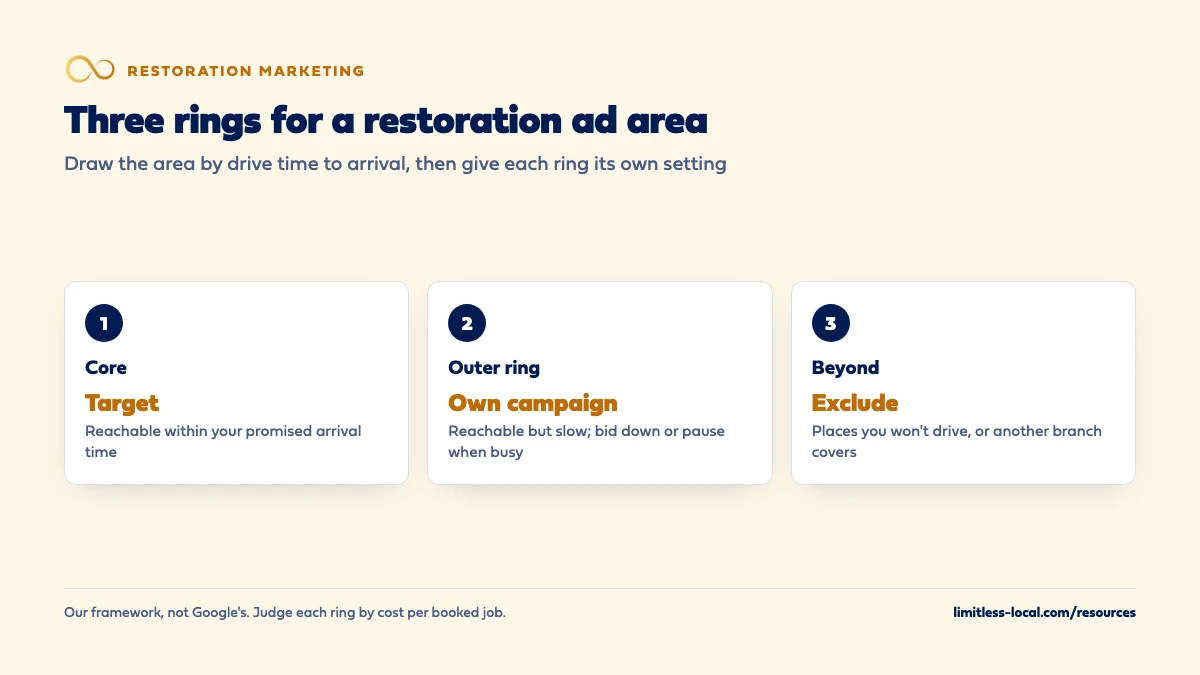
Start with the response time you promise on the phone. Then mark every town or ZIP code your crews can reach inside it at the worst normal time of day, and those are your core area. Places you can reach, but slowly, are your outer ring. Places you won’t go are exclusions.
Drive time changes with the hour. If your crews can reach a suburb in twenty minutes at night and an hour at rush hour, decide which promise you’ll make and target to that.
Is radius, town or ZIP code targeting better for restoration?
Each has a place. Google’s comparison on Target ads to geographic locations says radius targeting shows ads to people within a certain distance from your business, and that areas within a country can include regions, cities or postal codes, depending on the country.
- Radius is quick to set up and fine for a shop in the middle of an even area.
- Towns or counties follow how homeowners describe where they live and match how most owners think about their territory.
- ZIP codes give the finest control and suit metros where some neighborhoods are easy to reach and the next ones aren’t.
In our judgement, most restoration companies do best with towns or ZIP codes for the core and a separate campaign for the outer ring. Two limits from Google: radius targeting has to be at least 1 km, and if you target a very small radius or area, your ads might only show intermittently or not at all.
What does Presence or Interest mean, and should I change it?
This setting decides who counts as “in” your area. Google’s page About advanced location options says that by default, location targeting includes both people in or regularly in your locations and people who have shown interest in them. Google’s page About targeting geographic locations lists ways it detects interest, such as location terms in searches, past searches and searches on Google Maps.
Google recommends broad targeting (“Presence or Interest”) as a best practice on Search, and says to consider “Presence” when you only want to reach people in specific locations and not people elsewhere who are interested in them.
Restoration is a genuine judgement call here. Interest-based reach can bring calls from people three states away searching your town by name, which a restoration crew can’t use if they’re just researching. But it can also reach an out-of-town landlord or an adult child arranging help for a parent’s flooded house, and those jobs are real. In our judgement, test it: run Presence on the core campaign, compare a month of booked jobs, and keep whichever setting books more jobs per dollar.
Curious what your marketing is actually booking?
Get a free visibility audit — no obligation, no sales pitch.
Which areas should I exclude?
Exclusions do as much work as targets. Google’s page Exclude ads from geographic locations says exclusion can prevent your ad showing in certain parts of your targeted locations, such as a city within a state, so you don’t pay for people who likely wouldn’t have access to your service. It also allows bulk exclusion of up to 1,000 locations at a time.
Common restoration exclusions, in our judgement:
- Towns across a toll bridge or ferry your crews won’t take at night.
- Areas another branch of your company covers, so the two don’t bid against each other. Marketing a second location covers that split.
- Pockets inside your radius you can’t legally or practically serve, such as places that need a license you don’t hold.
- Areas that keep producing leads that don’t book, once your call tags prove it.
Do Local Services Ads service areas work the same way?
Not quite. Local Services Ads service areas are counties, cities or ZIP codes you include or exclude; Google’s service areas and job types page describes no radius or Presence option. You pay per lead rather than per click.
That makes the area more important, not less. Google’s page on automated lead credits says it no longer supports credits for “geo not serviced” leads. If your area includes a town you won’t drive to, a lead from there is yours to pay for. Set the LSA area to your core plus only the part of the outer ring you’ll reliably serve.
How Local Services Ads and Google Ads fit together is covered in running Google Ads, LSAs or both.
How should my Google Business Profile service area relate to my ads?
Keep them consistent but don’t expect one to control the other. Google’s service area help page says you can set up to 20 service areas and that your overall area shouldn’t be more than about 2 hours of driving time from where your business is based.
Your ads can be tighter than your profile. A company might list a wide area on its profile because it does take planned mold and contents jobs out there, while keeping emergency water ads to the core where it can arrive fast. In our judgement, that split is sensible: the profile says where you work; the ads say where you’ll pay to be found.
Should the outer ring run as its own campaign?
Yes, in our judgement, once you have enough budget to run two. Separate campaigns let you give the core area most of the budget, switch the outer ring off when crews are booked, and see cost per booked job for each ring on its own.
This is the main lever for matching ad spend to capacity. The live page on matching leads to crew capacity covers budgets, schedules and pausing in detail. On a small budget, one campaign for the core is usually enough; the one-truck emergency budget page covers drawing a tight area from scratch.
Why do I still get calls from outside my area?
A few reasons, and some you can’t fully stop:
- Presence or Interest is on, which reaches people who’ve shown interest in your area.
- Related areas. Google’s About targeting geographic locations page says it may also show your ad in nearby, closely related areas that couldn’t otherwise be targeted, giving Portland’s suburbs as an example.
- Location signals are imperfect. Google says location targeting is its best effort and 100% accuracy is not guaranteed.
- Not every call comes from ads. Maps, your website and directories bring callers from anywhere.
Tag where calls come from before blaming the ads. If out-of-area calls are mostly from your profile or website, the fix is page wording, which filtering junk leads covers. Wrong searches, rather than wrong places, are a negative keyword job: see restoration negative keywords.
How often should I change my ad service area?
Check it monthly, in our judgement, and change it when something real changes: a new hire, a new truck, a crew lost, a new office, or a pattern in your call tags. Storms are the exception. After a big storm or freeze, you may want to widen the area for a few weeks if crews can travel, then pull it back. Write down the normal settings first so you can return to them.
Judge every change the same way: booked jobs and cost per booked job for each area, over the same number of weeks before and after.
Not sure which of these is costing you jobs?
A free visibility audit checks the Google profile, reviews, site and tracking, and shows what to fix first.
What's different about ad service areas for restoration
Arrival time wins the job. In planned trades, a homeowner may wait a week for the right contractor. In emergency water work, the first crew that can get there usually books it, so the area should follow drive time.
Night and weekend reach is smaller. The area a crew will cover at 2 a.m. is often smaller than the daytime area. Ad schedules and a separate outer-ring campaign let you shrink reach after hours.
Storms move the map. A hail or freeze event can pull you into towns you never serve. Widen on purpose and narrow again after.
Remote decision-makers are real. Landlords, property managers and family members often search for a property they’re not standing in, which is why the Presence setting is a test, not a default, for restoration.
A worked example: splitting a core area and an outer ring
These numbers are made up to show the math, not a benchmark for your market. Say a company promises arrival within the hour and runs one campaign over a broad radius, spending $3,000 a month and booking 8 jobs: $375 per booked job.
The owner splits it. The core (towns the crews reach within the promise) gets $2,200 and books 7 jobs: about $314 each. The outer ring gets $800 and books 1 job, at $800 each. Same spend, same jobs, but now the owner can see the outer ring costs more than twice as much per job, and can cut it, move its budget to the core, or keep it only when crews are free.
If you’d like help, Google Ads management is part of every package. Our Essentials package at $3,500 a month covers one location and up to $2,500 a month in ad spend; Growth at $4,500 adds Local Services Ads management. Ad spend is paid to Google separately.
Frequently asked questions
What radius should a restoration company target?
There’s no right number of miles. Set it by how far your crews can drive within the arrival time you promise, which differs by town, traffic and time of day.
Can I target by ZIP code in Google Ads?
In the US, yes. Google says areas within a country can include regions, cities or postal codes, depending on the country. Local Services Ads also accept ZIP codes as service areas.
Does a wider ad area help my map ranking?
No. A wider ad area changes where your ads appear, not where your Business Profile ranks. Whether ads affect rankings at all is covered in do Google Ads help restoration rankings.
Should I advertise in a town I don't serve to win future work?
In our judgement, no. You’d pay for calls you have to turn away. Expand when you can actually serve the town.
How do I see where my ad calls come from?
Record the job address for every booked job and tag each call by source. Comparing addresses with your targeting shows whether the area is right.
Should my ad area change at night?
If your crews cover less ground at night, yes. Use ad schedules or pause the outer-ring campaign after hours.
Key takeaways
- Set the ad area by drive time to arrival, not by a round-number radius.
- Run a core campaign and a separate outer-ring campaign so you can cut the ring when crews are busy.
- Exclude areas you won’t drive to; Google allows bulk exclusion of up to 1,000 locations at a time.
- Presence or Interest is Google’s default; for restoration, test Presence against it by booked jobs.
- Local Services Ads no longer credit out-of-area leads, so the LSA area must match where you’ll go.
Want a second set of eyes on your setup?
We'll look at how you show up locally and where calls are leaking, then send you a plain-English breakdown.
More in this section
- What does a restoration lead cost on Local Services Ads?
- How does local competition change restoration ad costs?
- Should a restoration company run Google Ads, LSAs or both?
- How should a restoration company run Google Ads for fire damage?
- What negative keywords should restoration Google Ads use?
Sources
- Target ads to geographic locations — Google Ads Help
- About advanced location options — Google Ads Help
- About targeting geographic locations — Google Ads Help
- Exclude ads from geographic locations — Google Ads Help
- Edit your industries, service areas, and job types — Local Services Help
- About Automated Local Services Ads lead credits — Local Services Help
- Local Services Ads transition to Performance Max campaigns with pay-per-lead goals — Google Ads Help
- Manage your service areas for service-area & hybrid businesses — Google Business Profile Help