
What pages should an HVAC company website have?
- Which pages does an HVAC contractor's website need to book more jobs?
- What pages does every HVAC company website need?
- What should my HVAC home page say?
- Do I need a separate page for each HVAC service?
- Should I build a page for every town I serve?
- What goes on an HVAC about page, and does Google care?
- Do I need a reviews page if my reviews are already on Google?
- What should the contact or booking page include?
- Which extra pages are worth adding for an HVAC company?
- Does my HVAC website need a blog?
- How should my HVAC website pages link to each other?
- How many pages should an HVAC website have?
- Which pages can I cut from my HVAC website?
- What's different about websites for HVAC companies
- A worked example: the page list for a small HVAC shop
- Frequently asked questions
- Key takeaways
- More in this section
- Sources
The short version
- Start with five: home, one page per main service, about, reviews, contact or booking.
- Add financing, maintenance plan, emergency and city pages when you have real details for each.
- Every page needs its own title, its own content and a link from at least one other page.
- There's no magic page count or word count; the list follows the services and towns you actually sell.
For HVAC owners building a new site or cleaning up an old one, and deciding which pages earn their place in the menu.
Get a free visibility audit · Book a growth call
Which pages does an HVAC contractor's website need to book more jobs?
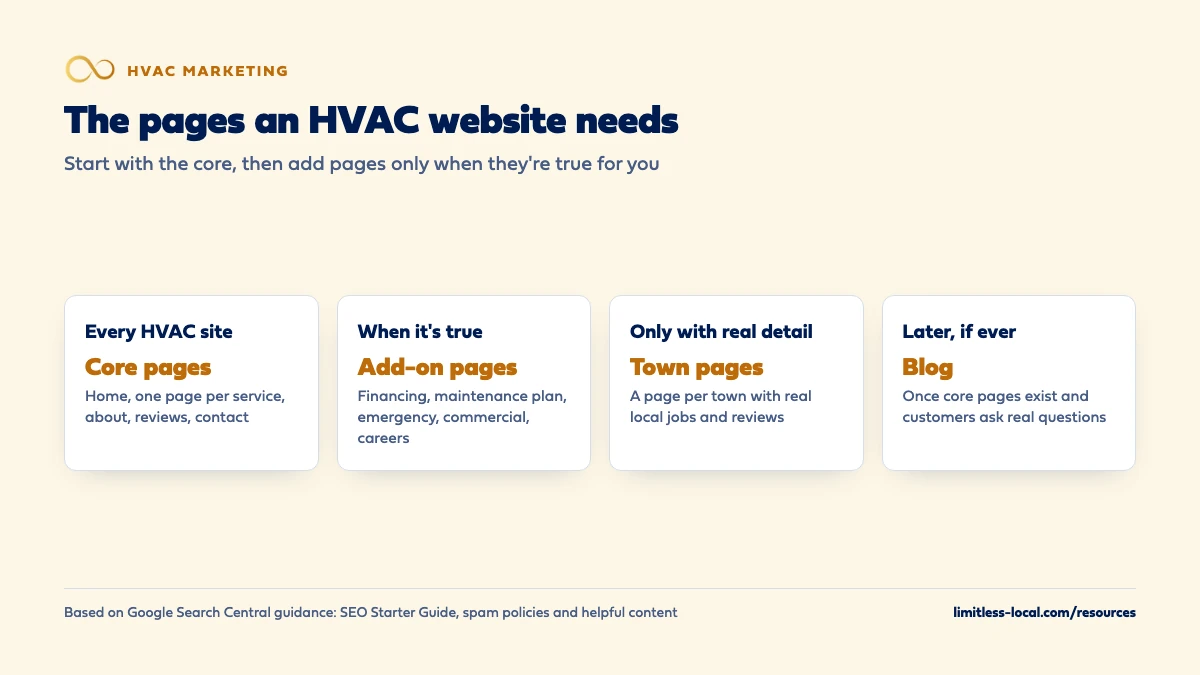
Every HVAC company website needs a home page, a separate page for each main service you sell (AC repair, AC replacement, furnace repair and installation, heat pumps, maintenance plans), an about page, a reviews page and a contact or booking page. Add pages for financing, emergency service and the towns you serve only when each one has something true and specific to say. Google’s guidance favors a site organized so people can see how the pages relate, with each page useful on its own instead of a near-copy of another.
That’s the order we build in, too: the pages that turn a visit into a call come first, and extra pages get added when there’s something real to put on them. Our website work is built around service and location pages for local trades, and the HVAC marketing page shows how the site fits with the map pack, ads and follow-up. The HVAC marketing guide covers where a website sits among the other channels, and the rest of the HVAC marketing questions library goes question by question.
What pages does every HVAC company website need?
Five kinds of pages carry most HVAC sites that book jobs:
- A home page that says what you do, where you do it and how to reach you.
- One page per main service: AC repair, AC replacement, furnace repair, furnace installation, heat pumps and maintenance, split the way homeowners actually search for them.
- An about page that shows who owns the company and who shows up at the door.
- A reviews page that puts what customers say in one place.
- A contact or booking page with your phone number, a short form and your hours.
Everything else, from a financing page to city pages to a blog, is worth adding only when you have something specific to put on it. Google’s SEO Starter Guide says that creating content people find compelling and useful will likely influence your presence in search results more than any of its other suggestions. A page that exists only to fill a slot in the menu doesn’t clear that bar, and a homeowner can tell.
What should my HVAC home page say?
The home page has one job: tell a homeowner with a broken AC or a cold house that they’ve found a company that can help, then make it easy to call. In the first screen, that means what you do (heating and cooling repair, replacement and maintenance), the towns you serve, your phone number and a way to book.
Google’s Search Essentials recommends using the words people would use to look for your content and placing them in prominent spots, such as the page title and main heading. For an HVAC home page, that’s plain words like heating, air conditioning and your main town, not a slogan. Google’s title link guidance also warns against vague titles like “Home” and says the home page title is a reasonable place for a little extra information about the business.
Below that, link to every main service page and show a few real reviews. The detail belongs on the pages it links to.
Do I need a separate page for each HVAC service?
For the services you want more of, yes. Someone searching for furnace repair wants a page about furnace repair: what you fix, how fast you can come and how to book. One long “Services” page can’t carry the words for a dozen jobs in its title and main heading.
The flip side is that each service page has to be its own page, not the AC repair page with “furnace” swapped in. Google’s Starter Guide explains that showing the same information on two pages can confuse people (they wonder which one is right and whether there’s a difference), and it suggests keeping each piece of content at one URL. If two of your pages say the same thing, merge them.
Getting those pages to show up for repair and installation searches is its own job, covered in making HVAC service pages rank.
Should I build a page for every town I serve?
Only for the towns where you can say something true and specific about the work you do there. Google’s spam policies list “doorway abuse”, and one of the examples is having multiple pages targeted at specific regions or cities that funnel users to one page. The same policies list blocks of text naming the cities and regions a page is trying to rank for as an example of keyword stuffing.
So twenty town pages that say the same thing with the town name changed is the pattern Google describes, not a shortcut. A better start is one service-area page that tells people plainly where your trucks go, then a page for each town where you have real material: jobs you’ve done there, reviews from customers there, local details a homeowner there would recognize. How to build those without crossing the line is covered in building HVAC city pages the right way.
What goes on an HVAC about page, and does Google care?
Homeowners are letting a stranger into their house, so the about page matters to them first. Put the owner’s name and photo on it, how long you’ve been in business, the licenses and certifications you actually hold, and real photos of your techs and trucks.
Google’s guidance on helpful, people-first content points the same way. Among its questions for judging whether content is trustworthy: is it clear who created it, and is there background about the business, for example through an About page? It also warns that fabricated profiles, such as AI-generated headshots or made-up names, are a form of deception that makes a page untrustworthy. In our view that’s a good rule for an HVAC site too: no stock photos passed off as your crew.
The about page is one piece of a bigger question, making your HVAC company look trustworthy online, which also covers reviews, photos and your Google profile.
Curious what your marketing is actually booking?
Get a free visibility audit — no obligation, no sales pitch.
Do I need a reviews page if my reviews are already on Google?
It helps. Homeowners comparing two or three companies often click around a site before they call, and a reviews page shows them, in one place, what customers in their area said about the kind of job they need.
Keep expectations in check on one point: Google’s local business structured data documentation recommends its review and rating properties only for sites that capture reviews about other local businesses. We read that as a reason not to count on star ratings in search results from marking up reviews of your own company on your own site. The page is there for the homeowner, and that’s reason enough.
What should the contact or booking page include?
Make it short and make it work on a phone:
- Your phone number as a tap-to-call link, at the top.
- A form with only the fields you need to call back: name, phone, address or ZIP, and what’s wrong.
- Your hours, and what happens after hours (emergency line, answering service or a callback time).
- The towns you cover, so nobody fills out a form from outside your area.
- Online booking, if your software supports it.
Keep the hours and phone number identical to your Google Business Profile. Google’s local business markup lets you tell it your business hours directly, which is one more reason they should match everywhere.
A booking page only pays off if somebody answers what comes in. If forms sit until the next morning, read how fast to respond to new leads before adding more ways to contact you.
Which extra pages are worth adding for an HVAC company?
These earn a place when they’re true for your business:
- Financing. System replacements are big tickets. If you offer financing, a page that explains it in plain terms answers the question homeowners hesitate to ask on the phone.
- Maintenance plan or membership. If you sell tune-up agreements, give them their own page with what’s included and how to sign up.
- Emergency and after-hours service. Only if you really run it. Say what hours and what it costs to come out.
- Commercial HVAC. Its own page if you want commercial work; a property manager looks for different things than a homeowner.
- Careers. Not a marketing page, but it’s where tech applicants look.
Which of these matter most is our judgement, not a Google rule. The test for each one is the same: would a homeowner (or a tech looking for work) be glad they found it?
Does my HVAC website need a blog?
Not to get started. A blog isn’t on the must-have list, because the pages that book jobs are the service pages, the contact page and the proof around them. Google’s helpful content guidance is blunt about two blog myths: there is no preferred word count, and adding lots of new content mainly to make a site seem fresh won’t help it rank.
A blog starts to earn its keep once the core pages are in place and you have real questions from customers to answer. When it’s worth the time and when it isn’t is covered in whether your HVAC website needs a blog.
How should my HVAC website pages link to each other?
Google’s link best practices say every page you care about should have a link from at least one other page on your site, and that Google can generally only follow links that are ordinary HTML links with a web address. In practice that means:
- A main menu with Services (each service page underneath), Service Area, About, Reviews and Contact.
- Service pages that link to related ones (AC repair to AC replacement, furnace repair to maintenance plans) and to the contact page.
- Link text that says where it goes, like “furnace repair” instead of “click here”, which is the example Google gives of link text that’s too generic.
Addresses matter a little too. The Starter Guide suggests URLs with words that are useful to people, so /furnace-repair/ beats an address made of random characters. It also says keywords in the URL alone have hardly any ranking effect, so don’t rename pages chasing that.
How many pages should an HVAC website have?
As many as you have real services and towns to cover, and no more. Google’s Starter Guide says the length of content alone doesn’t matter for ranking and there’s no magical word count target. The same thinking applies to page count: a small site that answers every question a homeowner has will do more than a large one stuffed with copies.
What does matter is that each page is distinct. Google’s title link guidance asks for a unique title on every page and warns against boilerplate titles that change by only one word. If you can’t write a title that’s clearly different from every other one on your site, that page probably shouldn’t exist on its own.
Which pages can I cut from my HVAC website?
Look hard at:
- Town pages that are the same text with a different town name.
- A general “Services” page that repeats what the individual service pages already say.
- Expired coupons and out-of-date blog posts.
Google’s Starter Guide suggests checking previously published content and updating it, or deleting it if it’s no longer relevant, and redirecting duplicate pages to the one that best represents that information. If you aren’t sure the website is even where your calls are getting lost, check that first with whether it’s your ads, website or follow-up.
Not sure which of these is costing you jobs?
A free visibility audit checks the Google profile, reviews, site and tracking, and shows what to fix first.
What's different about websites for HVAC companies
Two seasons, two sets of pages. Cooling and heating are different searches from different homeowners at different times of year. Both sides need their own service pages, and the home page can lead with whichever season you’re in.
Repair and replacement aren’t the same visitor. Someone with no heat wants to know how fast you can come. Someone replacing a system wants options, financing and an estimate. That’s why repair and replacement usually deserve separate pages instead of one “furnace” page trying to serve both.
Emergency calls happen at night. If you take after-hours calls, say so on the contact and service pages. If you don’t, say when you’ll call back.
Maintenance agreements are recurring revenue. A clear page for your plan gives techs somewhere to send customers after a repair, and something to promote in slow months.
A worked example: the page list for a small HVAC shop
This shop is made up to show the math. It sells six services: AC repair, AC replacement, furnace repair, furnace replacement, heat pumps and a maintenance plan. It works in three towns where it has years of jobs and reviews.
- Core pages: home, about, reviews, contact and financing, so 5 pages.
- Service pages: 6.
- Town pages for the three towns with real local material: 3.
That’s 14 pages. No blog yet, and no pages for towns the trucks rarely visit.
For comparison, our themed websites include up to 25 pages and cost $3,750, or $3,000 with any of our marketing packages, so a list like this one fits with room to grow. If the current site is in decent shape, our Essentials package ($3,500 a month) includes a content sprint of up to 10 pages, which would cover the six service pages and three town pages. Either way, the list comes from the services and towns you sell.
Frequently asked questions
Do I need a separate website for each town or location?
No. Google’s spam policies list multiple websites with slight variations, and multiple domains aimed at specific cities, as examples of doorway abuse. One site with good town pages where you have real material is the safer and simpler route.
Can I copy service descriptions from an equipment manufacturer's website?
Don’t. Google’s SEO Starter Guide says not to copy others’ content in part or in full, and its spam policies treat republishing content from other sites without adding value as scraping. Write about the work your crews actually do.
Does a service page need a minimum number of words?
No. Google says content length alone doesn’t matter for ranking and it has no preferred word count. Write enough to answer what a homeowner needs to know before they call, then stop.
Do I need structured data (schema) on my HVAC website?
It isn’t required, but Google’s local business structured data lets you tell it details like your business hours. If you add it, Google’s setup steps include validating it with its Rich Results Test.
Should my website's services match my Google Business Profile?
In our view, yes. Google says providing complete and detailed business info helps it match your Business Profile to relevant searches, and a site that lists the same services in the same words keeps the story consistent for homeowners and for Google.
How often should I update my HVAC website pages?
When something changes: a new service, new prices on a plan, a town you’ve stopped serving. Google’s helpful content guidance says changing a page’s date without really changing it won’t make it seem fresh.
Key takeaways
- Every HVAC site needs a home page, one page per main service, an about page, a reviews page and a contact or booking page.
- Financing, maintenance plan, emergency and town pages earn a place only when you have real, specific detail for them.
- Google’s spam policies list city-targeted pages that funnel visitors to one page as doorway abuse, so build town pages only where you have local material.
- Give every page a unique title and link to it from at least one other page with descriptive link text.
- There’s no magic page or word count; the list follows the services and towns you actually sell.
Want a second set of eyes on your setup?
We'll look at how you show up locally and where calls are leaking, then send you a plain-English breakdown.
More in this section
- Should my HVAC website have an FAQ page?
- What is the best website platform for an HVAC company?
- Does my HVAC company website need a blog?
- Does my HVAC company need landing pages for Google Ads?
- How do I make my HVAC company look trustworthy online?
Sources
- Search Engine Optimization (SEO) Starter Guide — Google Search Central
- Google Search Essentials — Google Search Central
- Creating helpful, reliable, people-first content — Google Search Central
- Spam policies for Google web search — Google Search Central
- Link best practices for Google — Google Search Central
- Influencing your title links in search results — Google Search Central
- Local business (LocalBusiness) structured data — Google Search Central
- Tips to improve your local ranking on Google — Google Business Profile Help