
Can AI help improve my plumbing Google Business Profile?

- Which plumbing Google Business Profile tasks can AI speed up, and which still need you?
- Which Google Business Profile tasks can AI speed up?
- Can AI write my plumbing business description?
- Can AI write the services list on my plumbing profile?
- Should I let AI choose my Google categories?
- Can AI write my Google posts?
- Can AI write my review replies?
- Can AI help with the questions customers ask about my company on Maps?
- Can AI audit my plumbing Google Business Profile?
- What should AI never do on my Google profile?
- Will AI-written profile content help me rank higher in Maps?
- What does a weekly AI routine for my profile look like?
- What's different about Google profiles for plumbing companies
- A worked example: the time AI saves on one profile
- Frequently asked questions
- Key takeaways
- More in this section
- Sources
The short version
- AI drafts the description, service blurbs, posts and review replies.
- You choose categories, hours and service area, and take the photos.
- Use AI to audit your profile for gaps and mismatches.
- Read and correct every AI draft before it goes live.
For plumbing owners who know their Google profile matters for Maps calls but can’t find the hours to keep it sharp every week.
Get a free visibility audit · Book a growth call
Which plumbing Google Business Profile tasks can AI speed up, and which still need you?
Yes, for the writing and the checking. AI can draft your business description, short descriptions for each service, weekly posts and first drafts of review replies, and it can audit your profile against your website to find gaps and mismatches. It can’t take your job photos, earn your reviews, verify the profile or decide your categories, hours and service area, and those are the parts that most affect whether the profile matches what people search for. Use AI to save time on words, then check every line against how your company actually works.
Keeping a profile current every week is the part most owners drop, which is why Google Business Profile management is in every package we sell: Essentials includes a profile post every week plus review responses, and Growth moves to posts three times a week with advanced review generation. It sits inside our local SEO work, priced on our packages page. See how it fits plumbing companies, or browse more plumbing marketing questions.
Which Google Business Profile tasks can AI speed up?
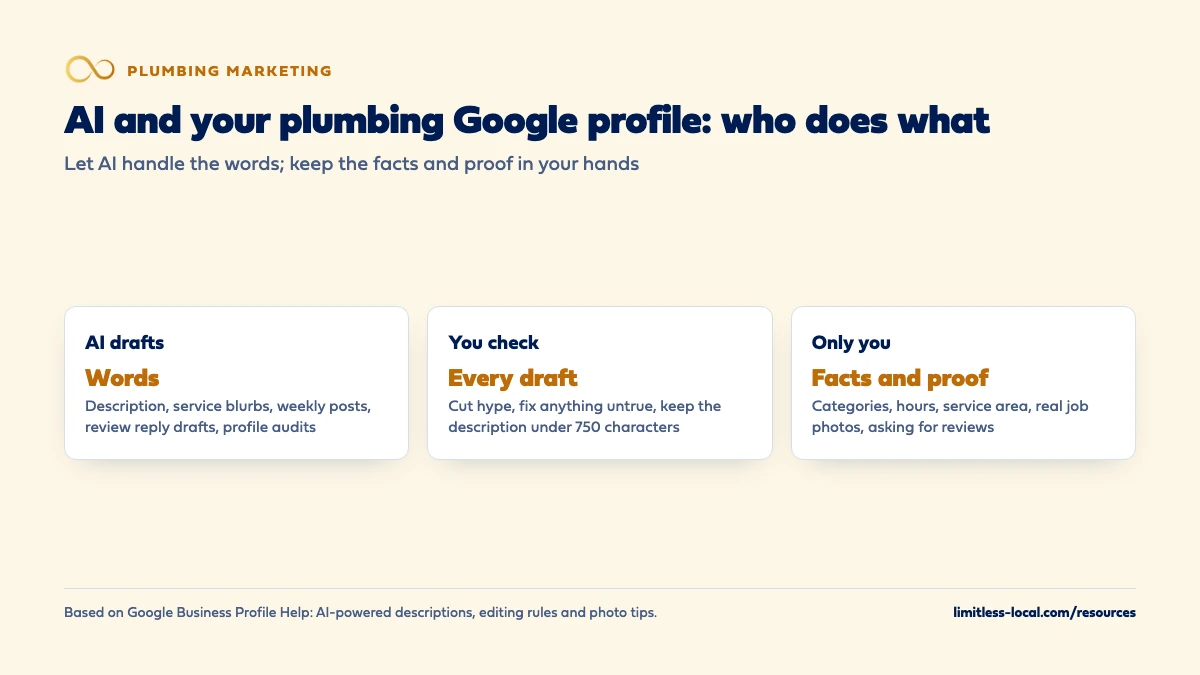
Split the profile into the parts that are words and the parts that are facts or proof. AI is quick with words. Facts and proof need you.
AI can draft or speed up:
- The business description.
- Short descriptions for each service in your services list.
- Weekly posts from a tech’s job notes.
- First drafts of review replies.
- A list of the questions customers keep asking, pulled from call notes and reviews.
- An audit comparing your profile with your website and your real service list.
You do by hand:
- Verification, business name, phone number and address settings.
- Categories, hours and service area.
- Photos and videos from real jobs.
- Asking customers for reviews.
Can AI write my plumbing business description?
Yes, and Google will even do the first draft for you. In the profile editor, Google’s AI-powered business description tool can suggest a description based on your profile and other sources, such as your website. It’s available in select regions and languages, and what it writes should be reviewed for accuracy and updated as needed.
A Google draft or a chatbot draft both get better when you give them the real details:
- The work you most want: emergency repairs, water heaters, drains and sewer, repipes.
- The towns you actually cover.
- What makes you different, in plain terms: family-owned, upfront pricing, techs who wear shoe covers, a real person on the phone at night.
- How long you’ve been in business.
Then edit. Cut words like “best” and “top-rated”, remove anything that isn’t true every day, and keep it under the 750-character limit with no links, as Google’s profile editing rules require. Google also asks that the description focus on your business, not promotions, prices or sales, so leave the coupon for a post.
Can AI write the services list on my plumbing profile?
It can write the short description under each service, which is the slow part. Give it your real job types, the way your field software or price book lists them, and ask for two plain sentences per service: what the job is and when a homeowner needs it.
For example, “Water heater replacement: we remove the old tank and install a new gas, electric or tankless unit, usually the same or next day. Call when your water won’t get hot, the tank is leaking, or it’s getting old.” That reads like a plumber talking, not an ad.
Two rules keep it honest. List only services your crew does and wants more of, because a homeowner who calls for a job you don’t take is a wasted call for both of you. And don’t pad the list with every town name or keyword variation; one clear entry per service is easier for customers and Google to read.
Should I let AI choose my Google categories?
No. Categories are a decision about your business, and they carry a lot of weight in which searches you show up for. Google’s guidelines for representing your business say to use as few categories as possible, pick ones that complete the sentence “this business IS a”, and never use categories as keywords.
An AI tool asked for “the best categories for a plumber” will usually hand you a long list, which is the opposite of what Google wants. Most plumbing companies should use Plumber as the primary category and add others only for real lines of work they staff. Which Google Business Profile categories a plumber should choose goes through the options one by one.
The same goes for your business name. Use the name on your trucks and invoices; adding “24/7 Emergency Plumber” to it goes against Google’s guidelines and puts the profile at risk.
Can AI write my Google posts?
Yes, and it’s one of the best uses of AI on the profile, because posts are where most owners give up. The trick is giving it something real to work from: a tech’s two-line note from the job, the town, and one photo you took on site.
A note like “Replaced corroded 40-gal tank, Smith St area, fixed bad shutoff valve too” becomes a short post about spotting an aging water heater, with the town mentioned once and a clear way to call. You check that nothing in it overstates the job, and it’s ready.
What to post, how often and what Google allows in posts are covered in whether AI can help write plumbing service pages and Google posts. Seasonal posts, like freeze prep before the first hard cold snap, are easy for AI to draft ahead and schedule.
Curious what your marketing is actually booking?
Get a free visibility audit — no obligation, no sales pitch.
Can AI write my review replies?
It can write the first draft, which helps when you’re replying to reviews from the truck at 9 pm. Feed it the review, the job and anything the customer mentioned, and ask for a short reply that thanks them by first name and mentions the work. Then change at least one line so it sounds like you.
A few things to know about how replies work, from Google’s page on managing customer reviews: replies are checked against Google’s content policies before they post, they show as coming from your business, the customer is notified, and the customer can still change their review after reading your reply. That last part is why a calm, specific reply to a bad review is worth the extra minute.
Keep AI away from copy-and-paste replies, though. Fifty reviews all answered “Thanks for choosing us, we appreciate your business!” look automated to every homeowner reading them. For the asking side, see whether AI can help a plumbing company get more 5-star reviews.
Can AI help with the questions customers ask about my company on Maps?
Indirectly, and it matters more now. In March 2026 Google introduced Ask Maps, a Gemini-powered feature rolling out in the U.S. that lets people ask Maps questions in plain words and get recommendations. Google says it draws on Maps’ information about places, including reviews from its community of contributors.
You can’t write those answers. You can make sure the information they draw on is complete. Use AI to:
- Read a month of call notes, chat logs and reviews and list the questions customers ask most: weekends? tankless? which towns? do you charge to come out?
- Check whether your profile, services list and website answer each one clearly.
- Draft the missing answers, for your website’s FAQ, your service descriptions or a post.
Questions about price and timing are worth answering plainly where you can. A homeowner choosing between three plumbers late at night is more likely to call the one that already answered their question.
Can AI audit my plumbing Google Business Profile?
Yes, and a quarterly audit catches problems that sit unnoticed for months. Paste in your profile details (name, phone, hours, service area, categories, services, description) along with your website’s service list and contact page, and ask AI to list:
- Anything that doesn’t match between the profile and the website, like hours, phone or service names.
- Services you do that aren’t on the profile.
- Towns you serve that the website never mentions.
- Claims in the description that you can’t back up.
- How long since the last post, the last photo and the last review reply.
You can do the same with the top few plumbers in your map results, using only what’s public, to see what they show that you don’t. How to see what plumbing competitors are doing online covers what’s worth copying and what isn’t. Treat the audit as a to-do list, not a verdict; you still decide which fixes are worth the time.

What should AI never do on my Google profile?
- Make photos. Google’s photo tips ask for images without significant alterations or excessive use of filters or AI; in other words, images that represent reality. Straightening or brightening a dark crawlspace shot is fine. A generated picture of a spotless install isn’t.
- Write reviews, or anything that pretends to be a customer.
- Stuff keywords into your name, description or services.
- Change hours or service area on its own. Those are promises to customers about when someone answers and where your trucks go.
- Post without a check. One wrong price, warranty or license claim in a post costs more than the time AI saved.
If you use a tool that posts or replies automatically, set it to drafts that wait for your approval.
Will AI-written profile content help me rank higher in Maps?
Only as far as it makes the profile more complete and accurate. Google’s tips to improve your local ranking say local results are mainly based on relevance, distance and popularity, and that there’s no way to request or pay for a better local ranking.
- Relevance is how well your profile matches the search. Complete, specific information helps, and this is where AI saves you time.
- Distance is how far you are from the person searching. No writing changes that.
- Popularity comes partly from how many reviews you have, your ratings and links to your business. More reviews and positive ratings can help, and replying to reviews shows you value feedback.
So AI helps you keep up with the work that counts, but it doesn’t replace it. For the full picture of what moves a plumber up the map, see how to get a plumbing company into the Google map pack.
What does a weekly AI routine for my profile look like?
- Monday: collect two or three job notes and photos from last week’s jobs.
- AI drafts one post and replies to any new reviews.
- You edit, upload the photos and publish.
- Monthly: AI reads your profile performance download and tells you what changed in calls and website clicks.
- Quarterly: run the audit and fix the top few items.
Once it’s a habit, most weeks take less than half an hour. For everything else that belongs on a strong plumbing profile, see how to optimize a plumbing Google Business Profile.
Not sure which of these is costing you jobs?
A free visibility audit checks the Google profile, reviews, site and tracking, and shows what to fix first.
What's different about Google profiles for plumbing companies
Hours have to be true at 2 am. If your profile says open 24 hours, someone must answer at night. AI will happily write “24/7 emergency service” into every post; only say it if your phone setup backs it up.
Most plumbers are service-area businesses. If customers don’t come to your shop, your address should be hidden and your service area set to the towns you really drive to. Check any AI-drafted copy doesn’t invite people to “stop by”.
High-ticket jobs need their own words. Water heaters, repipes and sewer lines are the jobs where a clear service description and real photos earn the call. Give AI the details of how your crew does them, not a generic description.
The seasons are predictable. Freeze warnings, holiday drain backups and spring sump checks come round every year. Have AI draft those posts ahead so they go up on time.
A worked example: the time AI saves on one profile
These numbers are made up to show the math, not a measurement. Say your company gets about 12 new Google reviews a month and you want one post a week.
Written from scratch, a thoughtful review reply takes you around 5 minutes, and a post with a photo takes about 20. That’s 60 minutes of replies plus 80 minutes of posts, or 140 minutes a month.
With AI drafting and you editing, say a reply takes 2 minutes and a post takes 8. That’s 24 minutes plus 32 minutes, or 56 minutes a month, saving about an hour and a half. The point isn’t the exact minutes; it’s that the work stops slipping. A profile that gets a real post every week and a reply on every review beats one that gets a burst of attention twice a year.
Frequently asked questions
Is it against Google's rules to use AI on my Business Profile?
No. Google offers its own AI tool for business descriptions. What its rules care about is that the information is accurate and the photos represent reality.
Why don't I see the AI description option in my profile?
AI-powered descriptions are available only in select regions and languages, and may not be available for all users. A chatbot draft that you paste in and edit works just as well.
Can AI-written posts get my profile suspended?
Posts that break Google’s content rules can be removed, whoever wrote them. Suspensions usually come from bigger problems, like a keyword-stuffed name or a bad address. If it does happen, see what to do when a plumbing Google profile is suspended.
Should I use a tool that auto-replies to every review?
Only if replies wait for your approval. Fully automatic replies tend to sound the same and can say the wrong thing on a complaint.
Can AI tell me which keywords to add to my profile?
It can suggest how homeowners describe your services, which helps you name them clearly. Use those words naturally in services and posts, never as a list stuffed into the name or description.
How long do profile edits take to show up?
Changes usually show in about 10 minutes and can take up to 30 days in some cases.
Key takeaways
- AI is useful for the description, service blurbs, posts, review reply drafts and profile audits.
- Categories, hours, service area, photos and review requests stay with you.
- Feed AI real job details and edit every draft before it goes live.
- AI-written content helps rankings only by making the profile more complete and accurate.
- A steady weekly routine beats occasional bursts of profile work.
Want a second set of eyes on your setup?
We'll look at how you show up locally and where calls are leaking, then send you a plain-English breakdown.
More in this section
- Can AI help write plumbing service pages and Google Posts?
- Can AI help my plumbing company get more 5-star reviews?
- Will Google AI Overviews take calls from my plumbing company?
- Can AI help track my plumbing rankings, calls and leads?
- How can I use AI to improve my plumbing ads and messages?
Sources
- Manage your Business Profile description — Google Business Profile Help
- Edit your Business Profile — Google Business Profile Help
- Guidelines for representing your business on Google — Google Business Profile Help
- Manage customer reviews — Google Business Profile Help
- Tips for business-specific photos on your Business Profile — Google Business Profile Help
- Tips to improve your local ranking on Google — Google Business Profile Help
- How we're reimagining Maps with Gemini — Google The Keyword