
What should a restoration company automate first in lead follow-up?
- Which lead follow-up automations should a restoration company set up first, and in what order?
- Why does the order of automation matter so much in restoration?
- Step 1: Get every lead into one list automatically
- Step 2: Send an instant reply when nobody can pick up
- Step 3: Alert whoever is on call
- Step 4: Confirm and remind every booked appointment
- Step 5: Follow up on open estimates on a schedule
- Step 6: Tag where each lead came from and how it ended
- Step 7: Ask for the review once the job is done
- What should a person always handle, not a machine?
- Do texting rules apply to automated follow-up?
- How do I know the automations are working?
- What's different about automating follow-up for a restoration company
- A worked example: what the first three steps are worth
- Frequently asked questions
- Key takeaways
- More in this section
- Sources
The short version
- First: every lead lands in one list, with no copying from email inboxes.
- Second: an instant reply goes out when a call or form comes in and nobody can answer.
- Third: the on-call person gets an alert with the job type and address.
- Then reminders, estimate follow-ups, source tagging and review requests, in that order.
For restoration owners who know leads are slipping through the cracks and want to fix the follow-up that books the most jobs before anything else.
Get a free visibility audit · Book a growth call
Which lead follow-up automations should a restoration company set up first, and in what order?
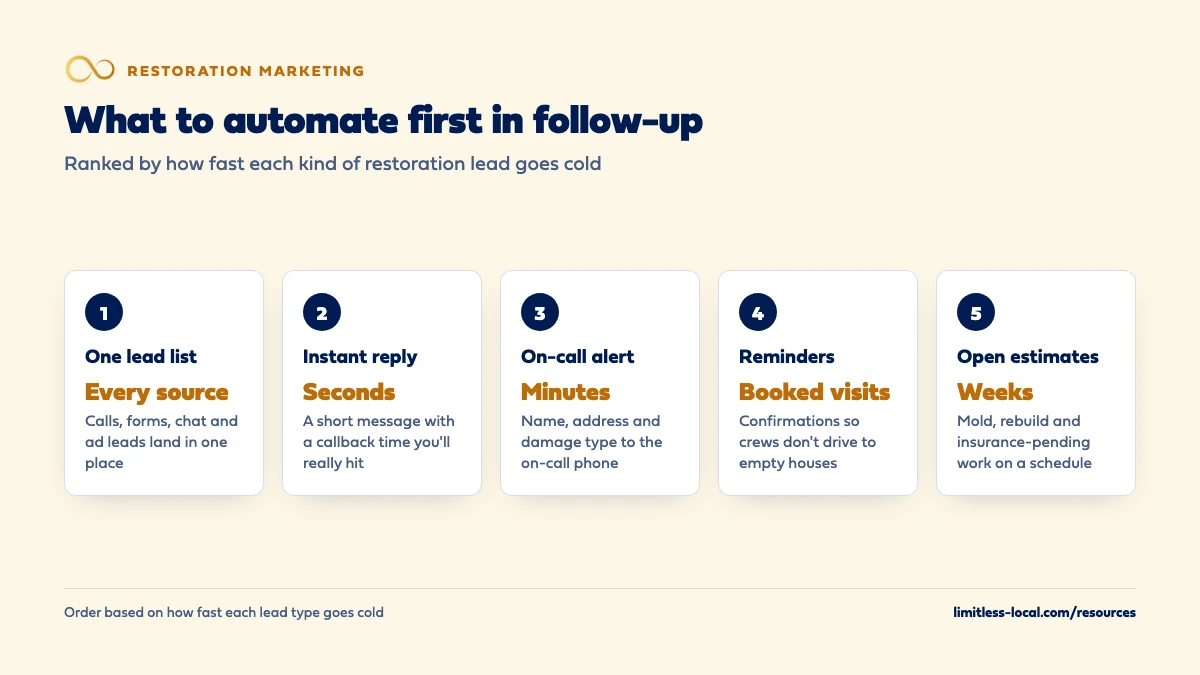
Automate the steps that lose emergency jobs first: get every call, form and ad message into one list automatically, send an instant reply when nobody can pick up, and alert whoever is on call with the job type and address. Next, automate appointment confirmations and reminders, then scheduled follow-ups on open estimates like mold and rebuild work. Leave lead-source tagging and review requests for last, and keep a person on every real conversation with a homeowner who has water in the house.
That order follows how restoration jobs are actually lost: in the first minutes, not the third week. Our automation add-ons cover the front of that list (unified messaging, a lead tracking dashboard, calendar and reminders, after-hours answering and AI website chat), plug into any package, and are priced on the discovery call. They sit on top of our restoration marketing, which brings the calls in. For every channel in one place, read the restoration marketing guide, and the restoration marketing questions library goes question by question.
Why does the order of automation matter so much in restoration?
Because restoration leads go cold on very different clocks. A homeowner with water coming through the ceiling is calling the next company on the list within minutes. A property manager asking about a mold inspection might wait a week. A rebuild estimate can sit for a month while the adjuster does their part.
If you automate in the wrong order, you end up with a polished email sequence for estimates while emergency calls still ring out at night. Start where the fastest money leaks, then work outward. Each step below is ranked by how many booked jobs it tends to save, not by how fancy the tool is.
Step 1: Get every lead into one list automatically
Before anything else can be automated, every lead has to land in the same place on its own. That means phone calls, website forms, chat messages, Local Services Ads leads and Google Ads lead forms all show up in one list, with a time stamp and a source, without anyone forwarding emails.
This matters more than it sounds. Take Google Ads lead form assets: Google says you can only download leads from the last 30 days, and it stores them for 60 days, so a form lead that nobody pulled out of the account is easy to miss. Email notifications per lead help, but an inbox isn’t a follow-up system.
Your field software may already do part of this. ServiceTitan, Housecall Pro and Jobber all take in leads in some form. Whether a restoration company needs a CRM to follow up and close leads covers when that’s enough and when it isn’t.
Step 2: Send an instant reply when nobody can pick up
When a call goes unanswered or a form comes in late at night, the person should hear back in seconds, even if it’s an automated message. Something short and specific works: “This is Dave’s Restoration. We got your call, and the on-call tech will call you back within 15 minutes. If water is still coming in, shut off the main valve if you can.”
A few practical limits apply. With one common call tracking tool, automated replies to missed calls don’t go out if the caller hangs up before 15 seconds, and a caller on a landline won’t get the text at all. So the auto-reply buys you time; it doesn’t replace the callback. What missed calls cost a restoration company shows why that callback is worth so much.
Only promise a callback time you’ll actually hit. A reply that promises a quick call followed by a callback two hours later does more damage than no reply.
Step 3: Alert whoever is on call
An automatic reply to the customer is half the job. The other half is waking up the right person. Set every new emergency lead to ping the on-call tech’s phone with the essentials: name, number, address, what kind of damage and how it came in.
Route it by rotation, not to a shared inbox that the whole team assumes someone else is watching. If the on-call person doesn’t acknowledge it within a few minutes, escalate it to a backup. For nights and weekends, who should answer restoration calls after hours compares an answering service, an on-call rotation and doing it yourself.
Step 4: Confirm and remind every booked appointment
Once a job is on the calendar, automate the confirmation and the reminders: a text when the appointment is booked, another the evening before or an hour ahead, and an “on my way” message when the tech leaves the shop.
This step matters most for scheduled work: mold inspections, moisture checks, contents pack-outs and rebuild walk-throughs. Those are the appointments homeowners forget, double-book with another company or cancel without telling you. A reminder that lets them confirm or reschedule by reply keeps your crew from driving to an empty house.
Curious what your marketing is actually booking?
Get a free visibility audit — no obligation, no sales pitch.
Step 5: Follow up on open estimates on a schedule
Non-emergency work is where automated follow-up earns its keep, because those leads rarely book on the first call. Set a fixed schedule for every estimate that hasn’t been accepted, so nobody has to remember.
Field software handles this well. Jobber’s automations can send an email or text reminding a client about a quote they haven’t answered, using the same method the quote went out by. ServiceTitan’s unsold estimate campaigns can automate reminders and follow-ups by text, and let customers accept the estimate by text.
Keep the messages short and human, and stop when they say no. For the wording and the timing, how to follow up on restoration leads that don’t book goes deeper, including jobs waiting on an insurance adjuster.
Step 6: Tag where each lead came from and how it ended
Automate the source and record the outcome by hand. Call tracking numbers, form tracking and ad platforms can tag the source of a lead on their own: Google Ads, Local Services Ads, Maps, the website, a referral partner. What usually needs a person is the outcome: booked, lost to a competitor, not a real job, waiting on insurance.
Make the outcome one tap or one dropdown, and make it part of closing out the lead. When source and outcome sit side by side, you can see cost per booked job by channel instead of guessing, which is what tells you where the next dollar of marketing should go.
Step 7: Ask for the review once the job is done
Review requests are worth automating, but they come last on this list because they happen after the booking is won. Trigger the request when the job is closed out, not when the crew leaves on day one of a five-day dry-out. Send it by text with a direct link, and send one reminder at most.
Hold the request on jobs that ended badly or where the claim is still in dispute, and handle those with a phone call first. Getting more five-star Google reviews covers the wording and timing that work.

What should a person always handle, not a machine?
- The first real conversation on an emergency. Someone scared, standing in water, needs a calm human who asks the right questions and gives a time.
- Anything about insurance. Coverage, deductibles and what the adjuster will pay are conversations, not templates.
- Commercial and property manager leads. These are relationships. An automated drip to a facility manager can cost you the account.
- Complaints and upset customers. Pull them out of every automated sequence the moment they come in.
- The decision to stop. Automations should stop when a lead books, says no or asks you to stop, and someone should check that they do.
Do texting rules apply to automated follow-up?
Yes. Automated texts are still business texts. CallRail’s text messaging compliance overview explains that the 10DLC rules apply to any business or application sending text messages to a person, and that they focus on spam prevention and consent, so that businesses send messages to people who agree to receive them. If you text from a CallRail number, you have to register; a business that doesn’t register or doesn’t follow the rules can’t send texts at all.
Most texting tools have their own registration step, so check yours before you switch anything on. In practice: text people who contacted you about a job, name your company, keep messages about that job, and honor stop requests right away.
How do I know the automations are working?
Check four things every month:
- Time to first reply on calls and forms, especially nights and weekends.
- Missed calls with no callback. This number should fall toward zero.
- No-shows and cancellations on scheduled appointments.
- Booked jobs from leads that didn’t book on the first contact. That’s the work Step 5 recovers.
Then read a handful of the actual messages that went out. Automations break quietly: a form field gets renamed, a phone gets swapped, a message still names a tech who left in the spring. A few minutes of reading catches most of it.
Not sure which of these is costing you jobs?
A free visibility audit checks the Google profile, reviews, site and tracking, and shows what to fix first.
What's different about automating follow-up for a restoration company
Two speeds of lead. Emergency water, sewage and fire calls need a reply in minutes; mold, rebuild and contents work can take weeks. Build two separate tracks so emergency leads never sit in a slow drip and estimate leads don’t get hammered with urgent messages.
The insurance wait. Many restoration jobs stall while the homeowner waits on an adjuster. Mark those leads as waiting on insurance and follow up on a slower schedule instead of treating them as lost.
Storm surges. When a freeze or a storm hits, call volume can jump overnight. Automated replies and on-call alerts are what keep the overflow from vanishing; make sure the messages give a callback time you can really hit that week.
Multi-day jobs. A dry-out runs for days. Automated “what to expect” updates between visits cut down on calls asking when the crew is coming back.
A worked example: what the first three steps are worth
These numbers are made up to show the math, not a benchmark for your market. A restoration company gets 60 leads a month. Of those, 15 come in when nobody can pick up: nights, weekends and busy afternoons. Before automating, the office calls those back the next morning and books 3 of them.
After setting up one lead list, an instant reply and an on-call alert, the on-call tech calls them back within the hour and books 6. That’s 3 more jobs a month.
- Average job value in this example: $4,000.
- Extra revenue: 3 jobs x $4,000 = $12,000 a month.
The math changes with your job mix and your market, but the shape usually holds: the after-hours leads you already paid for are the cheapest jobs to win back, which is why they come first.
Frequently asked questions
Should a small restoration company automate follow-up at all?
Yes, even a one-truck shop. The first three steps are built into a lot of phone and field software, and they protect the after-hours calls a small company misses most.
Will automated texts annoy homeowners?
Not if they’re short, about their job, and stop when the job books or they say no. A message that says when you’ll call back usually reads as relief, not spam.
Can an AI chat or voice tool answer emergency calls for me?
It can take details and set expectations after hours, but someone still needs to call back fast. Treat it as the front door, not the person who wins the job.
What should the automated reply after a missed call say?
Your company name, that you got the call, when the on-call tech will call back, and one useful step like shutting off the water if they can. Skip prices and insurance talk.
How many automated estimate follow-ups are too many?
Two or three over a few weeks is plenty for most estimates. After that, move the lead to a slower check-in or close it out, and stop the moment someone asks you to.
Do I need new software to do this?
Often not. Check what your call tracking and field software already do before you buy anything. Plenty of owners already pay for automations they never switched on.
Key takeaways
- Automate in the order leads go cold: one lead list, instant reply, on-call alert, then reminders and estimate follow-ups.
- An auto-reply buys time; it never replaces a fast callback from a person.
- Run emergency and estimate leads on separate tracks, and park insurance-pending jobs on a slower one.
- Texting rules center on consent and registration, so check your tool’s setup before switching anything on.
- Check reply times, missed calls with no callback and no-shows every month, and read the actual messages.
Want a second set of eyes on your setup?
We'll look at how you show up locally and where calls are leaking, then send you a plain-English breakdown.
More in this section
- How should a restoration company follow up on leads that don't book?
- Does a restoration company need a CRM to follow up and close leads?
- What can a restoration company use for leads while SEO ramps up?
- What marketing mistakes keep restoration companies from leads?
- How can I tell if restoration SEO is working before leads arrive?
Sources
- Automations — Jobber Help Center
- About lead form assets — Google Ads Help
- Automated responses for missed calls — CallRail Help Center
- Text Messaging Compliance overview — CallRail Help Center
- Create Unsold Estimates Campaigns using SMS — ServiceTitan Help